Possessed computer

Hypsis

New member
Local time
3:39 AM
Messages
3
Hi guys,

I have a strange problem. My computer wakes up all by itself from hibernation and I can't find a rational explanation for this... There are no scheduled tasks of any kind, I disabled windows updates and the automatic updates from all programs, so what should I do next?

I usually put it in hibernation on evenings but find it fully awake *every single day* when I come back from work. I'm a bit puzzled... Is there a hidden timer somewhere?
 

My Computer

OS
Windows 7 Home Premium 64bit
CPU
Intel i5-2500K
Motherboard
ASUS P8P67
Memory
4Gb
Graphics Card(s)
ATI Radeon HD6850
Monitor(s) Displays
BenQ G2420HD
Hard Drives
Western Digital Caviar Black 500Gb
Case
BitFenix Survivor
Are you sure you checked the task scheduler for ALL users ?
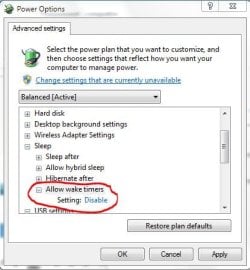
Check the advanced power options
Capture.JPG

-DG
 

My Computer

Computer Manufacturer/Model Number
HP m8000n
OS
Windows 7 Ultimate x86
CPU
DualCore AMD Athlon 64 X2, 2600 MHz 5200+
Motherboard
Asus M2N68-LA (Narra)
Memory
Samsung 2GB DDR2
Graphics Card(s)
Onboard NVIDIA GeForce 6150SE nForce 430
Sound Card
Onboard nVIDIA nForce 6100-430 (MCP61P)
Monitor(s) Displays
Westinghouse 19" LED
Screen Resolution
1280x1024
Hard Drives
SATA II Seagate Barracuda 500GB
USB II WD Elements 500GB
USB II WD My Book 1TB
USB II WD My Book 2TB
PSU
Stock (HP)
Case
Stock (HP)
Cooling
Stock
Keyboard
Logitech Classic KB 200
Mouse
Standard HP opticle USB mouse
To find out what woke up Windows, go to command prompt (type cmd in the Run/Search box and press ENTER), then type this and hit Enter:

powercfg – lastwake

To get detailed info type this and hit Enter:

powercfg –devicequery wake_armed
 

My Computer

Computer Manufacturer/Model Number
Too many to describe...
OS
Windows 7 x64 pro/ Windows 7 x86 Pro/ XP SP3 x86
Then there ARE hidden timers! I said it as a joke... Thanks guys, I'll have a look tonight.
 

My Computer

OS
Windows 7 Home Premium 64bit
CPU
Intel i5-2500K
Motherboard
ASUS P8P67
Memory
4Gb
Graphics Card(s)
ATI Radeon HD6850
Monitor(s) Displays
BenQ G2420HD
Hard Drives
Western Digital Caviar Black 500Gb
Case
BitFenix Survivor
So I checked the different points you raised guys and it turned out that the "allow wake timer" was indeed set to 'Enable' - and setting it to 'Disable' solved my problem. As obvious as it looks now, I really had no clue about what this option was doing -_-' Well, now I know. Thanks a lot !
 

My Computer

OS
Windows 7 Home Premium 64bit
CPU
Intel i5-2500K
Motherboard
ASUS P8P67
Memory
4Gb
Graphics Card(s)
ATI Radeon HD6850
Monitor(s) Displays
BenQ G2420HD
Hard Drives
Western Digital Caviar Black 500Gb
Case
BitFenix Survivor
Glad you got it sorted out
Thanks for the feedback!

-DG
 

My Computer

Computer Manufacturer/Model Number
HP m8000n
OS
Windows 7 Ultimate x86
CPU
DualCore AMD Athlon 64 X2, 2600 MHz 5200+
Motherboard
Asus M2N68-LA (Narra)
Memory
Samsung 2GB DDR2
Graphics Card(s)
Onboard NVIDIA GeForce 6150SE nForce 430
Sound Card
Onboard nVIDIA nForce 6100-430 (MCP61P)
Monitor(s) Displays
Westinghouse 19" LED
Screen Resolution
1280x1024
Hard Drives
SATA II Seagate Barracuda 500GB
USB II WD Elements 500GB
USB II WD My Book 1TB
USB II WD My Book 2TB
PSU
Stock (HP)
Case
Stock (HP)
Cooling
Stock
Keyboard
Logitech Classic KB 200
Mouse
Standard HP opticle USB mouse
Back
Top