Possible to get XP type folder veiw?

dazco

Banned
Local time
2:56 AM
Messages
126
In 7 when i choose details view as i did in XP, the focus rectange extends all the way to the right making it hard to select and drag file as i always did in XP. Then i found list view and at first i thought that was the same as details in XP. But there are 2 things different that i don't want...1)-any files past the length of the window are lined up to the right, and 2)- when you scroll it scrolls the entire window so that whichever file was at the bottom is now at the top out of view. And there isn't even a scroll bar to allow scrolling a file or 2 at a time. I realize it's showing the next group of files that wasn't visible before and the files i was seeing before are all out of view now, which seems convenient in a way. But it's not for me for several reasons. So is it possible to configure or even use some 3rd party app so that i can get all files in a single column and scrollable by small amounts like one file up like in XP's details view ?
 

My Computer

OS
windows 7 pro 64 bit
CPU
i5 760
Motherboard
GIGABYTE GA-P55A-UD3
Memory
4GB G skill DDR3 1600
Graphics Card(s)
XFX 5850
Sound Card
audigy 2 ZS
Monitor(s) Displays
samsung 22" 1650x1080
Hard Drives
Patriot SSD 120GB Inferno
maxtor 300GB IDE storage drive
PSU
Corsair TX650w
Hi Dazco,
Here is a link to a thread regarding this issue you mention, which is called Full Row Selection:

http://www.sevenforums.com/general-discussion/31918-full-row-selection.html

This thread is marked as solved, but it really hasn't been 'solved', persay. The above link discusses the problem and provides a few links, one of which is below:

How to Disable Full Row Select in Explorer in Windows 7? - The Winhelponline Blog

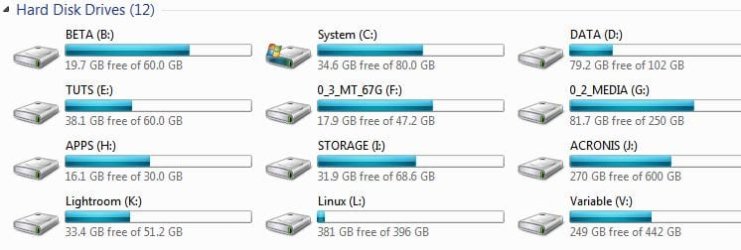
This fix worked for me, but I removed it because it had the 'side-effect' of removing the ability to view my partitions as tiles, with the horizontal 'drive space indicator', as per screenshot. The first link should fill you in.

James
 

Attachments

  • Drive Tiles.JPG
    Drive Tiles.JPG
    36.4 KB · Views: 24

My Computer

OS
Win7U 64 RTM
CPU
Q9550
Motherboard
GA-EP45-UD3R
Memory
8GB Gskill
Graphics Card(s)
ASUS|EAH4850/HTDI/1GD3/A
Sound Card
xfi Plat
Monitor(s) Displays
Dell 2405fpw
Screen Resolution
1920x1200
Hard Drives
Seagate & WD sata Drives
PSU
Antec
Case
Antec
Keyboard
MS Natural Ergonomic 4000
Mouse
Logitech MX610 USB Cordless
Well, if the selection in details view after this fix is the same as in list view, and at the same time details retains the scrolling method where you can scroll only a file or 2 at a time, then i will be fine with it. thats exactly what i wanted. Tho i'm not sure what you are saying about viewing the drives. If they no longer show as in your jpg, then what do you see? thanks
 

My Computer

OS
windows 7 pro 64 bit
CPU
i5 760
Motherboard
GIGABYTE GA-P55A-UD3
Memory
4GB G skill DDR3 1600
Graphics Card(s)
XFX 5850
Sound Card
audigy 2 ZS
Monitor(s) Displays
samsung 22" 1650x1080
Hard Drives
Patriot SSD 120GB Inferno
maxtor 300GB IDE storage drive
PSU
Corsair TX650w
Well, if the selection in details view after this fix is the same as in list view, and at the same time details retains the scrolling method where you can scroll only a file or 2 at a time, then i will be fine with it. thats exactly what i wanted. Tho i'm not sure what you are saying about viewing the drives. If they no longer show as in your jpg, then what do you see? thanks

The screenshot shows the drives in Tile View. You can see how other views look by clicking on Computer and selecting different views from the View Menu (if the menu bar is not showing, press the alt key on your keyboard), or click on the More Options icon. If you don't care about Tile View, you should be fine with the FRS hack.

James
 

My Computer

OS
Win7U 64 RTM
CPU
Q9550
Motherboard
GA-EP45-UD3R
Memory
8GB Gskill
Graphics Card(s)
ASUS|EAH4850/HTDI/1GD3/A
Sound Card
xfi Plat
Monitor(s) Displays
Dell 2405fpw
Screen Resolution
1920x1200
Hard Drives
Seagate & WD sata Drives
PSU
Antec
Case
Antec
Keyboard
MS Natural Ergonomic 4000
Mouse
Logitech MX610 USB Cordless
I just asked because i'm at work and have XP here. I will look when i get home tho, thanks.
 

My Computer

OS
windows 7 pro 64 bit
CPU
i5 760
Motherboard
GIGABYTE GA-P55A-UD3
Memory
4GB G skill DDR3 1600
Graphics Card(s)
XFX 5850
Sound Card
audigy 2 ZS
Monitor(s) Displays
samsung 22" 1650x1080
Hard Drives
Patriot SSD 120GB Inferno
maxtor 300GB IDE storage drive
PSU
Corsair TX650w
I tried the reg hacks but they didn't work. In details veiw it was still highlighting a file all the way across the folder.
 

My Computer

OS
windows 7 pro 64 bit
CPU
i5 760
Motherboard
GIGABYTE GA-P55A-UD3
Memory
4GB G skill DDR3 1600
Graphics Card(s)
XFX 5850
Sound Card
audigy 2 ZS
Monitor(s) Displays
samsung 22" 1650x1080
Hard Drives
Patriot SSD 120GB Inferno
maxtor 300GB IDE storage drive
PSU
Corsair TX650w
did you try the 'fix' at winhelponline?

James
 

My Computer

OS
Win7U 64 RTM
CPU
Q9550
Motherboard
GA-EP45-UD3R
Memory
8GB Gskill
Graphics Card(s)
ASUS|EAH4850/HTDI/1GD3/A
Sound Card
xfi Plat
Monitor(s) Displays
Dell 2405fpw
Screen Resolution
1920x1200
Hard Drives
Seagate & WD sata Drives
PSU
Antec
Case
Antec
Keyboard
MS Natural Ergonomic 4000
Mouse
Logitech MX610 USB Cordless
I tried a couple different reg files but the manual hacks say there are bugs and that they only work on a certain folder type and you have to do a different one for each folder etc etc. Other things mention they work in vista only unless you use the reg file which did nothing. It's just all too confusing so i think i'll probably just live with it. The last thing i want is to have to reinstall again.
 

My Computer

OS
windows 7 pro 64 bit
CPU
i5 760
Motherboard
GIGABYTE GA-P55A-UD3
Memory
4GB G skill DDR3 1600
Graphics Card(s)
XFX 5850
Sound Card
audigy 2 ZS
Monitor(s) Displays
samsung 22" 1650x1080
Hard Drives
Patriot SSD 120GB Inferno
maxtor 300GB IDE storage drive
PSU
Corsair TX650w
That's what I decided (to live with it) when I realized there was a Tile view bug. As you may have read in the Seven Forums thread I linked to, there is a small space to the left of a file or folder that will allow you to select it without launching or opening it. Not quite as convenient, IMO, but definitely usable.

James
 

My Computer

OS
Win7U 64 RTM
CPU
Q9550
Motherboard
GA-EP45-UD3R
Memory
8GB Gskill
Graphics Card(s)
ASUS|EAH4850/HTDI/1GD3/A
Sound Card
xfi Plat
Monitor(s) Displays
Dell 2405fpw
Screen Resolution
1920x1200
Hard Drives
Seagate & WD sata Drives
PSU
Antec
Case
Antec
Keyboard
MS Natural Ergonomic 4000
Mouse
Logitech MX610 USB Cordless
Yeah, thats what i've been doing but it's just a pain when you are working quickly and keep "missing" the target area. But with all the reg editing i'd rather not chance it. I already tried that too, but this editor works a bit different and some wierd things were happening, so i deleted the key and all the sub date i created within it. I just hope i didn't delete anything wrongly. I have a image i can use, but there are a number of things that i'd have to reinstall and so fourth. I can't figure why they leave out such options that you know a lot of people are going to want. Seem that would be progress.
 

My Computer

OS
windows 7 pro 64 bit
CPU
i5 760
Motherboard
GIGABYTE GA-P55A-UD3
Memory
4GB G skill DDR3 1600
Graphics Card(s)
XFX 5850
Sound Card
audigy 2 ZS
Monitor(s) Displays
samsung 22" 1650x1080
Hard Drives
Patriot SSD 120GB Inferno
maxtor 300GB IDE storage drive
PSU
Corsair TX650w
Progress indeed. But since there is interest, yet a 'clean fix' hasn't appeared, there may be a reason MS chose not to include it in win 7. Perhaps one day, it will return. I could appreciate that.

James
 

My Computer

OS
Win7U 64 RTM
CPU
Q9550
Motherboard
GA-EP45-UD3R
Memory
8GB Gskill
Graphics Card(s)
ASUS|EAH4850/HTDI/1GD3/A
Sound Card
xfi Plat
Monitor(s) Displays
Dell 2405fpw
Screen Resolution
1920x1200
Hard Drives
Seagate & WD sata Drives
PSU
Antec
Case
Antec
Keyboard
MS Natural Ergonomic 4000
Mouse
Logitech MX610 USB Cordless
If you use QTTabBar this works;


FULLROWON


FULLROWOFF


Regards....Mike Connor
 

My Computer

OS
Several, including Windows 7 x64 Ultimate
Looks interesting, but a google search revealed issues with it in 7/64bit which is what i have. Not sure if i should install it.
 

My Computer

OS
windows 7 pro 64 bit
CPU
i5 760
Motherboard
GIGABYTE GA-P55A-UD3
Memory
4GB G skill DDR3 1600
Graphics Card(s)
XFX 5850
Sound Card
audigy 2 ZS
Monitor(s) Displays
samsung 22" 1650x1080
Hard Drives
Patriot SSD 120GB Inferno
maxtor 300GB IDE storage drive
PSU
Corsair TX650w
I am using it on 7 / 64 ( See my specs). No issues at all. Quite brilliant actually. Lots of other advantages besides being able to toggle things like full row selection.

Regards....Mike Connor
 

My Computer

OS
Several, including Windows 7 x64 Ultimate
I gave it a shot, but i can't find how to get that window in your screen. ,The program files folder has nothing but 2 dll files, and i can't find anything in the shell to pull it up when in a folder. Not so far anyways....any tips on hot to get to that config dialog?
 

My Computer

OS
windows 7 pro 64 bit
CPU
i5 760
Motherboard
GIGABYTE GA-P55A-UD3
Memory
4GB G skill DDR3 1600
Graphics Card(s)
XFX 5850
Sound Card
audigy 2 ZS
Monitor(s) Displays
samsung 22" 1650x1080
Hard Drives
Patriot SSD 120GB Inferno
maxtor 300GB IDE storage drive
PSU
Corsair TX650w
nevermind, found it.

EDIT: configured it just like in your screen but still getting selection past the names all the way to wherever the next thing is, in this case the date.
 

My Computer

OS
windows 7 pro 64 bit
CPU
i5 760
Motherboard
GIGABYTE GA-P55A-UD3
Memory
4GB G skill DDR3 1600
Graphics Card(s)
XFX 5850
Sound Card
audigy 2 ZS
Monitor(s) Displays
samsung 22" 1650x1080
Hard Drives
Patriot SSD 120GB Inferno
maxtor 300GB IDE storage drive
PSU
Corsair TX650w
Well, 2 programs to do this....it just brings me back to what i said to james a few posts ago....too much for one tiny feature unless it's absolutly necassary. So i'll have to take a pass, but thanks. By the way, the Qbar thing didn't seem to work. Anything i changed in the dialog then click apply changed nothing. I tried quiet a few things. So for some reason i don't think it was working anyways.
 

My Computer

OS
windows 7 pro 64 bit
CPU
i5 760
Motherboard
GIGABYTE GA-P55A-UD3
Memory
4GB G skill DDR3 1600
Graphics Card(s)
XFX 5850
Sound Card
audigy 2 ZS
Monitor(s) Displays
samsung 22" 1650x1080
Hard Drives
Patriot SSD 120GB Inferno
maxtor 300GB IDE storage drive
PSU
Corsair TX650w
nevermind, found it.

EDIT: configured it just like in your screen but still getting selection past the names all the way to wherever the next thing is, in this case the date.

It takes a few minutes to learn what's what. If you read the review I posted then you will soon have it doing exactly what you want it to do, and saving you a great deal of time and effort.

Regards....Mike Connor
 

My Computer

OS
Several, including Windows 7 x64 Ultimate
Well, 2 programs to do this....it just brings me back to what i said to james a few posts ago....too much for one tiny feature unless it's absolutly necassary. So i'll have to take a pass, but thanks. By the way, the Qbar thing didn't seem to work. Anything i changed in the dialog then click apply changed nothing. I tried quiet a few things. So for some reason i don't think it was working anyways.

Did you enable it?

Go to toolbars and tick the boxes to enable it, or it wont do anything at all!


The fullrowselect is only a very small part of what it can do. It makes working with files and stuff a pleasure instead of a pain!

I don't use two programs to do that, I use two programs to do a very large number of things which Explorer can not do! :)

Regards....Mike Connor
 

My Computer

OS
Several, including Windows 7 x64 Ultimate
Back
Top