
Possible to get XP type folder veiw?

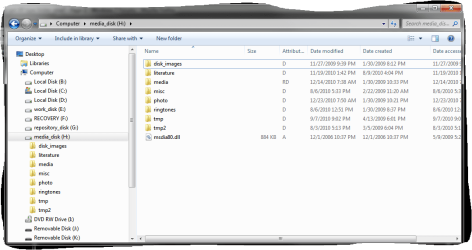
I am slightly confused by this thread. I am using Windows Explorer in 7 in exactly the same way as I was doing before in XP and before that in 2000. The details view is exactly the same in all versions of Windows, except that Windows 7 adds a different bar on top with various options, while the conventional "File", etc. buttons are gone by default (but can be restored if necessary). The attached screenshot show what I mean.
 

Attachments
  • Capture.PNG
    Capture.PNG
    31.6 KB · Views: 6

My Computer My Computer

Computer Manufacturer/Model Number
Dell Inspiron 530
OS
Windows 7 Ultimate (x64)
CPU
Q6600
Memory
8 GB
Graphics Card(s)
ATI Radeon HD 2600 XT
Monitor(s) Displays
Samsung Syncmaster P2450
Screen Resolution
1920x1080
Hard Drives
Samsung HD103UJ
Samsung HD501LJ
Internet Speed
25 Mb/s
Yes, i saw that and it was enabled by default. But like i said, i can live with it rather than add 2 apps to get one feature. Thanks for your trouble in any case.

Unifex....the difference is that in details view in 7, when the mouse cursor is next to any file in a folder, the focus rectangle highlights the file all the way across the folders so when you try and click and hold and pull the cursor down to highlight a bunch of files, it instead grabs the file it was next to when you clicked instead of creating a focus rectangle from that point on down till you stop. In XP the focus rectangle only appears on a single file if the mouse cursor touches the edge of the file name. Any tiny bit to the right of that and theres no focus rectangle and you can then hold the mouse button and create one that can be dragged down to enclose all the files you want down to wherever you stop. It's hard to describe so i hope thats clear. Anyway, you can chane it to the old way easily by selecting

Well, 2 programs to do this....it just brings me back to what i said to james a few posts ago....too much for one tiny feature unless it's absolutly necassary. So i'll have to take a pass, but thanks. By the way, the Qbar thing didn't seem to work. Anything i changed in the dialog then click apply changed nothing. I tried quiet a few things. So for some reason i don't think it was working anyways.

Did you enable it?

Go to toolbars and tick the boxes to enable it, or it wont do anything at all!


The fullrowselect is only a very small part of what it can do. It makes working with files and stuff a pleasure instead of a pain!

I don't use two programs to do that, I use two programs to do a very large number of things which Explorer can not do! :)

Regards....Mike Connor
 

My Computer My Computer

OS
windows 7 pro 64 bit
CPU
i5 760
Motherboard
GIGABYTE GA-P55A-UD3
Memory
4GB G skill DDR3 1600
Graphics Card(s)
XFX 5850
Sound Card
audigy 2 ZS
Monitor(s) Displays
samsung 22" 1650x1080
Hard Drives
Patriot SSD 120GB Inferno
maxtor 300GB IDE storage drive
PSU
Corsair TX650w
Unifex....the difference is that in details view in 7, when the mouse cursor is next to any file in a folder, the focus rectangle highlights the file all the way across the folders so when you try and click and hold and pull the cursor down to highlight a bunch of files, it instead grabs the file it was next to when you clicked instead of creating a focus rectangle from that point on down till you stop. In XP the focus rectangle only appears on a single file if the mouse cursor touches the edge of the file name. Any tiny bit to the right of that and theres no focus rectangle and you can then hold the mouse button and create one that can be dragged down to enclose all the files you want down to wherever you stop. It's hard to describe so i hope thats clear. Anyway, you can chane it to the old way easily by selecting

I see what you mean. Sorry for my confusion - I have never used this feature in XP, I have always used the "shift" key - click on one file to select, then hold the "shift" and click on another file to select all files located in between. Works in Windows 7 just as it was in XP or 2000.
 

My Computer My Computer

Computer Manufacturer/Model Number
Dell Inspiron 530
OS
Windows 7 Ultimate (x64)
CPU
Q6600
Memory
8 GB
Graphics Card(s)
ATI Radeon HD 2600 XT
Monitor(s) Displays
Samsung Syncmaster P2450
Screen Resolution
1920x1080
Hard Drives
Samsung HD103UJ
Samsung HD501LJ
Internet Speed
25 Mb/s
Yeah, i do that too but under most conditions I prefer the way i mentioned because i don't have to use the keyboard, which isn't as easy to get to as most people's due to my setup at home.
 

My Computer My Computer

OS
windows 7 pro 64 bit
CPU
i5 760
Motherboard
GIGABYTE GA-P55A-UD3
Memory
4GB G skill DDR3 1600
Graphics Card(s)
XFX 5850
Sound Card
audigy 2 ZS
Monitor(s) Displays
samsung 22" 1650x1080
Hard Drives
Patriot SSD 120GB Inferno
maxtor 300GB IDE storage drive
PSU
Corsair TX650w
Back
Top