Possible to use mlink to move (e.g.) user's folder

FuriousGeorge

New member
Local time
9:17 AM
Messages
6
I'd like to move "Users" and "Program Files" and some others to another partition.

I usually do this via brute force registry hacks, but I understand this is not supported, and it is tedious.

I was thinking it would be more elegant to do it with mlink.

I've heard that it is possible to do this with certain folders (e.g. Users and \Windows\winsxs) by jumping through some hoops.

I was hoping that with a Linux boot cd I could facilitate the process. Currently I am downloading a new Linux boot cd, because the ones I had weren't cutting it.

I was wondering if someone could tell me if I am wasting my time, as I await the completion of this download.

Here is an example of how to move the winsxs folder.
Other folders can also be moved.

P.S. The target partition is part of a dynamic disk.
 

My Computer My Computer

OS
Linux
It is possible, just be aware it may or may not work depending on certain unknown factors. But I've in the past reorganized the Program Files to a new location without much issue in both Windows XP and Windows Vista using junctions.

Just understand one thing. You will not save any hard drive space by moving the core application from Program Files. They are merely hardlinks, moving those will leave behind references and make duplicate content. You are better off telling new application installations to the alternative location.
 

My Computer My Computer

Computer type
PC/Desktop
Computer Manufacturer/Model Number
Alienware Aurora ALX R4
OS
Windows 10 Pro (x64)
CPU
Intel Core i7-3930K (3.2GHz - 4.5GHz)
Motherboard
Alienware Aurora-R4 x79
Memory
4x Samsung 4GB PC3-12800 DDR3 (16GB 1600MHz)
Graphics Card(s)
Nvidia Geforce GTX 690
Sound Card
SteelSeries Siberia Elite
Monitor(s) Displays
Dell UltraSharp U3011
Screen Resolution
2560x1600
Hard Drives
Samsung 850 Pro 256 GB, Seagate 1TB Desktop Hybrid HDD, 2x Western Digital 4TB Green HDD
PSU
875W Some Dell PSU <.<
Case
Alienware Aurora ALX
Cooling
Custom Liquid Cooling (EK CPU & GPU blocks) dual EK 480RAD
Keyboard
Logitech G710+ Mechanical
Mouse
Logitech G700s
Internet Speed
Verizon Fios (50 mbps average)
Other Info
Server: Intel NUC D54250WYK: i5-4250U, 16GB, 256 GB mSATA, Windows Server 2012 R2
It is possible, just be aware it may or may not work depending on certain unknown factors.

Just to be clear, are you saying it is possible using mlinks as I described?

Just understand one thing. You will not save any hard drive space by moving the core application from Program Files. They are merely hardlinks, moving those will leave behind references and make duplicate content. You are better off telling new application installations to the alternative location.

Which are the core programs?

I'm talking about moving the whole Program Files directory, and replacing it with an mlink called "Program Files' too, but points to a different partition.
 

My Computer My Computer

OS
Linux
Just to be clear, are you saying it is possible using mlinks as I described?
Yes it is possible. There just might be unforeseen problems.

Which are the core programs?
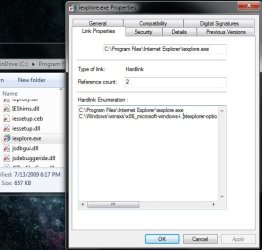
Everything that is installed by default. Like Internet Explorer. See screenshot below. Basically moving these you are only creating duplicate content and not saving any space on the primary drive. That is why in my opinion it is best to selectively move applications to the other drive.
 

Attachments

  • Untitled.jpg
    Untitled.jpg
    38.9 KB · Views: 69

My Computer My Computer

Computer type
PC/Desktop
Computer Manufacturer/Model Number
Alienware Aurora ALX R4
OS
Windows 10 Pro (x64)
CPU
Intel Core i7-3930K (3.2GHz - 4.5GHz)
Motherboard
Alienware Aurora-R4 x79
Memory
4x Samsung 4GB PC3-12800 DDR3 (16GB 1600MHz)
Graphics Card(s)
Nvidia Geforce GTX 690
Sound Card
SteelSeries Siberia Elite
Monitor(s) Displays
Dell UltraSharp U3011
Screen Resolution
2560x1600
Hard Drives
Samsung 850 Pro 256 GB, Seagate 1TB Desktop Hybrid HDD, 2x Western Digital 4TB Green HDD
PSU
875W Some Dell PSU <.<
Case
Alienware Aurora ALX
Cooling
Custom Liquid Cooling (EK CPU & GPU blocks) dual EK 480RAD
Keyboard
Logitech G710+ Mechanical
Mouse
Logitech G700s
Internet Speed
Verizon Fios (50 mbps average)
Other Info
Server: Intel NUC D54250WYK: i5-4250U, 16GB, 256 GB mSATA, Windows Server 2012 R2
OK, I see what you mean regarding hardlinks. My 'master plan' should account for that. It basically boils down as follows:

1) mlink -j c:\Program Files.new p:\Program Files
2) (boot another OS)
3) cp c:\Program Files p:\Program Files
4) del c:\Program Files
5) mv c:\Program Files.new c:\Program Files
6) (boot Win7. The program files has theoretically been deleted and moved to another partition, replaced by an NTFS junction)
 

My Computer My Computer

OS
Linux
Hardlinks cannot span across partitions like junctions and symlinks...So your 'master plan' will not account for them.
 

My Computer My Computer

Computer type
PC/Desktop
Computer Manufacturer/Model Number
Alienware Aurora ALX R4
OS
Windows 10 Pro (x64)
CPU
Intel Core i7-3930K (3.2GHz - 4.5GHz)
Motherboard
Alienware Aurora-R4 x79
Memory
4x Samsung 4GB PC3-12800 DDR3 (16GB 1600MHz)
Graphics Card(s)
Nvidia Geforce GTX 690
Sound Card
SteelSeries Siberia Elite
Monitor(s) Displays
Dell UltraSharp U3011
Screen Resolution
2560x1600
Hard Drives
Samsung 850 Pro 256 GB, Seagate 1TB Desktop Hybrid HDD, 2x Western Digital 4TB Green HDD
PSU
875W Some Dell PSU <.<
Case
Alienware Aurora ALX
Cooling
Custom Liquid Cooling (EK CPU & GPU blocks) dual EK 480RAD
Keyboard
Logitech G710+ Mechanical
Mouse
Logitech G700s
Internet Speed
Verizon Fios (50 mbps average)
Other Info
Server: Intel NUC D54250WYK: i5-4250U, 16GB, 256 GB mSATA, Windows Server 2012 R2
OK, I see what you mean regarding hardlinks. My 'master plan' should account for that. It basically boils down as follows:

1) mlink -j c:\Program Files.new p:\Program Files
2) (boot another OS)
3) cp c:\Program Files p:\Program Files
4) del c:\Program Files
5) mv c:\Program Files.new c:\Program Files
6) (boot Win7. The program files has theoretically been deleted and moved to another partition, replaced by an NTFS junction)

Hardlinks cannot span across partitions like junctions and symlinks...So your 'master plan' will not account for them.

Which is why, as I stated above when I clarified, I am using a junction point.

It seems to have worked as expected so far.
 

My Computer My Computer

OS
Linux
Back
Top