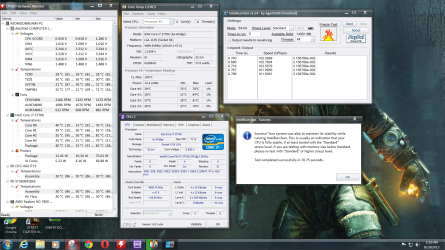
If you open up Core Temp and stress your system for a few minutes, you can find out what your VID # is. It's right below the frequency. It will jump around some, but you want to find the most consistent number. Once you have that, take your lowest stable manual voltage and subtract your most often seen VID # in Core Temp. That will be your offset. You may end up with a +/- depending on the VID. So if your lowest stable manual voltage is 1.270 and your most consistent VID is 1.260, your offset would be a +.010. If your lowest stable manual voltage was 1.255 and your VID was the same 1.260, your offset would be a -.005. The more "extreme" your LLC setting, the more extra juice it will provide OVER what your manual/offset setting is. For example, your manual voltage is 1.270, and your LLC is let's say Ultra....when stressing your CPU you may see a total voltage of 1.272-1.280. It's a way of keeping a static voltage, but giving it a little headroom for those times it needs to draw more power.
I have mine running on an offset and most of the time it's around 1.150 or less except if I'm stress testing. Just because your computer is running at 4.5 or 4.7GHz doesn't mean it's using your MAX allowable offset voltage. I can play games and it never hits my max of about 1.240-1.250. That only comes when running IBT/Prime/AIDA64.
You can set an offset voltage, save changes and boot back into Windows. Fire up your stressing application, Core Temp, and CPU-Z and see what it jumps up to. If it seems to go way above what your manual voltage was, go back into the BIOS and take the offset down a notch. I did some fine tuning that way and got my offset voltage while stressing down to 1.240-1.248 @ 4.5GHz.
These systems take a little knowledge and a little trial-and-error as well. I can only tell you what I've done that works, and what doesn't work, but at the end of the day, I'm not sitting where you are and your components might run differently than mine. There's not going to be a perfect frequency/voltage/temp because it's always changing and you have to tweak it to find a good stable frequency that doesn't require too much voltage so it doesn't put out too much heat. I think that's half the fun though!
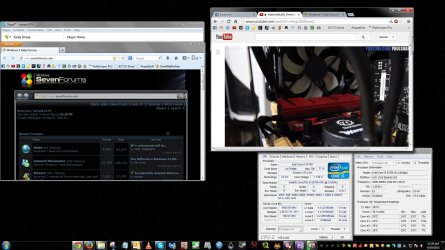
Here is an example of running at full frequency and not using all available voltage. I have Chrome and Firefox open, Outlook open, Yahoo and Skype open, CPU-Z and Core Temp open all while playing a 1080p video off YouTube......AND streaming an HD movie from my computer to my TV with Plex Media Server.
I have mine running on an offset and most of the time it's around 1.150 or less except if I'm stress testing. Just because your computer is running at 4.5 or 4.7GHz doesn't mean it's using your MAX allowable offset voltage. I can play games and it never hits my max of about 1.240-1.250. That only comes when running IBT/Prime/AIDA64.
You can set an offset voltage, save changes and boot back into Windows. Fire up your stressing application, Core Temp, and CPU-Z and see what it jumps up to. If it seems to go way above what your manual voltage was, go back into the BIOS and take the offset down a notch. I did some fine tuning that way and got my offset voltage while stressing down to 1.240-1.248 @ 4.5GHz.
These systems take a little knowledge and a little trial-and-error as well. I can only tell you what I've done that works, and what doesn't work, but at the end of the day, I'm not sitting where you are and your components might run differently than mine. There's not going to be a perfect frequency/voltage/temp because it's always changing and you have to tweak it to find a good stable frequency that doesn't require too much voltage so it doesn't put out too much heat. I think that's half the fun though!
Here is an example of running at full frequency and not using all available voltage. I have Chrome and Firefox open, Outlook open, Yahoo and Skype open, CPU-Z and Core Temp open all while playing a 1080p video off YouTube......AND streaming an HD movie from my computer to my TV with Plex Media Server.
Last edited:
My Computer
- Computer type
- PC/Desktop
- Computer Manufacturer/Model Number
- Custom Built
- OS
- Windows 7 Professional 64bit SP1
- CPU
- Intel Core i5-3570K @ 4.5GHz
- Motherboard
- Asus Sabertooth Z77
- Memory
- Corsair Vengeance 16GB (4x4) @1866MHz CL 9-9-9-24 1T
- Graphics Card(s)
- EVGA GTX 750 Ti FTW
- Sound Card
- Onboard Audio
- Monitor(s) Displays
- Dell S2309W
- Screen Resolution
- 1920x1080
- Hard Drives
- Samsung 830 128GB SSD - OS
(4) Seagate 5TB HDD
(1) Seagate 2TB HDD
- PSU
- Seasonic X750 80+ Gold Full Modular
- Case
- Antec Eleven Hundred Super Mid Tower
- Cooling
- Intel Liquid Cooler
- Keyboard
- Max Nighthawk X8 Mechanical keyboard
- Mouse
- Mionix Naos 7000
- Internet Speed
- 50 Mbps Down / 10 Mbps Up
- Antivirus
- Microsoft Security Essentials/Malwarebytes Anti-Malware
- Browser
- Chrome/Firefox
- Other Info
- Klipsch ProMedia 2.1's
Asus RT-N66R Wireless Router