
jimmydorry
New member
- Local time
- 3:56 PM
- Messages
- 4
Is there somewhere sneaky I can find power management settings for Bluetooth devices? Either through group policy or elsewhere?
I am rolling with Windows 7 x64 full admin rights on an Acer ASPIRE 7750G.
I have the most up-to-date drivers for my mouse (Logitech M555b): Bluetooth_Atheros_6.18.0624.0302_W7x64_A
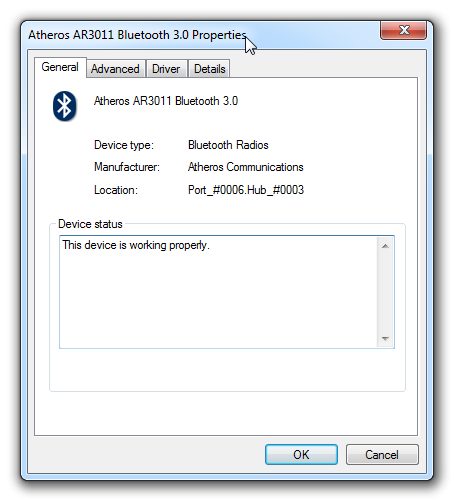
... but I get no option to set power management settings.
This is a real pain because one of the latest windows updates seems to make my bluetooth go to sleep and not wake up.
Symptoms:
* Mouse is working fine at startup
* After not using the mouse for a few seconds, it will not work any more until I turn it off and on again
Many "fixes" on the net point me to power management settings... except as seen from the pic... I am lacking said settings.
I have removed my driver, disabled automatic driver detection, and re-installed... to no avail.
EDIT: Tried the HID device, and noticed Power Settings, but the option I need is greyed out. Does that mean it is incompatible?

I am rolling with Windows 7 x64 full admin rights on an Acer ASPIRE 7750G.
I have the most up-to-date drivers for my mouse (Logitech M555b): Bluetooth_Atheros_6.18.0624.0302_W7x64_A
... but I get no option to set power management settings.
This is a real pain because one of the latest windows updates seems to make my bluetooth go to sleep and not wake up.
Symptoms:
* Mouse is working fine at startup
* After not using the mouse for a few seconds, it will not work any more until I turn it off and on again
Many "fixes" on the net point me to power management settings... except as seen from the pic... I am lacking said settings.
I have removed my driver, disabled automatic driver detection, and re-installed... to no avail.
EDIT: Tried the HID device, and noticed Power Settings, but the option I need is greyed out. Does that mean it is incompatible?
Last edited:
My Computer
- OS
- Windows 7 x64


