power on, no window boot up

mthollyspie

New member
Local time
1:34 PM
Messages
11
Location
Nampa, Idaho, USA
from another thread [email protected] responded to address this problem by removing all pwr sources depress stat button for 20 secs wait 10 secs then depress button for 5 secs. replace pwr sources and start up. windows booted up ok but extremely slow when going to ancestry and family tree maker programs. when done backed out of all browsers and hit start and shutdown. worked fine. that's the last time it did. retried the suggested previous protocall but w/o any results. again pwr indicator lights on but nothing happens except for a total black screen. will not boot up I don't have any ram sticks or whatever they are so can't try that option. all pc data is on thread 'not genuine windows issue'. I am using my wife's pc to communicate with you but it interrups her work tremendously. thanks in advance for any help or advice. you folks have been very helpful especially if I could return and try and correct my not genuine issue.
 

My Computer

Computer type
Laptop
Computer Manufacturer/Model Number
Gateway
OS
windows 7 home premium
Memory
4 GB
Graphics Card(s)
Multi-in-1 card reader
Hard Drives
500 GB HDD
Antivirus
MalewareBytes Premium
Browser
MSN, Google Crome
Ok mate now for another try - remove the battery and try to boot on power adaptor alone let us know what happens.
 

My Computer

Computer type
PC/Desktop
Computer Manufacturer/Model Number
Own build (new) Desk1 / Asus ROG Win 7 / Desk2 1st build
OS
Desk1 7 Home Prem / Desk2 10 Pro / Main lap Asus ROG 10 Pro 2 laptop Toshiba 7 Pro Asus P2520 7 & 10
CPU
Desk1 i5 3750K / Laptop i7 GTX 860M / Desk2 i5 2500
Motherboard
Desk1 Asus P877-V / Desk2 Gigabyte H67 UD3H / Laptop ?
Memory
Desk1 8GB (1866) / Desk2 16GB (1333) / Laptop 8Gb DDR3
Graphics Card(s)
Desk 1& 2NVidia GTX 650 & Laptops on board Intel
Sound Card
Desk 1 & 2 -XONAR DG Realtek High Def audio Laptop
Monitor(s) Displays
Desk 1 Benq HD 2450 / Desk2 Philips 24" / Laptop 17.5"
Screen Resolution
1920x1080 D1 & D2 & Laptop 1
Hard Drives
Desk1 Samsung 120GB 830 SSD
Asus ROG 256GB 850 Pro SSD
Desk2 Samsung 840 256 SSD
Toshiba 120GB EVO
PSU
Desk 1 Corsair HX 1050/ Laptop ? / Desk 2 Corsair HX 650
Case
Desk 1 Cooler HAF XM ? Toshiba laptop / Desk2 Coolermaster
Cooling
Fans on all Desk1 -2 Desk2 - all Coolermasters 5 Laptop ?
Keyboard
Desk 1 MS Sidewinder X6 Desk 2 MS Sidewinder X 4
Mouse
Desk 1&2 - Gigabyte MS 900 gamer - laptop - Logitec wireless
Internet Speed
ADSL2+
Other Info
One other Desktop (tester) and spare Toshba laptop both with SSD's
Running Kaspersky 2016 ISS on all machines config'd identically
Logitec audio stereo systems on each machine (x3)
Canon MG5250MFC
Router/modem TP-Link running WPA2SK
Thanks for your advice ICIT2LOL, but no luck. Still external pwr source light indicator, but still black screen, no windows boot up. I did notice one thing if its of any importance. When depressing the on power button the internal fan activates (?). Hope to hear from you soon.
 

My Computer

Computer type
Laptop
Computer Manufacturer/Model Number
Gateway
OS
windows 7 home premium
Memory
4 GB
Graphics Card(s)
Multi-in-1 card reader
Hard Drives
500 GB HDD
Antivirus
MalewareBytes Premium
Browser
MSN, Google Crome
When you press the power button, do you see a Gateway splash screen (or anything on the screen at all)? And then does the screen go black? Or is the screen black the whole time?
 

My Computer

Computer type
PC/Desktop
Computer Manufacturer/Model Number
Mellon Labs (custom build)
OS
Win 7 Pro x64/Win 10 Pro x64 dual boot
CPU
AMD FX 8350 Vishera @ 4200
Motherboard
ASUS M5A97 R2.0
Memory
16 GB Mushkin Blackline DDR3-2400 @ 1866 (9-10-10-10-31)
Graphics Card(s)
XFX Radeon R9 280 Double D Black Edition
Sound Card
Realtek HD Audio on MB. Sounds great.
Monitor(s) Displays
Acer 24", Acer 22"
Screen Resolution
3840 x 1080
Hard Drives
1 x Mushkin Chronos 120 GB SSD (Win 10)
1 x Samsung 850 EVO 250 GB SSD (Win 7)
1 x WD 1TB SATA Blue
1 x WD 1TB SATA Green
PSU
Corsair TX-750
Case
CoolerMaster HAF 912+
Cooling
Coolermaster Seidon 240M Liquid AIO. 6 case fans
Keyboard
Logitech G710+
Mouse
Logitech G500s
Internet Speed
Much better since I got fiber, but still way overpriced.
Antivirus
MSE, Malware Bytes for scanning
Browser
Firefox
Other Info
Corsair VOID USB headphones.

A Mellon Labs X-1 - LCD Smartie driven system status display.

Brought to you by the letter E
Ok mate now when the fan starts up is it really fast?? or just a gentle blowing .

If it is fast my gut feeling is that the CPU is not being cooled properly ie the thermal compound has dried out enough to prevent the CPU from overheating. On power up the load is quite large as you can imagine as it loads all of the start up programs. So whether you know or not a CPU has a high temperature setting that it will stop working at because it has an inbuilt thermal cutout.
I am just wondering if you can get into the BIOS it will show you the temps in there although if there is a real CPU problem you may not get that.
 

My Computer

Computer type
PC/Desktop
Computer Manufacturer/Model Number
Own build (new) Desk1 / Asus ROG Win 7 / Desk2 1st build
OS
Desk1 7 Home Prem / Desk2 10 Pro / Main lap Asus ROG 10 Pro 2 laptop Toshiba 7 Pro Asus P2520 7 & 10
CPU
Desk1 i5 3750K / Laptop i7 GTX 860M / Desk2 i5 2500
Motherboard
Desk1 Asus P877-V / Desk2 Gigabyte H67 UD3H / Laptop ?
Memory
Desk1 8GB (1866) / Desk2 16GB (1333) / Laptop 8Gb DDR3
Graphics Card(s)
Desk 1& 2NVidia GTX 650 & Laptops on board Intel
Sound Card
Desk 1 & 2 -XONAR DG Realtek High Def audio Laptop
Monitor(s) Displays
Desk 1 Benq HD 2450 / Desk2 Philips 24" / Laptop 17.5"
Screen Resolution
1920x1080 D1 & D2 & Laptop 1
Hard Drives
Desk1 Samsung 120GB 830 SSD
Asus ROG 256GB 850 Pro SSD
Desk2 Samsung 840 256 SSD
Toshiba 120GB EVO
PSU
Desk 1 Corsair HX 1050/ Laptop ? / Desk 2 Corsair HX 650
Case
Desk 1 Cooler HAF XM ? Toshiba laptop / Desk2 Coolermaster
Cooling
Fans on all Desk1 -2 Desk2 - all Coolermasters 5 Laptop ?
Keyboard
Desk 1 MS Sidewinder X6 Desk 2 MS Sidewinder X 4
Mouse
Desk 1&2 - Gigabyte MS 900 gamer - laptop - Logitec wireless
Internet Speed
ADSL2+
Other Info
One other Desktop (tester) and spare Toshba laptop both with SSD's
Running Kaspersky 2016 ISS on all machines config'd identically
Logitec audio stereo systems on each machine (x3)
Canon MG5250MFC
Router/modem TP-Link running WPA2SK
First - Mellon Head, the screen is always black.
Second - thanks again ICT2LOL - I know enough to open the bottom of the laptop but - what the devil is BIOS ? I know, I'm a computer ignoramus sorry!
 

My Computer

Computer type
Laptop
Computer Manufacturer/Model Number
Gateway
OS
windows 7 home premium
Memory
4 GB
Graphics Card(s)
Multi-in-1 card reader
Hard Drives
500 GB HDD
Antivirus
MalewareBytes Premium
Browser
MSN, Google Crome
If the screen is always black, you may have a computer or screen problem. Does the fan run? Does it beep on startup?

BIOS is the basic bootup program for your computer. It gets all the ducks in a row, hardware wise, and then is responsible for booting Windows. It looks after your CPU and memory, and how many hard disks you have, which hard disk to boot from, etc. It's a control program that is built into your computer. You can access it by typing a function key during bootup, (I'm sorry, I don't know which one for your particular model), and you can change parameters in it to set up the computer differently.

When your computer first powers on, BIOS does a check of the system and flashes up the name brand of the PC, and some other information before it goes and boots Windows. That's what you should see before Windows tries to load. If you can't see anything on the screen at all, then the problem is probably not with Windows, but with your hardware.
 

My Computer

Computer type
PC/Desktop
Computer Manufacturer/Model Number
Mellon Labs (custom build)
OS
Win 7 Pro x64/Win 10 Pro x64 dual boot
CPU
AMD FX 8350 Vishera @ 4200
Motherboard
ASUS M5A97 R2.0
Memory
16 GB Mushkin Blackline DDR3-2400 @ 1866 (9-10-10-10-31)
Graphics Card(s)
XFX Radeon R9 280 Double D Black Edition
Sound Card
Realtek HD Audio on MB. Sounds great.
Monitor(s) Displays
Acer 24", Acer 22"
Screen Resolution
3840 x 1080
Hard Drives
1 x Mushkin Chronos 120 GB SSD (Win 10)
1 x Samsung 850 EVO 250 GB SSD (Win 7)
1 x WD 1TB SATA Blue
1 x WD 1TB SATA Green
PSU
Corsair TX-750
Case
CoolerMaster HAF 912+
Cooling
Coolermaster Seidon 240M Liquid AIO. 6 case fans
Keyboard
Logitech G710+
Mouse
Logitech G500s
Internet Speed
Much better since I got fiber, but still way overpriced.
Antivirus
MSE, Malware Bytes for scanning
Browser
Firefox
Other Info
Corsair VOID USB headphones.

A Mellon Labs X-1 - LCD Smartie driven system status display.

Brought to you by the letter E
Sorry late reply but Mellon Head has answered it re the Basic Input Output System - just a firmware chip that is soldered to the board that is in part is enabled to be altered via updates. To all intents and purposes it remains Read Only Memory (ROM).
It is something that is usually best left alone if the machine is working ok and unless a change is indicated.
A lengthy article but if you are curious interesting especially how it controls the hardware etc at boot up as Mellon Head has said https://en.wikipedia.org/wiki/BIOS :)
 

My Computer

Computer type
PC/Desktop
Computer Manufacturer/Model Number
Own build (new) Desk1 / Asus ROG Win 7 / Desk2 1st build
OS
Desk1 7 Home Prem / Desk2 10 Pro / Main lap Asus ROG 10 Pro 2 laptop Toshiba 7 Pro Asus P2520 7 & 10
CPU
Desk1 i5 3750K / Laptop i7 GTX 860M / Desk2 i5 2500
Motherboard
Desk1 Asus P877-V / Desk2 Gigabyte H67 UD3H / Laptop ?
Memory
Desk1 8GB (1866) / Desk2 16GB (1333) / Laptop 8Gb DDR3
Graphics Card(s)
Desk 1& 2NVidia GTX 650 & Laptops on board Intel
Sound Card
Desk 1 & 2 -XONAR DG Realtek High Def audio Laptop
Monitor(s) Displays
Desk 1 Benq HD 2450 / Desk2 Philips 24" / Laptop 17.5"
Screen Resolution
1920x1080 D1 & D2 & Laptop 1
Hard Drives
Desk1 Samsung 120GB 830 SSD
Asus ROG 256GB 850 Pro SSD
Desk2 Samsung 840 256 SSD
Toshiba 120GB EVO
PSU
Desk 1 Corsair HX 1050/ Laptop ? / Desk 2 Corsair HX 650
Case
Desk 1 Cooler HAF XM ? Toshiba laptop / Desk2 Coolermaster
Cooling
Fans on all Desk1 -2 Desk2 - all Coolermasters 5 Laptop ?
Keyboard
Desk 1 MS Sidewinder X6 Desk 2 MS Sidewinder X 4
Mouse
Desk 1&2 - Gigabyte MS 900 gamer - laptop - Logitec wireless
Internet Speed
ADSL2+
Other Info
One other Desktop (tester) and spare Toshba laptop both with SSD's
Running Kaspersky 2016 ISS on all machines config'd identically
Logitec audio stereo systems on each machine (x3)
Canon MG5250MFC
Router/modem TP-Link running WPA2SK
As I speak I turned on my machine to check it in reply to Mellon Head's question and it started up perfectly!!. Fan on, Gateway flashed then began booting up windows. Now applying latest updates, now asking for password. Hang in there. I will go thru Crome and MSN browsers then shutdown normally and see what happens. Its been about 20 minutes now and everthing is SLOW but working. I am going to sync my family tree maker with my ancestry internet site and see if the previous changes come thru. OK.
While in Crome, You Tube, musical items, the following almost always pops up: There was a problem starting C:/users/Larry/appdata/roaming/wupdate/regpow/lan. ?


shut Off normally. Restart - nothing but 2 pwr lights and black screen and fans on. Go figure.
 

My Computer

Computer type
Laptop
Computer Manufacturer/Model Number
Gateway
OS
windows 7 home premium
Memory
4 GB
Graphics Card(s)
Multi-in-1 card reader
Hard Drives
500 GB HDD
Antivirus
MalewareBytes Premium
Browser
MSN, Google Crome
It sounds like you have an intermittent hardware fault to me. If you can get it started again, I would back up all of your data.

It might be cheaper to replace the laptop rather than fix it.
 

My Computer

Computer type
PC/Desktop
Computer Manufacturer/Model Number
Mellon Labs (custom build)
OS
Win 7 Pro x64/Win 10 Pro x64 dual boot
CPU
AMD FX 8350 Vishera @ 4200
Motherboard
ASUS M5A97 R2.0
Memory
16 GB Mushkin Blackline DDR3-2400 @ 1866 (9-10-10-10-31)
Graphics Card(s)
XFX Radeon R9 280 Double D Black Edition
Sound Card
Realtek HD Audio on MB. Sounds great.
Monitor(s) Displays
Acer 24", Acer 22"
Screen Resolution
3840 x 1080
Hard Drives
1 x Mushkin Chronos 120 GB SSD (Win 10)
1 x Samsung 850 EVO 250 GB SSD (Win 7)
1 x WD 1TB SATA Blue
1 x WD 1TB SATA Green
PSU
Corsair TX-750
Case
CoolerMaster HAF 912+
Cooling
Coolermaster Seidon 240M Liquid AIO. 6 case fans
Keyboard
Logitech G710+
Mouse
Logitech G500s
Internet Speed
Much better since I got fiber, but still way overpriced.
Antivirus
MSE, Malware Bytes for scanning
Browser
Firefox
Other Info
Corsair VOID USB headphones.

A Mellon Labs X-1 - LCD Smartie driven system status display.

Brought to you by the letter E
I'm very bummed out but can't say I didn't expect it. I am so grateful to you, Mellon Head, and everyone at Seven Forums for all you have done to walk me thru this problem. It's a great learning experience, even for a 71yo beginner.
 

My Computer

Computer type
Laptop
Computer Manufacturer/Model Number
Gateway
OS
windows 7 home premium
Memory
4 GB
Graphics Card(s)
Multi-in-1 card reader
Hard Drives
500 GB HDD
Antivirus
MalewareBytes Premium
Browser
MSN, Google Crome
Yep well I agree with what Mellon Head has said re hardware and I still think a look at the state of the CPU cooling would be worth it given that the problem is intermittent. It will not cost you anything to do after all eh?

But if you do end up with a non usable machine the data can always be retrieved from the drive using another machine;)
 

My Computer

Computer type
PC/Desktop
Computer Manufacturer/Model Number
Own build (new) Desk1 / Asus ROG Win 7 / Desk2 1st build
OS
Desk1 7 Home Prem / Desk2 10 Pro / Main lap Asus ROG 10 Pro 2 laptop Toshiba 7 Pro Asus P2520 7 & 10
CPU
Desk1 i5 3750K / Laptop i7 GTX 860M / Desk2 i5 2500
Motherboard
Desk1 Asus P877-V / Desk2 Gigabyte H67 UD3H / Laptop ?
Memory
Desk1 8GB (1866) / Desk2 16GB (1333) / Laptop 8Gb DDR3
Graphics Card(s)
Desk 1& 2NVidia GTX 650 & Laptops on board Intel
Sound Card
Desk 1 & 2 -XONAR DG Realtek High Def audio Laptop
Monitor(s) Displays
Desk 1 Benq HD 2450 / Desk2 Philips 24" / Laptop 17.5"
Screen Resolution
1920x1080 D1 & D2 & Laptop 1
Hard Drives
Desk1 Samsung 120GB 830 SSD
Asus ROG 256GB 850 Pro SSD
Desk2 Samsung 840 256 SSD
Toshiba 120GB EVO
PSU
Desk 1 Corsair HX 1050/ Laptop ? / Desk 2 Corsair HX 650
Case
Desk 1 Cooler HAF XM ? Toshiba laptop / Desk2 Coolermaster
Cooling
Fans on all Desk1 -2 Desk2 - all Coolermasters 5 Laptop ?
Keyboard
Desk 1 MS Sidewinder X6 Desk 2 MS Sidewinder X 4
Mouse
Desk 1&2 - Gigabyte MS 900 gamer - laptop - Logitec wireless
Internet Speed
ADSL2+
Other Info
One other Desktop (tester) and spare Toshba laptop both with SSD's
Running Kaspersky 2016 ISS on all machines config'd identically
Logitec audio stereo systems on each machine (x3)
Canon MG5250MFC
Router/modem TP-Link running WPA2SK
what is thermal compound and were is it and I will check it out. I know generally what it is from my military days on aircraft but I have trouble visualizing it in the laptop. Yes, the fan starts up in high rpm. I always thought this was normal so bought a laptop cooling platform to rest it on a table surface. I have dismantled the fan several times to clean it of dust, pollen, etc. Does this harm the laptop fan? Again, Thank You All
 

My Computer

Computer type
Laptop
Computer Manufacturer/Model Number
Gateway
OS
windows 7 home premium
Memory
4 GB
Graphics Card(s)
Multi-in-1 card reader
Hard Drives
500 GB HDD
Antivirus
MalewareBytes Premium
Browser
MSN, Google Crome
Thermal compound is a paste that allows heat transfer between your computer's CPU and it's heat sink. All current computers have to dissipate heat somehow, and most do it by having some sort of metal block with radiator fins on it attached to the CPU to radiate the heat away from the CPU and to keep it cool.

Unfortunately, the metal casing of the CPU and the metal block of the heat sink do not make for a good thermal connection because of very small voids in the metal in the two items. Thermal compound is therefore spread between the heat sink and the CPU, to fill the voids, and that allows the heat to transfer more efficiently. Think of it like a peanut butter sandwich. The two pieces of bread are the CPU and heat sink, and the peanut butter is the thermal compound between them. The peanut butter holds the sandwich together, much like the thermal compound allows the heat to transfer to the heat sink.

Now, the big problem to investigating your thermal compound is that you would have to disassemble your laptop to see it, which I don't recommend that you do. You can, however, check your temperatures, if you can get Windows running again. If you can, you can download HWMonitor from here:

HWMONITOR | Softwares | CPUID

and install it and run it. It will tell you the temperatures of the CPU and graphics card. If you can get it running and can do this, please take a screenshot and post it here in this thread so we can look. Here's how to post a screenshot:

http://www.sevenforums.com/tutorials/9733-screenshots-files-upload-post-seven-forums.html

You can take a screenshot by using Window's Snipping Tool, found under Accessories in the start menu.
 

My Computer

Computer type
PC/Desktop
Computer Manufacturer/Model Number
Mellon Labs (custom build)
OS
Win 7 Pro x64/Win 10 Pro x64 dual boot
CPU
AMD FX 8350 Vishera @ 4200
Motherboard
ASUS M5A97 R2.0
Memory
16 GB Mushkin Blackline DDR3-2400 @ 1866 (9-10-10-10-31)
Graphics Card(s)
XFX Radeon R9 280 Double D Black Edition
Sound Card
Realtek HD Audio on MB. Sounds great.
Monitor(s) Displays
Acer 24", Acer 22"
Screen Resolution
3840 x 1080
Hard Drives
1 x Mushkin Chronos 120 GB SSD (Win 10)
1 x Samsung 850 EVO 250 GB SSD (Win 7)
1 x WD 1TB SATA Blue
1 x WD 1TB SATA Green
PSU
Corsair TX-750
Case
CoolerMaster HAF 912+
Cooling
Coolermaster Seidon 240M Liquid AIO. 6 case fans
Keyboard
Logitech G710+
Mouse
Logitech G500s
Internet Speed
Much better since I got fiber, but still way overpriced.
Antivirus
MSE, Malware Bytes for scanning
Browser
Firefox
Other Info
Corsair VOID USB headphones.

A Mellon Labs X-1 - LCD Smartie driven system status display.

Brought to you by the letter E
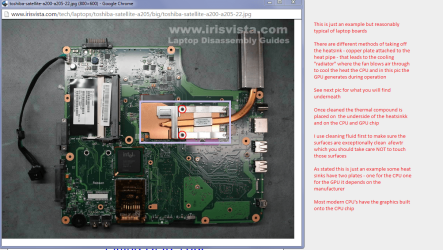
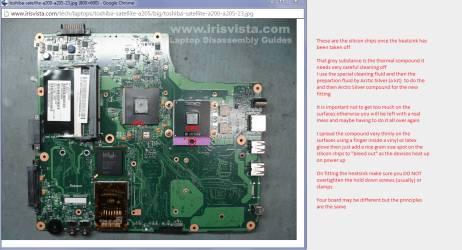
Ok mate just to give you a rough idea of what you will be looking for see my pics and as I say boards differ from maker to maker but the principles are the same.
Plus I use these for all renewals of the compound but the choice is yours of course as there are others around I just happen to like the cleaning method and the compound.
Arctic Silver Incorporated - ArctiClean

Arctic Silver Incorporated - Arctic Silver 5

PS Meant to add that this is how you can change the CPU if necessary the GPU if separate is usually soldered into the board
 

Attachments

  • LAP BOARD 1.PNG
    LAP BOARD 1.PNG
    326.9 KB · Views: 0
  • LAP BOARD 2.PNG
    LAP BOARD 2.PNG
    337.3 KB · Views: 0

My Computer

Computer type
PC/Desktop
Computer Manufacturer/Model Number
Own build (new) Desk1 / Asus ROG Win 7 / Desk2 1st build
OS
Desk1 7 Home Prem / Desk2 10 Pro / Main lap Asus ROG 10 Pro 2 laptop Toshiba 7 Pro Asus P2520 7 & 10
CPU
Desk1 i5 3750K / Laptop i7 GTX 860M / Desk2 i5 2500
Motherboard
Desk1 Asus P877-V / Desk2 Gigabyte H67 UD3H / Laptop ?
Memory
Desk1 8GB (1866) / Desk2 16GB (1333) / Laptop 8Gb DDR3
Graphics Card(s)
Desk 1& 2NVidia GTX 650 & Laptops on board Intel
Sound Card
Desk 1 & 2 -XONAR DG Realtek High Def audio Laptop
Monitor(s) Displays
Desk 1 Benq HD 2450 / Desk2 Philips 24" / Laptop 17.5"
Screen Resolution
1920x1080 D1 & D2 & Laptop 1
Hard Drives
Desk1 Samsung 120GB 830 SSD
Asus ROG 256GB 850 Pro SSD
Desk2 Samsung 840 256 SSD
Toshiba 120GB EVO
PSU
Desk 1 Corsair HX 1050/ Laptop ? / Desk 2 Corsair HX 650
Case
Desk 1 Cooler HAF XM ? Toshiba laptop / Desk2 Coolermaster
Cooling
Fans on all Desk1 -2 Desk2 - all Coolermasters 5 Laptop ?
Keyboard
Desk 1 MS Sidewinder X6 Desk 2 MS Sidewinder X 4
Mouse
Desk 1&2 - Gigabyte MS 900 gamer - laptop - Logitec wireless
Internet Speed
ADSL2+
Other Info
One other Desktop (tester) and spare Toshba laptop both with SSD's
Running Kaspersky 2016 ISS on all machines config'd identically
Logitec audio stereo systems on each machine (x3)
Canon MG5250MFC
Router/modem TP-Link running WPA2SK
again,very late but very appreciative. Mellon Head, I put the laptop & batt. out in the garage under the assumption cold air would bring the thermal compound into operating parameters, but nada. Couldn't boot up anything again except pwr indicators. I am trying to print these messages as I am going next Monday, to see my son for the holidays. He used to do IT work at a large hospital facility but he admits laptops aren't his forte'.
ICIT2LOL, I see and comprehend the description and pictures you have forwarded. Most appreciated and trying to print but this forum isn't cooperating to my efforts. Any suggestions? All you folks have a nice week (I was going to say holiday, then noticed you might not have the same holidays as we do in the States). Hope to hear from you soon at your convenience.
PSSS forget the notes regarding can't print. figured it out, I have to print before sending the quick reply.
 

My Computer

Computer type
Laptop
Computer Manufacturer/Model Number
Gateway
OS
windows 7 home premium
Memory
4 GB
Graphics Card(s)
Multi-in-1 card reader
Hard Drives
500 GB HDD
Antivirus
MalewareBytes Premium
Browser
MSN, Google Crome
Back
Top