
How to Restore Default Power Plan Settings in Windows 7 and Windows 8
Information
This will show you how to reset and restore all of the default Power Plans back with their default settings, or how to restore a single Power Plan back to default settings in Windows 7 and Windows 8.
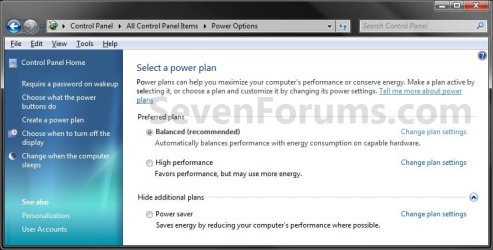
EXAMPLE: Default Power Plans
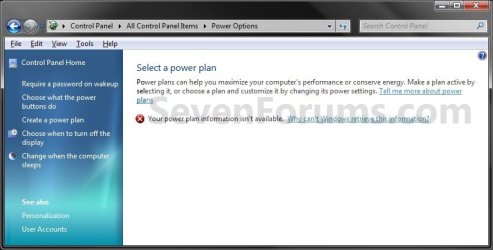
EXAMPLE: Missing Power Plans
NOTE: This is just an example of the power plans missing.
OPTION ONE
To Reset and Restore All Power Plans to Default
NOTE: This can be handy if you have a missing default power plan and would like to restore it, or would like to reset all default power plans back to their default settings. 1. Open a command prompt in Windows 7 or Windows 8.
2. In the command prompt, type powercfg -restoredefaultschemes and press Enter. (See screenshot below)

3. Close the command prompt.
OPTION TWO
To Restore a Single Power Plan back to Default
NOTE: This will restore a single power plan that you select back to it's default settings. 1. Open the Control Panel (icons view) in Windows 7 or Windows 8, click/tap on the Power Options icon, and go to step 3 below.
2. Click/tap on the Change plan settings link to the right of the power plan that you want to restore the default settings for. (See screenshot below)
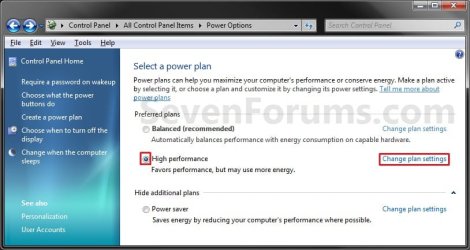
3. Do step 4 or 5 below for what you would like to do.
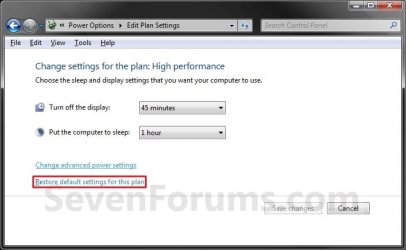
4. Click/tap on the Restore default settings for this plan link, and go to step 6 below.. (See screenshot below)
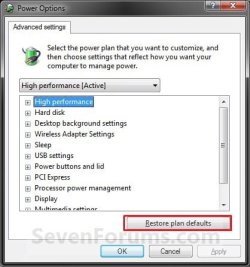
5. Click/tap on the Change advanced power settings link, click/tap on the Restore plan defaults button, and go to step 6 below.. (See screenshot below)
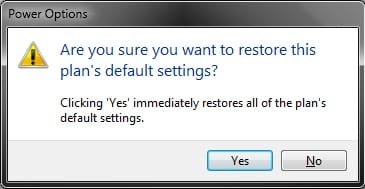
6. Click/tap on Yes to confirm. (See screenshot below)
NOTE: If you did step 5 instead of step 4, then click/tap on OK. (See screenshot below step 5A)
7. Close the Edit Plan Settings window. (See screenshot below step 4)
That's it,
Shawn
Related Tutorials
- How to Select a Power Plan in Windows 7
- How to Change the Power Plan Settings in Windows 7
- How to Change Power Plan Settings in Windows 8 and 8.1
- How to Create or Delete a Custom Power Plan in Windows 7
- How to Run a Windows 7 Power Efficiency Diagnostics Report
- How to Enable or Disable Require Password on Wakeup in Windows 7
- How to Create a Shortcut to Change Power Plans in Windows 7
- How to Change the Return to Sleep Timeout for a Unattended Wake Up in Windows 7
- How to Create a Power Options Shortcut in Windows 7
- How to Create a "Advanced Power Options" Shortcut in Windows 7
- How to Create a Power Troubleshoot Shortcut in Windows 7
- How to Export and Import Power Plans in Windows 7
- How to Rename a Power Plan Name in Windows 7
- How to Specify a Default Power Plan for All Users in Vista and Windows 7
Last edited:


