
Power plan

panais

New member
Guru
Gold Member
VIP
Local time
12:12 AM
Messages
4,725
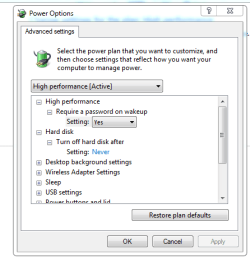
a)I change advanced power option too <<turn off hard disk never>> is that ok?
b)When i try to open my other hard disks E: and F: i get that loading thing,is that normal?
c)If i download something and set the computer to sleep mode the download it will continue or is stop?
 

Attachments
  • Capture.PNG
    Capture.PNG
    11.3 KB · Views: 2
  • E.PNG
    E.PNG
    7.7 KB · Views: 5
  • F.PNG
    F.PNG
    14.5 KB · Views: 5
Last edited:

My Computer

Computer Manufacturer/Model Number
Custom Built by me.
OS
Windows 7 Ultimate 64bit SP1
CPU
Intel Core 2 Quad Q6600
Motherboard
Gigabyte GA-X38-DS4
Memory
2X2GB DDR2 PC6400 800MHZ DUAL CHANNEL
Graphics Card(s)
XFX RADEON HD 6850 1GB GDDR5
Sound Card
2/4/5.1/7.1-channel Realtek High Definition
Monitor(s) Displays
Samsung LE40A656F1 1080p 100Hz LCD HD TV 50,000:1
Screen Resolution
1366x768 in Desktop,1920x1080p in gaming and video
Hard Drives
C:\WD VelociRaptor 150 GB,10,000 RPM
E:\WESTERN DIGITAL WD15EADS 1.5TB CAVIAR GREEN SATA2 F:\WESTERN DIGITAL WD15EADS 1.5TB CAVIAR GREEN SATA2
PSU
THERMALTAKE W0229 TOUGHPOWER XT 750W
Case
A-Case Twin Engine BB
Cooling
3 x thermaltake smart case fan II + 1 arctic cooling fan
Keyboard
Wireless Logitech LX710
Mouse
Logitech Wireless Gaming Mouse G700
Internet Speed
ADSL 12000 plus
Other Info
Mouse Logitech G700,with 13 buttons who needs keyboard in RPG?

D:\Sony high speed sata Dvd Rewriter
Logitech Cordless Rumblepad 2
a)I change advanced power option too <<turn off hard disk never>> is that ok?
b)When i try to open my other hard disks E: and F: i get that loading thing,is that normal?
c)If i download something and set the computer to sleep mode the download it will continue or is stop?

A ok but will wear out hd faster
b if you mean the green line that is the index and normal
c-Will stop unless configured properly.


ken j
 

My Computer

Computer Manufacturer/Model Number
HP Pavillion dv-7 1005 Tx
OS
Win 8 Release candidate 8400
CPU
[email protected]
Memory
4 gigs
Graphics Card(s)
Nvidia 9600M
Sound Card
HD built-in
Monitor(s) Displays
17" Wxga
Screen Resolution
1440x900
Cooling
none
Internet Speed
45Mb down 5Mb up
I'm sorry that I interfere,but want to ask something. If I set to turn off hdd after ... 30 min lets say,and in background something is downloading,after 30 minutes the download will continue or it will stop. (because the hdd will turn off) ?
Thanks,StalkeR
 

My Computer

Computer type
PC/Desktop
Computer Manufacturer/Model Number
Custom Build
OS
Windows 10 Pro x64
CPU
Intel Core i5 4440 @Stock
Motherboard
Gigabyte Z97 D3H
Memory
4 x 4GB HyperX Fury DDR3
Graphics Card(s)
Gigabyte GTX 1050Ti O4G
Sound Card
Integrated
Monitor(s) Displays
Dell P2417H
Screen Resolution
1920 x 1080
Hard Drives
Samsung EVO 850 120GB / Toshiba DT01ACA050 1TB 7200prm 32MB
PSU
Riotoro Onyx 750W
Case
NZXT H500 Black-Red
Cooling
Stock CPU + NZXT 120mm + 2x120mm red fans
Keyboard
Modecom Volcano Lanparty
Mouse
Asus ROG Gladius / DeepCool E-Pad Plus
Internet Speed
DOCSIS 50/3 Mbit
Browser
Google Chrome
Other Info
Asus K55VJ(i5 3210M, GT635M / 2GB, 8GB DDR3, 500GB HDD)
a)I change advanced power option too <<turn off hard disk never>> is that ok?
b)When i try to open my other hard disks E: and F: i get that loading thing,is that normal?
c)If i download something and set the computer to sleep mode the download it will continue or is stop?

A ok but will wear out hd faster
b if you mean the green line that is the index and normal
c-Will stop unless configured properly.


ken j
A ok but will wear out hd faster <-->WHY? and have i any benefits or negatives from that? (turn off hard disk never)
b if you mean the green line that is the index and normal<-->have i any benefits or negatives from that? is that ok to disable index?what exactly is index?
c-Will stop unless configured properly. how to configure that?
 

My Computer

Computer Manufacturer/Model Number
Custom Built by me.
OS
Windows 7 Ultimate 64bit SP1
CPU
Intel Core 2 Quad Q6600
Motherboard
Gigabyte GA-X38-DS4
Memory
2X2GB DDR2 PC6400 800MHZ DUAL CHANNEL
Graphics Card(s)
XFX RADEON HD 6850 1GB GDDR5
Sound Card
2/4/5.1/7.1-channel Realtek High Definition
Monitor(s) Displays
Samsung LE40A656F1 1080p 100Hz LCD HD TV 50,000:1
Screen Resolution
1366x768 in Desktop,1920x1080p in gaming and video
Hard Drives
C:\WD VelociRaptor 150 GB,10,000 RPM
E:\WESTERN DIGITAL WD15EADS 1.5TB CAVIAR GREEN SATA2 F:\WESTERN DIGITAL WD15EADS 1.5TB CAVIAR GREEN SATA2
PSU
THERMALTAKE W0229 TOUGHPOWER XT 750W
Case
A-Case Twin Engine BB
Cooling
3 x thermaltake smart case fan II + 1 arctic cooling fan
Keyboard
Wireless Logitech LX710
Mouse
Logitech Wireless Gaming Mouse G700
Internet Speed
ADSL 12000 plus
Other Info
Mouse Logitech G700,with 13 buttons who needs keyboard in RPG?

D:\Sony high speed sata Dvd Rewriter
Logitech Cordless Rumblepad 2
a)I change advanced power option too <<turn off hard disk never>> is that ok?
b)When i try to open my other hard disks E: and F: i get that loading thing,is that normal?
c)If i download something and set the computer to sleep mode the download it will continue or is stop?

A ok but will wear out hd faster
b if you mean the green line that is the index and normal
c-Will stop unless configured properly.


ken j
A ok but will wear out hd faster <-->WHY? and have i any benefits or negatives from that? (turn off hard disk never)
b if you mean the green line that is the index and normal<-->have i any benefits or negatives from that? is that ok to disable index?what exactly is index?
c-Will stop unless configured properly. how to configure that?

A.) (I love this letter system lol...) Nothing is permanent, so if you run a machine constantly, eventually it will wear out. how long that takes depends on what machine and how well it was pieced together. In this case, that machine is your hard drive. It shouldn't be a problem really, provided you don't have the world's social security numbers on it ;)

B.) Index is how you search. it is in the start menu and that white bar where you can type something in and have it display what you want, such as "control panel" and it will show control panel and you can click on it. Its just a simpler way of finding documents and such, and can safely be disabled if you don't need to go looking for stuff or aren't lazy like I am.

However, that green bar search for drive contents is not exactly the index. Its reading the drive and displaying your drives contents after a search for it. Enabling or disabling the index does not effect this search (unless your computer is really really slow, in which case disabling index speeds up your computer). The index is a computer's search for you so you don't have to. Or you could search manually through start menu links and menus or through your computer, then clicking on your hard drive and browsing its contents

C.) Go into power options, then "Change Plan settings" and then advanced power options. At the bottom of the list under multimedia settings and under "when sharing media", there is an option to prevent idling to sleep. That is the option you want to have selected in this case. If you force the computer to sleep, than I do believe it will stop it, and I'm not sure on its success in reinstating the connection once it wakes. The network usually goes to "sleep" as well and any hardware dealing with that. You can set your computer to sleep in a set time limit so you don't have to, but if you set it wrong, it wont go to sleep. Follow this tutorial for sleep mode if you'd like: http://www.sevenforums.com/tutorials/778-power-plan-settings-change.html
 

My Computer

Computer type
PC/Desktop
Computer Manufacturer/Model Number
Custom Asus Build
OS
Microsoft Windows 8.1 Pro 64-bit
CPU
Intel(R) Core(TM) i3-4130 CPU @ 3.40GHz
Motherboard
B85M-E
Memory
8.00 GB
Graphics Card(s)
None
Sound Card
Realtek High Definition Audio
Monitor(s) Displays
Asus 23.6" Monitor
Screen Resolution
1920 x 1080 x 32 bits (4294967296 colors) @ 60 Hz
Hard Drives
INTEL SSDSC2BW180A4
Samsung SSD 840 PRO Series
PSU
Seasonic S12II-380Bronze
Case
Lian Li
Cooling
Fan, Passive
Keyboard
Logitech K120
Mouse
Microsoft Touch Mouse
Internet Speed
4ms Ping, 19.0 Mbps Download, 19.0 Mbps Upload
Antivirus
Eset Endpoint
Browser
Internet Explorer, Chrome
  • Like
Reactions: JMH
I'm sorry that I interfere,but want to ask something. If I set to turn off hdd after ... 30 min lets say,and in background something is downloading,after 30 minutes the download will continue or it will stop. (because the hdd will turn off) ?
Thanks,StalkeR

Read my post right above this one for what I said in C.). Then you should have no trouble.

But yes, the download will stop if HDD is forced off. If you are downloading and you have the hard drive set to turn off after a set period of time, then it will not turn itself off until the download is complete (Most of the time). Most downloads complete way before the time you set the HDD to turn off, unless you set the time at a very low number in the power options. If you have something downloading and it fails, most of the time you can just redownload it.

Overall, you should be fine setting your HDD to turn off after a number of minutes even while downloading content. That takes an action and your HDD registers that and does not count down to the time it turns off at, until it registers that the computer hasn't been active in however much time you've set it to turn the HDD off at.

I almost think I was a little too thorough in my reply, I will try to refine my statements better in the future (For now, I'm just too tired)

*edit* and my grammar is lacking lol
 
Last edited:

My Computer

Computer type
PC/Desktop
Computer Manufacturer/Model Number
Custom Asus Build
OS
Microsoft Windows 8.1 Pro 64-bit
CPU
Intel(R) Core(TM) i3-4130 CPU @ 3.40GHz
Motherboard
B85M-E
Memory
8.00 GB
Graphics Card(s)
None
Sound Card
Realtek High Definition Audio
Monitor(s) Displays
Asus 23.6" Monitor
Screen Resolution
1920 x 1080 x 32 bits (4294967296 colors) @ 60 Hz
Hard Drives
INTEL SSDSC2BW180A4
Samsung SSD 840 PRO Series
PSU
Seasonic S12II-380Bronze
Case
Lian Li
Cooling
Fan, Passive
Keyboard
Logitech K120
Mouse
Microsoft Touch Mouse
Internet Speed
4ms Ping, 19.0 Mbps Download, 19.0 Mbps Upload
Antivirus
Eset Endpoint
Browser
Internet Explorer, Chrome
Back
Top
