

- Local time
- 12:26 PM
- Messages
- 568
My system, see specs for details, started to popup this error message:
"The usb device exceeded the power limit of its hub port"
Clicking on the message brings up this window:
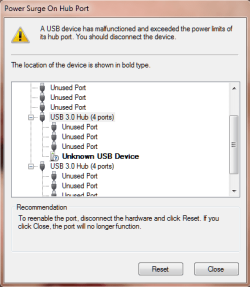
There are two USB devices plugged in to the computer, keyboard and mouse in the USB 2.0 ports, when the message pops up. The same keyboard and mouse had been used for years without any issues. The Dell keyboard does have two USB ports, but they are not used.
There's nothing to disconnect and selecting the option of "Reset" in the above image does not fix the issue. The keyboard and mouse does work just fine during the reset. While the eSATA should have no relation to this issue, disconnecting the eSATA external drive did not fixed the issue either.
Since the issue does not relate to and actual device, it seems that the motherboard's power delivery (capacitors?) could be the reason for the error message. Is there a way to check this power delivery?
TIA...
"The usb device exceeded the power limit of its hub port"
Clicking on the message brings up this window:
There are two USB devices plugged in to the computer, keyboard and mouse in the USB 2.0 ports, when the message pops up. The same keyboard and mouse had been used for years without any issues. The Dell keyboard does have two USB ports, but they are not used.
There's nothing to disconnect and selecting the option of "Reset" in the above image does not fix the issue. The keyboard and mouse does work just fine during the reset. While the eSATA should have no relation to this issue, disconnecting the eSATA external drive did not fixed the issue either.
Since the issue does not relate to and actual device, it seems that the motherboard's power delivery (capacitors?) could be the reason for the error message. Is there a way to check this power delivery?
TIA...
My Computer
At a glance
Windows 7 64-bit, Windows 8.1 64-bit, OSX El ...Intel i5-3350P 3.1 GHz16 GBs GSkill SniperRadeon HD 7850
- Computer type
- PC/Desktop
- Computer Manufacturer/Model Number
- Custom built at Home
- OS
- Windows 7 64-bit, Windows 8.1 64-bit, OSX El Capitan, Windows 10 (VMware)
- CPU
- Intel i5-3350P 3.1 GHz
- Motherboard
- Gigabyte GA-Z77X-UP5 TH
- Memory
- 16 GBs GSkill Sniper
- Graphics Card(s)
- Radeon HD 7850
- Sound Card
- VIA HD Audio
- Monitor(s) Displays
- Dell U2410 24"
- Screen Resolution
- 1920x1200
- Hard Drives
- 1 x Intel 520 240 GBs
1 x Seagate 1TBs SATA 2.0,
1 x Seagate 1TBs eSATA 2.0
- PSU
- Thermaltake 850W
- Case
- Antec P183
- Cooling
- Noctua NH-D14 Heatsink 2 x 120mm fans, 4 x 120mm case fans
- Keyboard
- Dell Multimedia keyboard
- Mouse
- Logitech Trackball
- Internet Speed
- 28.5 Mb/s


