Preview Jpeg Images In Folder

Lollies

New member
Local time
9:04 PM
Messages
301
This is somewhat of a stupid question but I can not find the answer to it anywhere. when looking at images while in a folder such as pictures, none of the images are preview able. I have several jpeg images but they all have the default images for the thumbnails, as if it is not recognized. Is there anyway to change thing?

EXAMPLE:
JpegPreview.jpg


Thanks,
Lollies :party:
 

My Computer

Computer Manufacturer/Model Number
Self-Built
OS
Windows 7 Ultimate x64
CPU
Intel Core 2 Extreme QX9650 @ 3.00GHz 1333FSB 12
Motherboard
Asus Striker II Formula nForce 780i SLI Mainboard
Memory
8G Corsair Dominator DDR2
Graphics Card(s)
None LoL
Sound Card
Creative Labs X-FI XtremeGamer 24-Bit PCI Sound Card
Monitor(s) Displays
None LoL
Screen Resolution
None LoL
Hard Drives
2 Western Digital Raid-0 10,000 RPM Velociraptor's
PSU
Corsair AX850
Case
Corsair Graphite 600T
Cooling
Corsair H70
Keyboard
None LoL
Mouse
None LoL
Internet Speed
Download: 14.95 MB/s Upload: 2.88 MB/s
Other Info
32" LG LCD TV
Astro A40 Audio System
Logitech Z-2300 Speakers
Microsoft Xbox 360 Slim
Rosewill External Enclosure
Hi Lollies, have you tried increasing the thumbnail size? on mine, anything above large icon will show a preview, also, if you have alot of pictures, it may take a couple of minutes for the prieviews to load
 

Attachments

  • Pictures.PNG
    Pictures.PNG
    19.2 KB · Views: 22

My Computer

Computer type
PC/Desktop
Computer Manufacturer/Model Number
Medion Erazer (note to self: insert model number) - with custom additions
OS
Windows 10 Pro x64
CPU
Intel Core i5 7400 @ 3.00GHz
Motherboard
OEM supllied with PC
Memory
8GB 2133Mhz DDR4 (OEM supplied)
Graphics Card(s)
Gygabyte Windforce GTX 1050Ti (Factory Overclocked)
Sound Card
Realtek
Monitor(s) Displays
Acer Al1980 + HKC
Screen Resolution
1360*768(HKC) / 1280*1024(Acer)
Hard Drives
1TB Toshiba
1TB WD Caviar Green
120GB Samsung Evo 840
PSU
OEM supplied (no power rating on case)
Case
OEM Supplied
Cooling
Stock
Keyboard
Logitech Wireless
Mouse
Logitect Wireless
Internet Speed
40Mb/s Down 10Mb/s Up
Antivirus
Defender
Browser
Firefox
Even at Extra large it still shows the default beach picture. :cry:
 

My Computer

Computer Manufacturer/Model Number
Self-Built
OS
Windows 7 Ultimate x64
CPU
Intel Core 2 Extreme QX9650 @ 3.00GHz 1333FSB 12
Motherboard
Asus Striker II Formula nForce 780i SLI Mainboard
Memory
8G Corsair Dominator DDR2
Graphics Card(s)
None LoL
Sound Card
Creative Labs X-FI XtremeGamer 24-Bit PCI Sound Card
Monitor(s) Displays
None LoL
Screen Resolution
None LoL
Hard Drives
2 Western Digital Raid-0 10,000 RPM Velociraptor's
PSU
Corsair AX850
Case
Corsair Graphite 600T
Cooling
Corsair H70
Keyboard
None LoL
Mouse
None LoL
Internet Speed
Download: 14.95 MB/s Upload: 2.88 MB/s
Other Info
32" LG LCD TV
Astro A40 Audio System
Logitech Z-2300 Speakers
Microsoft Xbox 360 Slim
Rosewill External Enclosure

Anyone? It works fine on my desktop but not on my (new) yet sh!teh Hp Laptop.
 

My Computer

Computer Manufacturer/Model Number
Self-Built
OS
Windows 7 Ultimate x64
CPU
Intel Core 2 Extreme QX9650 @ 3.00GHz 1333FSB 12
Motherboard
Asus Striker II Formula nForce 780i SLI Mainboard
Memory
8G Corsair Dominator DDR2
Graphics Card(s)
None LoL
Sound Card
Creative Labs X-FI XtremeGamer 24-Bit PCI Sound Card
Monitor(s) Displays
None LoL
Screen Resolution
None LoL
Hard Drives
2 Western Digital Raid-0 10,000 RPM Velociraptor's
PSU
Corsair AX850
Case
Corsair Graphite 600T
Cooling
Corsair H70
Keyboard
None LoL
Mouse
None LoL
Internet Speed
Download: 14.95 MB/s Upload: 2.88 MB/s
Other Info
32" LG LCD TV
Astro A40 Audio System
Logitech Z-2300 Speakers
Microsoft Xbox 360 Slim
Rosewill External Enclosure
sorry lollies i completely forgot about this thread :o try this: open an elevated command prompt (right click, run as administrator) and type sfc /scannow see if it finds anything
 

My Computer

Computer type
PC/Desktop
Computer Manufacturer/Model Number
Medion Erazer (note to self: insert model number) - with custom additions
OS
Windows 10 Pro x64
CPU
Intel Core i5 7400 @ 3.00GHz
Motherboard
OEM supllied with PC
Memory
8GB 2133Mhz DDR4 (OEM supplied)
Graphics Card(s)
Gygabyte Windforce GTX 1050Ti (Factory Overclocked)
Sound Card
Realtek
Monitor(s) Displays
Acer Al1980 + HKC
Screen Resolution
1360*768(HKC) / 1280*1024(Acer)
Hard Drives
1TB Toshiba
1TB WD Caviar Green
120GB Samsung Evo 840
PSU
OEM supplied (no power rating on case)
Case
OEM Supplied
Cooling
Stock
Keyboard
Logitech Wireless
Mouse
Logitect Wireless
Internet Speed
40Mb/s Down 10Mb/s Up
Antivirus
Defender
Browser
Firefox
No worries, I just realized that my comp has the pics as "JPEG" images but on my laptop for whatever reason they are "JPG" images? :sarc:
 

My Computer

Computer Manufacturer/Model Number
Self-Built
OS
Windows 7 Ultimate x64
CPU
Intel Core 2 Extreme QX9650 @ 3.00GHz 1333FSB 12
Motherboard
Asus Striker II Formula nForce 780i SLI Mainboard
Memory
8G Corsair Dominator DDR2
Graphics Card(s)
None LoL
Sound Card
Creative Labs X-FI XtremeGamer 24-Bit PCI Sound Card
Monitor(s) Displays
None LoL
Screen Resolution
None LoL
Hard Drives
2 Western Digital Raid-0 10,000 RPM Velociraptor's
PSU
Corsair AX850
Case
Corsair Graphite 600T
Cooling
Corsair H70
Keyboard
None LoL
Mouse
None LoL
Internet Speed
Download: 14.95 MB/s Upload: 2.88 MB/s
Other Info
32" LG LCD TV
Astro A40 Audio System
Logitech Z-2300 Speakers
Microsoft Xbox 360 Slim
Rosewill External Enclosure
i dont see that would make a difference to be honest, its the same thing pretty much
 

My Computer

Computer type
PC/Desktop
Computer Manufacturer/Model Number
Medion Erazer (note to self: insert model number) - with custom additions
OS
Windows 10 Pro x64
CPU
Intel Core i5 7400 @ 3.00GHz
Motherboard
OEM supllied with PC
Memory
8GB 2133Mhz DDR4 (OEM supplied)
Graphics Card(s)
Gygabyte Windforce GTX 1050Ti (Factory Overclocked)
Sound Card
Realtek
Monitor(s) Displays
Acer Al1980 + HKC
Screen Resolution
1360*768(HKC) / 1280*1024(Acer)
Hard Drives
1TB Toshiba
1TB WD Caviar Green
120GB Samsung Evo 840
PSU
OEM supplied (no power rating on case)
Case
OEM Supplied
Cooling
Stock
Keyboard
Logitech Wireless
Mouse
Logitect Wireless
Internet Speed
40Mb/s Down 10Mb/s Up
Antivirus
Defender
Browser
Firefox
The scan is still running but besides that I have found nothing that would make it so the images were not visible as thumbnails.
 

My Computer

Computer Manufacturer/Model Number
Self-Built
OS
Windows 7 Ultimate x64
CPU
Intel Core 2 Extreme QX9650 @ 3.00GHz 1333FSB 12
Motherboard
Asus Striker II Formula nForce 780i SLI Mainboard
Memory
8G Corsair Dominator DDR2
Graphics Card(s)
None LoL
Sound Card
Creative Labs X-FI XtremeGamer 24-Bit PCI Sound Card
Monitor(s) Displays
None LoL
Screen Resolution
None LoL
Hard Drives
2 Western Digital Raid-0 10,000 RPM Velociraptor's
PSU
Corsair AX850
Case
Corsair Graphite 600T
Cooling
Corsair H70
Keyboard
None LoL
Mouse
None LoL
Internet Speed
Download: 14.95 MB/s Upload: 2.88 MB/s
Other Info
32" LG LCD TV
Astro A40 Audio System
Logitech Z-2300 Speakers
Microsoft Xbox 360 Slim
Rosewill External Enclosure
just a thought, how long have you had windows 7 installed for? and how long ago did this problem start?

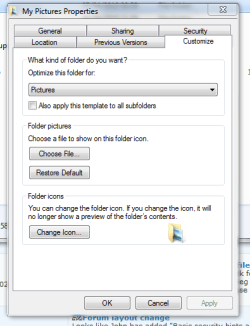
also: try optimising the folder for pictures, (right click your pictures folder then click properties,) iv attached a screen to show what i mean
 

Attachments

  • Pictures.PNG
    Pictures.PNG
    14.6 KB · Views: 51

My Computer

Computer type
PC/Desktop
Computer Manufacturer/Model Number
Medion Erazer (note to self: insert model number) - with custom additions
OS
Windows 10 Pro x64
CPU
Intel Core i5 7400 @ 3.00GHz
Motherboard
OEM supllied with PC
Memory
8GB 2133Mhz DDR4 (OEM supplied)
Graphics Card(s)
Gygabyte Windforce GTX 1050Ti (Factory Overclocked)
Sound Card
Realtek
Monitor(s) Displays
Acer Al1980 + HKC
Screen Resolution
1360*768(HKC) / 1280*1024(Acer)
Hard Drives
1TB Toshiba
1TB WD Caviar Green
120GB Samsung Evo 840
PSU
OEM supplied (no power rating on case)
Case
OEM Supplied
Cooling
Stock
Keyboard
Logitech Wireless
Mouse
Logitect Wireless
Internet Speed
40Mb/s Down 10Mb/s Up
Antivirus
Defender
Browser
Firefox
I unfortunately do not know when it started, I was sitting in class today and just kinda paused for a minute and realized none of the pictures were visible as thumbnails. I had Windows 7 on my laptop for a longer period of time than my desktop. So maybe like little after December?

The properties box is different compared to yours but its set to pictures. Here is what mine looks like:
Capture.jpg

Capture1.jpg

I dono what else would make the thumbnails show a default picture. The scan finish, it said it corrected some files but nothing else.
 

My Computer

Computer Manufacturer/Model Number
Self-Built
OS
Windows 7 Ultimate x64
CPU
Intel Core 2 Extreme QX9650 @ 3.00GHz 1333FSB 12
Motherboard
Asus Striker II Formula nForce 780i SLI Mainboard
Memory
8G Corsair Dominator DDR2
Graphics Card(s)
None LoL
Sound Card
Creative Labs X-FI XtremeGamer 24-Bit PCI Sound Card
Monitor(s) Displays
None LoL
Screen Resolution
None LoL
Hard Drives
2 Western Digital Raid-0 10,000 RPM Velociraptor's
PSU
Corsair AX850
Case
Corsair Graphite 600T
Cooling
Corsair H70
Keyboard
None LoL
Mouse
None LoL
Internet Speed
Download: 14.95 MB/s Upload: 2.88 MB/s
Other Info
32" LG LCD TV
Astro A40 Audio System
Logitech Z-2300 Speakers
Microsoft Xbox 360 Slim
Rosewill External Enclosure
Preview set to default jpegs?

adsds
 
Last edited:

My Computer

Computer Manufacturer/Model Number
Self-Built
OS
Windows 7 Ultimate x64
CPU
Intel Core 2 Extreme QX9650 @ 3.00GHz 1333FSB 12
Motherboard
Asus Striker II Formula nForce 780i SLI Mainboard
Memory
8G Corsair Dominator DDR2
Graphics Card(s)
None LoL
Sound Card
Creative Labs X-FI XtremeGamer 24-Bit PCI Sound Card
Monitor(s) Displays
None LoL
Screen Resolution
None LoL
Hard Drives
2 Western Digital Raid-0 10,000 RPM Velociraptor's
PSU
Corsair AX850
Case
Corsair Graphite 600T
Cooling
Corsair H70
Keyboard
None LoL
Mouse
None LoL
Internet Speed
Download: 14.95 MB/s Upload: 2.88 MB/s
Other Info
32" LG LCD TV
Astro A40 Audio System
Logitech Z-2300 Speakers
Microsoft Xbox 360 Slim
Rosewill External Enclosure
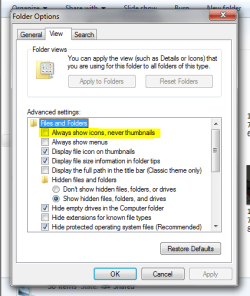
right, another idea :) in the pictures folder, hit the Alt key, then click tools>folder options>view check that "always show icons never thumbnails" is unchecked
 

Attachments

  • Pictures.PNG
    Pictures.PNG
    18.6 KB · Views: 16

My Computer

Computer type
PC/Desktop
Computer Manufacturer/Model Number
Medion Erazer (note to self: insert model number) - with custom additions
OS
Windows 10 Pro x64
CPU
Intel Core i5 7400 @ 3.00GHz
Motherboard
OEM supllied with PC
Memory
8GB 2133Mhz DDR4 (OEM supplied)
Graphics Card(s)
Gygabyte Windforce GTX 1050Ti (Factory Overclocked)
Sound Card
Realtek
Monitor(s) Displays
Acer Al1980 + HKC
Screen Resolution
1360*768(HKC) / 1280*1024(Acer)
Hard Drives
1TB Toshiba
1TB WD Caviar Green
120GB Samsung Evo 840
PSU
OEM supplied (no power rating on case)
Case
OEM Supplied
Cooling
Stock
Keyboard
Logitech Wireless
Mouse
Logitect Wireless
Internet Speed
40Mb/s Down 10Mb/s Up
Antivirus
Defender
Browser
Firefox
This is somewhat of a stupid question but I can not find the answer to it anywhere. when looking at images while in a folder such as pictures, none of the images are preview able. I have several jpeg images but they all have the default images for the thumbnails, as if it is not recognized. Is there anyway to change thing?

EXAMPLE:
JpegPreview.jpg


Thanks,
Lollies :party:


I was haveing this same issue its been driving me crazy since when i got my laptop it did work anyways i figured it out . In the advanced folder options make sure to uncheck the checkbox that says always show icons never show thumbnails. If this option is checked you wont be able to get your preview icons to work no matter what. Thanks for the help and support even though it didnt help me with my issue this forum lead me to find the solution which is why im returning the favor
 

My Computer

Computer type
Laptop
Computer Manufacturer/Model Number
hp
OS
windows 8
also in order to get to the folder options in advance right click the desktop click personalize in the pop up and then on the file menu bar click tools folder options then the view tab and its the first check box under the subcategory files and folders uncheck the box and press apply and you will notice the difference immediately
 

My Computer

Computer type
Laptop
Computer Manufacturer/Model Number
hp
OS
windows 8
Back
Top