Previous versions of files, does it backup ALL files?

gabriolinari

New member
Member
VIP
Local time
9:08 AM
Messages
144
hi there

i have a question related to "Previous versions of files" which i have to say is pretty handy...

i wanted to know, if i enabled it on a partition where i have lets say "DATA", which in effect has movies, photos and documents (xls, jpegs, mkvs, movs, avis, etc etc), would that back up the ENTIRE partition? for instance if i have a movie of 2gb, will that be backed up as well?

i currently have it enabled on C: which is the windows/programs partition only..

as far as i can tell you cannot choose which files are going to be backed up or maybe i am missing a setting somewhere?

thanks
Gab
 

My Computer My Computer

At a glance

Windows 7 Ultimate x64
Computer type
PC/Desktop
OS
Windows 7 Ultimate x64
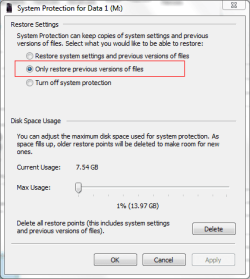
Yes. It works well on a data partition. If there are no system data on the partition select the only restore previous versions option.

screenshot163_2012-05-18.png

It doesn't actually back therm up. It keeps them in shadow storage so it is not a true backup. When your allocated shadow storage is used up it will delete the oldest version. As you can see I have 1% of my disk allocated. That gives me a couple of months of versions. You will need to experiment with what works for you
 

My Computer My Computer

At a glance

Microsoft Windows 7 Home Premium 64-bit Servi...Intel(R) Core(TM) i3 CPU M 330 @ 2.13GHz8 GB DDR3Intel(R) HD Graphics
Computer type
Laptop
Computer Manufacturer/Model Number
Hewlett-Packard/G62-107SA Notebook
OS
Microsoft Windows 7 Home Premium 64-bit Service Pack 1
CPU
Intel(R) Core(TM) i3 CPU M 330 @ 2.13GHz
Motherboard
Hewlett-Packard 1425
Memory
8 GB DDR3
Graphics Card(s)
Intel(R) HD Graphics
Sound Card
Realtek High Definition Audio
Monitor(s) Displays
Builtin
Screen Resolution
1366 x 768 x 32 bits (4294967296 colors) @ 60 Hz
Hard Drives
250 GB SATA Hard Disk Drive 7200 rpm
2TB Seagate GoFlex USB 2 Drive
1TB Iomega Prestige USB 2 Drive
1.5TB Iomega Prestige USB 2 Drive (Samsung)
2TB WD MyBook Live NAS.
Mouse
Logitech Anywhere MX
Internet Speed
152 Mbs download 10 Mbs upload
Antivirus
Norton 360
Browser
Chrome
hi there

maybe i have explained in the wrong way.....

if i turn it on on my D: drive that is my DATA partition, i called it that way, could have been "TODAYS" or whatever, and if i have lets say a 2gb movie there, is it going to be backed up or not?

or that depends by the "maximum" filesize i will put, say 5% means 1 gb, then what is it going to back up automatically? all documents but not big movies? how is he going to decide what to backup, on what basis?

thanks
gab
 

My Computer My Computer

At a glance

Windows 7 Ultimate x64
Computer type
PC/Desktop
OS
Windows 7 Ultimate x64
It doesn't work that way. It is an all or nothing thing. When you create a restore point it keeps references to the changed files in shadow storage and differences the changes at the block level. In my case I have about 500GB of data and 11GB reserved for it gives me a couple of months worth of versions. Tis Wikipedia article may give you an idea of what is going on Shadow Copy - Wikipedia, the free encyclopedia
 

My Computer My Computer

At a glance

Microsoft Windows 7 Home Premium 64-bit Servi...Intel(R) Core(TM) i3 CPU M 330 @ 2.13GHz8 GB DDR3Intel(R) HD Graphics
Computer type
Laptop
Computer Manufacturer/Model Number
Hewlett-Packard/G62-107SA Notebook
OS
Microsoft Windows 7 Home Premium 64-bit Service Pack 1
CPU
Intel(R) Core(TM) i3 CPU M 330 @ 2.13GHz
Motherboard
Hewlett-Packard 1425
Memory
8 GB DDR3
Graphics Card(s)
Intel(R) HD Graphics
Sound Card
Realtek High Definition Audio
Monitor(s) Displays
Builtin
Screen Resolution
1366 x 768 x 32 bits (4294967296 colors) @ 60 Hz
Hard Drives
250 GB SATA Hard Disk Drive 7200 rpm
2TB Seagate GoFlex USB 2 Drive
1TB Iomega Prestige USB 2 Drive
1.5TB Iomega Prestige USB 2 Drive (Samsung)
2TB WD MyBook Live NAS.
Mouse
Logitech Anywhere MX
Internet Speed
152 Mbs download 10 Mbs upload
Antivirus
Norton 360
Browser
Chrome
Back
Top