Print Spooler Error

Benjamin123

New member
Member
Local time
4:51 AM
Messages
54
Location
Carleton, Skipton, North Yorkshire
Hello, I'm having problems with my mother's Laptop with the spooler, for some reason this keeps popping up everytime I want to "Add a printer", but I have watched a few video clips and I was thinking then.. In the services, the word "Print Spooler" don't exist on her laptop, BUT there is another spooler called "Spooler" which I thought it might be for other devices that can be installed onto her laptop.
Now; I'm going to show you the image of the error that I keep having on her laptop...

localprintspoolererror1.jpg


Can anybody solve this problem out?
 

My Computer

Computer type
PC/Desktop
Computer Manufacturer/Model Number
HP
OS
Windows 7 Professional
CPU
AMD Athlon(tm) Duel Core Processor 4450e 2.30 GHz
Memory
3.00 GB
Sorry, I uploaded the wrong image, this is the right image:

localprintpoolererror2.jpg
 

My Computer

Computer type
PC/Desktop
Computer Manufacturer/Model Number
HP
OS
Windows 7 Professional
CPU
AMD Athlon(tm) Duel Core Processor 4450e 2.30 GHz
Memory
3.00 GB
My assumption is that the Print Spooler service is stopped and disabled from starting at startup.


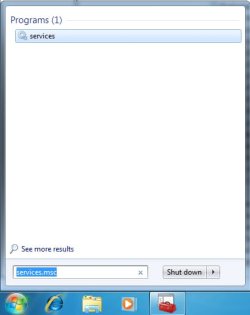
  1. :orb: Search the Start Menu for services.msc and hit Enter.
    • spool1.jpg
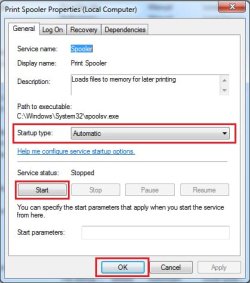
  2. Find the Print Spooler service and Double Click it.
    • spool2.jpg
    • spool3.jpg
  3. First Click the Start under Services status.
  4. Set the Startup type to Automatic.
  5. Confirm by Clicking the OK button.
Restart the system and try to mange a printer to confirm the service's active state is configured.
 

My Computer

Computer type
PC/Desktop
OS
Windows 10
CPU
Intel Core i5 3570K
Motherboard
Asus P8Z77V-PRO
Memory
16GB 1600Mhz G.Skill
Graphics Card(s)
Gigabyte GTX 970 G1-Gaming
PSU
Seasonic 1000W Platinum
Case
Fractal Design Define R4
Cooling
Noctua NH-D14
Well, my mothers laptop don't have the name "Print Spooler" in it and it don't exist BUT she has the word "Spooler" in her services, at the moment - she can't print! I want to help her to fix it! :(
 

My Computer

Computer type
PC/Desktop
Computer Manufacturer/Model Number
HP
OS
Windows 7 Professional
CPU
AMD Athlon(tm) Duel Core Processor 4450e 2.30 GHz
Memory
3.00 GB
Is her OS Windows XP?
Your attachments indicate Windows 7..

The process I detailed above is the same with Windows XP, just with Spooler instead.
 

My Computer

Computer type
PC/Desktop
OS
Windows 10
CPU
Intel Core i5 3570K
Motherboard
Asus P8Z77V-PRO
Memory
16GB 1600Mhz G.Skill
Graphics Card(s)
Gigabyte GTX 970 G1-Gaming
PSU
Seasonic 1000W Platinum
Case
Fractal Design Define R4
Cooling
Noctua NH-D14
Other than the error massages, where else does spool appear?
 

My Computer

Computer type
PC/Desktop
OS
Windows 10
CPU
Intel Core i5 3570K
Motherboard
Asus P8Z77V-PRO
Memory
16GB 1600Mhz G.Skill
Graphics Card(s)
Gigabyte GTX 970 G1-Gaming
PSU
Seasonic 1000W Platinum
Case
Fractal Design Define R4
Cooling
Noctua NH-D14
In the printer page where you install the printer.
 

My Computer

Computer type
PC/Desktop
Computer Manufacturer/Model Number
HP
OS
Windows 7 Professional
CPU
AMD Athlon(tm) Duel Core Processor 4450e 2.30 GHz
Memory
3.00 GB
The only reason I can think of that would keep Print Spooler from appearing
in the services panel would be a corrupt registry.

You do a System Restore to before this was an issue.
 

My Computer

Computer type
PC/Desktop
OS
Windows 10
CPU
Intel Core i5 3570K
Motherboard
Asus P8Z77V-PRO
Memory
16GB 1600Mhz G.Skill
Graphics Card(s)
Gigabyte GTX 970 G1-Gaming
PSU
Seasonic 1000W Platinum
Case
Fractal Design Define R4
Cooling
Noctua NH-D14
The only reason I can think of that would keep Print Spooler from appearing
in the services panel would be a corrupt registry.

You do a System Restore to before this was an issue.

Or restore missing service by importing reg file. (save reg file, double click and choose yes then ok and restart your computer).
 

Attachments

My Computer

Computer type
PC/Desktop
Computer Manufacturer/Model Number
Custom build
OS
Windows 7 Ultimate x64
CPU
Intel Core i3-2120 3,30 GHz
Motherboard
Asus P8Z68-V
Memory
Apacer 4GB
Graphics Card(s)
Nvidia GeForce GTX 275
Hard Drives
SanDisk Extreme SDSSDX-120G-G25 2.5" - 120GB
WD 3200AAKS - 320GB
Seagate ST3400832AS - 400GB
Samsung HM16HJI - 160GB
Browser
Google Chrome
A system restore is basically restoring the registry.
I'd be weary about adding reg entries into mine.
 

My Computer

Computer type
PC/Desktop
OS
Windows 10
CPU
Intel Core i5 3570K
Motherboard
Asus P8Z77V-PRO
Memory
16GB 1600Mhz G.Skill
Graphics Card(s)
Gigabyte GTX 970 G1-Gaming
PSU
Seasonic 1000W Platinum
Case
Fractal Design Define R4
Cooling
Noctua NH-D14
Back
Top