Hello,
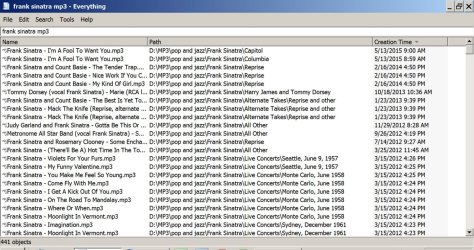
I have been using Directory List & Print (and Karen's Directory Print) for several years, to print lists of files in various directories (especially media). In order to keep track of all my media files, which are scattered amond numerous drives and many different folders, I create shortcuts for each file, then paste them into a single "master list" folder. This way, I have one place I can quickly turn to for up to date info. Directory List & Print (free version) works quite well for sending the current list of files (actually - list of shortcuts) in the "master folder" to MS Word, for printing and formatting. I just recently tried to sort my file list by date, in order to resolve a problem I was having with keeping track of when certain files were created. When I tried to sort the Directory List & Print order by "date", all files in the master folder were shown as the same date (the current date = 10-20-15), even though each file in the directory shows the actual date the file was originally created. I cannot figure out why this app (Dir ListPrint) assigns the current date to each file, instead of the correct date. I have tried several other third party directory print progams and the result is the same with each. I have also tried the DOS command to create a txt list within the master folder - same result. I want the printed list to show the filename and the correct date. What am I doing wrong? Any help will be greatly appreciated. Thank you for reading this lengthy request.
Steve
I have been using Directory List & Print (and Karen's Directory Print) for several years, to print lists of files in various directories (especially media). In order to keep track of all my media files, which are scattered amond numerous drives and many different folders, I create shortcuts for each file, then paste them into a single "master list" folder. This way, I have one place I can quickly turn to for up to date info. Directory List & Print (free version) works quite well for sending the current list of files (actually - list of shortcuts) in the "master folder" to MS Word, for printing and formatting. I just recently tried to sort my file list by date, in order to resolve a problem I was having with keeping track of when certain files were created. When I tried to sort the Directory List & Print order by "date", all files in the master folder were shown as the same date (the current date = 10-20-15), even though each file in the directory shows the actual date the file was originally created. I cannot figure out why this app (Dir ListPrint) assigns the current date to each file, instead of the correct date. I have tried several other third party directory print progams and the result is the same with each. I have also tried the DOS command to create a txt list within the master folder - same result. I want the printed list to show the filename and the correct date. What am I doing wrong? Any help will be greatly appreciated. Thank you for reading this lengthy request.
Steve
My Computer
- Computer Manufacturer/Model Number
- Custom Build
- OS
- Windows 7 Home Premium 64bit
- CPU
- Intel Core i920
- Motherboard
- ASUS P6X58D-E
- Memory
- gskill (12gb)
- Graphics Card(s)
- EVGA nVidia 9800 GTX+
- Sound Card
- on board
- Monitor(s) Displays
- Samsun BX2450
- Hard Drives
- 7
- PSU
- Seasonic
- Case
- Lian li
- Cooling
- 6 x 120mm (quiet) fans