Printing garbage on computer shutdown

Aristeidisp

New member
Local time
10:58 PM
Messages
8
Greetings to everyone in the sevenforums,
I have a problem I need your help with.

I am using Win 7 Ultimate x86 and everytime I shutdown my computer, my printer prints 2-3 pages with one line garbage characters.
I had a Lexmark E250d laser printer with this problem, contacted Lexmark and they said that the problem lies with the printer spooler service of windows. Somehow it collects garbage during it's use and flushes them all out through the printer at computer shutdown. Now I have a Lexmark 350 in it's place and it is doing the same thing, so it's not the printer, as I have also updated it's drivers.

Through this computer I also connect remotely to virtual machines. Could that play a role in creating the problem? Transferring the documents for printing through the remote desktop?

I have also used the .bat file from the relevant tutorial to stop, clear and restart the print spooler service with no luck. The problem remains

Any advice on how I could deal with this issue?
 
Last edited:

My Computer

Computer type
PC/Desktop
OS
Microsoft Windows 7 Ultimate 32-bit 7600 Multiprocessor Free
CPU
Intel(R) Core(TM)2 CPU 6700 @ 2.66GHz
Motherboard
Gigabyte Technology Co., Ltd. G31M-S2L
Memory
4,00 GB
Graphics Card(s)
(1) Intel(R) G33/G31 Express Chipset Family (2) Radmin Mir
Sound Card
Συσκευή High Definition A
Screen Resolution
1600 x 900 x 32 bits (4294967296 colors) @ 60 Hz
Hard Drives
(1) WDC WD2500AAKS-00L9A0 ATA Device (2) WDC WD2500AAKS-00VSA0 ATA Device
Antivirus
Avira free antivirus
Hello and welcome Ariste mate some system specs please http://www.sevenforums.com/tutorials/180324-system-info-see-your-system-specs.html

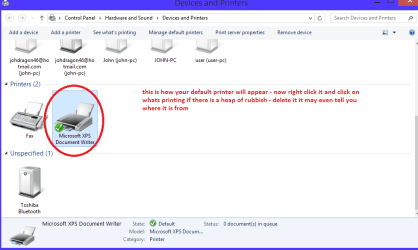
Try opening the default printer from Start > Devices and printers as in my pic and see what is the default printer and what it has backed up and maybe it will tell you from where.

but first run these in safe mode if necessary
http://www.sevenforums.com/tutorials/1538-sfc-scannow-command-system-file-checker.html
http://www.sevenforums.com/tutorials/433-disk-check.html < use the /f and /r options in Option 2 if necessary
if no change run these
http://www.superantispyware.com/
http://www.malwarebytes.org/products/malwarebytes_free/
http://www.bleepingcomputer.com/download/adwcleaner/
download from bleeping computer – delete any rubbish these find.
 

Attachments

  • PRINTER QUEUE.PNG
    PRINTER QUEUE.PNG
    24.7 KB · Views: 2

My Computer

Computer type
PC/Desktop
Computer Manufacturer/Model Number
Own build (new) Desk1 / Asus ROG Win 7 / Desk2 1st build
OS
Desk1 7 Home Prem / Desk2 10 Pro / Main lap Asus ROG 10 Pro 2 laptop Toshiba 7 Pro Asus P2520 7 & 10
CPU
Desk1 i5 3750K / Laptop i7 GTX 860M / Desk2 i5 2500
Motherboard
Desk1 Asus P877-V / Desk2 Gigabyte H67 UD3H / Laptop ?
Memory
Desk1 8GB (1866) / Desk2 16GB (1333) / Laptop 8Gb DDR3
Graphics Card(s)
Desk 1& 2NVidia GTX 650 & Laptops on board Intel
Sound Card
Desk 1 & 2 -XONAR DG Realtek High Def audio Laptop
Monitor(s) Displays
Desk 1 Benq HD 2450 / Desk2 Philips 24" / Laptop 17.5"
Screen Resolution
1920x1080 D1 & D2 & Laptop 1
Hard Drives
Desk1 Samsung 120GB 830 SSD
Asus ROG 256GB 850 Pro SSD
Desk2 Samsung 840 256 SSD
Toshiba 120GB EVO
PSU
Desk 1 Corsair HX 1050/ Laptop ? / Desk 2 Corsair HX 650
Case
Desk 1 Cooler HAF XM ? Toshiba laptop / Desk2 Coolermaster
Cooling
Fans on all Desk1 -2 Desk2 - all Coolermasters 5 Laptop ?
Keyboard
Desk 1 MS Sidewinder X6 Desk 2 MS Sidewinder X 4
Mouse
Desk 1&2 - Gigabyte MS 900 gamer - laptop - Logitec wireless
Internet Speed
ADSL2+
Other Info
One other Desktop (tester) and spare Toshba laptop both with SSD's
Running Kaspersky 2016 ISS on all machines config'd identically
Logitec audio stereo systems on each machine (x3)
Canon MG5250MFC
Router/modem TP-Link running WPA2SK
I am sorry for the delay, I will do as suggested and reply as soon as I am able, thank you for your understanding
 

My Computer

Computer type
PC/Desktop
OS
Microsoft Windows 7 Ultimate 32-bit 7600 Multiprocessor Free
CPU
Intel(R) Core(TM)2 CPU 6700 @ 2.66GHz
Motherboard
Gigabyte Technology Co., Ltd. G31M-S2L
Memory
4,00 GB
Graphics Card(s)
(1) Intel(R) G33/G31 Express Chipset Family (2) Radmin Mir
Sound Card
Συσκευή High Definition A
Screen Resolution
1600 x 900 x 32 bits (4294967296 colors) @ 60 Hz
Hard Drives
(1) WDC WD2500AAKS-00L9A0 ATA Device (2) WDC WD2500AAKS-00VSA0 ATA Device
Antivirus
Avira free antivirus
No solution yet

Update on the issue:
I run sfc, it fixed some issues,
I run chkdsk with no problems found,
I scanned the computer with walwarebytes antimalware found some infected files and removed them,
lastly, I run adwcleaner.

Unfortunately, the problem persists. If there are any other suggestions, they are welcome!

Edit:I also updated my profile to include my system specs
 

My Computer

Computer type
PC/Desktop
OS
Microsoft Windows 7 Ultimate 32-bit 7600 Multiprocessor Free
CPU
Intel(R) Core(TM)2 CPU 6700 @ 2.66GHz
Motherboard
Gigabyte Technology Co., Ltd. G31M-S2L
Memory
4,00 GB
Graphics Card(s)
(1) Intel(R) G33/G31 Express Chipset Family (2) Radmin Mir
Sound Card
Συσκευή High Definition A
Screen Resolution
1600 x 900 x 32 bits (4294967296 colors) @ 60 Hz
Hard Drives
(1) WDC WD2500AAKS-00L9A0 ATA Device (2) WDC WD2500AAKS-00VSA0 ATA Device
Antivirus
Avira free antivirus
Ok Ariste it seems to be a Windows problem if the driver is up to date.
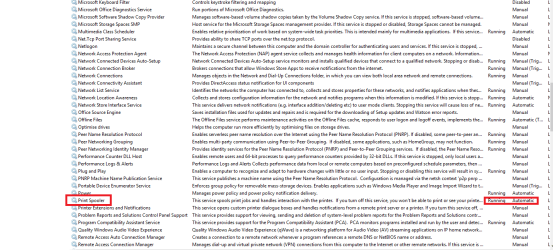
Go to Start and type services.msc when that opens go down the listing until you get to the print spooler as in my pic and see what has at the end of that line where I marked.

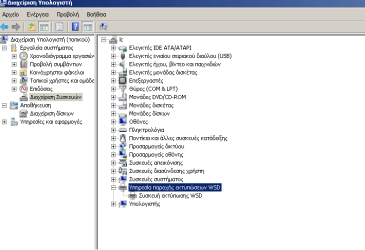
Also can you pleasecheck device manager to see my pic
 

Attachments

  • PRINTER SPOOL.PNG
    PRINTER SPOOL.PNG
    41.5 KB · Views: 1
  • PRINTER SPOOL 2.PNG
    PRINTER SPOOL 2.PNG
    26.5 KB · Views: 2

My Computer

Computer type
PC/Desktop
Computer Manufacturer/Model Number
Own build (new) Desk1 / Asus ROG Win 7 / Desk2 1st build
OS
Desk1 7 Home Prem / Desk2 10 Pro / Main lap Asus ROG 10 Pro 2 laptop Toshiba 7 Pro Asus P2520 7 & 10
CPU
Desk1 i5 3750K / Laptop i7 GTX 860M / Desk2 i5 2500
Motherboard
Desk1 Asus P877-V / Desk2 Gigabyte H67 UD3H / Laptop ?
Memory
Desk1 8GB (1866) / Desk2 16GB (1333) / Laptop 8Gb DDR3
Graphics Card(s)
Desk 1& 2NVidia GTX 650 & Laptops on board Intel
Sound Card
Desk 1 & 2 -XONAR DG Realtek High Def audio Laptop
Monitor(s) Displays
Desk 1 Benq HD 2450 / Desk2 Philips 24" / Laptop 17.5"
Screen Resolution
1920x1080 D1 & D2 & Laptop 1
Hard Drives
Desk1 Samsung 120GB 830 SSD
Asus ROG 256GB 850 Pro SSD
Desk2 Samsung 840 256 SSD
Toshiba 120GB EVO
PSU
Desk 1 Corsair HX 1050/ Laptop ? / Desk 2 Corsair HX 650
Case
Desk 1 Cooler HAF XM ? Toshiba laptop / Desk2 Coolermaster
Cooling
Fans on all Desk1 -2 Desk2 - all Coolermasters 5 Laptop ?
Keyboard
Desk 1 MS Sidewinder X6 Desk 2 MS Sidewinder X 4
Mouse
Desk 1&2 - Gigabyte MS 900 gamer - laptop - Logitec wireless
Internet Speed
ADSL2+
Other Info
One other Desktop (tester) and spare Toshba laptop both with SSD's
Running Kaspersky 2016 ISS on all machines config'd identically
Logitec audio stereo systems on each machine (x3)
Canon MG5250MFC
Router/modem TP-Link running WPA2SK
At the services.msc menu the print spooler service says "running" and "automatic" like in the picture you provided.
In the device manager menu there are no yellow triangles but there are no printers also. It only says "WSD Print Device".
Does this mean that the service is on the server?
 

My Computer

Computer type
PC/Desktop
OS
Microsoft Windows 7 Ultimate 32-bit 7600 Multiprocessor Free
CPU
Intel(R) Core(TM)2 CPU 6700 @ 2.66GHz
Motherboard
Gigabyte Technology Co., Ltd. G31M-S2L
Memory
4,00 GB
Graphics Card(s)
(1) Intel(R) G33/G31 Express Chipset Family (2) Radmin Mir
Sound Card
Συσκευή High Definition A
Screen Resolution
1600 x 900 x 32 bits (4294967296 colors) @ 60 Hz
Hard Drives
(1) WDC WD2500AAKS-00L9A0 ATA Device (2) WDC WD2500AAKS-00VSA0 ATA Device
Antivirus
Avira free antivirus
Well this is what the WSD means and it is a pity I don't have the machine in front of me as it would be easier to work out what is going on. From what you say it looks as if it is in place but just maybe a little corrupted. Now as for a fix I am not sure.
I might ask for help if you don't mind?
 

My Computer

Computer type
PC/Desktop
Computer Manufacturer/Model Number
Own build (new) Desk1 / Asus ROG Win 7 / Desk2 1st build
OS
Desk1 7 Home Prem / Desk2 10 Pro / Main lap Asus ROG 10 Pro 2 laptop Toshiba 7 Pro Asus P2520 7 & 10
CPU
Desk1 i5 3750K / Laptop i7 GTX 860M / Desk2 i5 2500
Motherboard
Desk1 Asus P877-V / Desk2 Gigabyte H67 UD3H / Laptop ?
Memory
Desk1 8GB (1866) / Desk2 16GB (1333) / Laptop 8Gb DDR3
Graphics Card(s)
Desk 1& 2NVidia GTX 650 & Laptops on board Intel
Sound Card
Desk 1 & 2 -XONAR DG Realtek High Def audio Laptop
Monitor(s) Displays
Desk 1 Benq HD 2450 / Desk2 Philips 24" / Laptop 17.5"
Screen Resolution
1920x1080 D1 & D2 & Laptop 1
Hard Drives
Desk1 Samsung 120GB 830 SSD
Asus ROG 256GB 850 Pro SSD
Desk2 Samsung 840 256 SSD
Toshiba 120GB EVO
PSU
Desk 1 Corsair HX 1050/ Laptop ? / Desk 2 Corsair HX 650
Case
Desk 1 Cooler HAF XM ? Toshiba laptop / Desk2 Coolermaster
Cooling
Fans on all Desk1 -2 Desk2 - all Coolermasters 5 Laptop ?
Keyboard
Desk 1 MS Sidewinder X6 Desk 2 MS Sidewinder X 4
Mouse
Desk 1&2 - Gigabyte MS 900 gamer - laptop - Logitec wireless
Internet Speed
ADSL2+
Other Info
One other Desktop (tester) and spare Toshba laptop both with SSD's
Running Kaspersky 2016 ISS on all machines config'd identically
Logitec audio stereo systems on each machine (x3)
Canon MG5250MFC
Router/modem TP-Link running WPA2SK
Sure! Ask away and thanks for all the help so far, I've learnt a thing or two ;)
 

My Computer

Computer type
PC/Desktop
OS
Microsoft Windows 7 Ultimate 32-bit 7600 Multiprocessor Free
CPU
Intel(R) Core(TM)2 CPU 6700 @ 2.66GHz
Motherboard
Gigabyte Technology Co., Ltd. G31M-S2L
Memory
4,00 GB
Graphics Card(s)
(1) Intel(R) G33/G31 Express Chipset Family (2) Radmin Mir
Sound Card
Συσκευή High Definition A
Screen Resolution
1600 x 900 x 32 bits (4294967296 colors) @ 60 Hz
Hard Drives
(1) WDC WD2500AAKS-00L9A0 ATA Device (2) WDC WD2500AAKS-00VSA0 ATA Device
Antivirus
Avira free antivirus

My Computer

Computer type
PC/Desktop
Computer Manufacturer/Model Number
Own build (new) Desk1 / Asus ROG Win 7 / Desk2 1st build
OS
Desk1 7 Home Prem / Desk2 10 Pro / Main lap Asus ROG 10 Pro 2 laptop Toshiba 7 Pro Asus P2520 7 & 10
CPU
Desk1 i5 3750K / Laptop i7 GTX 860M / Desk2 i5 2500
Motherboard
Desk1 Asus P877-V / Desk2 Gigabyte H67 UD3H / Laptop ?
Memory
Desk1 8GB (1866) / Desk2 16GB (1333) / Laptop 8Gb DDR3
Graphics Card(s)
Desk 1& 2NVidia GTX 650 & Laptops on board Intel
Sound Card
Desk 1 & 2 -XONAR DG Realtek High Def audio Laptop
Monitor(s) Displays
Desk 1 Benq HD 2450 / Desk2 Philips 24" / Laptop 17.5"
Screen Resolution
1920x1080 D1 & D2 & Laptop 1
Hard Drives
Desk1 Samsung 120GB 830 SSD
Asus ROG 256GB 850 Pro SSD
Desk2 Samsung 840 256 SSD
Toshiba 120GB EVO
PSU
Desk 1 Corsair HX 1050/ Laptop ? / Desk 2 Corsair HX 650
Case
Desk 1 Cooler HAF XM ? Toshiba laptop / Desk2 Coolermaster
Cooling
Fans on all Desk1 -2 Desk2 - all Coolermasters 5 Laptop ?
Keyboard
Desk 1 MS Sidewinder X6 Desk 2 MS Sidewinder X 4
Mouse
Desk 1&2 - Gigabyte MS 900 gamer - laptop - Logitec wireless
Internet Speed
ADSL2+
Other Info
One other Desktop (tester) and spare Toshba laptop both with SSD's
Running Kaspersky 2016 ISS on all machines config'd identically
Logitec audio stereo systems on each machine (x3)
Canon MG5250MFC
Router/modem TP-Link running WPA2SK
Your Device Manager shows a double listing under Bluetooth.
One of them is a RFCOMM with a yellow triangle.
Recommend you delete this listing and reboot.
After reboot, is this double listing resolved?
I do not know if this is the cause of your issue, but resolving the cause of the yellow triangle can't hurt.
 

My Computer

Computer type
PC/Desktop
Computer Manufacturer/Model Number
Custome Built
OS
Microsoft Windows 7 Ultimate 64-bit 7601 Multiprocessor Free Service Pack 1
CPU
Intel(R) Core(TM) i7 CPU 950 @ 3.07GHz
Motherboard
ASUSTeK Computer INC. SABERTOOTH X58 (LGA1366)
Memory
16.0GB Dual-Channel DDR3 @ 534MHz (8-8-8-20)
Graphics Card(s)
1023MB NVIDIA GeForce GTX 650 (EVGA)
Sound Card
(1) NVIDIA High Definition Audio (2) High Definition Audio
Monitor(s) Displays
HP W2072a LED Backlit
Screen Resolution
1920x1080@60Hz
Hard Drives
(1) SAMSUNG MMCRE28G5MXP-0VB SCSI Disk Device
(2) ST1000DM 003-1CH162 SCSI Disk Device
(3) WDC WD10EURX-73FH1Y0 SCSI Disk Device
PSU
XION XON-1000P14F
Cooling
Fans
Antivirus
Windows Security Essentials
Browser
Mozilla Firefox
Other Info
BIOS Version/Date
American Megatrends Inc. 1402, 8/9/2012
SMBIOS Version 2.5
  • Like
Reactions: Arc
Sorry Gandalf that is my laptop and I take on board what you have said - where I ma staying I ma surrounded by multiple Blutooth devices and I don't have the printer problem a in post#1 - sorry for the confusion mate I was just posting my DM as an example:o
 

My Computer

Computer type
PC/Desktop
Computer Manufacturer/Model Number
Own build (new) Desk1 / Asus ROG Win 7 / Desk2 1st build
OS
Desk1 7 Home Prem / Desk2 10 Pro / Main lap Asus ROG 10 Pro 2 laptop Toshiba 7 Pro Asus P2520 7 & 10
CPU
Desk1 i5 3750K / Laptop i7 GTX 860M / Desk2 i5 2500
Motherboard
Desk1 Asus P877-V / Desk2 Gigabyte H67 UD3H / Laptop ?
Memory
Desk1 8GB (1866) / Desk2 16GB (1333) / Laptop 8Gb DDR3
Graphics Card(s)
Desk 1& 2NVidia GTX 650 & Laptops on board Intel
Sound Card
Desk 1 & 2 -XONAR DG Realtek High Def audio Laptop
Monitor(s) Displays
Desk 1 Benq HD 2450 / Desk2 Philips 24" / Laptop 17.5"
Screen Resolution
1920x1080 D1 & D2 & Laptop 1
Hard Drives
Desk1 Samsung 120GB 830 SSD
Asus ROG 256GB 850 Pro SSD
Desk2 Samsung 840 256 SSD
Toshiba 120GB EVO
PSU
Desk 1 Corsair HX 1050/ Laptop ? / Desk 2 Corsair HX 650
Case
Desk 1 Cooler HAF XM ? Toshiba laptop / Desk2 Coolermaster
Cooling
Fans on all Desk1 -2 Desk2 - all Coolermasters 5 Laptop ?
Keyboard
Desk 1 MS Sidewinder X6 Desk 2 MS Sidewinder X 4
Mouse
Desk 1&2 - Gigabyte MS 900 gamer - laptop - Logitec wireless
Internet Speed
ADSL2+
Other Info
One other Desktop (tester) and spare Toshba laptop both with SSD's
Running Kaspersky 2016 ISS on all machines config'd identically
Logitec audio stereo systems on each machine (x3)
Canon MG5250MFC
Router/modem TP-Link running WPA2SK
ICit2lol - then you would seen to have an issue with your DM.

I would like to see the DM from the OP.
 

My Computer

Computer type
PC/Desktop
Computer Manufacturer/Model Number
Custome Built
OS
Microsoft Windows 7 Ultimate 64-bit 7601 Multiprocessor Free Service Pack 1
CPU
Intel(R) Core(TM) i7 CPU 950 @ 3.07GHz
Motherboard
ASUSTeK Computer INC. SABERTOOTH X58 (LGA1366)
Memory
16.0GB Dual-Channel DDR3 @ 534MHz (8-8-8-20)
Graphics Card(s)
1023MB NVIDIA GeForce GTX 650 (EVGA)
Sound Card
(1) NVIDIA High Definition Audio (2) High Definition Audio
Monitor(s) Displays
HP W2072a LED Backlit
Screen Resolution
1920x1080@60Hz
Hard Drives
(1) SAMSUNG MMCRE28G5MXP-0VB SCSI Disk Device
(2) ST1000DM 003-1CH162 SCSI Disk Device
(3) WDC WD10EURX-73FH1Y0 SCSI Disk Device
PSU
XION XON-1000P14F
Cooling
Fans
Antivirus
Windows Security Essentials
Browser
Mozilla Firefox
Other Info
BIOS Version/Date
American Megatrends Inc. 1402, 8/9/2012
SMBIOS Version 2.5
ICit2lol - then you would seen to have an issue with your DM.

I would like to see the DM from the OP.
Hmm apparently so but if it is with the Blu tooth stuff then it can wait for a while as I don't use it with this machine:)
 

My Computer

Computer type
PC/Desktop
Computer Manufacturer/Model Number
Own build (new) Desk1 / Asus ROG Win 7 / Desk2 1st build
OS
Desk1 7 Home Prem / Desk2 10 Pro / Main lap Asus ROG 10 Pro 2 laptop Toshiba 7 Pro Asus P2520 7 & 10
CPU
Desk1 i5 3750K / Laptop i7 GTX 860M / Desk2 i5 2500
Motherboard
Desk1 Asus P877-V / Desk2 Gigabyte H67 UD3H / Laptop ?
Memory
Desk1 8GB (1866) / Desk2 16GB (1333) / Laptop 8Gb DDR3
Graphics Card(s)
Desk 1& 2NVidia GTX 650 & Laptops on board Intel
Sound Card
Desk 1 & 2 -XONAR DG Realtek High Def audio Laptop
Monitor(s) Displays
Desk 1 Benq HD 2450 / Desk2 Philips 24" / Laptop 17.5"
Screen Resolution
1920x1080 D1 & D2 & Laptop 1
Hard Drives
Desk1 Samsung 120GB 830 SSD
Asus ROG 256GB 850 Pro SSD
Desk2 Samsung 840 256 SSD
Toshiba 120GB EVO
PSU
Desk 1 Corsair HX 1050/ Laptop ? / Desk 2 Corsair HX 650
Case
Desk 1 Cooler HAF XM ? Toshiba laptop / Desk2 Coolermaster
Cooling
Fans on all Desk1 -2 Desk2 - all Coolermasters 5 Laptop ?
Keyboard
Desk 1 MS Sidewinder X6 Desk 2 MS Sidewinder X 4
Mouse
Desk 1&2 - Gigabyte MS 900 gamer - laptop - Logitec wireless
Internet Speed
ADSL2+
Other Info
One other Desktop (tester) and spare Toshba laptop both with SSD's
Running Kaspersky 2016 ISS on all machines config'd identically
Logitec audio stereo systems on each machine (x3)
Canon MG5250MFC
Router/modem TP-Link running WPA2SK
There's great advice given already, but sometimes the most simple things are overlooked :)
Let's start with the basics. Is your printing qeue empty?
You can check this by going to the Devices and Printers in the Control Panel, right clicking on the printer and clicking on See what's printing. If there is anything there, click on Printer and then Cancel all documents.

Next, have you already attempted to reinstall the printer?
You can do so by going to Devices and Printers in the Control Panel, right clicking on the printer and clicking on Remove device. After that follow the on screen instructions, reboot when done and then reinstall the printer with the provided software/disk.

And lastly, is the driver of your integrated graphics chip up to date? You can download the most recent version (15.12.75.4.1930) from here.


Good luck and keep us posted,
Nommy
 

My Computer

Computer type
Laptop
Computer Manufacturer/Model Number
Dell Inspiron 5547
OS
Microsoft Windows 8.1 64-bit Professional
CPU
Intel(R) Core(TM) i7-4510U CPU @ 2.00GHz
Motherboard
Dell Inc. 08KNCD
Memory
8.00 GB (2 x 4.00 GB)
Graphics Card(s)
AMD Radeon R7 M265
Screen Resolution
1366 x 768 x 4294967296 colors
Hard Drives
(1) 1TB ST1000LM024 HN-M101MBB (2) 2TB Western Digital external hard drive (3) 500GB Packard Bell external hard drive
Mouse
Corsair Vengeance M60
Antivirus
Windows Defender & Malwarebytes
Browser
Firefox, Chromium
Other Info
+ Acer TravelMate 7730G with 32bit Ubuntu 14.04 LTS Trusty Tahr.
nommy the first:
The printing qeue is empty, I have reinstalled and updated the printer many times in the past but the problem remained.

I also updated the integrated graphics chip driver as instructed, but unfortunately I can't test it right now, the printer is "in the shop" for some paper related issues. Soon enough I will have it back and I will see if there are any changes.
 

My Computer

Computer type
PC/Desktop
OS
Microsoft Windows 7 Ultimate 32-bit 7600 Multiprocessor Free
CPU
Intel(R) Core(TM)2 CPU 6700 @ 2.66GHz
Motherboard
Gigabyte Technology Co., Ltd. G31M-S2L
Memory
4,00 GB
Graphics Card(s)
(1) Intel(R) G33/G31 Express Chipset Family (2) Radmin Mir
Sound Card
Συσκευή High Definition A
Screen Resolution
1600 x 900 x 32 bits (4294967296 colors) @ 60 Hz
Hard Drives
(1) WDC WD2500AAKS-00L9A0 ATA Device (2) WDC WD2500AAKS-00VSA0 ATA Device
Antivirus
Avira free antivirus
Gandalf:
I have attached a screenshot of my Device Manager, I don't know if you can read it (it's in Greek), at least it shows that there are no yellow warning signs.

I have 3 printers in total,

2 connected directly to my PC:
-a Lexmark e350 -the one that keeps printing on shutdown / is in the shop temporarily
-a Samsung CLP-510 series

and a network printer:
-Lexmark X204n


The WSD Printer device shown on the Device Manager refers to the network printer Lexmark X204n.
Should the others be listed there too? They work fine.
 

Attachments

  • DM.png
    DM.png
    13.2 KB · Views: 0

My Computer

Computer type
PC/Desktop
OS
Microsoft Windows 7 Ultimate 32-bit 7600 Multiprocessor Free
CPU
Intel(R) Core(TM)2 CPU 6700 @ 2.66GHz
Motherboard
Gigabyte Technology Co., Ltd. G31M-S2L
Memory
4,00 GB
Graphics Card(s)
(1) Intel(R) G33/G31 Express Chipset Family (2) Radmin Mir
Sound Card
Συσκευή High Definition A
Screen Resolution
1600 x 900 x 32 bits (4294967296 colors) @ 60 Hz
Hard Drives
(1) WDC WD2500AAKS-00L9A0 ATA Device (2) WDC WD2500AAKS-00VSA0 ATA Device
Antivirus
Avira free antivirus
You're right. Your DM is all Greek to me. :D Sorry, I just couldn't resist.
Thanks for posting your DM.
Does any of the items translate to "Other"?
 

My Computer

Computer type
PC/Desktop
Computer Manufacturer/Model Number
Custome Built
OS
Microsoft Windows 7 Ultimate 64-bit 7601 Multiprocessor Free Service Pack 1
CPU
Intel(R) Core(TM) i7 CPU 950 @ 3.07GHz
Motherboard
ASUSTeK Computer INC. SABERTOOTH X58 (LGA1366)
Memory
16.0GB Dual-Channel DDR3 @ 534MHz (8-8-8-20)
Graphics Card(s)
1023MB NVIDIA GeForce GTX 650 (EVGA)
Sound Card
(1) NVIDIA High Definition Audio (2) High Definition Audio
Monitor(s) Displays
HP W2072a LED Backlit
Screen Resolution
1920x1080@60Hz
Hard Drives
(1) SAMSUNG MMCRE28G5MXP-0VB SCSI Disk Device
(2) ST1000DM 003-1CH162 SCSI Disk Device
(3) WDC WD10EURX-73FH1Y0 SCSI Disk Device
PSU
XION XON-1000P14F
Cooling
Fans
Antivirus
Windows Security Essentials
Browser
Mozilla Firefox
Other Info
BIOS Version/Date
American Megatrends Inc. 1402, 8/9/2012
SMBIOS Version 2.5
Now I think I posted about that queue some posts back and just going on another tack it seems the Lexmark is the problem so as I have had Lexmark printers in the past and frankly would never have another one why not just replace the thing. I guess it is a matter of how expensive a replacement would be but is it worth this grief??
 

My Computer

Computer type
PC/Desktop
Computer Manufacturer/Model Number
Own build (new) Desk1 / Asus ROG Win 7 / Desk2 1st build
OS
Desk1 7 Home Prem / Desk2 10 Pro / Main lap Asus ROG 10 Pro 2 laptop Toshiba 7 Pro Asus P2520 7 & 10
CPU
Desk1 i5 3750K / Laptop i7 GTX 860M / Desk2 i5 2500
Motherboard
Desk1 Asus P877-V / Desk2 Gigabyte H67 UD3H / Laptop ?
Memory
Desk1 8GB (1866) / Desk2 16GB (1333) / Laptop 8Gb DDR3
Graphics Card(s)
Desk 1& 2NVidia GTX 650 & Laptops on board Intel
Sound Card
Desk 1 & 2 -XONAR DG Realtek High Def audio Laptop
Monitor(s) Displays
Desk 1 Benq HD 2450 / Desk2 Philips 24" / Laptop 17.5"
Screen Resolution
1920x1080 D1 & D2 & Laptop 1
Hard Drives
Desk1 Samsung 120GB 830 SSD
Asus ROG 256GB 850 Pro SSD
Desk2 Samsung 840 256 SSD
Toshiba 120GB EVO
PSU
Desk 1 Corsair HX 1050/ Laptop ? / Desk 2 Corsair HX 650
Case
Desk 1 Cooler HAF XM ? Toshiba laptop / Desk2 Coolermaster
Cooling
Fans on all Desk1 -2 Desk2 - all Coolermasters 5 Laptop ?
Keyboard
Desk 1 MS Sidewinder X6 Desk 2 MS Sidewinder X 4
Mouse
Desk 1&2 - Gigabyte MS 900 gamer - laptop - Logitec wireless
Internet Speed
ADSL2+
Other Info
One other Desktop (tester) and spare Toshba laptop both with SSD's
Running Kaspersky 2016 ISS on all machines config'd identically
Logitec audio stereo systems on each machine (x3)
Canon MG5250MFC
Router/modem TP-Link running WPA2SK
:D There is no "other" option in the DM

The one replacement I have done so far was with another lexmark. Next time I buy a printer I'll think it through!
I'll experiment a bit more with the WSD and the server and if that doesn't pan out, well, I think I'll have to live with it for now!
If there aren't any more ideas about this (so much can anyone do from afar...), I would like to thank you all for your time and effort!
 

My Computer

Computer type
PC/Desktop
OS
Microsoft Windows 7 Ultimate 32-bit 7600 Multiprocessor Free
CPU
Intel(R) Core(TM)2 CPU 6700 @ 2.66GHz
Motherboard
Gigabyte Technology Co., Ltd. G31M-S2L
Memory
4,00 GB
Graphics Card(s)
(1) Intel(R) G33/G31 Express Chipset Family (2) Radmin Mir
Sound Card
Συσκευή High Definition A
Screen Resolution
1600 x 900 x 32 bits (4294967296 colors) @ 60 Hz
Hard Drives
(1) WDC WD2500AAKS-00L9A0 ATA Device (2) WDC WD2500AAKS-00VSA0 ATA Device
Antivirus
Avira free antivirus
Back
Top