Solved Problem Booting Up

Killjointica

New member
Local time
4:13 PM
Messages
9
Windows 7 Home Premium 64-bit
Intel Core i5-4670K 3.4GHz
1 4GB RAM Ballistix
1 8GB RAM Ballistix
Corsair 500M power supply
Western Digital 1.0TB hardrive
Intel Desktop Graphics Chipset

Was running a Gigabyte GTX-660 and had bought and installed a EVGA GTX-960. I'd also bought the 8GB RAM stick as one of my 4GB RAM had a short. Well I uninstall the 660 and the old RAM, install the 960 and the new RAM.

The power turns on, but my rear aux fan doesn't power on and there is no activity in the hard-drive. My keyboard doesn't seem to be receiving any power and my monitor stays blank. I check and double check to make sure the GPU and the RAM have been sat properly and it all looks good. The power supply hooked up accordingly and nothing out of place. So I do a bit of tinkering. I put the power for the rear fan in a slot beneath my GPU and it turns on, but that doesn't solve any other issues.

I then removed the GPU entirely and detached the hard drive. The monitor and keyboard become responsive and notify me there is no drive to boot from. I re-connect the drive and boot up and everything works fine.

I decide to re-install the 660 but the problem persists again, the display stays blank and the keyboard remains inactive. So I'm suspecting I've a short somewhere in the motherboard, I've a power supply going bad or I've somehow shorted out both GPU's. However when the 660 is plugged in and seated the fans turn on, but nothing else.

At the moment I've no GPU installed and everything seems to work just fine.
Thoughts? Do note I'm not to savvy with computers. I've only got the basics down.
 

My Computer

Computer type
PC/Desktop
Computer Manufacturer/Model Number
Custom Build
OS
Windows 7 Home Premium 64-bit
CPU
Intel Core i5-4670K [email protected]
Motherboard
MS-7850
Memory
12288MB RAM
Graphics Card(s)
Onboard
Monitor(s) Displays
Acer E202HL & Sony 1080 television
Screen Resolution
Acer @ 1600x900 & Sony TV @ 1080i
Hard Drives
One Terra byte Hard drive
PSU
(Current) Corsair CX500M & (unintalled) Corsair CX750M
Case
Fractal (can't remember which design, lost box to flood)
Cooling
Three aux fans (front, exhaust and top), Hyper T4 Cooler CPU
Keyboard
eMachines
Mouse
EMachines
Internet Speed
20MB/s
Antivirus
Bullguard
Browser
Chrome
Update.
Fiddling around, I popped the 660 back in and started up. Nothing, hit the power switch, waited a few seconds and tried again and now the PC starts up normally and the 660 is detected and running properly. I'm thinking there is a short somewhere but I can't quite figure it out.
 

My Computer

Computer type
PC/Desktop
Computer Manufacturer/Model Number
Custom Build
OS
Windows 7 Home Premium 64-bit
CPU
Intel Core i5-4670K [email protected]
Motherboard
MS-7850
Memory
12288MB RAM
Graphics Card(s)
Onboard
Monitor(s) Displays
Acer E202HL & Sony 1080 television
Screen Resolution
Acer @ 1600x900 & Sony TV @ 1080i
Hard Drives
One Terra byte Hard drive
PSU
(Current) Corsair CX500M & (unintalled) Corsair CX750M
Case
Fractal (can't remember which design, lost box to flood)
Cooling
Three aux fans (front, exhaust and top), Hyper T4 Cooler CPU
Keyboard
eMachines
Mouse
EMachines
Internet Speed
20MB/s
Antivirus
Bullguard
Browser
Chrome
Went back to the Microcenter and found the rep who "helped" me out.
Turns out he didn't know what he was talking about. A very simple solution. Picked up a 700W PSU and things work fine, though there is still an unseen issue somewhere. Everything powers up properly though I did a few shut downs and boots and the same problem still persists with the rear exhaust fan and no hard-drive activity. However if I disconnect power, turn it back on and try again things work all proper.
 

My Computer

Computer type
PC/Desktop
Computer Manufacturer/Model Number
Custom Build
OS
Windows 7 Home Premium 64-bit
CPU
Intel Core i5-4670K [email protected]
Motherboard
MS-7850
Memory
12288MB RAM
Graphics Card(s)
Onboard
Monitor(s) Displays
Acer E202HL & Sony 1080 television
Screen Resolution
Acer @ 1600x900 & Sony TV @ 1080i
Hard Drives
One Terra byte Hard drive
PSU
(Current) Corsair CX500M & (unintalled) Corsair CX750M
Case
Fractal (can't remember which design, lost box to flood)
Cooling
Three aux fans (front, exhaust and top), Hyper T4 Cooler CPU
Keyboard
eMachines
Mouse
EMachines
Internet Speed
20MB/s
Antivirus
Bullguard
Browser
Chrome
Connections checked.
Everything is set and locked in nice and tight.
 

My Computer

Computer type
PC/Desktop
Computer Manufacturer/Model Number
Custom Build
OS
Windows 7 Home Premium 64-bit
CPU
Intel Core i5-4670K [email protected]
Motherboard
MS-7850
Memory
12288MB RAM
Graphics Card(s)
Onboard
Monitor(s) Displays
Acer E202HL & Sony 1080 television
Screen Resolution
Acer @ 1600x900 & Sony TV @ 1080i
Hard Drives
One Terra byte Hard drive
PSU
(Current) Corsair CX500M & (unintalled) Corsair CX750M
Case
Fractal (can't remember which design, lost box to flood)
Cooling
Three aux fans (front, exhaust and top), Hyper T4 Cooler CPU
Keyboard
eMachines
Mouse
EMachines
Internet Speed
20MB/s
Antivirus
Bullguard
Browser
Chrome
Unhook the fan you have been having problems with. Leave it unhooked for the time being. Then see if you have the same problem.
Watch your temps.
 

My Computer

Computer type
PC/Desktop
Computer Manufacturer/Model Number
Home made Desktop
OS
Windows 10 Pro. 64/ version 1709 Windows 7 Pro/64
CPU
Intel i7-6800K @ 4.3
Motherboard
ASUS X-99 Deluxe II
Memory
Corsair Platinum 16 gig @2400
Graphics Card(s)
EVGA GTX 1070 OC
Monitor(s) Displays
Asus 27" LED LCD/VE278Q
Screen Resolution
1920-1080 or 1280-720 HDMI
Hard Drives
INTEL SSD 730-240 Gb Sata 3.0/
PSU
EVGA Platium 1200W
Case
Phanteks Luxe Tempered Glass 8 fans/ one radiator
Cooling
XSPC/ Water Cooled CPU
Keyboard
Das 4 Professional
Mouse
Logitech M705/MX Anywhere 2-S
Internet Speed
100 mbits
Antivirus
Microsoft Security Essentials/ Malwarebytes Premium 3.0/ SAS
Browser
I.E. 11 default/Firefox/ ISP Time Warner Cable/Spectrum
Other Info
LG BluRay Burner/
Sound system-KLipsch-THX/
Icy Dock ssd Hot Swap bays.
Look even though the PSU is new maybe it is worth checking it out it is not out of the realms of possibilities it is not functioning correctly and using this takes no time and will eliminate any voltage discrepancies.
Using HW Info
PART A:
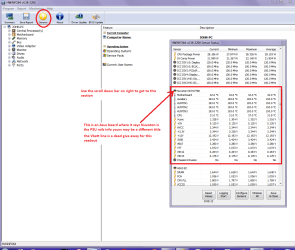
You can test the volts on the PSU with HW Info HWiNFO, HWiNFO32/64 - Download < download the right bit version and close the right hand window select Sensors and scroll down to the power section where you will see what the volts are doing see my pic. In my pic the section (Nuvoton) with VBATT is a dead give away you are in the section for the rail voltages. There are other section titles and one that pops up often is ITE
Now the voltage on the different rails have to be within 5% =+/- of what is required or the machine will not work properly if at all.
See this for the rail voltage info
http://www.tomshardware.com/reviews/power-supply-specifications-atx-reference,3061.html (Section 2.)
The original right hand window shows the machine running and is handy for that but for looking at the components in some detail close it and use the main left hand side panel
FOR OTHER COMPONENTS
PART B:
Open each small square with + in it on the section the components are in and then click on the individual component/s (it will highlight in blue) - in the right hand side will appear all sorts of details including brands speeds and other essential info that particular device. See pic for example.
Use PART A:

PS in your specs the motherboard is listed as MS-8750 ?? what is the brand??
 

Attachments

  • HW INFO DESKTOP PSU.PNG
    HW INFO DESKTOP PSU.PNG
    49.8 KB · Views: 3

My Computer

Computer type
PC/Desktop
Computer Manufacturer/Model Number
Own build (new) Desk1 / Asus ROG Win 7 / Desk2 1st build
OS
Desk1 7 Home Prem / Desk2 10 Pro / Main lap Asus ROG 10 Pro 2 laptop Toshiba 7 Pro Asus P2520 7 & 10
CPU
Desk1 i5 3750K / Laptop i7 GTX 860M / Desk2 i5 2500
Motherboard
Desk1 Asus P877-V / Desk2 Gigabyte H67 UD3H / Laptop ?
Memory
Desk1 8GB (1866) / Desk2 16GB (1333) / Laptop 8Gb DDR3
Graphics Card(s)
Desk 1& 2NVidia GTX 650 & Laptops on board Intel
Sound Card
Desk 1 & 2 -XONAR DG Realtek High Def audio Laptop
Monitor(s) Displays
Desk 1 Benq HD 2450 / Desk2 Philips 24" / Laptop 17.5"
Screen Resolution
1920x1080 D1 & D2 & Laptop 1
Hard Drives
Desk1 Samsung 120GB 830 SSD
Asus ROG 256GB 850 Pro SSD
Desk2 Samsung 840 256 SSD
Toshiba 120GB EVO
PSU
Desk 1 Corsair HX 1050/ Laptop ? / Desk 2 Corsair HX 650
Case
Desk 1 Cooler HAF XM ? Toshiba laptop / Desk2 Coolermaster
Cooling
Fans on all Desk1 -2 Desk2 - all Coolermasters 5 Laptop ?
Keyboard
Desk 1 MS Sidewinder X6 Desk 2 MS Sidewinder X 4
Mouse
Desk 1&2 - Gigabyte MS 900 gamer - laptop - Logitec wireless
Internet Speed
ADSL2+
Other Info
One other Desktop (tester) and spare Toshba laptop both with SSD's
Running Kaspersky 2016 ISS on all machines config'd identically
Logitec audio stereo systems on each machine (x3)
Canon MG5250MFC
Router/modem TP-Link running WPA2SK
Layback: Fan is unplugged.

ICIT: Downloaded the HWi and to be honest, I don't know squat about Voltages. I know what I'm looking at for the most part here and have located the section referred in monitoring the voltages.

My motherboard, MSI z87-G41 PC Mate(MS-7850) (Nuvoton NCT67790).

Now here's a weird thing. I have my tower tilted sideways a bit toward the side the motherboard is on. And everything booted on normally. I did a full shut down twice and it boots on normally each time. I've kept the fan unplugged and temps seem fine.
 

Attachments

  • HwIthing.png
    HwIthing.png
    14.3 KB · Views: 19

My Computer

Computer type
PC/Desktop
Computer Manufacturer/Model Number
Custom Build
OS
Windows 7 Home Premium 64-bit
CPU
Intel Core i5-4670K [email protected]
Motherboard
MS-7850
Memory
12288MB RAM
Graphics Card(s)
Onboard
Monitor(s) Displays
Acer E202HL & Sony 1080 television
Screen Resolution
Acer @ 1600x900 & Sony TV @ 1080i
Hard Drives
One Terra byte Hard drive
PSU
(Current) Corsair CX500M & (unintalled) Corsair CX750M
Case
Fractal (can't remember which design, lost box to flood)
Cooling
Three aux fans (front, exhaust and top), Hyper T4 Cooler CPU
Keyboard
eMachines
Mouse
EMachines
Internet Speed
20MB/s
Antivirus
Bullguard
Browser
Chrome
Ok mate the volts are fine and what you say about tilting the machine is leading me towards perhaps the board is not grounding properly to the case though the blacks on the 24 pin plug should take care of that issue. It might be worth just reseating the plug ( plus all the fans etc) and make sure the screws holding the board down are firm - but please take care NOT to over-tighten them - very easily done.

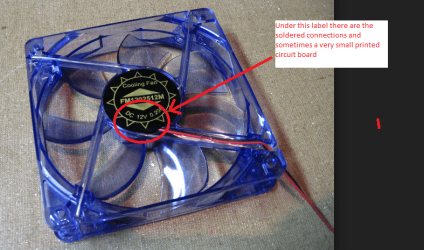
The fan I would be inclined to ditch it and just get a new one as the one you have may just have faulty windings or the little controller circuit board a bit out of whack. It could even be something like the bearing is shot which allows the spindle to angle over making the fan jam.

If you see my pic and it is similar to the one that is causing a problem you will see what I mean.

PS I meant to add if the connections on that fan are shorting out then it will account for some of the problems you are having.
 

Attachments

  • FAN 3.PNG
    FAN 3.PNG
    222.5 KB · Views: 0

My Computer

Computer type
PC/Desktop
Computer Manufacturer/Model Number
Own build (new) Desk1 / Asus ROG Win 7 / Desk2 1st build
OS
Desk1 7 Home Prem / Desk2 10 Pro / Main lap Asus ROG 10 Pro 2 laptop Toshiba 7 Pro Asus P2520 7 & 10
CPU
Desk1 i5 3750K / Laptop i7 GTX 860M / Desk2 i5 2500
Motherboard
Desk1 Asus P877-V / Desk2 Gigabyte H67 UD3H / Laptop ?
Memory
Desk1 8GB (1866) / Desk2 16GB (1333) / Laptop 8Gb DDR3
Graphics Card(s)
Desk 1& 2NVidia GTX 650 & Laptops on board Intel
Sound Card
Desk 1 & 2 -XONAR DG Realtek High Def audio Laptop
Monitor(s) Displays
Desk 1 Benq HD 2450 / Desk2 Philips 24" / Laptop 17.5"
Screen Resolution
1920x1080 D1 & D2 & Laptop 1
Hard Drives
Desk1 Samsung 120GB 830 SSD
Asus ROG 256GB 850 Pro SSD
Desk2 Samsung 840 256 SSD
Toshiba 120GB EVO
PSU
Desk 1 Corsair HX 1050/ Laptop ? / Desk 2 Corsair HX 650
Case
Desk 1 Cooler HAF XM ? Toshiba laptop / Desk2 Coolermaster
Cooling
Fans on all Desk1 -2 Desk2 - all Coolermasters 5 Laptop ?
Keyboard
Desk 1 MS Sidewinder X6 Desk 2 MS Sidewinder X 4
Mouse
Desk 1&2 - Gigabyte MS 900 gamer - laptop - Logitec wireless
Internet Speed
ADSL2+
Other Info
One other Desktop (tester) and spare Toshba laptop both with SSD's
Running Kaspersky 2016 ISS on all machines config'd identically
Logitec audio stereo systems on each machine (x3)
Canon MG5250MFC
Router/modem TP-Link running WPA2SK
I personally would just replace the fan with a quality fan.
 

My Computer

Computer type
PC/Desktop
Computer Manufacturer/Model Number
Home made Desktop
OS
Windows 10 Pro. 64/ version 1709 Windows 7 Pro/64
CPU
Intel i7-6800K @ 4.3
Motherboard
ASUS X-99 Deluxe II
Memory
Corsair Platinum 16 gig @2400
Graphics Card(s)
EVGA GTX 1070 OC
Monitor(s) Displays
Asus 27" LED LCD/VE278Q
Screen Resolution
1920-1080 or 1280-720 HDMI
Hard Drives
INTEL SSD 730-240 Gb Sata 3.0/
PSU
EVGA Platium 1200W
Case
Phanteks Luxe Tempered Glass 8 fans/ one radiator
Cooling
XSPC/ Water Cooled CPU
Keyboard
Das 4 Professional
Mouse
Logitech M705/MX Anywhere 2-S
Internet Speed
100 mbits
Antivirus
Microsoft Security Essentials/ Malwarebytes Premium 3.0/ SAS
Browser
I.E. 11 default/Firefox/ ISP Time Warner Cable/Spectrum
Other Info
LG BluRay Burner/
Sound system-KLipsch-THX/
Icy Dock ssd Hot Swap bays.
Unhooked everything, took an air-duster to every port and plugged it all back in and the issue persists.

I've been told I should pick up a multimeter and check the output of my PSU manually.
 

My Computer

Computer type
PC/Desktop
Computer Manufacturer/Model Number
Custom Build
OS
Windows 7 Home Premium 64-bit
CPU
Intel Core i5-4670K [email protected]
Motherboard
MS-7850
Memory
12288MB RAM
Graphics Card(s)
Onboard
Monitor(s) Displays
Acer E202HL & Sony 1080 television
Screen Resolution
Acer @ 1600x900 & Sony TV @ 1080i
Hard Drives
One Terra byte Hard drive
PSU
(Current) Corsair CX500M & (unintalled) Corsair CX750M
Case
Fractal (can't remember which design, lost box to flood)
Cooling
Three aux fans (front, exhaust and top), Hyper T4 Cooler CPU
Keyboard
eMachines
Mouse
EMachines
Internet Speed
20MB/s
Antivirus
Bullguard
Browser
Chrome
I personally would just replace the fan with a quality fan.
Yep that's what I said too LB for what the thing is worth I couldn't be bothered and I have "refurbished" a lot of fans when I first started out building and tinkering.

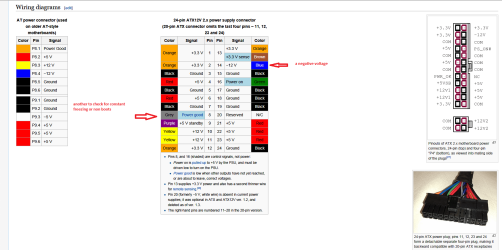
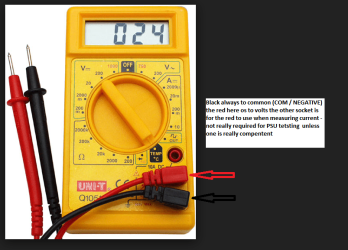
As for testing the volts with a meter mate yes you could and it is very easy the meters are so cheap now - all you need to do is set the meter to DC volts stick the black lead in a black cable on the 24 pin plug and use the red lead to test the volts on the other colours. The only one you really need to not do is the
-12v cable - see pic in this Power supply unit (computer - Wikipedia, the free encyclopedia)
 

Attachments

  • PSU PLUG.PNG
    PSU PLUG.PNG
    78.4 KB · Views: 0
  • DIG METER.PNG
    DIG METER.PNG
    120.5 KB · Views: 0

My Computer

Computer type
PC/Desktop
Computer Manufacturer/Model Number
Own build (new) Desk1 / Asus ROG Win 7 / Desk2 1st build
OS
Desk1 7 Home Prem / Desk2 10 Pro / Main lap Asus ROG 10 Pro 2 laptop Toshiba 7 Pro Asus P2520 7 & 10
CPU
Desk1 i5 3750K / Laptop i7 GTX 860M / Desk2 i5 2500
Motherboard
Desk1 Asus P877-V / Desk2 Gigabyte H67 UD3H / Laptop ?
Memory
Desk1 8GB (1866) / Desk2 16GB (1333) / Laptop 8Gb DDR3
Graphics Card(s)
Desk 1& 2NVidia GTX 650 & Laptops on board Intel
Sound Card
Desk 1 & 2 -XONAR DG Realtek High Def audio Laptop
Monitor(s) Displays
Desk 1 Benq HD 2450 / Desk2 Philips 24" / Laptop 17.5"
Screen Resolution
1920x1080 D1 & D2 & Laptop 1
Hard Drives
Desk1 Samsung 120GB 830 SSD
Asus ROG 256GB 850 Pro SSD
Desk2 Samsung 840 256 SSD
Toshiba 120GB EVO
PSU
Desk 1 Corsair HX 1050/ Laptop ? / Desk 2 Corsair HX 650
Case
Desk 1 Cooler HAF XM ? Toshiba laptop / Desk2 Coolermaster
Cooling
Fans on all Desk1 -2 Desk2 - all Coolermasters 5 Laptop ?
Keyboard
Desk 1 MS Sidewinder X6 Desk 2 MS Sidewinder X 4
Mouse
Desk 1&2 - Gigabyte MS 900 gamer - laptop - Logitec wireless
Internet Speed
ADSL2+
Other Info
One other Desktop (tester) and spare Toshba laptop both with SSD's
Running Kaspersky 2016 ISS on all machines config'd identically
Logitec audio stereo systems on each machine (x3)
Canon MG5250MFC
Router/modem TP-Link running WPA2SK
Problem solved.
PSU was going out. Room-mate mentioned he had a 750W and a 600W I could test out. PC boots up flawlessly with both. Used my 500W in his PC (GPU removed) and the problem persisted there.
 

My Computer

Computer type
PC/Desktop
Computer Manufacturer/Model Number
Custom Build
OS
Windows 7 Home Premium 64-bit
CPU
Intel Core i5-4670K [email protected]
Motherboard
MS-7850
Memory
12288MB RAM
Graphics Card(s)
Onboard
Monitor(s) Displays
Acer E202HL & Sony 1080 television
Screen Resolution
Acer @ 1600x900 & Sony TV @ 1080i
Hard Drives
One Terra byte Hard drive
PSU
(Current) Corsair CX500M & (unintalled) Corsair CX750M
Case
Fractal (can't remember which design, lost box to flood)
Cooling
Three aux fans (front, exhaust and top), Hyper T4 Cooler CPU
Keyboard
eMachines
Mouse
EMachines
Internet Speed
20MB/s
Antivirus
Bullguard
Browser
Chrome
Good stuff mate and I think that a lot of us as quoted by Scott Mueller in that reference link for the voltage rails that the PSU is more of a problem than most give credence for.

Anyway have fun but just keep this episode in mind eh? !!
 

My Computer

Computer type
PC/Desktop
Computer Manufacturer/Model Number
Own build (new) Desk1 / Asus ROG Win 7 / Desk2 1st build
OS
Desk1 7 Home Prem / Desk2 10 Pro / Main lap Asus ROG 10 Pro 2 laptop Toshiba 7 Pro Asus P2520 7 & 10
CPU
Desk1 i5 3750K / Laptop i7 GTX 860M / Desk2 i5 2500
Motherboard
Desk1 Asus P877-V / Desk2 Gigabyte H67 UD3H / Laptop ?
Memory
Desk1 8GB (1866) / Desk2 16GB (1333) / Laptop 8Gb DDR3
Graphics Card(s)
Desk 1& 2NVidia GTX 650 & Laptops on board Intel
Sound Card
Desk 1 & 2 -XONAR DG Realtek High Def audio Laptop
Monitor(s) Displays
Desk 1 Benq HD 2450 / Desk2 Philips 24" / Laptop 17.5"
Screen Resolution
1920x1080 D1 & D2 & Laptop 1
Hard Drives
Desk1 Samsung 120GB 830 SSD
Asus ROG 256GB 850 Pro SSD
Desk2 Samsung 840 256 SSD
Toshiba 120GB EVO
PSU
Desk 1 Corsair HX 1050/ Laptop ? / Desk 2 Corsair HX 650
Case
Desk 1 Cooler HAF XM ? Toshiba laptop / Desk2 Coolermaster
Cooling
Fans on all Desk1 -2 Desk2 - all Coolermasters 5 Laptop ?
Keyboard
Desk 1 MS Sidewinder X6 Desk 2 MS Sidewinder X 4
Mouse
Desk 1&2 - Gigabyte MS 900 gamer - laptop - Logitec wireless
Internet Speed
ADSL2+
Other Info
One other Desktop (tester) and spare Toshba laptop both with SSD's
Running Kaspersky 2016 ISS on all machines config'd identically
Logitec audio stereo systems on each machine (x3)
Canon MG5250MFC
Router/modem TP-Link running WPA2SK
Yes, thanks for the help very much!

Process of elimination. Works every time. :D
 

My Computer

Computer type
PC/Desktop
Computer Manufacturer/Model Number
Custom Build
OS
Windows 7 Home Premium 64-bit
CPU
Intel Core i5-4670K [email protected]
Motherboard
MS-7850
Memory
12288MB RAM
Graphics Card(s)
Onboard
Monitor(s) Displays
Acer E202HL & Sony 1080 television
Screen Resolution
Acer @ 1600x900 & Sony TV @ 1080i
Hard Drives
One Terra byte Hard drive
PSU
(Current) Corsair CX500M & (unintalled) Corsair CX750M
Case
Fractal (can't remember which design, lost box to flood)
Cooling
Three aux fans (front, exhaust and top), Hyper T4 Cooler CPU
Keyboard
eMachines
Mouse
EMachines
Internet Speed
20MB/s
Antivirus
Bullguard
Browser
Chrome
Back
Top