Problem Ejecting USB Mass Storage Device

osu1357

New member
Local time
6:38 PM
Messages
28
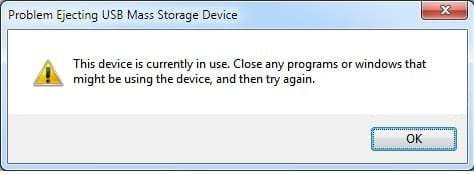
I am having issues disconnecting / ejecting a Seagate portable expansion drive. I keep getting the following error message (see pic) .. I don't have any open programs.. Why am I getting this message? How do I fix it?
 

Attachments

  • USB.jpg
    USB.jpg
    12.6 KB · Views: 41

My Computer

Computer type
PC/Desktop
Computer Manufacturer/Model Number
Dell Inspiron 5721
OS
Windows 7 Home Premium 64-Bit
CPU
Intel Core i7
Memory
8 GB
Hard Drives
1 TB
Internet Speed
20 Mbps
Antivirus
McAfee Internet Security
There is some handle (process) hanging on to it. Once you shut down the system, you can remove it - that is the easiest approach. That happens often.
 

My Computer

Computer Manufacturer/Model Number
HP, Dell, Gateway, Toshiba - 4 laptops and 2 desktops
OS
Vista, Windows7, Mint Mate, Zorin, Windows 8
CPU
from 1.6GHz Duo to i7
Monitor(s) Displays
2x HP w2207
Hard Drives
5x HDD, 7x SSD, 12x Externals
Keyboard
with trackball - no mices
Mouse
Trackball mice
Internet Speed
DSL 6000

My Computer

Computer type
PC/Desktop
Computer Manufacturer/Model Number
Custom Build
OS
Windows 7 Home Premium 64 bit
CPU
Intel Core i7-4790
Motherboard
GA-Z87X-D3H
Memory
G.SKILL 8GB (2 x 4GB) DDR3 F3-10666CL9D-8GBNT
Graphics Card(s)
AMD Radeon R7 250
Sound Card
Realtek ALC892
Monitor(s) Displays
Samsung UN32EH5000, Dell 1703FPT
Screen Resolution
1920 x 1080, 1280 x 1024
Hard Drives
WD5003AZEX
WD10EZEX
Samsung HD103SJ
Samsung 128 GB 840 PRO
PSU
SeaSonic M12II SS-500GM
Case
Fractal Design Define R4
Cooling
Zalman CNPS9900ALED
Keyboard
Logitech K800
Mouse
Logitech M705
Internet Speed
16 Mbps
Antivirus
Avast
Browser
Firefox
Other Info
Bose Companion 2 Multimedia Speakers
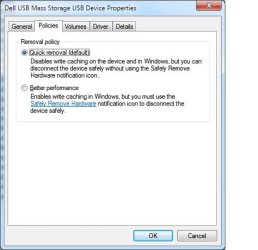
I just read that Windows 7 by default sets the USB external drive policies so that it is optimized for "Quick Removal", and according to Windows 7 that means that I can just unplug the external drive without having to go through "Safely Remove" .... Can someone please confirm / verify this? I'm referring to Right click on My Computer > Manage > Device Manager > Disk Drives > Properties > Policies ... See attached screen shot
 

Attachments

  • policy.jpg
    policy.jpg
    25.3 KB · Views: 119

My Computer

Computer type
PC/Desktop
Computer Manufacturer/Model Number
Dell Inspiron 5721
OS
Windows 7 Home Premium 64-Bit
CPU
Intel Core i7
Memory
8 GB
Hard Drives
1 TB
Internet Speed
20 Mbps
Antivirus
McAfee Internet Security
The "Quick removal" option implies that the write data is not being buffered and the write operation is therefore slower. But that has nothing to do with the handles that are on your device. As I said, when you shut down, all handles are being released.
 

My Computer

Computer Manufacturer/Model Number
HP, Dell, Gateway, Toshiba - 4 laptops and 2 desktops
OS
Vista, Windows7, Mint Mate, Zorin, Windows 8
CPU
from 1.6GHz Duo to i7
Monitor(s) Displays
2x HP w2207
Hard Drives
5x HDD, 7x SSD, 12x Externals
Keyboard
with trackball - no mices
Mouse
Trackball mice
Internet Speed
DSL 6000
So how do I know what "handles" are active on my device? Should I disable them? I guess I'm confused... Seems that there's always a handle on that device when I plug in.
 

My Computer

Computer type
PC/Desktop
Computer Manufacturer/Model Number
Dell Inspiron 5721
OS
Windows 7 Home Premium 64-Bit
CPU
Intel Core i7
Memory
8 GB
Hard Drives
1 TB
Internet Speed
20 Mbps
Antivirus
McAfee Internet Security
Seems that there's always a handle on that device when I plug in.
The reason is probably because you once removed it when it was still "in use". Now the system remembers that the thing is "in use". Usually that should not happen because when you shut off, all handles should be removed. But who knows what happened here.

I would not worry about it. If you have no data in the buffers that could get lost, there is no danger. And buffer data is written out in no time (within seconds at most).
 

My Computer

Computer Manufacturer/Model Number
HP, Dell, Gateway, Toshiba - 4 laptops and 2 desktops
OS
Vista, Windows7, Mint Mate, Zorin, Windows 8
CPU
from 1.6GHz Duo to i7
Monitor(s) Displays
2x HP w2207
Hard Drives
5x HDD, 7x SSD, 12x Externals
Keyboard
with trackball - no mices
Mouse
Trackball mice
Internet Speed
DSL 6000
Back
Top