Solved Problem Finding HP Drivers

bej

New member
Power User
Local time
8:33 PM
Messages
325
Location
NV, Amerika
Having trouble ferreting through the driver monster at HP.
I bought a HP 8460P laptop with Windows 7/Pro. I got an OS disc and a driver disc full of traditional bloatware. I ran the OS disc, which worked fine, but I'm missing a couple of drivers and can't figure
out which ones are correct.

Base System Device PCI\VEN_197B&DEV_2392&SUBSYS_161C103C&REV_30\4&21F27D54&0&01E2

Network Controller PCI\VEN_8086&DEV_4238&SUBSYS_11118086&REV_3E\247703FFFF3A539400

ACPI\HPQ0004\3&33FD14CA&0

PCI Simple Communications Controller PCI\VEN_8086&DEV_1C3A&SUBSYS_161C103C&REV_04 \3&33FD14CA&0&B0

Universal Serial Bus (USB) Controller PCI\VEN_1033&DEV_0194&SUBSYS_161C103C&REV_04\FFFFFFFFFFFFFFFF00

Can anyone give me a hand with this problem ?
 

My Computer

Computer type
PC/Desktop
Computer Manufacturer/Model Number
Home Built
OS
Windows 7 Home Pro SP1 64bit
CPU
Intel Xeon E-3 1240v2
Motherboard
HP
Memory
8GB
Graphics Card(s)
NVIDIA 300
Sound Card
Onboard
Monitor(s) Displays
Hanns G 25"
Screen Resolution
1920x1080
Hard Drives
Hitachi 2GB
PSU
Seasonic 430W
Case
Antec
Cooling
Stock
Keyboard
Logitech
Mouse
Logitech
Internet Speed
5MB

My Computer

Computer type
PC/Desktop
Computer Manufacturer/Model Number
Own build (new) Desk1 / Asus ROG Win 7 / Desk2 1st build
OS
Desk1 7 Home Prem / Desk2 10 Pro / Main lap Asus ROG 10 Pro 2 laptop Toshiba 7 Pro Asus P2520 7 & 10
CPU
Desk1 i5 3750K / Laptop i7 GTX 860M / Desk2 i5 2500
Motherboard
Desk1 Asus P877-V / Desk2 Gigabyte H67 UD3H / Laptop ?
Memory
Desk1 8GB (1866) / Desk2 16GB (1333) / Laptop 8Gb DDR3
Graphics Card(s)
Desk 1& 2NVidia GTX 650 & Laptops on board Intel
Sound Card
Desk 1 & 2 -XONAR DG Realtek High Def audio Laptop
Monitor(s) Displays
Desk 1 Benq HD 2450 / Desk2 Philips 24" / Laptop 17.5"
Screen Resolution
1920x1080 D1 & D2 & Laptop 1
Hard Drives
Desk1 Samsung 120GB 830 SSD
Asus ROG 256GB 850 Pro SSD
Desk2 Samsung 840 256 SSD
Toshiba 120GB EVO
PSU
Desk 1 Corsair HX 1050/ Laptop ? / Desk 2 Corsair HX 650
Case
Desk 1 Cooler HAF XM ? Toshiba laptop / Desk2 Coolermaster
Cooling
Fans on all Desk1 -2 Desk2 - all Coolermasters 5 Laptop ?
Keyboard
Desk 1 MS Sidewinder X6 Desk 2 MS Sidewinder X 4
Mouse
Desk 1&2 - Gigabyte MS 900 gamer - laptop - Logitec wireless
Internet Speed
ADSL2+
Other Info
One other Desktop (tester) and spare Toshba laptop both with SSD's
Running Kaspersky 2016 ISS on all machines config'd identically
Logitec audio stereo systems on each machine (x3)
Canon MG5250MFC
Router/modem TP-Link running WPA2SK
Among that loooong list of HP drivers for network, choose the one for Intel Gigabit Ethernet
 

My Computer

Computer type
PC/Desktop
Computer Manufacturer/Model Number
Dell Optiplex 360 and Optiplex 755
OS
Desk 1: Win 7 Pro x32; Desk 2: Windows 10 x64
Hard Drives
500GB Crucial SSD in both Desktops
Other Info
Buffalo 6TB NAS, Raid 1
"Among that loooong list of HP drivers for network, choose the one for Intel Gigabit Ethernet"

Thank you for the exact driver. There are four chipset drivers and I don't know how to tell the correct one, or for that matter, any of the others.
 

My Computer

Computer type
PC/Desktop
Computer Manufacturer/Model Number
Home Built
OS
Windows 7 Home Pro SP1 64bit
CPU
Intel Xeon E-3 1240v2
Motherboard
HP
Memory
8GB
Graphics Card(s)
NVIDIA 300
Sound Card
Onboard
Monitor(s) Displays
Hanns G 25"
Screen Resolution
1920x1080
Hard Drives
Hitachi 2GB
PSU
Seasonic 430W
Case
Antec
Cooling
Stock
Keyboard
Logitech
Mouse
Logitech
Internet Speed
5MB
Check the device name in MSINFO
 

My Computer

Computer type
PC/Desktop
Computer Manufacturer/Model Number
Golden Mk. I.4
OS
Windows 10 Pro x64 ; Xubuntu x64
CPU
Intel i7 860 @ 2.80 GHz O/C'ed to 4.0GHz
Motherboard
Gigabyte P55A-UD3R Rev.1. Award BIOS F13
Memory
16GB Corsair Vengance DDR3 @ 661 MHz Dual Channel (9-9-9-24)
Graphics Card(s)
EVGA NVidia GTX 560 1024MB
Sound Card
Realtek Integrated
Monitor(s) Displays
Dual Samsung SyncMaster 2494HS
Screen Resolution
1920*1080 and 1920*1080
Hard Drives
1*Samsung 840 EVO 120GB SSD;
1*OCZ Vertex 2 60GB SSD;
2*Samsung F3 SpinPoint 1TB in RAID0;
1*Samsung F1 SpinPoint 1TB;
2*Western Digital 1TB External USB 3.0
1*Western Digital 500GB External USB 3.0
1*Seagate 500GB External USB 2.0
PSU
Thermaltake ToughPower QFan 750W
Case
Thermaltake Element S VK60001W2Z
Cooling
Corsair H60 Water Cooling, 2*230mm and 2*80mm case fans
Keyboard
Logitech G110
Mouse
Logitech MX518
SM Bus Controller for Base System Device.....still can.t find it in drivers.
 

My Computer

Computer type
PC/Desktop
Computer Manufacturer/Model Number
Home Built
OS
Windows 7 Home Pro SP1 64bit
CPU
Intel Xeon E-3 1240v2
Motherboard
HP
Memory
8GB
Graphics Card(s)
NVIDIA 300
Sound Card
Onboard
Monitor(s) Displays
Hanns G 25"
Screen Resolution
1920x1080
Hard Drives
Hitachi 2GB
PSU
Seasonic 430W
Case
Antec
Cooling
Stock
Keyboard
Logitech
Mouse
Logitech
Internet Speed
5MB
Look under the Storage drivers and try the latest version they provide for the Jmicron Card Reader
 

My Computer

Computer type
PC/Desktop
Computer Manufacturer/Model Number
Dell Optiplex 360 and Optiplex 755
OS
Desk 1: Win 7 Pro x32; Desk 2: Windows 10 x64
Hard Drives
500GB Crucial SSD in both Desktops
Other Info
Buffalo 6TB NAS, Raid 1
bej mate run look at this and try a run
Using HW Info
PART A:
You can test the volts on the PSU with HW Info HWiNFO, HWiNFO32/64 - Download < download the right bit version and close the right hand window select Sensors and scroll down to the power section where you will see what the volts are doing see my pic. In my pic the section (Nuvoton) with VBATT is a dead give away you are in the section for the rail voltages. There are other section titles and one that pops up often is ITE
Now the voltage on the different rails have to be within 5% =+/- of what is required or the machine will not work properly if at all.
See this for the rail voltage info
Power Supply 101: A Reference Of Specifications - Power Supplies (Section 2.)
The original right hand window shows the machine running and is handy for that but for looking at the components in some detail close it and use the main left hand side panel
FOR OTHER COMPONENTS
PART B:
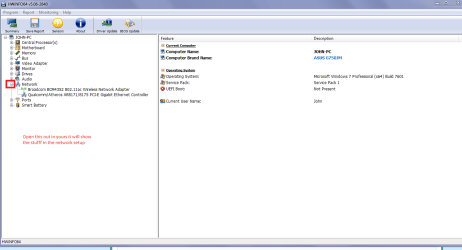
Open each small square with + in it on the section the components are in and then click on the individual component/s (it will highlight in blue) - in the right hand side will appear all sorts of details including brands speeds and other essential info that particular device. See pic for example.
Use PART B:
see my pic
 

Attachments

  • HW INFO network.PNG
    HW INFO network.PNG
    27.8 KB · Views: 0

My Computer

Computer type
PC/Desktop
Computer Manufacturer/Model Number
Own build (new) Desk1 / Asus ROG Win 7 / Desk2 1st build
OS
Desk1 7 Home Prem / Desk2 10 Pro / Main lap Asus ROG 10 Pro 2 laptop Toshiba 7 Pro Asus P2520 7 & 10
CPU
Desk1 i5 3750K / Laptop i7 GTX 860M / Desk2 i5 2500
Motherboard
Desk1 Asus P877-V / Desk2 Gigabyte H67 UD3H / Laptop ?
Memory
Desk1 8GB (1866) / Desk2 16GB (1333) / Laptop 8Gb DDR3
Graphics Card(s)
Desk 1& 2NVidia GTX 650 & Laptops on board Intel
Sound Card
Desk 1 & 2 -XONAR DG Realtek High Def audio Laptop
Monitor(s) Displays
Desk 1 Benq HD 2450 / Desk2 Philips 24" / Laptop 17.5"
Screen Resolution
1920x1080 D1 & D2 & Laptop 1
Hard Drives
Desk1 Samsung 120GB 830 SSD
Asus ROG 256GB 850 Pro SSD
Desk2 Samsung 840 256 SSD
Toshiba 120GB EVO
PSU
Desk 1 Corsair HX 1050/ Laptop ? / Desk 2 Corsair HX 650
Case
Desk 1 Cooler HAF XM ? Toshiba laptop / Desk2 Coolermaster
Cooling
Fans on all Desk1 -2 Desk2 - all Coolermasters 5 Laptop ?
Keyboard
Desk 1 MS Sidewinder X6 Desk 2 MS Sidewinder X 4
Mouse
Desk 1&2 - Gigabyte MS 900 gamer - laptop - Logitec wireless
Internet Speed
ADSL2+
Other Info
One other Desktop (tester) and spare Toshba laptop both with SSD's
Running Kaspersky 2016 ISS on all machines config'd identically
Logitec audio stereo systems on each machine (x3)
Canon MG5250MFC
Router/modem TP-Link running WPA2SK
SM Bus Controller for Base System Device.....still can.t find it in drivers.

That's usually the free fall sensor. If you can connect to the internet, choose the option to let windows find the driver automatically. I know it's odd, but I have an HP laptop as well, and HP didn't put that driver in the list, but windows was able to find it and install it.
 

My Computer

Computer type
Laptop
Computer Manufacturer/Model Number
Dell
OS
Windows 7 Professional x64
CPU
Intel i5-3230M
Just curious....Would it be easier to load the driver disc, with all the bloatware, then try and get rid of the bloatware ??
 

My Computer

Computer type
PC/Desktop
Computer Manufacturer/Model Number
Home Built
OS
Windows 7 Home Pro SP1 64bit
CPU
Intel Xeon E-3 1240v2
Motherboard
HP
Memory
8GB
Graphics Card(s)
NVIDIA 300
Sound Card
Onboard
Monitor(s) Displays
Hanns G 25"
Screen Resolution
1920x1080
Hard Drives
Hitachi 2GB
PSU
Seasonic 430W
Case
Antec
Cooling
Stock
Keyboard
Logitech
Mouse
Logitech
Internet Speed
5MB
Usually should be able to find what's needed without the disc

Did you try the Jmicron driver? What was the error message if it didn't install.

Repeat the steps you did earlier to show the current Problem Report
 

My Computer

Computer type
PC/Desktop
Computer Manufacturer/Model Number
Dell Optiplex 360 and Optiplex 755
OS
Desk 1: Win 7 Pro x32; Desk 2: Windows 10 x64
Hard Drives
500GB Crucial SSD in both Desktops
Other Info
Buffalo 6TB NAS, Raid 1
bertison

Just curious....Would it be easier to load the driver disc, with all the bloatware, then try and get rid of the bloatware ??

bej, that is exactly what I did when the warranty on my 6 year old HP Pavilion Dv7, ran out. If there are any HP drivers in the bloatware that you want to keep, get them back from the HP site by picking them out one by one.

Incidentally, I have never had any problem finding stuff on the HP site, with either the 6 year old laptop or the 5 year old Photosmart C5380 printer. I just look for the Automatic identification feature. (Think that's what they call it) It finds the device and lists the drivers, I just choose which I want.
 

My Computer

Computer type
PC/Desktop
Computer Manufacturer/Model Number
bertison
OS
Windows 7/64 HPremium.
CPU
AMD FX-6300.
Motherboard
Asus M5A78L-M LE/USB3.
Memory
Corsair (2x4) GB DDR3 CMXGX3M2A1337CL9.
Graphics Card(s)
NVidia/Gigabyte GT730 (2GB) GDDR5.
Sound Card
Onboard.
Monitor(s) Displays
Iiyama PLE2407HDS.
Screen Resolution
1920 x 1280
Hard Drives
Desktop: 1TB. WD10EZEX-00BN5A0.
Zyxel nsa310 NAS: 2TB Seagate Barracuda 7200.14.
Cache Drive: Sandisk SDSSDRC032G.
Laptop Lenovo B50/80 128 GB SSD.
PSU
Corsair 750M.
Case
Coolermaster N300.
Cooling
FRONT: (2X) 140mm. TOP: (1x) 120mm. REAR: (1x) 120mm.
Keyboard
Logitech K290
Mouse
Trust Optical Wired
Internet Speed
15 Mb Down, 0.55 Up.
Antivirus
Kaspersky Total Security 2017, Hitman Pro.
Browser
Firefox.
Other Info
NETWORK:
Sky "Q box" and router.
Desktop & NAS - 30 Metres Cat6 Ethernet wired, via TP-Link 4-port switch.
Lenovo B50/80 Laptop, 2x Wileyfox phones, Lenovo TAB3-8 tablet - all wireless.
Grandchildren, their parents and friends as bandwidth 'parasites' at various times!
Frankly, I have no interest in wasting more time playing the "HP Driver" game.
Thanks to all for your time, patience and expertise.
 

My Computer

Computer type
PC/Desktop
Computer Manufacturer/Model Number
Home Built
OS
Windows 7 Home Pro SP1 64bit
CPU
Intel Xeon E-3 1240v2
Motherboard
HP
Memory
8GB
Graphics Card(s)
NVIDIA 300
Sound Card
Onboard
Monitor(s) Displays
Hanns G 25"
Screen Resolution
1920x1080
Hard Drives
Hitachi 2GB
PSU
Seasonic 430W
Case
Antec
Cooling
Stock
Keyboard
Logitech
Mouse
Logitech
Internet Speed
5MB
Back
Top