Problem importing emails into WLM

Nosmas

New member
Local time
4:21 PM
Messages
46
Location
Chipstead, Surrey, UK
I am attempting to move all my emails from a machine with W7 SP1 Windows Live Mail to a new machine with W10 Outlook. As I understand it is not possible to transfer from WLM on one machine to Outlook on another machine I decided to install WLM on the new machine as an interim measure.

I backed up the emails by exporting from WLM to a folder on a Kingston Data Traveller, then installed a completely new WLM on the new machine and imported the emails from Kingston to WLM where they appeared in Storage Folders > Imported Folder. To my surprise the import procedure also copied in the details of the accounts I had set up on the old machine. Using Windows Explorer I copied Imported Folder and pasted it to C:\Users\Peter\AppData\Local\Microsoft\Windows Live Mail. Having closed then re-opened WLM I was disappointed to find no sign of my emails in the Inbox folder and all the sub folders. Tried getting callback from MS Support - although very quick they couldn't help as WLM no longer supported.

Please can you advise me if I have done something wrong or omitted a step, and what I need to do now to complete the transfer of emails.
 

My Computer

Computer type
PC/Desktop
Computer Manufacturer/Model Number
Dell Optiplex 9030
OS
Microsoft Windows 10 Pro 64-bit Multiprocessor
CPU
Intel(R) Core(TM) i3-4160 CPU @3.60 GHz x 4
Memory
4.00 GB
Monitor(s) Displays
23-inch full-HD WLED
Screen Resolution
1920 x 1080 @ 60 Hz
Hard Drives
1 x 2.5-inch SATA hard drive
PSU
185 Watt
Browser
MS Edge and IE 11
There's probably a way to do it but I'm not a WLM user so don't know too much about it.

Here's an alternative method that might work but requires effort.

Grab a copy of Mitec MailViewer. It's free and runs without installing.

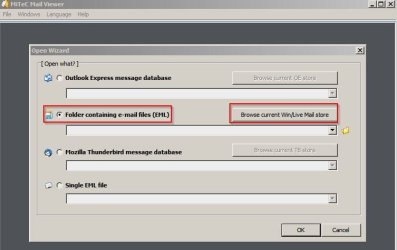
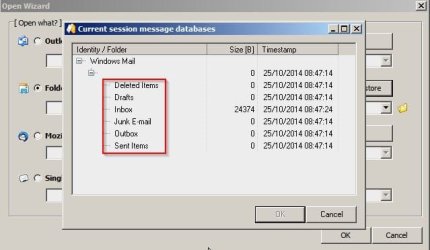
Run the program on the old machine and browse WLM database. You will see folder names.

MiTeC Mail Viewer 1.jpg

Create folders with identical names somewhere - say on your desktop.

MiTeC Mail Viewer 2.jpg

Then in Mitec MailViever click each folder - start with Inbox ans it will display messages. Check (tick) all the ones you want to copy.

Then on the toolbar choose "Messages" > "Save" > "Email" and browse for the Inbox folder you created.

Do the same for other folders.

Once done copy these folders containing saved emails to your new machine.

Open each folder and highlight all messages. Drag them into the folder with the same name in WLM.

EDIT: Meant to say Drag them into the folder with the same name in Outlook

Maybe that will work. I'm not sure. I know it works for email clients that I've used.Just do a test run with a single message first to confirm that it will or won't work.

How's the Midday Sun?
 
Last edited:

My Computer

Computer type
Laptop
Computer Manufacturer/Model Number
ASUS
OS
Microsoft Windows 7 Home Premium 64-bit 7601 Multiprocessor Free Service Pack 1
CPU
AMD C-60 APU with Radeon(tm) HD Graphics
Motherboard
ASUSTeK COMPUTER INC. X501U
Memory
4.00 GB
Graphics Card(s)
AMD Radeon HD 6290 Graphics
Sound Card
(1) AMD High Definition Audio Device (2) Realtek High Defi
Screen Resolution
1366 x 768 x 32 bits (4294967296 colors) @ 60 Hz
Hard Drives
Hitachi HTS545050A7E380 SATA Disk Device
Antivirus
Comodo CIS & FW, SecureAplus App Whitelisting, Threatfire
Browser
Cyberfox 64bit, Opera 64bit, Airfox
Other Info
Spy-The-Spy, HitmanPro.Alert, Norton Connect Safe, MJRegWatcher, BitDefender TrafficLight, Voodoo Shield, Zemana AntiMalware
Callender - many thanks for your reply and suggestion. However I feel it would entail quite a bit of work and this is only an interim step as I ultimately want to export the emails from wlm and import them into Outlook in the new machine. Nevertheless I will bear it in mind if I cannot find a solution to my present problem.
 

My Computer

Computer type
PC/Desktop
Computer Manufacturer/Model Number
Dell Optiplex 9030
OS
Microsoft Windows 10 Pro 64-bit Multiprocessor
CPU
Intel(R) Core(TM) i3-4160 CPU @3.60 GHz x 4
Memory
4.00 GB
Monitor(s) Displays
23-inch full-HD WLED
Screen Resolution
1920 x 1080 @ 60 Hz
Hard Drives
1 x 2.5-inch SATA hard drive
PSU
185 Watt
Browser
MS Edge and IE 11

My Computer

Computer type
PC/Desktop
Computer Manufacturer/Model Number
Self built using existing case
OS
Windows 7 Home Premium 64 bit sp1
CPU
Intel i5 3570 3.4Ghz Ivy Bridge SKT 1155 quad core
Motherboard
Gigabyte Z77-HD3 SKT 1155 2xSata 3, 4x USB 3.0
Memory
G-Skill Rip Jaws 16Gb (8x2) DDR3 -1600 PC3 12800 CL 10 red
Graphics Card(s)
Gigabyte NVIDIA GT610 1Gb DDR3 810/1200 PCI-E 2.0 Silent
Sound Card
NVIDIA High Definition & Realtech High Definition Audio
Monitor(s) Displays
2 x Philips 226V4L 16:9 aspect ratio
Screen Resolution
1920 x 1080 HD
Hard Drives
Samsung 840 Pro 256gb SSD, SATA 3.
Hitachi Touro Portable 1tb, USB 3.0 HDD used for image b/ups.
PSU
Corsair VS450
Case
Codeng
Cooling
PSU fan & CPU fan
Keyboard
Logitech
Mouse
Logitech Wireless trackball M570
Internet Speed
Wireless 3G. 3mg down & 550kb up.
Antivirus
Bitdefender Internet Security 2020
Browser
Opera (Current Version) & Firefox
Other Info
MS Office 2013 Pro. Davis weather station software. MGE Nova 600 avr UPS.
From what i read you shouldn't export/import directly to/from a flash drive, you should use a local drive such as . See if using the instructions in this article helps: [url=http://answers.microsoft.com/en-us/windowslive/wiki/livemail-files/export-and-import-messages/97e1f967-6ea7-4aac-94c9-e95ea8e740c3]Export and import messages - Microsoft Community[/url]
 

My Computer

Computer type
PC/Desktop
Computer Manufacturer/Model Number
home built
OS
Multi-Boot W7_Pro_x64 W8.1_Pro_x64 W10_Pro_x64 +Linux_VMs +Chromium_VM
CPU
AMD Athlon II x4 620
Motherboard
Gigabyte GA-MA785G-UD3H
Memory
6GB GSkill DDR2 800
Graphics Card(s)
AMD 4670 GPU + AMD 4200 IGP
Sound Card
on board Realtek ALC889A
Monitor(s) Displays
RCA 40" LCD TV, Insignia 32" LCD TV, HP 15" LCD monitor
Screen Resolution
1680 x 1050
Hard Drives
OCZ Vertex 3 120GB,
Samsung F3 1TB (3),
Several others - WD, Seagate, Hitachi, ...
PSU
Corsair 500 W
Case
Rosewill mid tower
Cooling
CM 90mm rifle
Keyboard
Gyration wireless, Logitech wireless, Dell USB wired
Mouse
Gyration wireless, Logitech wireless, V7 USB wired
Internet Speed
Spectrum - 100Mbps D / 10Mbps U
Antivirus
Avast, MBAM3, EMET, WinPatrol
Browser
Pale Moon, Firefox, IE
Other Info
2 multi-boot PC's
Mainly HTPC/Office/Gen purpose (no gaming).
Trendnet USB KVM.
LG DVD burner/Blue Ray Player.
Tray system for removable SATA backup drives.

Not currently OCd, under-volted.
I use Hybrid sleep, rarely re-boot or shutdown.

Hauppauge HD-PVR, Avermedia PCIe TV Tuner, Hauppauge PCI TV Tuner.
Back
Top