problem inserting photos into emails

Jovin

New member
Local time
4:33 PM
Messages
11
When I got this computer with Windows 7, I had my old email account (from XP and Outlook Express) imported into the live mail, along with my gmail. I am having trouble inserting siggies or photos into emails that I send out now. I've just given up on it since having this new OS, but I want to see if anyone can help me.

I realize that I can go up to the top of a new email and "insert" and "single photo" and it will let me browse my folders. I then go to My Pictures, and to whichever subfolder I have there, and click on it and open it and it appears in the body of my message. What I DON'T like and don't want to use is the darned image with a line on the right side and across the bottom of whichever image I insert. What causes this? I hate it. I have tried taking various images and cropping them in Photobucket and save them again to the same folder, but it still inserts the same way!

Can someone help me with this please?
Thank you,
Jovin
 

My Computer

OS
windows 7 home premiumm 64 bit
Hi Jovin,
Set the option on the 'Compose' tab like this.

RR.jpg
 

My Computer

Computer Manufacturer/Model Number
Look in my Signature.
OS
Win7 H.Prem. 32bit+SP1
thanks, but

this is all so darned confusing. I can't even find a compose tab with this, because I guess it's actually using Live Mail, and it isn't set up the way it was for me with XP. I am soooo lost with this darned problem. I hate WINDOWS SEVEN!

Even if I could find a compose tab, I don't see what you wanted me to change. I'm sorry, but I used to be really good with computers. This program has screwed me up alot.
 

My Computer

OS
windows 7 home premiumm 64 bit
sorry...okay...

I just found out how to get to the compose tab...will do...
 

My Computer

OS
windows 7 home premiumm 64 bit
okay...working on it.

I haven't check your last hint, but I did get it set to what you said, but it's not semibold, it's only bold. Then down below my boxes are checked for "convert special keystrokes for emoticons" which I'm sure doesn't cause a problem most likely, and the other one that's checked below is "convert messages to photo emails when adding photos".... ???
 

My Computer

OS
windows 7 home premiumm 64 bit
Okay, I am going to go by your last suggestion

just looking at it now and will let you know if this solves the problem. Thank you very much.
 

My Computer

OS
windows 7 home premiumm 64 bit
It didn't change anything.

I did the exact settings that you suggested at that pdf of fonts, and it still has the stupid line down the right side and across the bottom of my image that I used (same one as used before in emails.)

Thanks, and I do appreciate your help.
 

My Computer

OS
windows 7 home premiumm 64 bit
Does your internet service provider have email ? You could be using their service. I only use verizons email, that way I can see all my mail from any pc anywhere in the world. And I never have to worry about transferring addresses.
 

My Computer

Computer type
PC/Desktop
Computer Manufacturer/Model Number
Skylake Special #666
OS
Windows 10 Pro x64
CPU
Intel Core i7 6700K
Motherboard
Asus Sabertooth Z170 Mark 1
Memory
GSkill TridentZ RGB 16GB 3600 16-16-16-36
Graphics Card(s)
EVGA GTX 980 Ti SC x2
Sound Card
Realtek High Definition
Monitor(s) Displays
AOC G2460PG
Screen Resolution
1920 x 1080 144Hz
Hard Drives
Samsung 860 Pro 256GB, Seagate Barracuda 4TB x2
PSU
EVGA 1000 P2, EVGA White Custom Braided Cables
Case
Corsair Vengeance C70 Gunmetal Black
Cooling
Corsair H100i v2, Corsair ML120 x2, Thermal Grizzly Kryonaut
Keyboard
Logitech G910 Orion Spectrum
Mouse
Logitech G700s
Internet Speed
Verizon Fios Quantum Gateway 75/75
Antivirus
Windows Defender, Malwarebytes Free 3.8.3
Browser
Chrome
Other Info
Corsair SP120 x4, LG Blu-ray Drive, Durabrand HT-395 100 Watt Dolby Digital Amp, Corsair H2100 Wireless 7.1 Headset
I did the exact settings that you suggested at that pdf of fonts, and it still has the stupid line down the right side and across the bottom of my image that I used (same one as used before in emails.)

Thanks, and I do appreciate your help.
Are you using latest version of WLM ?
 

My Computer

Computer Manufacturer/Model Number
Look in my Signature.
OS
Win7 H.Prem. 32bit+SP1
back again....

I am really confused about what the heck I'm using for email. I have cogeco for my internet provider here, and my email was through cogeco when I had my other computer with XP and used Outlook Express...My daughter had my emails and other stuff copied into Incredimail when they copied my old hard drive over to the new computer. They said that was the only way they could do it. I dislike Incredimail intensely. I tried to use Live mail so that I could have my old address for cogeco.

Therefore, I imported my cogeco email and my gmail into the live mail, but do not use the actual Live mail address....I'm really confused. I'm sorry to not be of more help with the info, but my daughter absolutely refuses to help me since I did this.
 

My Computer

OS
windows 7 home premiumm 64 bit
I did the exact settings that you suggested at that pdf of fonts, and it still has the stupid line down the right side and across the bottom of my image that I used (same one as used before in emails.)

Thanks, and I do appreciate your help.
Are you using latest version of WLM ?

As far as I know, it is.
 

My Computer

OS
windows 7 home premiumm 64 bit
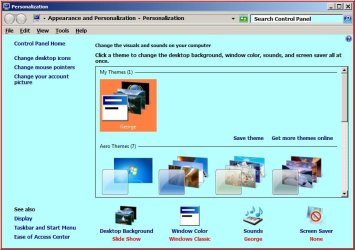
Jovin, right click on the desktop select properties. What shows under 'Windows Color'

Untitled.jpg
 

My Computer

Computer Manufacturer/Model Number
Look in my Signature.
OS
Win7 H.Prem. 32bit+SP1
Wow, this is so different from when I had XP...anyway I did get to that point where it shows that I have Fuchsia...thanks to my daughter!
 

My Computer

OS
windows 7 home premiumm 64 bit
Back
Top