Problem in IPFIG

bluegill36

New member
Local time
10:06 PM
Messages
4
My system is Windows 7 Professional 64 bit.
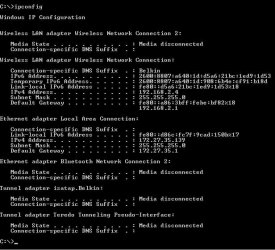
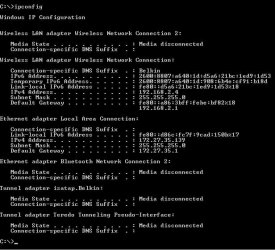
I need help activating media within ipfig that someone accessed my computer and disconnected.
Any help or suggestions is appreciated.
I can furnish a screenshot to anyone that is fluent with configuring IPFIG
 

My Computer My Computer

At a glance

Windows 7 Professiopnal 64 bit
Computer type
PC/Desktop
Computer Manufacturer/Model Number
Dell
OS
Windows 7 Professiopnal 64 bit
Actually it's in IPCONFIG that my problem is because someone disconnected a media source without me knowing it which is now causing a problem in Wi-Fi not connecting to other devices.
My knowledge in IPCONFIG is very limited and any help will be greatly appreciated.
I can furnish a screenshot showing the problem if necessary.
 

My Computer My Computer

At a glance

Windows 7 Professiopnal 64 bit
Computer type
PC/Desktop
Computer Manufacturer/Model Number
Dell
OS
Windows 7 Professiopnal 64 bit

My Computer My Computer

At a glance

Win 7 HP SP1 64-bit Vista HB SP2 32-bit Linux...Intel(R) Pentium(R) CPU P6200 @ 2.13GHz4.00 GBIntel(R) Graphics Media Accelerator HD
Computer type
Laptop
Computer Manufacturer/Model Number
Fujitsu LIFEBOOK
OS
Win 7 HP SP1 64-bit Vista HB SP2 32-bit Linux Mint 18.3
CPU
Intel(R) Pentium(R) CPU P6200 @ 2.13GHz
Motherboard
FUJITSU FJNBB06
Memory
4.00 GB
Graphics Card(s)
Intel(R) Graphics Media Accelerator HD
Sound Card
[1] Realtek High Definition Audio [2] Intel(R) Display Audio
Screen Resolution
1366 x 768 x 32 bits (4294967296 colors) @ 59 Hz
Hard Drives
TOSHIBA MK5076GSX
Antivirus
AVG FREE
WIndows IP Configuration.jpg
 

My Computer My Computer

At a glance

Windows 7 Professiopnal 64 bit
Computer type
PC/Desktop
Computer Manufacturer/Model Number
Dell
OS
Windows 7 Professiopnal 64 bit
WIndows IP Configuration.jpg
 

My Computer My Computer

At a glance

Windows 7 Professiopnal 64 bit
Computer type
PC/Desktop
Computer Manufacturer/Model Number
Dell
OS
Windows 7 Professiopnal 64 bit
Back
Top