
Problem installing AUDIO DRIVER

maruf39

New member
Local time
1:45 PM
Messages
2
I'm running Windows 7 Ultimate 32bit.
Motherboard > Gigabyte ga-m68mt-s2p

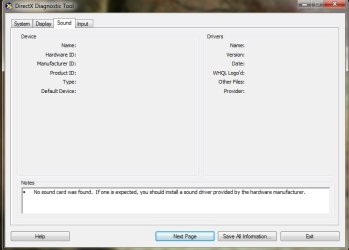
When I manually install audio driver for Realtek alc-888b/889 from the dvd came with motherboard, still windows says 'No sound card was found. No driver installed....'
I checked by running dxdiag.

I can't get the issue. Please help. Tnx.
 

Attachments
  • Untitled.jpg
    Untitled.jpg
    30.4 KB · Views: 11

My Computer

OS
Windows 7 Ultimate 32bit
Hi,

Run the Windows Update before reinstalling driver.

Go to system manufacturer’s website and look for latest driver, Download - SAVE - right click and
RUN AS ADMIN. REBOOT after each driver installation.

Sound drivers often rollback so check the version after installation and the reboot to
see if the version you installed is there, if not repeat the install - reboot until it is. It can take
several tries depending on how many rollbacks it does.

Also Right Click Speaker near clock - Playback Devices - right click in the box area - check
Show disable and disconnected devices. Highlight speaker and on the lower Right click
Properties check settings for Device Usage enabled and so on. Also do same for Configure
on Lower Left of that box.
 

My Computer

OS
Windows 7 Enterprise x64
Debbie B - thanks. I'll try your suggestions.
 

My Computer

OS
Windows 7 Ultimate 32bit
and if you are using laptop you'd better to try enabling sound card, cause your windows cannot find sound cards
 

My Computer

Computer Manufacturer/Model Number
asus/k53s
OS
windows 7 ultimate x64
CPU
intel core i5 - 2450m , 2.5 ghz
Motherboard
k53sd
Memory
ddr3 1333 2g+4g
Graphics Card(s)
nvidia geforce 610m 2gb
Monitor(s) Displays
15.6 hd led
Hard Drives
500 gb 5400 r sata
Cooling
ice cool
Back
Top