Solved Problem installing DMC4

converse5

Banned
Local time
3:05 AM
Messages
26
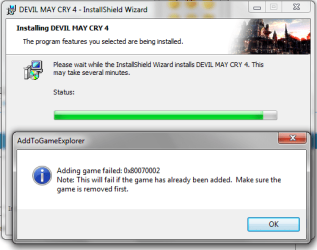
when i install the game, it gives me this error.
now i need to mention here that i had installed it first but removed it by uninstaller.
Now when i again installing i get the error.
Can any one help me with this error please?

also if i have posted it in wrong place the please moderator move it to right section.
But as it is gaming related so i posted here, forgive me if i m wrong.

Edit: When i click on OK, i get the error
2d1mx4l.png
 

Attachments

  • err.png
    err.png
    62.4 KB · Views: 4
Last edited:

My Computer

Computer Manufacturer/Model Number
Custom
OS
Windows 7 Ultimate 64 bit
CPU
E7500
Motherboard
Intel DG41RG
Memory
3GB
Graphics Card(s)
Nvidia GeForce GTX 550 Ti
Sound Card
Onboard
Monitor(s) Displays
Acer v193HQ
Screen Resolution
1366x768
Hard Drives
250GB SATA
PSU
CoolerMaster 450W Bronze
Keyboard
A4Tech
Mouse
A4Tech
Internet Speed
1Mbps Dl and 512Kbps Ul
Did you restart after the first uninstallation? Also try revo uninstaler, and do a registry clean. Only if you know what your doing, some cleans can corrupt other processes

My Evo sent this on its own.
 

My Computer

Computer Manufacturer/Model Number
The Vampire
OS
Windows 7 Ultimate
CPU
Intel i5 2500k @ 3.30
Motherboard
P8Z68 V-Pro
Memory
G.Skill Ripjaws 1600 2x4 Gb
Graphics Card(s)
BFG GTX 260 MAXCORE 55 OC 896MB GDDR3
Sound Card
Onboard
Monitor(s) Displays
50'' Sony Display Panel
Screen Resolution
1360 x 768
Hard Drives
Seagate 750 GB
WD 160 GB
PSU
OCZ 750 Watts ZT Series Fully Modular PSU 80 Plus Bronze
Case
NZXT Red Phantom
Cooling
120mm x2 Intake, 120mm x 1 and 200mm x2 Exhaust
Keyboard
LX710 Logitech Wireless Keyboard
Mouse
Logitech Wireless Mouse
no i did'nt restart. and the game does not show up in revo or in windows uninstaller.
and whats the registry clean? how to perform it?
 

My Computer

Computer Manufacturer/Model Number
Custom
OS
Windows 7 Ultimate 64 bit
CPU
E7500
Motherboard
Intel DG41RG
Memory
3GB
Graphics Card(s)
Nvidia GeForce GTX 550 Ti
Sound Card
Onboard
Monitor(s) Displays
Acer v193HQ
Screen Resolution
1366x768
Hard Drives
250GB SATA
PSU
CoolerMaster 450W Bronze
Keyboard
A4Tech
Mouse
A4Tech
Internet Speed
1Mbps Dl and 512Kbps Ul
well your supposed to restart, some items aren't fully gone after an uninstallation , unless its restarted. i would recommend you use CCleaner, its a free and powerful tool. Alot of the users here would recommend it. you can find it here
CCleaner - Optimization and Cleaning - Free Download. Get it and perform a clean, the menu isn't that complicated its pretty straight forward.
 

My Computer

Computer Manufacturer/Model Number
The Vampire
OS
Windows 7 Ultimate
CPU
Intel i5 2500k @ 3.30
Motherboard
P8Z68 V-Pro
Memory
G.Skill Ripjaws 1600 2x4 Gb
Graphics Card(s)
BFG GTX 260 MAXCORE 55 OC 896MB GDDR3
Sound Card
Onboard
Monitor(s) Displays
50'' Sony Display Panel
Screen Resolution
1360 x 768
Hard Drives
Seagate 750 GB
WD 160 GB
PSU
OCZ 750 Watts ZT Series Fully Modular PSU 80 Plus Bronze
Case
NZXT Red Phantom
Cooling
120mm x2 Intake, 120mm x 1 and 200mm x2 Exhaust
Keyboard
LX710 Logitech Wireless Keyboard
Mouse
Logitech Wireless Mouse
tried CCleaner and cleaned everything, and also used Registry First Aid and cleaned registry but still the same error :(
is there any other method to try to?
 

My Computer

Computer Manufacturer/Model Number
Custom
OS
Windows 7 Ultimate 64 bit
CPU
E7500
Motherboard
Intel DG41RG
Memory
3GB
Graphics Card(s)
Nvidia GeForce GTX 550 Ti
Sound Card
Onboard
Monitor(s) Displays
Acer v193HQ
Screen Resolution
1366x768
Hard Drives
250GB SATA
PSU
CoolerMaster 450W Bronze
Keyboard
A4Tech
Mouse
A4Tech
Internet Speed
1Mbps Dl and 512Kbps Ul
well first can you tell me your computers specs? ram, cpu, mb, stuff like that. also im thinking its not fully compatible with Windows 7, have you tried it on a machine with xp or vista? is your computer a laptop?
 

My Computer

Computer Manufacturer/Model Number
The Vampire
OS
Windows 7 Ultimate
CPU
Intel i5 2500k @ 3.30
Motherboard
P8Z68 V-Pro
Memory
G.Skill Ripjaws 1600 2x4 Gb
Graphics Card(s)
BFG GTX 260 MAXCORE 55 OC 896MB GDDR3
Sound Card
Onboard
Monitor(s) Displays
50'' Sony Display Panel
Screen Resolution
1360 x 768
Hard Drives
Seagate 750 GB
WD 160 GB
PSU
OCZ 750 Watts ZT Series Fully Modular PSU 80 Plus Bronze
Case
NZXT Red Phantom
Cooling
120mm x2 Intake, 120mm x 1 and 200mm x2 Exhaust
Keyboard
LX710 Logitech Wireless Keyboard
Mouse
Logitech Wireless Mouse
I have a computer. and i got 3GB RAM, 2.93GHz core 2 Duo processor, i got 250Gb Sata seagate, and about the game. i had it installed first, but some files were corrupt in the disc, but still i managed to install, but when i played i couldnt go after level 7. it just got stuck at that. I thought that it is due to the corrupt files, so i uninstalled it and then try to re-install but this just gives me the Add to Game Explorer failed :mad:
i am thinking to re-install the windows but it would be a huge step, because i have currently installed GTA 4 and Mafia II and i dont want to lose them or their saves right now.
 

My Computer

Computer Manufacturer/Model Number
Custom
OS
Windows 7 Ultimate 64 bit
CPU
E7500
Motherboard
Intel DG41RG
Memory
3GB
Graphics Card(s)
Nvidia GeForce GTX 550 Ti
Sound Card
Onboard
Monitor(s) Displays
Acer v193HQ
Screen Resolution
1366x768
Hard Drives
250GB SATA
PSU
CoolerMaster 450W Bronze
Keyboard
A4Tech
Mouse
A4Tech
Internet Speed
1Mbps Dl and 512Kbps Ul
Yeah as soon as you got corrupt files, you should have uninstalled and restarted the PC. Corrupt files are usually caused by Faulty installations. Dont go and install different windows just yet, see if you can get a hold of a different computer. You can also try a virtual machine, sort of like an emulator. This Forums has tutorials on how to set up a Virtual machine, you can also try third party virtualization software, like VirtualBox and VMware. If your worried about your saves, you can go to where the games is installed or in its Documents folder. There you can usually find a ''Saves'' folder, just open it up and saves whichever ones you want and put them on a usb. Then when you reinstall, just put the saves back in the folder.
 

My Computer

Computer Manufacturer/Model Number
The Vampire
OS
Windows 7 Ultimate
CPU
Intel i5 2500k @ 3.30
Motherboard
P8Z68 V-Pro
Memory
G.Skill Ripjaws 1600 2x4 Gb
Graphics Card(s)
BFG GTX 260 MAXCORE 55 OC 896MB GDDR3
Sound Card
Onboard
Monitor(s) Displays
50'' Sony Display Panel
Screen Resolution
1360 x 768
Hard Drives
Seagate 750 GB
WD 160 GB
PSU
OCZ 750 Watts ZT Series Fully Modular PSU 80 Plus Bronze
Case
NZXT Red Phantom
Cooling
120mm x2 Intake, 120mm x 1 and 200mm x2 Exhaust
Keyboard
LX710 Logitech Wireless Keyboard
Mouse
Logitech Wireless Mouse
alright, i'll try those
 

My Computer

Computer Manufacturer/Model Number
Custom
OS
Windows 7 Ultimate 64 bit
CPU
E7500
Motherboard
Intel DG41RG
Memory
3GB
Graphics Card(s)
Nvidia GeForce GTX 550 Ti
Sound Card
Onboard
Monitor(s) Displays
Acer v193HQ
Screen Resolution
1366x768
Hard Drives
250GB SATA
PSU
CoolerMaster 450W Bronze
Keyboard
A4Tech
Mouse
A4Tech
Internet Speed
1Mbps Dl and 512Kbps Ul
I tried your method of virtual machine that u suggested.
but same error came in that too.
then i realized maybe the source is corrupt. so i tried another disc and intalled and viola! It finished successfully and now i can play.
Thanks for your help vierasniper
:D
Edit: unable to give reputation, says must spread before giving it to u :(
 

My Computer

Computer Manufacturer/Model Number
Custom
OS
Windows 7 Ultimate 64 bit
CPU
E7500
Motherboard
Intel DG41RG
Memory
3GB
Graphics Card(s)
Nvidia GeForce GTX 550 Ti
Sound Card
Onboard
Monitor(s) Displays
Acer v193HQ
Screen Resolution
1366x768
Hard Drives
250GB SATA
PSU
CoolerMaster 450W Bronze
Keyboard
A4Tech
Mouse
A4Tech
Internet Speed
1Mbps Dl and 512Kbps Ul
Glad you Got it All Sorted out, have fun with your game. :)
 

My Computer

Computer Manufacturer/Model Number
The Vampire
OS
Windows 7 Ultimate
CPU
Intel i5 2500k @ 3.30
Motherboard
P8Z68 V-Pro
Memory
G.Skill Ripjaws 1600 2x4 Gb
Graphics Card(s)
BFG GTX 260 MAXCORE 55 OC 896MB GDDR3
Sound Card
Onboard
Monitor(s) Displays
50'' Sony Display Panel
Screen Resolution
1360 x 768
Hard Drives
Seagate 750 GB
WD 160 GB
PSU
OCZ 750 Watts ZT Series Fully Modular PSU 80 Plus Bronze
Case
NZXT Red Phantom
Cooling
120mm x2 Intake, 120mm x 1 and 200mm x2 Exhaust
Keyboard
LX710 Logitech Wireless Keyboard
Mouse
Logitech Wireless Mouse
Back
Top