Problem installing VS 2008 and other softwares

CheiFE

New member
Local time
8:14 AM
Messages
7
Hello everyone,
I had visual web developer 2008 express on the computer and I wanted to change it to visual studio 2008 and I realized that there is another way to install it by removin web developer step-by-step and then instaling visual studio, so I did it.
Currently, it is not letting me install because of missing components and I do not know what is missing me.

The bigger problem is since then I can't install anything on my computer, such as games etc.

If someone has encountered a problem and can solve it I'll happy to hear and learn how to do it.

I have Windows 7 build 7000

Thanks
 

My Computer My Computer

OS
Windows 7
Detailing the steps you took would help us troubleshoot what exactly is going on....
 

My Computers My Computers

System One System Two

  • Computer type
    PC/Desktop
    Computer Manufacturer/Model Number
    The Beast Model A (homebrew)
    OS
    Windows 11 21H2 Current build
    CPU
    AMD Ryzen 9 3950X
    Motherboard
    MSI MEG X570 GODLIKE
    Memory
    4 * 32 GB - Corsair Vengeance 3600 MHz
    Graphics Card(s)
    EVGA GeForce RTX 3080 Ti XC3 ULTRA GAMING (12G-P5-3955-KR)
    Sound Card
    Realtek® ALC1220 Codec
    Monitor(s) Displays
    2x Eve Spectrum ES07D03 4K Gaming Monitor (Matte) | Eve Spec
    Screen Resolution
    3x 3840 x 2160
    Hard Drives
    3x Samsung 980 Pro NVMe PCIe 4 M.2 2 TB SSD (MZ-V8P2T0B/AM) } 3x Sabrent Rocket NVMe 4.0 1 TB SSD
    PSU
    PC Power & Cooling’s Silencer Series 1050 Watt, 80 Plus Plat
    Case
    Fractal Design Define 7 XL Dark ATX Full Tower Case
    Cooling
    SteelSeries Apex Pro Wired Gaming Keyboard
    Keyboard
    SteelSeries Apex Pro
    Mouse
    Logitech MX Master 3S | MX Master 3 for business
    Internet Speed
    AT&T LightSpeed Gigabit Duplex Ftth
    Antivirus
    Windows Defender + MB 3
    Browser
    Nightly (default) + Firefox (stable),Chrome, Edge
  • Computer type
    PC/Desktop
    System Manufacturer/Model Number
    Dell Latitude E5470
    OS
    ChromeOS Flex Dev Channel (current)
    CPU
    Intel(R) Core(TM) i5-6300U CPU @ 2.40GHz, 2501 Mhz, 2 Core(s), 4 Logical Processor(s)
    Motherboard
    Dell
    Memory
    16 GB
    Graphics Card(s)
    Intel(R) HD Graphics 520
    Sound Card
    Intel(R) HD Graphics 520 + RealTek Audio
    Monitor(s) Displays
    Dell laptop display 15"
    Screen Resolution
    1920 * 1080
    Hard Drives
    Toshiba 128GB M.2 22300 drive
    INTEL Cherryville 520 Series SSDSC2CW180A 180 GB SATA III SSD
    PSU
    Dell
    Case
    Dell
    Cooling
    Dell
    Keyboard
    Dell
    Mouse
    Logitech MX Master 3S (shared w. Sys 1) | Dell TouchPad
    Internet Speed
    AT&T LightSpeed Gigabit Duplex Ftth
2.2.1.1. Uninstalling the Windows SDK can affect Visual Studio 2008.

If you install either the Windows SDK for Windows Vista or the Windows SDK Update for Windows Vista together with Visual Studio 2008, and then uninstall the Windows SDK, registry keys that are required by Visual Studio to find Windows headers, libraries, and tools are removed.
To resolve this issue:
Do one of the following things:
- Repair Visual Studio 2008 by using Add or Remove Programs (Windows Server 2003 and Windows XP) or Programs and Features (Windows Vista and Windows Server 2008).
- Install the Windows SDK for Windows Server 2008 and .NET Framework 3.5.
2.2.1.2. Manual uninstalling of earlier versions of Visual Studio 2008.

A). If you installed Visual Studio Code Name "Orcas" Beta 1 or Visual Studio 2008 Beta 2, use the Control Panel to remove all related, such as Professional, Standard, Enterprise Architect, or Team Suite.
All pre-release components are chain-uninstalled together with the Visual Studio product so that uninstalling components manually is not required.
B) If you installed an earlier version of Visual Studio, such as a Visual Studio Code Name "Orcas" Community Technology Preview (CTP), then you must uninstall it by performing the following steps in exact order.
1. Open Add or Remove Programs (Windows Server 2003 and Windows XP) or Programs and Features (Windows Vista and Windows Server 2008).
2. Remove "Microsoft SQL Server Compact Edition 3.5".
3. Remove "Microsoft SQL Server Compact Edition 3.5 Design Tools".
4. Remove "Microsoft SQL Server Compact Edition 3.5 for Devices".
5. Remove "Microsoft Visual Studio Performance Collection Tools".
6. Remove "Windows Mobile 5.0 SDK R2 for Pocket PC".
7. Remove "Windows Mobile 5.0 SDK R2 for Smartphone".
8. Remove "Crystal Reports 2007".
9. Remove "Visual Studio Asset System".
10.Remove "Visual Web Developer Design Service Reminder Tools".
11.Remove "Microsoft Visual Studio 2005 Tools for the 2007 Microsoft Office System Runtime".
12.Remove "Microsoft Visual Studio 2005 Tools for the 2007 Microsoft Office System Runtime Language Pack". This step is not required if you have only the English ENU edition.
13.Remove "Microsoft Visual Studio Tools for Office Runtime 3.0".
14.Remove "Microsoft Visual Studio Codename Orcas Professional" or other related Visual Studio installations, such as Professional, Standard, Enterprise Architect, or Team Suite.
15.Remove "Microsoft Document Explorer".
16.Remove "Microsoft Document Explorer 2005 Language Pack". This step is not required if you have only the English ENU edition.
17.Remove "Microsoft Device Emulator 3.0".
18.Remove "Microsof`t .NET Compact Framework 2.0 SP1".
19.Remove ".NET Framework 2.0 SDK".
20.Remove "Microsoft Visual Studio Codename Orcas Remote Debugger".
21.Remove "Microsoft Visual Studio 64bit Prerequisites Beta". This step is required only if Visual Studio is installed on a 64-bit computer.
22.Remove "Microsoft .NET Framework 3.5".
To resolve this issue:
No workaround is available.
that what i did.
It told me that I need to install windows xp service pack 2 update information but i didnt do that.
but before it told me that window installer missing part or doesnt exist
 

My Computer My Computer

OS
Windows 7
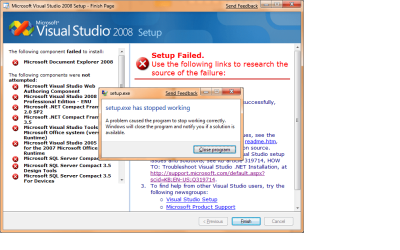
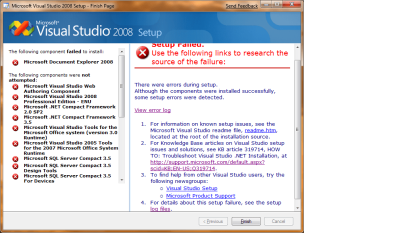
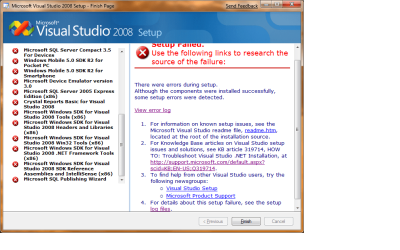
I did a printscreen to the installation and that what I've got:

VS3.png

VS1.png

VS2.png
 
Last edited:

My Computer My Computer

OS
Windows 7
sorry for writing msg after msg...
but i hope those details helps u to help me

more info:

this is the error log:

Code:
[04/15/09,20:47:55] Microsoft Visual Studio 2008 Professional Edition - ENU: [2] ERROR:The installer has encountered an unexpected error installing this package. This may indicate a problem with this package. The error code is 2329. 
[04/15/09,20:47:55] Microsoft Visual Studio 2008 Professional Edition - ENU: [2] ACTION FAILURE:Action ended 20:47:55: InstallFinalize. Return value 3.See MSI log for details.
[04/15/09,20:47:55] Microsoft Visual Studio 2008 Professional Edition - ENU: [2] ACTION FAILURE:Action ended 20:47:55: INSTALL. Return value 3.See MSI log for details.
[04/15/09,20:56:11] setup.exe: [2] ISetupComponent::Pre/Post/Install() failed in ISetupManager::InternalInstallManager() with HRESULT -2147023293.
[04/15/09,20:56:11] VS70pgui: [2] DepCheck indicates Microsoft Visual Studio 2008 Professional Edition - ENU is not installed.
[04/15/09,20:56:11] VS70pgui: [2] DepCheck indicates Microsoft .NET Compact Framework 2.0 SP2 was not attempted to be installed.
[04/15/09,20:56:11] VS70pgui: [2] DepCheck indicates Microsoft .NET Compact Framework 3.5 was not attempted to be installed.
[04/15/09,20:56:11] VS70pgui: [2] DepCheck indicates Microsoft Visual Studio Tools for the Microsoft Office system (version 3.0 Runtime) was not attempted to be installed.
[04/15/09,20:56:11] VS70pgui: [2] DepCheck indicates Microsoft Visual Studio 2005 Tools for the 2007 Microsoft Office System Runtime was not attempted to be installed.
[04/15/09,20:56:12] VS70pgui: [2] DepCheck indicates Microsoft SQL Server Compact 3.5 was not attempted to be installed.
[04/15/09,20:56:12] VS70pgui: [2] DepCheck indicates Microsoft SQL Server Compact 3.5 Design Tools was not attempted to be installed.
[04/15/09,20:56:12] VS70pgui: [2] DepCheck indicates Microsoft SQL Server Compact 3.5 For Devices was not attempted to be installed.
[04/15/09,20:56:12] VS70pgui: [2] DepCheck indicates Windows Mobile 5.0 SDK R2 for Pocket PC was not attempted to be installed.
[04/15/09,20:56:12] VS70pgui: [2] DepCheck indicates Windows Mobile 5.0 SDK R2 for Smartphone was not attempted to be installed.
[04/15/09,20:56:12] VS70pgui: [2] DepCheck indicates Microsoft Device Emulator version 3.0 was not attempted to be installed.
[04/15/09,20:56:12] VS70pgui: [2] DepCheck indicates Microsoft SQL Server 2005 Express Edition (x86) was not attempted to be installed.
[04/15/09,20:56:12] VS70pgui: [2] DepCheck indicates Crystal Reports Basic for Visual Studio 2008 was not attempted to be installed.
[04/15/09,20:56:12] VS70pgui: [2] DepCheck indicates Microsoft Windows SDK for Visual Studio 2008 Tools (x86) was not attempted to be installed.
[04/15/09,20:56:13] VS70pgui: [2] DepCheck indicates Microsoft Windows SDK for Visual Studio 2008 Headers and Libraries (x86) was not attempted to be installed.
[04/15/09,20:56:13] VS70pgui: [2] DepCheck indicates Microsoft Windows SDK for Visual Studio 2008 Win32 Tools (x86) was not attempted to be installed.
[04/15/09,20:56:13] VS70pgui: [2] DepCheck indicates Microsoft Windows SDK for Visual Studio 2008 .NET Framework Tools (x86) was not attempted to be installed.
[04/15/09,20:56:13] VS70pgui: [2] DepCheck indicates Microsoft Windows SDK for Visual Studio 2008 SDK Reference Assemblies and IntelliSense (x86) was not attempted to be installed.
[04/15/09,20:56:13] VS70pgui: [2] DepCheck indicates Microsoft SQL Publishing Wizard was not attempted to be installed.

 

My Computer My Computer

OS
Windows 7
hi CheiFE!
Have you fix your VS?
I have an error as you did! Please help me if you know what to do! Thanks
 

My Computer My Computer

OS
Windows 7 Ultimate
Back
Top