
Problem on changing Default Copy Handler

DaYiM

New member
Member
VIP
Local time
12:46 PM
Messages
130
Hello,
I have been using TeraCopy as my DCH in the past two years,
But since i made my customized desktop & installed it won't become my DCH
even though the settings is to make it DCH, i have installed other Copy Handlers
but all of them came with the same issue that they won't become DCH,
clearly the problem is in my PC/Windows, Please tell me if any one knows how to fix this?
Specially that i have a lot to Copy & Move files to do, because of my line
of work & i am really sick of windows DCH.
 

My Computer

Computer Manufacturer/Model Number
Qosmio X300-13O
OS
Windows 7, 64Bit
CPU
Intel Mobile Core 2 Duo T9600 @ 2.80GHz
Motherboard
TOSHIBA KSRAA (U2E1)
Memory
8.0GB Dual-Channel DDR3 @ 531MHz
Graphics Card(s)
1024MB GeForce 9800M GTX (Toshiba)
Sound Card
Realtek High Definition Audio
Monitor(s) Displays
Generic PnP Monitor on NVIDIA GeForce 9800M GTX
Screen Resolution
Generic PnP Monitor @ 1440x900
Hard Drives
125GB KINGSTON SV100S2128G ATA Device (SATA)
488GB Seagate ST95005620AS ATA Device (SATA)
What do you mean by since i made my customized desktop?

What happens if you remove the customization?
 

My Computer

Computer type
PC/Desktop
Computer Manufacturer/Model Number
Lenovo IdeaCenter 450
OS
Windows 10 Pro X64
CPU
Intel Quad Core i7-4770 @ 3.4Ghz
Memory
16.0GB PC3-12800 DDR3 SDRAM 1600 MHz
Graphics Card(s)
Intel Integrated HD Graphics
Sound Card
Realtek HD Audio
Monitor(s) Displays
HP 22" LCD
Screen Resolution
1680 x 1050
Hard Drives
250GB Samsung EVO SATA-3 SSD
2TB Seagate ST2000DM001 SATA-2
1.5TB Seagate ST3150041AS SATA
Keyboard
Dell USB
Mouse
Lenovo USB
Internet Speed
Cable via Road Runner 3MB Upload, 30MB Download
Antivirus
Windows Defender, MBAM Pro, MBAE
Browser
Seamonkey
Other Info
UEFI/GPT
PLDS DVD-RW DH16AERSH
Not that, i meant i made a custom Desktop PC:-
Thermaltake Case, Asus MotherBoard ...etc
 
Last edited:

My Computer

Computer Manufacturer/Model Number
Qosmio X300-13O
OS
Windows 7, 64Bit
CPU
Intel Mobile Core 2 Duo T9600 @ 2.80GHz
Motherboard
TOSHIBA KSRAA (U2E1)
Memory
8.0GB Dual-Channel DDR3 @ 531MHz
Graphics Card(s)
1024MB GeForce 9800M GTX (Toshiba)
Sound Card
Realtek High Definition Audio
Monitor(s) Displays
Generic PnP Monitor on NVIDIA GeForce 9800M GTX
Screen Resolution
Generic PnP Monitor @ 1440x900
Hard Drives
125GB KINGSTON SV100S2128G ATA Device (SATA)
488GB Seagate ST95005620AS ATA Device (SATA)
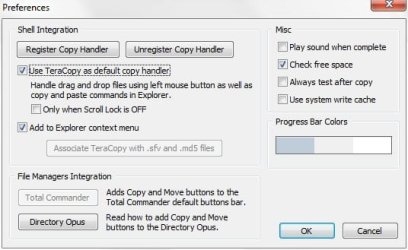
So Teracopy is setup like this?

TeraCopy.jpg
 

My Computer

Computer type
PC/Desktop
Computer Manufacturer/Model Number
Lenovo IdeaCenter 450
OS
Windows 10 Pro X64
CPU
Intel Quad Core i7-4770 @ 3.4Ghz
Memory
16.0GB PC3-12800 DDR3 SDRAM 1600 MHz
Graphics Card(s)
Intel Integrated HD Graphics
Sound Card
Realtek HD Audio
Monitor(s) Displays
HP 22" LCD
Screen Resolution
1680 x 1050
Hard Drives
250GB Samsung EVO SATA-3 SSD
2TB Seagate ST2000DM001 SATA-2
1.5TB Seagate ST3150041AS SATA
Keyboard
Dell USB
Mouse
Lenovo USB
Internet Speed
Cable via Road Runner 3MB Upload, 30MB Download
Antivirus
Windows Defender, MBAM Pro, MBAE
Browser
Seamonkey
Other Info
UEFI/GPT
PLDS DVD-RW DH16AERSH
Exactly, See the picture:-
The only thing i think that will work in this case
is to set the DCH value in the Registry to =0!!!!
But i don't know how nor if it possible/will it work?
 

Attachments

  • 3.png
    3.png
    464.3 KB · Views: 9

My Computer

Computer Manufacturer/Model Number
Qosmio X300-13O
OS
Windows 7, 64Bit
CPU
Intel Mobile Core 2 Duo T9600 @ 2.80GHz
Motherboard
TOSHIBA KSRAA (U2E1)
Memory
8.0GB Dual-Channel DDR3 @ 531MHz
Graphics Card(s)
1024MB GeForce 9800M GTX (Toshiba)
Sound Card
Realtek High Definition Audio
Monitor(s) Displays
Generic PnP Monitor on NVIDIA GeForce 9800M GTX
Screen Resolution
Generic PnP Monitor @ 1440x900
Hard Drives
125GB KINGSTON SV100S2128G ATA Device (SATA)
488GB Seagate ST95005620AS ATA Device (SATA)
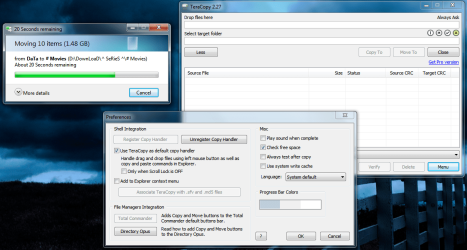
I searched the registry for teracopy and found lots of locations but none that seemed to have anything to do with DCH (default copy handler). Do you know what key that is?

Hmmm, just noticed TeraCopy does not get used for me either when I drag and drop files, at least I don't see the TeraCopy window pop up.
 

My Computer

Computer type
PC/Desktop
Computer Manufacturer/Model Number
Lenovo IdeaCenter 450
OS
Windows 10 Pro X64
CPU
Intel Quad Core i7-4770 @ 3.4Ghz
Memory
16.0GB PC3-12800 DDR3 SDRAM 1600 MHz
Graphics Card(s)
Intel Integrated HD Graphics
Sound Card
Realtek HD Audio
Monitor(s) Displays
HP 22" LCD
Screen Resolution
1680 x 1050
Hard Drives
250GB Samsung EVO SATA-3 SSD
2TB Seagate ST2000DM001 SATA-2
1.5TB Seagate ST3150041AS SATA
Keyboard
Dell USB
Mouse
Lenovo USB
Internet Speed
Cable via Road Runner 3MB Upload, 30MB Download
Antivirus
Windows Defender, MBAM Pro, MBAE
Browser
Seamonkey
Other Info
UEFI/GPT
PLDS DVD-RW DH16AERSH
Actually i don't really remember about Drag-n-Drop,
because usually i copy/move files that is larger than 1GB
between HardDisks, & in my laptop TeraCopy was the manager!
 

My Computer

Computer Manufacturer/Model Number
Qosmio X300-13O
OS
Windows 7, 64Bit
CPU
Intel Mobile Core 2 Duo T9600 @ 2.80GHz
Motherboard
TOSHIBA KSRAA (U2E1)
Memory
8.0GB Dual-Channel DDR3 @ 531MHz
Graphics Card(s)
1024MB GeForce 9800M GTX (Toshiba)
Sound Card
Realtek High Definition Audio
Monitor(s) Displays
Generic PnP Monitor on NVIDIA GeForce 9800M GTX
Screen Resolution
Generic PnP Monitor @ 1440x900
Hard Drives
125GB KINGSTON SV100S2128G ATA Device (SATA)
488GB Seagate ST95005620AS ATA Device (SATA)
Ah, just tried a large file between two drives and TeraCopy handled it, so it is working for me.
 

My Computer

Computer type
PC/Desktop
Computer Manufacturer/Model Number
Lenovo IdeaCenter 450
OS
Windows 10 Pro X64
CPU
Intel Quad Core i7-4770 @ 3.4Ghz
Memory
16.0GB PC3-12800 DDR3 SDRAM 1600 MHz
Graphics Card(s)
Intel Integrated HD Graphics
Sound Card
Realtek HD Audio
Monitor(s) Displays
HP 22" LCD
Screen Resolution
1680 x 1050
Hard Drives
250GB Samsung EVO SATA-3 SSD
2TB Seagate ST2000DM001 SATA-2
1.5TB Seagate ST3150041AS SATA
Keyboard
Dell USB
Mouse
Lenovo USB
Internet Speed
Cable via Road Runner 3MB Upload, 30MB Download
Antivirus
Windows Defender, MBAM Pro, MBAE
Browser
Seamonkey
Other Info
UEFI/GPT
PLDS DVD-RW DH16AERSH
Does any one knows why is this problem happening to me?
 

My Computer

Computer Manufacturer/Model Number
Qosmio X300-13O
OS
Windows 7, 64Bit
CPU
Intel Mobile Core 2 Duo T9600 @ 2.80GHz
Motherboard
TOSHIBA KSRAA (U2E1)
Memory
8.0GB Dual-Channel DDR3 @ 531MHz
Graphics Card(s)
1024MB GeForce 9800M GTX (Toshiba)
Sound Card
Realtek High Definition Audio
Monitor(s) Displays
Generic PnP Monitor on NVIDIA GeForce 9800M GTX
Screen Resolution
Generic PnP Monitor @ 1440x900
Hard Drives
125GB KINGSTON SV100S2128G ATA Device (SATA)
488GB Seagate ST95005620AS ATA Device (SATA)
Try creating a new user account and set TeraCopy as the DCH there maybe, see if that makes a difference?
 

My Computer

Computer type
PC/Desktop
Computer Manufacturer/Model Number
Lenovo IdeaCenter 450
OS
Windows 10 Pro X64
CPU
Intel Quad Core i7-4770 @ 3.4Ghz
Memory
16.0GB PC3-12800 DDR3 SDRAM 1600 MHz
Graphics Card(s)
Intel Integrated HD Graphics
Sound Card
Realtek HD Audio
Monitor(s) Displays
HP 22" LCD
Screen Resolution
1680 x 1050
Hard Drives
250GB Samsung EVO SATA-3 SSD
2TB Seagate ST2000DM001 SATA-2
1.5TB Seagate ST3150041AS SATA
Keyboard
Dell USB
Mouse
Lenovo USB
Internet Speed
Cable via Road Runner 3MB Upload, 30MB Download
Antivirus
Windows Defender, MBAM Pro, MBAE
Browser
Seamonkey
Other Info
UEFI/GPT
PLDS DVD-RW DH16AERSH
sorry for the late response, i tried that i created the user
as standard unlike my original which is Admin
but that also didn't work!
Any Other IDEAS?
 

My Computer

Computer Manufacturer/Model Number
Qosmio X300-13O
OS
Windows 7, 64Bit
CPU
Intel Mobile Core 2 Duo T9600 @ 2.80GHz
Motherboard
TOSHIBA KSRAA (U2E1)
Memory
8.0GB Dual-Channel DDR3 @ 531MHz
Graphics Card(s)
1024MB GeForce 9800M GTX (Toshiba)
Sound Card
Realtek High Definition Audio
Monitor(s) Displays
Generic PnP Monitor on NVIDIA GeForce 9800M GTX
Screen Resolution
Generic PnP Monitor @ 1440x900
Hard Drives
125GB KINGSTON SV100S2128G ATA Device (SATA)
488GB Seagate ST95005620AS ATA Device (SATA)
I'm out of ides. Hopefully someone else has some.

Do you have UAC enabled or disabled? If enabled, try this.

Uninstall TeraCopy.
Disable UAC.
Install TeraCopy

Test it. If okay, enable UAC.
 

My Computer

Computer type
PC/Desktop
Computer Manufacturer/Model Number
Lenovo IdeaCenter 450
OS
Windows 10 Pro X64
CPU
Intel Quad Core i7-4770 @ 3.4Ghz
Memory
16.0GB PC3-12800 DDR3 SDRAM 1600 MHz
Graphics Card(s)
Intel Integrated HD Graphics
Sound Card
Realtek HD Audio
Monitor(s) Displays
HP 22" LCD
Screen Resolution
1680 x 1050
Hard Drives
250GB Samsung EVO SATA-3 SSD
2TB Seagate ST2000DM001 SATA-2
1.5TB Seagate ST3150041AS SATA
Keyboard
Dell USB
Mouse
Lenovo USB
Internet Speed
Cable via Road Runner 3MB Upload, 30MB Download
Antivirus
Windows Defender, MBAM Pro, MBAE
Browser
Seamonkey
Other Info
UEFI/GPT
PLDS DVD-RW DH16AERSH
Actually UAC is already disabled.
 

My Computer

Computer Manufacturer/Model Number
Qosmio X300-13O
OS
Windows 7, 64Bit
CPU
Intel Mobile Core 2 Duo T9600 @ 2.80GHz
Motherboard
TOSHIBA KSRAA (U2E1)
Memory
8.0GB Dual-Channel DDR3 @ 531MHz
Graphics Card(s)
1024MB GeForce 9800M GTX (Toshiba)
Sound Card
Realtek High Definition Audio
Monitor(s) Displays
Generic PnP Monitor on NVIDIA GeForce 9800M GTX
Screen Resolution
Generic PnP Monitor @ 1440x900
Hard Drives
125GB KINGSTON SV100S2128G ATA Device (SATA)
488GB Seagate ST95005620AS ATA Device (SATA)
Hi

I know these post is quite old, but i am having these problem for a while and can´t solve it. I have tried cleaning manually the registry (damaging it and than fixing it) deactivating antivirus and everything i think, installing it on a diferent location. Please if you fix it tell me what you did. I don´t want to reinstal all my OS just because it does´nt work.

Thank you
 

My Computer

Computer type
Laptop
Computer Manufacturer/Model Number
Toshiba
OS
Windows 7 Home 64bit
CPU
i3
Motherboard
Intel
Memory
3gbs
Graphics Card(s)
None
Hard Drives
500gb
Antivirus
Kaskersky
Browser
Firefox
I'm also having the same issue on one particular machine and it's driving me insane because I use teracopy on a heap of windows 7 machines. The one machine I actually NEED it to work on it doesn't. Only thing I can think is different is that I run as the administrator user on this machine.

Basically teracopy refuses to make itself the default copy handler and wont appear in the context menu.
 

My Computer

Computer type
PC/Desktop
Computer Manufacturer/Model Number
Custom Build AMD/Gigabyte
OS
Windows 7 Home Premium
I'm also having the same issue on one particular machine and it's driving me insane because I use teracopy on a heap of windows 7 machines. The one machine I actually NEED it to work on it doesn't. Only thing I can think is different is that I run as the administrator user on this machine.

Basically teracopy refuses to make itself the default copy handler and wont appear in the context menu.

I did everything I know and it was impossible to make it run as a default handler. I noticed that the 2.7 version has a big issue and won´t run. You have to uninstall it, clean the registry and reinstall Teracopy 2.3. That is how i solve the problem, don´t try to contact them you will loose your time, I also did that.
 

My Computer

Computer type
Laptop
Computer Manufacturer/Model Number
Toshiba
OS
Windows 7 Home 64bit
CPU
i3
Motherboard
Intel
Memory
3gbs
Graphics Card(s)
None
Hard Drives
500gb
Antivirus
Kaskersky
Browser
Firefox
Thanks I'll give 2.3 a try after a registry clean out.

Edit: Actually it looks like I am using the 2.3 version cause I don't see a 2.7 version. I'm going to grab a few of the older versions and see if I can get them to work.

I notice that they're working on a version 3. It will be interesting to see how that progresses.
 
Last edited:

My Computer

Computer type
PC/Desktop
Computer Manufacturer/Model Number
Custom Build AMD/Gigabyte
OS
Windows 7 Home Premium
Same problem in Win 8.1

I am experiencing the same problem in 8.1. Teracopy won't register as the DCH, despite it saying that it already is the DCH in Teracopy options. I've tried older versions and the latest version to no avail. I've been using Teracopy for years and cannot figure out why all of a sudden it stopped working on my machine.

Anyone figure out a solution for this?
 

My Computer

Computer Manufacturer/Model Number
Gateway M6827
OS
Win 7 Professional 32-bit
CPU
Intel Core 2 Duo CPU T5750 @ 2.00 GHz
Memory
3GB
Monitor(s) Displays
ViewSonic Vx900
Screen Resolution
1280x1024
Hard Drives
150GB Hard Drive
Doesn't help your win8.1 issue but I found that TC version 2.27 solved my issues.
 

My Computer

Computer type
PC/Desktop
Computer Manufacturer/Model Number
Custom Build AMD/Gigabyte
OS
Windows 7 Home Premium
Doesn't help your win8.1 issue but I found that TC version 2.27 solved my issues.

I'm curious what method you used to clean the registry, before you installed 2.27?
 

My Computer

Computer Manufacturer/Model Number
Gateway M6827
OS
Win 7 Professional 32-bit
CPU
Intel Core 2 Duo CPU T5750 @ 2.00 GHz
Memory
3GB
Monitor(s) Displays
ViewSonic Vx900
Screen Resolution
1280x1024
Hard Drives
150GB Hard Drive
Back
Top