Solved Problem restoring to factory setting, "the parameter is incorrect".

jalnyc

New member
Local time
8:50 AM
Messages
27
Problem restoring to factory setting, "the parameter is incorrect".

Hi all

So I want to restore my computer to its factory settings because it is giving me a few annoying problems that I would like to get rid of. I go through the steps (given here), but I get stuck once I get to the step right before the system is about to be restored. I get an error message that just says "the parameter is incorrect". It doesn't give an error code. From here I have to do a hard shutdown of my computer.

I tried calling dell but since I'm out of warranty they want to charge me ~100 bucks to get this fixed. That seems way too high for me, especially for this problem given my budget. I did get some info from the tech guy though he said":

1- The recovery files may be corrupt, possible due to a virus (this could just be a scare tactic)
2- will have to use windows 7 re-installation cd if the files are indeed corrput

That's about all I got from him. I have the windows 7 cd that came with the comp and 2 other cds that have the drivers. The computer itself is a Dell insprion 560.

So basically does anyone know what my options are? Is there anyway to get around the parameter is incorrect problem or will I have to restore the computer another way?

Any help would be really appreciated!!
 

My Computer My Computer

OS
windows 7 home premium
There is probably a way round that.

If somebody posts a screenie of their similar Dell recov partition , we wlll be able to see.
 

My Computers My Computers

System One System Two

  • Computer type
    PC/Desktop
    OS
    7 X64
    CPU
    i5 8400
    Motherboard
    gigabyte b365m ds3h
    Memory
    2x8gb 3200mhz
    Hard Drives
    various
    PSU
    pure power 11 400w cm
    Case
    Coolermaster
    Cooling
    cryorig m9i
  • Computer type
    PC/Desktop
    OS
    7x64
    CPU
    g5400
    Motherboard
    ga b365m ds3h
    Memory
    8gb ddr4 2400
    PSU
    xfx pro 450w
If you have the Dell Windows DVD and a driver disc, you'd do better to use those.

You'll finish up with a pristine system that has none of Dell's bloatware.

Insert the Windows DVD and restart your computer.

When the Dell logo appears, press F12 immediately.

Select your CD/DVD drive from the boot list and press Enter then follow the onscreen instructions.

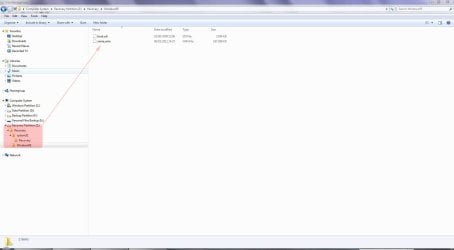
Recovery partition for Dell XPS 8300:

Rec.JPG
 

My Computer My Computer

Computer Manufacturer/Model Number
HP Pavilion Elite 495UK
OS
Windows 7 Ultimate SP1 64-Bit
CPU
Intel Core i7 870 @ 2.93GHz
Motherboard
MSI 2A9C (CPU1)
Memory
8Gb Dual-Channel DDR3 @ 664MHz
Graphics Card(s)
nVidia GeForce GTX 460 1024MB dedicated RAM
Sound Card
Realtek HD Audio
Monitor(s) Displays
HP2310i
Screen Resolution
1920 x 1080
Hard Drives
1x1954GB Hitachi HDS22020ALA 330 (RAID), 1x1954GB Hitachi External for backup and storage
PSU
460W
Case
HP Elite
Cooling
Air cooled
Keyboard
Logitech K750 solar-powered keyboard
Mouse
Logitech Wireless M180 mouse
Internet Speed
2Mb
Other Info
Pure Avanti Flow Internet Radio with iPod Dock, 64Gb iPod, HP USB Speakers, Sony MDR-V500 Headphones, Sony Vaio F-Series Laptop
Thanks for the reply guys.

I don't have a partition drive on my comp, it's just the big ol C drive. Does that matter?
 

My Computer My Computer

OS
windows 7 home premium
Can you post a screenshot of your disk management layout?

We need the screenie from Start>Control Panel>System & Security>Administrative Tools>Create and format hard disk partitions.
 

My Computer My Computer

Computer Manufacturer/Model Number
HP Pavilion Elite 495UK
OS
Windows 7 Ultimate SP1 64-Bit
CPU
Intel Core i7 870 @ 2.93GHz
Motherboard
MSI 2A9C (CPU1)
Memory
8Gb Dual-Channel DDR3 @ 664MHz
Graphics Card(s)
nVidia GeForce GTX 460 1024MB dedicated RAM
Sound Card
Realtek HD Audio
Monitor(s) Displays
HP2310i
Screen Resolution
1920 x 1080
Hard Drives
1x1954GB Hitachi HDS22020ALA 330 (RAID), 1x1954GB Hitachi External for backup and storage
PSU
460W
Case
HP Elite
Cooling
Air cooled
Keyboard
Logitech K750 solar-powered keyboard
Mouse
Logitech Wireless M180 mouse
Internet Speed
2Mb
Other Info
Pure Avanti Flow Internet Radio with iPod Dock, 64Gb iPod, HP USB Speakers, Sony MDR-V500 Headphones, Sony Vaio F-Series Laptop
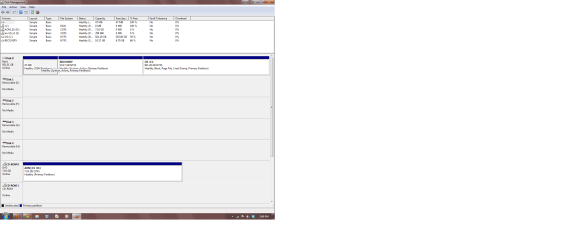
Ok here is the screen:


Hope that's what you guys need!
 

Attachments

  • screen.png
    screen.png
    41.7 KB · Views: 139

My Computer My Computer

OS
windows 7 home premium
Well, there appears to be nothing wrong with Drive 0.

However, it has three partitions, not one as you mentioned. You currently have:
  1. A 47 MB Dell OEM partition.
  2. A 10 GB Recovery partition.
  3. Your Windows partition.
One thing that puzzles me, it also shows a RAW partition J, with no size. Any idea how that came about?

In retrospect, I think the Dell technician is probably right in that the recovery partition may well be corrupt.

As you have a Dell Windows DVD and driver DVD I'd be inclined to use them to carry out a clean install. I see no point in paying Dell a shed load of money to do something you can do yourself.

Just make sure you download or are in possession of an ethernet LAN adapter driver so that you have a way of getting online after you're reinstalled Windows. I'm fairly certain the Dell driver disc won't have all the drivers you need.
 

My Computer My Computer

Computer Manufacturer/Model Number
HP Pavilion Elite 495UK
OS
Windows 7 Ultimate SP1 64-Bit
CPU
Intel Core i7 870 @ 2.93GHz
Motherboard
MSI 2A9C (CPU1)
Memory
8Gb Dual-Channel DDR3 @ 664MHz
Graphics Card(s)
nVidia GeForce GTX 460 1024MB dedicated RAM
Sound Card
Realtek HD Audio
Monitor(s) Displays
HP2310i
Screen Resolution
1920 x 1080
Hard Drives
1x1954GB Hitachi HDS22020ALA 330 (RAID), 1x1954GB Hitachi External for backup and storage
PSU
460W
Case
HP Elite
Cooling
Air cooled
Keyboard
Logitech K750 solar-powered keyboard
Mouse
Logitech Wireless M180 mouse
Internet Speed
2Mb
Other Info
Pure Avanti Flow Internet Radio with iPod Dock, 64Gb iPod, HP USB Speakers, Sony MDR-V500 Headphones, Sony Vaio F-Series Laptop
Thanks for your help so far seavixen.

So I just installed the windows 7 app on there and the computer is fresh. It seems that it saved all my old files to a folder called windows.old since my harddrive has the same capacity as it did before i did the installation.

I just inserted one of the dell drivers and I'm not really sure where to go from here. I have an ethernet cord which I can plug into my router but I'm not sure if that will give me internet access?

What is the next step?

Thanks again for your help so far.
 

My Computer My Computer

OS
windows 7 home premium
Ok I fixed the problem, thanks to the people on here who helped.

Eventually I just used the windows OS reinstallation cd to reinstall the OS. This wiped my hard drive but kept all my old files in a folder called windows.old which was very nice. I then had to reinstall all the drivers that came in the pre-packed dell cd and now the computer is running great. :)
 

My Computer My Computer

OS
windows 7 home premium
Well done.

Sorry I didn't get back to you earlier, but being in a different time zone, I was in bed!

Anyway, pleased to see you're up and running and thanks for the update.
 

My Computer My Computer

Computer Manufacturer/Model Number
HP Pavilion Elite 495UK
OS
Windows 7 Ultimate SP1 64-Bit
CPU
Intel Core i7 870 @ 2.93GHz
Motherboard
MSI 2A9C (CPU1)
Memory
8Gb Dual-Channel DDR3 @ 664MHz
Graphics Card(s)
nVidia GeForce GTX 460 1024MB dedicated RAM
Sound Card
Realtek HD Audio
Monitor(s) Displays
HP2310i
Screen Resolution
1920 x 1080
Hard Drives
1x1954GB Hitachi HDS22020ALA 330 (RAID), 1x1954GB Hitachi External for backup and storage
PSU
460W
Case
HP Elite
Cooling
Air cooled
Keyboard
Logitech K750 solar-powered keyboard
Mouse
Logitech Wireless M180 mouse
Internet Speed
2Mb
Other Info
Pure Avanti Flow Internet Radio with iPod Dock, 64Gb iPod, HP USB Speakers, Sony MDR-V500 Headphones, Sony Vaio F-Series Laptop
It's cool man, you were a big help!
 

My Computer My Computer

OS
windows 7 home premium
That's very kind of you - makes all the effort worthwhile. :)
 

My Computer My Computer

Computer Manufacturer/Model Number
HP Pavilion Elite 495UK
OS
Windows 7 Ultimate SP1 64-Bit
CPU
Intel Core i7 870 @ 2.93GHz
Motherboard
MSI 2A9C (CPU1)
Memory
8Gb Dual-Channel DDR3 @ 664MHz
Graphics Card(s)
nVidia GeForce GTX 460 1024MB dedicated RAM
Sound Card
Realtek HD Audio
Monitor(s) Displays
HP2310i
Screen Resolution
1920 x 1080
Hard Drives
1x1954GB Hitachi HDS22020ALA 330 (RAID), 1x1954GB Hitachi External for backup and storage
PSU
460W
Case
HP Elite
Cooling
Air cooled
Keyboard
Logitech K750 solar-powered keyboard
Mouse
Logitech Wireless M180 mouse
Internet Speed
2Mb
Other Info
Pure Avanti Flow Internet Radio with iPod Dock, 64Gb iPod, HP USB Speakers, Sony MDR-V500 Headphones, Sony Vaio F-Series Laptop
Back
Top