Solved Problem running ALL games with DirectX 10-11

fnnoname

New member
Local time
3:01 PM
Messages
14
So,I'm having problem running every game with DirectX 10, 10.1, and 11.

And i mean ALL games because every game i run using DirectX 10 above will exits itself to desktop but with sound still playing at the background after 30 minutes or less playing it.

And if I alt+tab back to the game,it will crash and not responding so I have to end process via task manager.

The problem doesn't exists if I force these games using DirectX 9 though.

I've tried reinstalling DirectX,run the game as an administrator,and even turn off my antivirus completely..the problem still persists.

So,what could be causing this problem? Thanks
 

My Computer My Computer

OS
Windows 7 Home Premium 64bit
CPU
Intel Core i7-2600K 3.4GHz
Motherboard
Gigabyte P67A-UD3-B3
Memory
Corsair Vengeance 8GB DDR3
Graphics Card(s)
Nvidia Geforce GTX 570
Screen Resolution
1920 x 1080
PSU
FSP Aurum Gold 700W
Try updating/reinstalling your nvdia drivers for your gtx 570.That might possibly resolve your issues.
click the blue link below
Drivers | GeForce
 

My Computer My Computer

Computer type
PC/Desktop
Computer Manufacturer/Model Number
custom build
OS
Windows 10 64bit
CPU
AMD Phenom II X4 925 (Deneb)(2.8GHz) OC 3.4GHz
Motherboard
M5A78L-MLX Plus
Memory
Corsair Vengeance DDR3 4GBX2 (8192MB)
Graphics Card(s)
XFX HD 6870 1GB (OC)- 940MHz core, mem 1150MHz
Monitor(s) Displays
Vizio 26' 1920x1080 / Acer 1336x768
Screen Resolution
1920x1080 60Hz /1336x768
Hard Drives
Kingston Digital 60GB SSDNow V300/500gb HDD Western Digital 7200rpm (/WD 160GB HDD 7200rpm
PSU
CORSAIR CX600 600w
Case
AZZA Orion 202 EVO
Cooling
cooler master hyper TX3 cpu cooler
Keyboard
Razer DeathStalker
Mouse
Logitech Optical Gaming Mouse G400
Antivirus
Defualt on win 10
Browser
Firefox
Other Info
cpu is overclocked in bios
Thanks for your reply M1GU31,but i've already done that..oh and btw all of my drivers are current.
Any other solution?
 

My Computer My Computer

OS
Windows 7 Home Premium 64bit
CPU
Intel Core i7-2600K 3.4GHz
Motherboard
Gigabyte P67A-UD3-B3
Memory
Corsair Vengeance 8GB DDR3
Graphics Card(s)
Nvidia Geforce GTX 570
Screen Resolution
1920 x 1080
PSU
FSP Aurum Gold 700W
Open up command prompt by typing it in the search bar located in the start menu and in command prompt type sfc /scannow and it will scan for errors in the windows file system and then do a reboot and keep checking until you get no errors showing up.
 

My Computer My Computer

Computer type
PC/Desktop
Computer Manufacturer/Model Number
custom build
OS
Windows 10 64bit
CPU
AMD Phenom II X4 925 (Deneb)(2.8GHz) OC 3.4GHz
Motherboard
M5A78L-MLX Plus
Memory
Corsair Vengeance DDR3 4GBX2 (8192MB)
Graphics Card(s)
XFX HD 6870 1GB (OC)- 940MHz core, mem 1150MHz
Monitor(s) Displays
Vizio 26' 1920x1080 / Acer 1336x768
Screen Resolution
1920x1080 60Hz /1336x768
Hard Drives
Kingston Digital 60GB SSDNow V300/500gb HDD Western Digital 7200rpm (/WD 160GB HDD 7200rpm
PSU
CORSAIR CX600 600w
Case
AZZA Orion 202 EVO
Cooling
cooler master hyper TX3 cpu cooler
Keyboard
Razer DeathStalker
Mouse
Logitech Optical Gaming Mouse G400
Antivirus
Defualt on win 10
Browser
Firefox
Other Info
cpu is overclocked in bios
Thanks again M1GU31,but i've done that until cmd says something about "no violations" but still the problem exists :(

Anyway,have this issue has something to do with the Windows' edition? I've tried playing games on my laptop with lower specs,using DirectX 10 and above and I could play to 2 hours or more without any problem.

My laptop's spec is : Intel Core i5 2410M 2.3GHz,Nvidia GT 550M,4GB RAM but running Windows 7 Professional while my desktop is Home Premium.
 

My Computer My Computer

OS
Windows 7 Home Premium 64bit
CPU
Intel Core i7-2600K 3.4GHz
Motherboard
Gigabyte P67A-UD3-B3
Memory
Corsair Vengeance 8GB DDR3
Graphics Card(s)
Nvidia Geforce GTX 570
Screen Resolution
1920 x 1080
PSU
FSP Aurum Gold 700W
Hello there fnnoname,

Can i suggest a possible solution?

Have you tried using a Driver Cleaner like Driver Sweeper (Phyxion.net - Driver Sweeper) in Safe mode after uninstalling your drivers and before installing the new ones on your system?

Your windows edition should have nothing to do with your systems ability to handle DX 10/11 games as they're both 7 and have built in functionality for that purpose...

Hope that helps!

EDIT: You mentioned DX10/11 games... how about 3D bencmarks that utilize DX10/11, like 3DMark Vantage, 3DMark11 or the newest Heaven benchmark that uses tesselation? Do those fail to run as well? Just checking...
 

My Computer My Computer

Computer Manufacturer/Model Number
DELL SXPS 1640
OS
Windows 7 x64 Professional SP1
CPU
Intel C2D T9550 2.66 GHz @ 2.793 GHz (Thanks ThrottleStop!!)
Motherboard
Intel PM45
Memory
8 GB DDR3
Graphics Card(s)
ATI MOBILITY RADEON 4670
Sound Card
CREATIVE XFI AUDIO NOTEBOOK
Monitor(s) Displays
16.1 WLED
Screen Resolution
1920x1080
Hard Drives
Seagate ST9500420AS 500GB (465GiBi) 7200 RPM Drive

External Drives:-
2 TB WD Essentials x 3
1 TB WD Mybook Gen 1
1 TB WD Mybook Gen 2
1 TB Seagate
1 TB Seagate
320 GB WD Scorpio Black (enclosed)
PSU
90W Dell Power Brick
Case
Dell Chassis
Cooling
Coolermaster Cooling Pad
Keyboard
Built-in backlighted Keyboard
Mouse
Logitech Wireless Mini Mouse
Internet Speed
4/0.5
Hello solarmystic,

No,I've never use (and never heard of) Driver Sweeper :p so if I may,I would ask you how to use this tool.
Do I have to clean all drivers or only specific driver? And do I have to run this tool while I'm in safe mode?
I'm completely new to this Driver Cleaner software.

Yep,I run all of the benchmark softwares you mentioned above but all of them are working without problem.
Well, the problem arises when I play something in DX10 or above after 30 minutes or so.

And all of those benchmarks run less than 30 minutes (if I remember correctly).
 

My Computer My Computer

OS
Windows 7 Home Premium 64bit
CPU
Intel Core i7-2600K 3.4GHz
Motherboard
Gigabyte P67A-UD3-B3
Memory
Corsair Vengeance 8GB DDR3
Graphics Card(s)
Nvidia Geforce GTX 570
Screen Resolution
1920 x 1080
PSU
FSP Aurum Gold 700W
@fnnoname,

You would first uninstall your drivers like normal using the uninstaller at Add/Remove Programs in Control Panel, restart your computer to safe mode, run the Driver Sweeper, and choose only the NVIDIA - Display option, clean it, restart to normal boot after cleaning, and then finally install your new drivers...

Ahh.. my bad for failing to read your whole problem... the keywords i missed was the problem arising after 30 minutes... That would most likely be an indication of some graphical stress/overheating... but you then say that the games do not have the same problem in DX9. hmm... could it be that the problem only manifests itself beyond a certain amount of graphical stress...

If you don't mind can you use a program like GPUz (GPU-Z Video card GPU Information Utility) to monitor your graphic card's temperatures and load while playing the DX10/11 game in windowed mode? Also, if the game is running in windowed mode does the problem happen?
 

My Computer My Computer

Computer Manufacturer/Model Number
DELL SXPS 1640
OS
Windows 7 x64 Professional SP1
CPU
Intel C2D T9550 2.66 GHz @ 2.793 GHz (Thanks ThrottleStop!!)
Motherboard
Intel PM45
Memory
8 GB DDR3
Graphics Card(s)
ATI MOBILITY RADEON 4670
Sound Card
CREATIVE XFI AUDIO NOTEBOOK
Monitor(s) Displays
16.1 WLED
Screen Resolution
1920x1080
Hard Drives
Seagate ST9500420AS 500GB (465GiBi) 7200 RPM Drive

External Drives:-
2 TB WD Essentials x 3
1 TB WD Mybook Gen 1
1 TB WD Mybook Gen 2
1 TB Seagate
1 TB Seagate
320 GB WD Scorpio Black (enclosed)
PSU
90W Dell Power Brick
Case
Dell Chassis
Cooling
Coolermaster Cooling Pad
Keyboard
Built-in backlighted Keyboard
Mouse
Logitech Wireless Mini Mouse
Internet Speed
4/0.5
Hello solarmystic,

I've done running the Driver Sweeper exactly as you said and I chose "clean install" while installing the Nvidia drivers.

Also,I've updated the games that I played to their latest versions just in case the problem is within the game itself.

But still,no luck :(. I just played Dirt 3 and it's still having the same problem. It exits itself while sound still playing in the background. The funny thing is I pressed the print screen button to get a screenshot so I can show you but when I opened MS Paint I can't paste it.

The temperatures are fine though,55 degrees Celsius at most. Using DX9 and above.
Now I'm going to play it in windowed mode.

EDIT: I think it was Dirt 3's fault. I've played several games including Max Payne 3 in DX11 now,and that I'm sure the problem is solved because I'm still playing it for 2 hours now without any problem.

It looks like solarmystic's method of using Driver Sweeper works. Thanks solarmystic for the solution and thanks to you too M1GU31 for trying to help me. Cheers :)http://www.sevenforums.com/member.php?u=163098
 
Last edited:

My Computer My Computer

OS
Windows 7 Home Premium 64bit
CPU
Intel Core i7-2600K 3.4GHz
Motherboard
Gigabyte P67A-UD3-B3
Memory
Corsair Vengeance 8GB DDR3
Graphics Card(s)
Nvidia Geforce GTX 570
Screen Resolution
1920 x 1080
PSU
FSP Aurum Gold 700W
Hi there!

Glad to know it's just that one game that offends your system! Have a great time playing the rest of your games the way they're meant to be played!
 

My Computer My Computer

Computer Manufacturer/Model Number
DELL SXPS 1640
OS
Windows 7 x64 Professional SP1
CPU
Intel C2D T9550 2.66 GHz @ 2.793 GHz (Thanks ThrottleStop!!)
Motherboard
Intel PM45
Memory
8 GB DDR3
Graphics Card(s)
ATI MOBILITY RADEON 4670
Sound Card
CREATIVE XFI AUDIO NOTEBOOK
Monitor(s) Displays
16.1 WLED
Screen Resolution
1920x1080
Hard Drives
Seagate ST9500420AS 500GB (465GiBi) 7200 RPM Drive

External Drives:-
2 TB WD Essentials x 3
1 TB WD Mybook Gen 1
1 TB WD Mybook Gen 2
1 TB Seagate
1 TB Seagate
320 GB WD Scorpio Black (enclosed)
PSU
90W Dell Power Brick
Case
Dell Chassis
Cooling
Coolermaster Cooling Pad
Keyboard
Built-in backlighted Keyboard
Mouse
Logitech Wireless Mini Mouse
Internet Speed
4/0.5
I'm so sorry that I've marked this thread to unsolved because the problem still exists.

Okay here's the story : I thought that the problem solved so I turned off my computer and the next time I turn it on again and playing Max Payne 3 using DX11,it could only get past a cutscene and then it exits itself again while sound still playing :(
This time I couldn't even get 5 minutes in game.

Tried playing Just Cause 2,I could only play to 15 minutes :(
And I used Driver Sweeper again,still no luck.

So,any suggestions that this issue could come within the hardware?
 

My Computer My Computer

OS
Windows 7 Home Premium 64bit
CPU
Intel Core i7-2600K 3.4GHz
Motherboard
Gigabyte P67A-UD3-B3
Memory
Corsair Vengeance 8GB DDR3
Graphics Card(s)
Nvidia Geforce GTX 570
Screen Resolution
1920 x 1080
PSU
FSP Aurum Gold 700W
Oh dear me... it does sound more likely there's some hardware instability on your system...

Time to narrow this down further... do you overclock your CPU and/or your graphics card using software like MSI Afterburner or the like? If so, can you try and revert all your clocks back to default....

Another set of stress tests i'd like you try to rule out hardware instability would be LinX (LinX - A simple Linpack interface) for your CPU and RAM, and also Furmark (FurMark: VGA Stress Test, Graphics Card and GPU Stability Test, Burn-in Test, OpenGL Benchmark and GPU Temperature | oZone3D.Net) for your GPU.

For maximum stress run those two applications seperately first to isolate which component is cause, and then together (for at least an hour or until they complete), side by side while monitoring your temperatures... If your system passes those tests (i.e. doesn't crash or hard lock) then we can safely rule out hardware instability and blame it on the software 100%
 

My Computer My Computer

Computer Manufacturer/Model Number
DELL SXPS 1640
OS
Windows 7 x64 Professional SP1
CPU
Intel C2D T9550 2.66 GHz @ 2.793 GHz (Thanks ThrottleStop!!)
Motherboard
Intel PM45
Memory
8 GB DDR3
Graphics Card(s)
ATI MOBILITY RADEON 4670
Sound Card
CREATIVE XFI AUDIO NOTEBOOK
Monitor(s) Displays
16.1 WLED
Screen Resolution
1920x1080
Hard Drives
Seagate ST9500420AS 500GB (465GiBi) 7200 RPM Drive

External Drives:-
2 TB WD Essentials x 3
1 TB WD Mybook Gen 1
1 TB WD Mybook Gen 2
1 TB Seagate
1 TB Seagate
320 GB WD Scorpio Black (enclosed)
PSU
90W Dell Power Brick
Case
Dell Chassis
Cooling
Coolermaster Cooling Pad
Keyboard
Built-in backlighted Keyboard
Mouse
Logitech Wireless Mini Mouse
Internet Speed
4/0.5
Hi solarmystic,sorry to bother you again.

I've reverting back all of my configurations to their stock speed. CPU,RAM,everything except Graphics Card.
I've no idea how to revert it to its stock speed because it's like factory-over clocked or something.
The reason that I bought this graphics card is that it has 3 fans so I thought it would be cooler than reference,I have no idea of this factory-over clocked. Here's the pic :
3721.jpg

And no,I don't use MSI Afterburner or something similar. I do overclock via BIOS.
But the thing is: It doesn't make any difference :( . Stock speed or overclocked,the problem still exists.

Okay I'll try those stress tests and I'll post the results here :).
 

My Computer My Computer

OS
Windows 7 Home Premium 64bit
CPU
Intel Core i7-2600K 3.4GHz
Motherboard
Gigabyte P67A-UD3-B3
Memory
Corsair Vengeance 8GB DDR3
Graphics Card(s)
Nvidia Geforce GTX 570
Screen Resolution
1920 x 1080
PSU
FSP Aurum Gold 700W
I eagerly await your stress test results!
 

My Computer My Computer

Computer Manufacturer/Model Number
DELL SXPS 1640
OS
Windows 7 x64 Professional SP1
CPU
Intel C2D T9550 2.66 GHz @ 2.793 GHz (Thanks ThrottleStop!!)
Motherboard
Intel PM45
Memory
8 GB DDR3
Graphics Card(s)
ATI MOBILITY RADEON 4670
Sound Card
CREATIVE XFI AUDIO NOTEBOOK
Monitor(s) Displays
16.1 WLED
Screen Resolution
1920x1080
Hard Drives
Seagate ST9500420AS 500GB (465GiBi) 7200 RPM Drive

External Drives:-
2 TB WD Essentials x 3
1 TB WD Mybook Gen 1
1 TB WD Mybook Gen 2
1 TB Seagate
1 TB Seagate
320 GB WD Scorpio Black (enclosed)
PSU
90W Dell Power Brick
Case
Dell Chassis
Cooling
Coolermaster Cooling Pad
Keyboard
Built-in backlighted Keyboard
Mouse
Logitech Wireless Mini Mouse
Internet Speed
4/0.5
I did a clean reinstallation of Windows however,so I get a fresh OS to play and to make sure that there is no other software that might interfere when I'm playing.

Done installing Windows,I proceed to install essential drivers and 2 games: Just Cause 2 and Max Payne 3.

Even worse,this isn't solve anything. I could only play Just Cause 2 up to 45 minutes and Max Payne 3 (DX11) only 15 minutes. BUT there is a notification pop up message when Max Payne 3 exits itself saying something about "Nvidia driver error has crashed and recovered" (I don't really remember the exact message because it disappears so quickly).

So I used Driver Sweeper again but still no luck.
Next, I run the FurMark software and these are the results:
1920x1080 0xMSAA
FPS: Min 17,Max 29,Avg 22
Temperature: Min 34 degrees,Max 68 degrees (in celsius)
Time: 1 hour 5 minutes.

However I don't know how to use LinX because when I press start,nothing happens..CPU still 0-1% load and there's no increase in RAM use. And once I click start,the stop button does nothing when pressed..strange..
SO I used hyperpi and it runs without problem (I don't know if this equivalent or not).

EDIT : I managed to play around with Unigine Heaven and this happens : :(
2nrk6is.png
 
Last edited:

My Computer My Computer

OS
Windows 7 Home Premium 64bit
CPU
Intel Core i7-2600K 3.4GHz
Motherboard
Gigabyte P67A-UD3-B3
Memory
Corsair Vengeance 8GB DDR3
Graphics Card(s)
Nvidia Geforce GTX 570
Screen Resolution
1920 x 1080
PSU
FSP Aurum Gold 700W
Thanks for all the effort fnnoname!

That's really good work there refreshing your OS to exclude all other software possibilites... hmm if Furmark runs for an hour without any issues, your GPU should theoretically be in the clear... BUT that fatal error for Unigine still makes it suspect...

There're two last things i'd like you to try before i recommend a GPU replacement (I'm sorry =(),

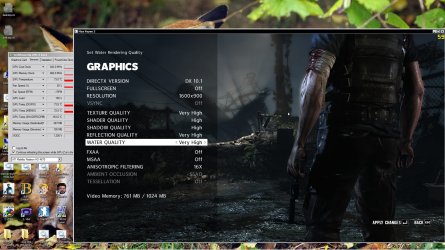
1. Can you take a screenshot of GPUz and your game in windowed mode side by on your desktop with the sensors tab selected (e.g. for Max Payne), like below? (before it crashes of course)

test.jpg


2. Download MSI Afterburner (event.msi.com/vga/afterburner/download.htm) and either reduce the clocks (core, shader and memory frequencies) or increase the voltage of your graphics card slightly?

Your default clocks should be:-

732/1464/950 for core/shaders/memory respectively

(You mentioned your card was factory overclocked, perhaps the supplied voltage is not enough to run DX11 games stable enough)

How to: Once inside the program go to settings then check two boxes saying "unlock voltage control", and "unlock voltage monitoring"

After that just bump up your voltage and hit apply.

Try running the games after a small voltage increase?

Once again, thank you for your patience mate!
 

My Computer My Computer

Computer Manufacturer/Model Number
DELL SXPS 1640
OS
Windows 7 x64 Professional SP1
CPU
Intel C2D T9550 2.66 GHz @ 2.793 GHz (Thanks ThrottleStop!!)
Motherboard
Intel PM45
Memory
8 GB DDR3
Graphics Card(s)
ATI MOBILITY RADEON 4670
Sound Card
CREATIVE XFI AUDIO NOTEBOOK
Monitor(s) Displays
16.1 WLED
Screen Resolution
1920x1080
Hard Drives
Seagate ST9500420AS 500GB (465GiBi) 7200 RPM Drive

External Drives:-
2 TB WD Essentials x 3
1 TB WD Mybook Gen 1
1 TB WD Mybook Gen 2
1 TB Seagate
1 TB Seagate
320 GB WD Scorpio Black (enclosed)
PSU
90W Dell Power Brick
Case
Dell Chassis
Cooling
Coolermaster Cooling Pad
Keyboard
Built-in backlighted Keyboard
Mouse
Logitech Wireless Mini Mouse
Internet Speed
4/0.5
No,it should be me for thanking you for your efforts and patience :)

But I'm using Gigabyte graphics card,is this OK with MSI afterburner?

Okay,I'm going to test it now.
 

My Computer My Computer

OS
Windows 7 Home Premium 64bit
CPU
Intel Core i7-2600K 3.4GHz
Motherboard
Gigabyte P67A-UD3-B3
Memory
Corsair Vengeance 8GB DDR3
Graphics Card(s)
Nvidia Geforce GTX 570
Screen Resolution
1920 x 1080
PSU
FSP Aurum Gold 700W
MSI Afterburner works with most dedicated desktop graphics cards from AMD/NVIDIA, so it should be okay...

Don't forget to post screenshots of Max Payne and GPUz, plus the MSI Afterburner windows of your detected clocks and voltages, and the lowered clocks too!
 

My Computer My Computer

Computer Manufacturer/Model Number
DELL SXPS 1640
OS
Windows 7 x64 Professional SP1
CPU
Intel C2D T9550 2.66 GHz @ 2.793 GHz (Thanks ThrottleStop!!)
Motherboard
Intel PM45
Memory
8 GB DDR3
Graphics Card(s)
ATI MOBILITY RADEON 4670
Sound Card
CREATIVE XFI AUDIO NOTEBOOK
Monitor(s) Displays
16.1 WLED
Screen Resolution
1920x1080
Hard Drives
Seagate ST9500420AS 500GB (465GiBi) 7200 RPM Drive

External Drives:-
2 TB WD Essentials x 3
1 TB WD Mybook Gen 1
1 TB WD Mybook Gen 2
1 TB Seagate
1 TB Seagate
320 GB WD Scorpio Black (enclosed)
PSU
90W Dell Power Brick
Case
Dell Chassis
Cooling
Coolermaster Cooling Pad
Keyboard
Built-in backlighted Keyboard
Mouse
Logitech Wireless Mini Mouse
Internet Speed
4/0.5
you dont state what your PSU is

try this site for graphics card power requirements. it has a very good DB

Power-On
 

My Computer My Computer

Computer Manufacturer/Model Number
asus k53e bbr23 laptop
OS
windows 7 x64 pro sp1
CPU
intel i5 2540m
Motherboard
asus
Memory
8 gig ddr3 12800
Graphics Card(s)
intel hd 3000
Sound Card
realtek hd audio
Screen Resolution
1366*768 hd
Hard Drives
(1) ST3250312AS ATA Device (2) TOSHIBA External USB 3.0 USB Device
Mouse
lenovo usb mouse
Internet Speed
20Mbps/1Mbps
@solarmystic

This is the screenshot of MSI Afterburner at default :
28b6sz5.jpg


So far I've only increased the Core Voltage from 1025 to 1038 and I think games are going well..I played Max Payne 3 for 30 minutes and Just Cause 2 up to 1 hour,but because I have other things to do I stop playing it and now I leave my PC running Heaven DX11 Benchmark.

So far so good though,15 minutes running Heaven without any problems now.

and this is the screenshot of Max Payne 3:
2qdzyvm.jpg


@w1dpc :

Oh yes,I use FSP Aurum Gold 700W. Is it good enough?
 

My Computer My Computer

OS
Windows 7 Home Premium 64bit
CPU
Intel Core i7-2600K 3.4GHz
Motherboard
Gigabyte P67A-UD3-B3
Memory
Corsair Vengeance 8GB DDR3
Graphics Card(s)
Nvidia Geforce GTX 570
Screen Resolution
1920 x 1080
PSU
FSP Aurum Gold 700W
Back
Top