Problem taking screenshots in games

Hi icymay,

My bad... I misread your post. I thought you said Prt had nothing to do with the OS, which, clearly, you didn't.

... who needs sleep, right? :)
 

My Computer

OS
7 Ultimate x64
CPU
i5-2500k
Motherboard
Asus P8P67 Pro
Memory
8GB G.Skill Ripjaws X F3-12800CL7D-8GBXH 1866MHz 8-9-8-24
Graphics Card(s)
EVGA GTX 570 SC
Sound Card
X-Fi Titanium Fatality
Monitor(s) Displays
Samsung S27A550H 27" LED
Screen Resolution
1920x1080
Hard Drives
OCZ Vertex 3 120GB.
1TB Samsung F3.
2TB Samsung F4.
PSU
PC Power & Cooling Silencer 760
Case
Lian Li Lancool K62
Cooling
Thermalright Venomous X Black/Scythe S-Flex/Shin-Etsu X23
Keyboard
MS Natural Elite 4000 Ergonomic
Mouse
Logitech G500
Internet Speed
6MB/768
Other Info
Logitech Z-5500 505 watts.
D-Link DGL-4500.
Tripp-Lite Smart Pro 1500.
I have no clue... have you tried xfire's screenshot function?

Yes, and it does work, I'm not to fond of the x-fire interface though.
 

My Computer

OS
Windows 7
CPU
Intel
Motherboard
Asus p5kSE
Memory
4GB
Graphics Card(s)
NVIDIA 8600GT
I found an easier solution and it works for me in the latest NFS Shift. I use Windows 7 Ultimate 64bit. I noticed that if you select/mark the "Disable desktop composition" option in the settings of the exe (game launcher) you can take screenshots while the gaming is running. Take print screen, ALT + TAB to come to desktop and paste the clipboard content into some image editor (for eg: IrfanView/Paint).

For more details, visit:
think-free ~ Need for Games: Screenshots of Games in Windows 7
 

My Computer

OS
Windows 7
I have the exact same issue as netza, who originally started this thread. After trying various printscreen utilities like Gadwin, Screenshoter and ZScreen, I found that the issue was indeed with Windows 7. I also found that changing the Bioshock 2 in-game Graphics Option to "Windowed Mode" does result in being able to take screenshots, but playing that way takes away from the game play experience, and results in screenshots that have to be edited to remove the top "window chrome."

Computers are supposed to make things easier, not more difficult. Does anyone have a solution for this other than the workaround I discovered?
 

My Computer

Computer Manufacturer/Model Number
N/A
OS
Windows 7
CPU
Intel Core 2 Duo [email protected] GHz
Motherboard
Fatal1ty 9P-1N
Memory
4 GB
Graphics Card(s)
NVIDIA 9800 GT
Sound Card
Onboard
Monitor(s) Displays
LG 22"
Hard Drives
Western Digital 500GB
PSU
Corsair 650W
Case
Alienware Predator
Cooling
Zalmon
Fraps.
The best solution for screenshots and movies from the games.
 

My Computer

Computer type
PC/Desktop
Computer Manufacturer/Model Number
intel x58 selfmade
OS
Windows 7 Ultimate x64
CPU
[email protected] (non overclocked)
Motherboard
x58
Memory
8gb DDR3
Graphics Card(s)
Asus 6850
Monitor(s) Displays
lg 22"
Hard Drives
1TB
PSU
Corsair 650w
Case
Gigabyte
Cooling
Scytech
Keyboard
noname
Mouse
Logitech wireless xy
Internet Speed
70GB
Antivirus
Windows Defender
Browser
Chrome (default)

My Computer

Computer type
PC/Desktop
Computer Manufacturer/Model Number
Custom built by me.
OS
Windows 10 Pro
CPU
Intel Core i7-4770K (3.5Ghz)
Motherboard
Gigabyte G1 Sniper 5 (F10 Bios)
Memory
32 gig Corsair Dominator Platinum (4x8Gig)
Graphics Card(s)
Sapphire Tri-X R9 Fury
Sound Card
Soundblaster ZXR
Monitor(s) Displays
NEC PA242W 24" LCD Monitor
Screen Resolution
1920 x 1200
Hard Drives
Primary - Samsung 850 Pro (512gig), Samsung 840 Pro (256gig), 2TB WD Caviar Black.
PSU
EVGA Supernova 1000 G2
Case
Cooler Master HAF X
Cooling
Corsair H100i with Corsair Air Series SP120 Quiet Fans
Keyboard
Logitech Wireless Wave
Mouse
Logitech Performance MX
Internet Speed
High Speed Cable
Antivirus
Norton Security
Browser
IE11
Other Info
Memory Timings - 1866MHz @ 9-9-9-27-1T @ 1.5 volts
Yes.I read thread from the beginning,and I don't see Fraps superfuous at all,when it does what it is meant to do.
It is low on resources,you can set hot key for capturing movies and for capturing screenshots,right?
So what is the problem?
Someones said it initiates elevation prompt?Not by me.
It is buggy?Not at all,I don't know which version do you run.
 

My Computer

Computer type
PC/Desktop
Computer Manufacturer/Model Number
intel x58 selfmade
OS
Windows 7 Ultimate x64
CPU
[email protected] (non overclocked)
Motherboard
x58
Memory
8gb DDR3
Graphics Card(s)
Asus 6850
Monitor(s) Displays
lg 22"
Hard Drives
1TB
PSU
Corsair 650w
Case
Gigabyte
Cooling
Scytech
Keyboard
noname
Mouse
Logitech wireless xy
Internet Speed
70GB
Antivirus
Windows Defender
Browser
Chrome (default)
Found a fix for this, if you read above someone said "Disable Dekstop Composition" << This works.

Right click on the shortcut (or exe) of your game and go to the 'Compatibility' Tab, check off Disable Desktop Composition and hit Apply, then OK. It should let you take screenshots after that without a problem. It will take away the color of your taskbar and stuff until you close the game but it will let you screenshot again. Thank you for posting that above, it helped alot
 

My Computer

Computer Manufacturer/Model Number
Dell
OS
Windows 7
CPU
AMD Athlon Dual core Processor 4450e 2.30GHz
Memory
4 GB
Monitor(s) Displays
32" Olevia HDTV
Hard Drives
680GB (1 600GB and 1 80GB)
Cooling
6 Blue LED speed switching fans
Hi everyone, I have the exact same problem with windows 7 64-bit professional (legit). I have tried the best freeware program (picpick) based on reviews I've read and it doesn't work. I found out that it works on some old adventure games like Syberia and Secret Files: Tunguska. I have tried installing, configuring and using a ton of screen capturing programs but none of them works. I am quite sure it is a windows 7 issue. I will try reporting it to Microsoft Hellas, by giving them the link to this forum, so they can see it's their Operating System problem. I had reported it in the past but they said it was not their problem. Ιf a game has a special key for taking screenshots, that works as well. The PrintScreen key doesn't work in 3D games. I get a grey screen when I paste it to windows paint. Don't know if it is a windows problem after all. :sarc:
 
Last edited:

My Computer

Computer Manufacturer/Model Number
Plaisio computers
OS
Windows 7 Professional 64-bit
CPU
AMD Athlon II X4 640
Motherboard
Gigabyte GA-MA74GM-S2H (rev. 2.0)
Memory
4 GB
Graphics Card(s)
Gigabyte ATI Radeon HD 5670 1 GB GDDR-5, GV-R567OC-1GI
Sound Card
Onboard Realtek audio
Monitor(s) Displays
LG Flatron L1753S
Hard Drives
160 GB Seagate (SATA)
250 GB Western Digital (IDE)
PSU
700 W Thermaltake
Case
Chieftec
Cooling
None
Keyboard
Turbo-X standard black keyboard
Mouse
Logitech G400 gaming mouse
Internet Speed
8 Mbps
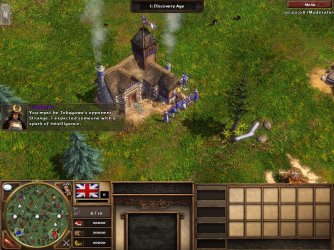
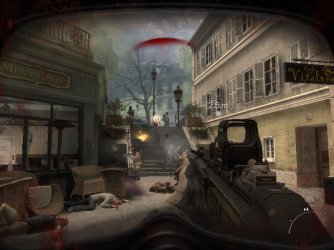
use freeware software like bandicam of fraps
i use that software to take this screenshot
 

Attachments

  • age3y 2011-10-31 06-29-21-172.jpg
    age3y 2011-10-31 06-29-21-172.jpg
    347.3 KB · Views: 21
  • iw5sp 2011-11-12 00-19-38-779.jpg
    iw5sp 2011-11-12 00-19-38-779.jpg
    93.5 KB · Views: 24

My Computer

Computer type
PC/Desktop
OS
windows 7 ultimate x86
CPU
core 2 duo e7500 @3.22Ghz (OC)
Motherboard
asus p5kpl-am se
Memory
4GB DDR2 @ 800MHz
Graphics Card(s)
HD 5570
Sound Card
onboard
Screen Resolution
1024*768
Case
power logic modena gtx2500
Keyboard
komic SR-K8860
Mouse
logitech
Internet Speed
400Kbps
Dear awang

Thank you very very much. I downloaded Bandicam as you said and it works fine on all my games. You are a true windows 7 expert. Now I can take screenshots of all my games:D. Just one last question: Is this program a freeware or do I have to buy it?
 

My Computer

Computer Manufacturer/Model Number
Plaisio computers
OS
Windows 7 Professional 64-bit
CPU
AMD Athlon II X4 640
Motherboard
Gigabyte GA-MA74GM-S2H (rev. 2.0)
Memory
4 GB
Graphics Card(s)
Gigabyte ATI Radeon HD 5670 1 GB GDDR-5, GV-R567OC-1GI
Sound Card
Onboard Realtek audio
Monitor(s) Displays
LG Flatron L1753S
Hard Drives
160 GB Seagate (SATA)
250 GB Western Digital (IDE)
PSU
700 W Thermaltake
Case
Chieftec
Cooling
None
Keyboard
Turbo-X standard black keyboard
Mouse
Logitech G400 gaming mouse
Internet Speed
8 Mbps
Dear awang

Thank you very very much. I downloaded Bandicam as you said and it works fine on all my games. You are a true windows 7 expert. Now I can take screenshots of all my games:D. Just one last question: Is this program a freeware or do I have to buy it?
don't mention it
this software is 100% free
the diferent premium and free version is when you record video there is no watermarks in top of it. i use free version since 2010 :geek:

sorry for my bad english :o
 

My Computer

Computer type
PC/Desktop
OS
windows 7 ultimate x86
CPU
core 2 duo e7500 @3.22Ghz (OC)
Motherboard
asus p5kpl-am se
Memory
4GB DDR2 @ 800MHz
Graphics Card(s)
HD 5570
Sound Card
onboard
Screen Resolution
1024*768
Case
power logic modena gtx2500
Keyboard
komic SR-K8860
Mouse
logitech
Internet Speed
400Kbps
Your English is fine. Where are you from may I ask?
 

My Computer

Computer Manufacturer/Model Number
Plaisio computers
OS
Windows 7 Professional 64-bit
CPU
AMD Athlon II X4 640
Motherboard
Gigabyte GA-MA74GM-S2H (rev. 2.0)
Memory
4 GB
Graphics Card(s)
Gigabyte ATI Radeon HD 5670 1 GB GDDR-5, GV-R567OC-1GI
Sound Card
Onboard Realtek audio
Monitor(s) Displays
LG Flatron L1753S
Hard Drives
160 GB Seagate (SATA)
250 GB Western Digital (IDE)
PSU
700 W Thermaltake
Case
Chieftec
Cooling
None
Keyboard
Turbo-X standard black keyboard
Mouse
Logitech G400 gaming mouse
Internet Speed
8 Mbps
Your English is fine. Where are you from may I ask?
Indonesia
i understand english language, but i'm not sure with my english both speaking and writing :o
 

My Computer

Computer type
PC/Desktop
OS
windows 7 ultimate x86
CPU
core 2 duo e7500 @3.22Ghz (OC)
Motherboard
asus p5kpl-am se
Memory
4GB DDR2 @ 800MHz
Graphics Card(s)
HD 5570
Sound Card
onboard
Screen Resolution
1024*768
Case
power logic modena gtx2500
Keyboard
komic SR-K8860
Mouse
logitech
Internet Speed
400Kbps
What language/s do you speak in Indonesia?
 

My Computer

Computer Manufacturer/Model Number
Plaisio computers
OS
Windows 7 Professional 64-bit
CPU
AMD Athlon II X4 640
Motherboard
Gigabyte GA-MA74GM-S2H (rev. 2.0)
Memory
4 GB
Graphics Card(s)
Gigabyte ATI Radeon HD 5670 1 GB GDDR-5, GV-R567OC-1GI
Sound Card
Onboard Realtek audio
Monitor(s) Displays
LG Flatron L1753S
Hard Drives
160 GB Seagate (SATA)
250 GB Western Digital (IDE)
PSU
700 W Thermaltake
Case
Chieftec
Cooling
None
Keyboard
Turbo-X standard black keyboard
Mouse
Logitech G400 gaming mouse
Internet Speed
8 Mbps
national language is "bahasa indonesia" but indonesia has 33 province and more than 659 traditional language
 

My Computer

Computer type
PC/Desktop
OS
windows 7 ultimate x86
CPU
core 2 duo e7500 @3.22Ghz (OC)
Motherboard
asus p5kpl-am se
Memory
4GB DDR2 @ 800MHz
Graphics Card(s)
HD 5570
Sound Card
onboard
Screen Resolution
1024*768
Case
power logic modena gtx2500
Keyboard
komic SR-K8860
Mouse
logitech
Internet Speed
400Kbps
What language does bahasa resemble? Chinese, Japanese, Korean?
 

My Computer

Computer Manufacturer/Model Number
Plaisio computers
OS
Windows 7 Professional 64-bit
CPU
AMD Athlon II X4 640
Motherboard
Gigabyte GA-MA74GM-S2H (rev. 2.0)
Memory
4 GB
Graphics Card(s)
Gigabyte ATI Radeon HD 5670 1 GB GDDR-5, GV-R567OC-1GI
Sound Card
Onboard Realtek audio
Monitor(s) Displays
LG Flatron L1753S
Hard Drives
160 GB Seagate (SATA)
250 GB Western Digital (IDE)
PSU
700 W Thermaltake
Case
Chieftec
Cooling
None
Keyboard
Turbo-X standard black keyboard
Mouse
Logitech G400 gaming mouse
Internet Speed
8 Mbps
none of them, bahasa is similiar like malaysia or singapore
 

My Computer

Computer type
PC/Desktop
OS
windows 7 ultimate x86
CPU
core 2 duo e7500 @3.22Ghz (OC)
Motherboard
asus p5kpl-am se
Memory
4GB DDR2 @ 800MHz
Graphics Card(s)
HD 5570
Sound Card
onboard
Screen Resolution
1024*768
Case
power logic modena gtx2500
Keyboard
komic SR-K8860
Mouse
logitech
Internet Speed
400Kbps
Back
Top