Problem with Adobe Flash

FrankP999

New member
Local time
12:04 PM
Messages
24
I have installed Adobe Flash in IE8 (32 bit) on my Win 7 Premium Home 64 bit system. Periodically I get messages from various web sites that I don't have Flash installed. If I re-install Flash that web site works but I later get prompted again to install Flash. It happens on numerous pages one example is the Finance graphs in Yahoo like L-3 COMM HLDGS INC Share Price Chart | LLL - Yahoo! Finance

I would any suggestions on this. I get tired of haing to install Flash over and over. I am downloading/installing Flash directly from Adobe so I presume I am getting the latest version every time.

Help please,

Frank
 

My Computer

OS
Windows 7 64 bit
CPU
Intel i940
Motherboard
ASUS P6T6 WS Revolution
Memory
12 GB
I have installed Adobe Flash in IE8 (32 bit) on my Win 7 Premium Home 64 bit system. Periodically I get messages from various web sites that I don't have Flash installed. If I re-install Flash that web site works but I later get prompted again to install Flash. It happens on numerous pages one example is the Finance graphs in Yahoo like L-3 COMM HLDGS INC Share Price Chart | LLL - Yahoo! Finance

I would any suggestions on this. I get tired of haing to install Flash over and over. I am downloading/installing Flash directly from Adobe so I presume I am getting the latest version every time.

Help please,

Frank

Hi Frank! Welcome to SevenForums! Which browser are you using when this happens?

ZeshanA
 
I am using InternetExplorer version 8 in 32 bit. My OS is Windows7 Home Premium 64 bit.

Frank
 

My Computer

OS
Windows 7 64 bit
CPU
Intel i940
Motherboard
ASUS P6T6 WS Revolution
Memory
12 GB

My Computer

Computer Manufacturer/Model Number
Samsung NP550P5C-S02IN
OS
Windows 7 Ultimate - 64-bit | Windows 8 Pro - 64-bit
CPU
Intel® Core™ i7 Processor 3,610QM (2.30Hz, 6MB L3 Cach
Memory
8 GB
Graphics Card(s)
NVIDIA® GeForce® GT 650M 2GB Graphics, Optimus™ techno
Sound Card
SoundAlive™ JBL 3 Speakers (With sub-Woofer)
Monitor(s) Displays
39.62cm (15.6) SuperBright 300nit HD+ LED Display
Screen Resolution
1,600 x 900, Anti-Reflective
Hard Drives
1TB S-ATA II Hard Drive (5,400RPM)
I am using InternetExplorer version 8 in 32 bit. My OS is Windows7 Home Premium 64 bit.

Frank

Hi Frank.

1.Type "Internet Options" into Start (No quotes) and press enter.

2. Click the "Programs" tab.

3. Click "Manage Add-Ons"

4. Under "Show", select "All Add-Ons"

5. Find Flash in the list. (IF FLASH ISN'T THERE THEN OPEN INTERNET EXPLORER, CLICK TOOLS, THEN CHOOSE INTERNET OPTIONS AND START FROM STEP 2.)

6. Right-Click and choose Enable.

If that doesn't work, try installing a different browser from here: http://www.sevenforums.com/browsers-mail/25307-4-popular-browsers.html

The problem may just be IE.

ZeshanA
 
I've had some issues with flash and IE 8 too.
In my particular situation, it worked to update Flash to version 10.1. This is a beta version that has to be secifically searched for. (it handles HD video better with certain nVidia cards...some ATI cards too, I think.)

Anyway, research your video card and Flash 10.1 a little. If it looks like this may help, then, here's Adobe's link to v. 10.1
Adobe Labs - Downloads: Flash Player 10.1

Good luck

btw, the yahoo page you linked to showed up fine in my broweser, IE8 w/7 64 bit.
 

My Computer

Computer Manufacturer/Model Number
Bumpus Did it!
OS
WIN7
CPU
Intel i7 920
Motherboard
Gigabyte EX58-UDR
Memory
6GB DDR3 Triple Channel
Graphics Card(s)
Nvidia 250 GTS
Sound Card
Realtek onboard
Monitor(s) Displays
Samsung 192n & 204b
Hard Drives
37gb WD Velociraptors (2) Raid 1 -
Seagate SATAII 1 tb -
WD SATAII 1tb -
WD SATAII Green 1.5tb
PSU
OCZ ModXStream Pro 600W
Case
Lian-Li V1000
Cooling
3 x 120mm
Keyboard
crap
Mouse
MS Intelimouse
Internet Speed
Uverse 12mbps
Other Info
TV (via Slingbox), Data backup & game box.

Hope it never blows up ;)
Thanks. I have done the uninstall then reinstall routine before and that did not help. I uninstalled again and this time reinstalled the beta version Bumpus mentioned. I will try it out andreport back.

Frank
 

My Computer

OS
Windows 7 64 bit
CPU
Intel i940
Motherboard
ASUS P6T6 WS Revolution
Memory
12 GB
Thanks. I have done the uninstall then reinstall routine before and that did not help. I uninstalled again and this time reinstalled the beta version Bumpus mentioned. I will try it out andreport back.

Frank

When you uninstall try the Abode Flash uninstaller as i mentioned in the earlier post
 

My Computer

Computer Manufacturer/Model Number
Samsung NP550P5C-S02IN
OS
Windows 7 Ultimate - 64-bit | Windows 8 Pro - 64-bit
CPU
Intel® Core™ i7 Processor 3,610QM (2.30Hz, 6MB L3 Cach
Memory
8 GB
Graphics Card(s)
NVIDIA® GeForce® GT 650M 2GB Graphics, Optimus™ techno
Sound Card
SoundAlive™ JBL 3 Speakers (With sub-Woofer)
Monitor(s) Displays
39.62cm (15.6) SuperBright 300nit HD+ LED Display
Screen Resolution
1,600 x 900, Anti-Reflective
Hard Drives
1TB S-ATA II Hard Drive (5,400RPM)
I have installed Adobe Flash in IE8 (32 bit) on my Win 7 Premium Home 64 bit system. Periodically I get messages from various web sites that I don't have Flash installed. If I re-install Flash that web site works but I later get prompted again to install Flash. It happens on numerous pages one example is the Finance graphs in Yahoo like L-3 COMM HLDGS INC Share Price Chart | LLL - Yahoo! Finance

I would any suggestions on this. I get tired of haing to install Flash over and over. I am downloading/installing Flash directly from Adobe so I presume I am getting the latest version every time.

Help please,

Frank

Frank,
Follow these steps for dealing with Adobe Flash Player problems.

1.To remove old versions you must use the appropriate uninstall tool -
How to uninstall the Adobe Flash Player plug-in and ActiveX control

2.Download the current version from here -
**Untick free Google Toolbar if you don't require it.**
Adobe - Adobe Flash Player

3 Validate installation here -
Version test for Adobe Flash Player

If you still have problems refer -
Flash Player Support FAQ

Flash Player Settings Manager.
Adobe - Flash Player : Settings Manager - Website Storage Settings panel

Hope that helps. Let us know how you go.
 

My Computer

Computer Manufacturer/Model Number
LAPTOP. HP Pavilion dv7-4010TX .
OS
Win 7 Ultimate 64-bit. SP1.
CPU
Intel i7 -720QM.[1.6GHz Turbo Boost 2.8GHz. 6MB Cache.]
Memory
8 DDR 3 RAM. 1066MHZ
Graphics Card(s)
ATI 1024 MB. DDR3. Radeon HD5650
Monitor(s) Displays
17.3" High Definition Brightview LCD. LED Backlit.
Screen Resolution
1600 x 900.
Hard Drives
640GB
Case
Laptop / notebook.
Mouse
Logitech Anywhere mouse. MX.
Internet Speed
ADSL [ but too slow ]
I still am having problems with Flash. I have used the above mentioned Adobe uninstaller to remove Flash followed by re-boot followed by re-installation of Flash. I have done this procedure (remove-reboot-reinstall) a dozen or more times. I continue to get messages that Flash is not installed when I browse to pages with Flash.

If anyone has other ideas why the Flash install does not "stick" I would appreciate your help. Thanks

Frank
 

My Computer

OS
Windows 7 64 bit
CPU
Intel i940
Motherboard
ASUS P6T6 WS Revolution
Memory
12 GB
FrankP999,
Refer this link taking careful note of
5. Troubleshoot other installation and viewing problems.

Troubleshoot Flash Player installation for Windows

Your Anti Virus Program could also be interfering. What are you using?
Did your computer have an anti virus program preinstalled?
 

My Computer

Computer Manufacturer/Model Number
LAPTOP. HP Pavilion dv7-4010TX .
OS
Win 7 Ultimate 64-bit. SP1.
CPU
Intel i7 -720QM.[1.6GHz Turbo Boost 2.8GHz. 6MB Cache.]
Memory
8 DDR 3 RAM. 1066MHZ
Graphics Card(s)
ATI 1024 MB. DDR3. Radeon HD5650
Monitor(s) Displays
17.3" High Definition Brightview LCD. LED Backlit.
Screen Resolution
1600 x 900.
Hard Drives
640GB
Case
Laptop / notebook.
Mouse
Logitech Anywhere mouse. MX.
Internet Speed
ADSL [ but too slow ]
FrankP999,
Refer this link taking careful note of
5. Troubleshoot other installation and viewing problems.

Troubleshoot Flash Player installation for Windows

Your Anti Virus Program could also be interfering. What are you using?
Did your computer have an anti virus program preinstalled?
I installed AVG anti-virus. I have never received a warning from AVG while instalking Flash or running Flash. Once I install Flash everything works for a while then all of a sudden I have to re-install because I get messages that Flash is not installed.

Thanks

Frank
 

My Computer

OS
Windows 7 64 bit
CPU
Intel i940
Motherboard
ASUS P6T6 WS Revolution
Memory
12 GB
Bump
 

My Computer

OS
Windows 7 64 bit
CPU
Intel i940
Motherboard
ASUS P6T6 WS Revolution
Memory
12 GB
Adobe Flash Beta

Frank, welcome to Windows 7 Support forums.
As with all beta software what you are experiencing are issue with the beta release. In addition to the 10.1 version there were debuggers and other software to install along with it to allow adobe to see what faults were crashing the player.
Some of the issues I observed were lag times, flash showing fault and appcrash and printer malfunction when trying to print from a web page.
So remove the beta version and D/L a previous non-beta version.
 

My Computer

Computer Manufacturer/Model Number
Custom Build
OS
Windows 7 7600 1 X64
CPU
AMD PHENOM II X 550 PROCESSOR 3.1 ghz
Motherboard
ASUS M4A78-TE
Memory
Corsair 4 gig ddr 3
Graphics Card(s)
ati radeon 3300
Sound Card
ati hd
Monitor(s) Displays
syncmaster 2033sw
Screen Resolution
1600X900 60 hz refresh
Hard Drives
twin_seagates SATA's 1 TB & 500 Gig, hitachi_slimline 160 gig
PSU
antec_550 watt
Case
cooler master GLite
Cooling
stock_heat sink
Internet Speed
20mbs up/ 1.5mbs down
Other Info
favorite child "stewie"
favorite dog "brian"
Frank, welcome to Windows 7 Support forums.
As with all beta software what you are experiencing are issue with the beta release. In addition to the 10.1 version there were debuggers and other software to install along with it to allow adobe to see what faults were crashing the player.
Some of the issues I observed were lag times, flash showing fault and appcrash and printer malfunction when trying to print from a web page.
So remove the beta version and D/L a previous non-beta version.

I thought 10.1 was a regular release not beta. What version should I install for Windows7?

Thanks

Frank
 

My Computer

OS
Windows 7 64 bit
CPU
Intel i940
Motherboard
ASUS P6T6 WS Revolution
Memory
12 GB

My Computer

Computer type
PC/Desktop
Computer Manufacturer/Model Number
Me
OS
Win 7 Ultimate x64
CPU
FX-8350 @ 4.6 GHz so far
Motherboard
Asus M5A97 EVO
Memory
ADATA XPG V1 Series Black 8GB DDR3 1600
Graphics Card(s)
Sapphire R9 270x Dual-X
Sound Card
Xonar DGX w/ Corsair Vengence 1300
Monitor(s) Displays
Acer S232HL Abid
Screen Resolution
1920x1080
Hard Drives
120 GB OCZ Vertex 3
500 GB Seagate 7200.12
PSU
Antec Earthwatts 650W Green
Case
Antec Three Hundred
Cooling
Cooler Master 212 EVO
Keyboard
Logitech G510
Mouse
Logitech G500s
Internet Speed
35000/3000

My Computer

Computer Manufacturer/Model Number
LAPTOP. HP Pavilion dv7-4010TX .
OS
Win 7 Ultimate 64-bit. SP1.
CPU
Intel i7 -720QM.[1.6GHz Turbo Boost 2.8GHz. 6MB Cache.]
Memory
8 DDR 3 RAM. 1066MHZ
Graphics Card(s)
ATI 1024 MB. DDR3. Radeon HD5650
Monitor(s) Displays
17.3" High Definition Brightview LCD. LED Backlit.
Screen Resolution
1600 x 900.
Hard Drives
640GB
Case
Laptop / notebook.
Mouse
Logitech Anywhere mouse. MX.
Internet Speed
ADSL [ but too slow ]
I removed Flash using the Adobe utility. I installed 10.0.42.34

I still have the problem.

Frank
 

My Computer

OS
Windows 7 64 bit
CPU
Intel i940
Motherboard
ASUS P6T6 WS Revolution
Memory
12 GB
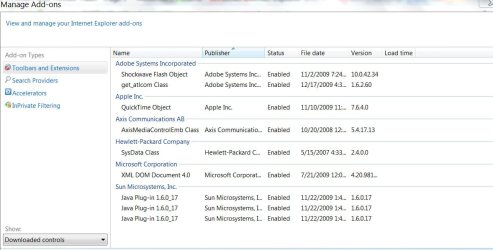
Frank, can we see your addins in the tools section of IE?
This is what we want to see.
 

Attachments

  • add.jpg
    add.jpg
    95.4 KB · Views: 32

My Computer

Computer Manufacturer/Model Number
Custom Build
OS
Windows 7 7600 1 X64
CPU
AMD PHENOM II X 550 PROCESSOR 3.1 ghz
Motherboard
ASUS M4A78-TE
Memory
Corsair 4 gig ddr 3
Graphics Card(s)
ati radeon 3300
Sound Card
ati hd
Monitor(s) Displays
syncmaster 2033sw
Screen Resolution
1600X900 60 hz refresh
Hard Drives
twin_seagates SATA's 1 TB & 500 Gig, hitachi_slimline 160 gig
PSU
antec_550 watt
Case
cooler master GLite
Cooling
stock_heat sink
Internet Speed
20mbs up/ 1.5mbs down
Other Info
favorite child "stewie"
favorite dog "brian"
This shows the add ons as requested. Thanks

Frank
 

Attachments

  • ScreenHunter_02 Jan. 13 08.24.jpg
    ScreenHunter_02 Jan. 13 08.24.jpg
    69.5 KB · Views: 24

My Computer

OS
Windows 7 64 bit
CPU
Intel i940
Motherboard
ASUS P6T6 WS Revolution
Memory
12 GB
Back
Top