Problem with Com Port Windows 7 Professional

AlCatt

New member
Local time
9:05 PM
Messages
4
Hi I've read previous posts about this but I cannot find a way to add the Com Port to my windows 7 Professional PC. I've been to device manger, hardware manager, etc. I've tried to 'view' all devices, etc.
I have no Com or LTP listings and cannot find a way to 'add' a device as suggested to manually add the COM or LTP port. My issue is that I am trying to read a device that has USB input. The software in the device has a way to change the number of the COM Port. I have tried every number from 1 to 25 with no luck. I have not changed the BIOS, as some of the posts referred to. I would not know how to do that without instructions.
Can someone suggest a fix please?
Thanks in advance.
AlCatt
 

My Computer

OS
windows 7 professional
...and one more detail about Com Port trouble

I also chose "show hidden devices" while in the device manager and still no evidence of COM or LTP
 

My Computer

OS
windows 7 professional
COM port and LPT missing

Any LPT (printer port) will be a female DB25 on the back of your PC. If you have a physical serial port it will be a male 9 pin DB9 connector on the back of the PC. If you never used either of these in the past and they are physically on the back of your PC, then it's a good chance they may be disabled in the system BIOS of your motherboard.
 

My Computer

Computer type
PC/Desktop
Computer Manufacturer/Model Number
custom build
OS
Windows 7 PRO 64-bit SP1
CPU
Intel Core 2 Qual Q6600 @ 2.40 Ghz
Motherboard
Abit IP35 PRO (P35+ICH9R) Socket 775
Memory
8.00 GB Dual Channel DDR2 @ 407 Mhz
Graphics Card(s)
Nvidia GeForce 8500 GT (PNY)
Hard Drives
931 GB Seagate ST1000DM003-9YN162 ATA Device (SATA)
465 GB Western Digital WDC WD5000AACS-00ZUB0 ATA Device (SATA)
Antivirus
Kaspersky Internet Security
Browser
IE11.0.9600.17420
Hi I've read previous posts about this but I cannot find a way to add the Com Port to my windows 7 Professional PC. I've been to device manger, hardware manager, etc. I've tried to 'view' all devices, etc.
I have no Com or LTP listings and cannot find a way to 'add' a device as suggested to manually add the COM or LTP port. My issue is that I am trying to read a device that has USB input. The software in the device has a way to change the number of the COM Port. I have tried every number from 1 to 25 with no luck. I have not changed the BIOS, as some of the posts referred to. I would not know how to do that without instructions.
Can someone suggest a fix please?
Thanks in advance.
AlCatt

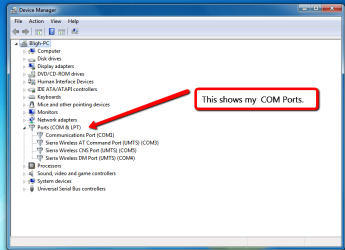
Have you loaded the necessary driver for this COM Port. You may need to go to their website to find the right driver. With the correct driver installed the device should show up under Ports (COM & LPT) in device manager, see screen shot. All devices shown in the screen shot are USB connected.

Device_Manager_showing_COM_Ports..png
 

My Computer

Computer type
PC/Desktop
Computer Manufacturer/Model Number
Self built using existing case
OS
Windows 7 Home Premium 64 bit sp1
CPU
Intel i5 3570 3.4Ghz Ivy Bridge SKT 1155 quad core
Motherboard
Gigabyte Z77-HD3 SKT 1155 2xSata 3, 4x USB 3.0
Memory
G-Skill Rip Jaws 16Gb (8x2) DDR3 -1600 PC3 12800 CL 10 red
Graphics Card(s)
Gigabyte NVIDIA GT610 1Gb DDR3 810/1200 PCI-E 2.0 Silent
Sound Card
NVIDIA High Definition & Realtech High Definition Audio
Monitor(s) Displays
2 x Philips 226V4L 16:9 aspect ratio
Screen Resolution
1920 x 1080 HD
Hard Drives
Samsung 840 Pro 256gb SSD, SATA 3.
Hitachi Touro Portable 1tb, USB 3.0 HDD used for image b/ups.
PSU
Corsair VS450
Case
Codeng
Cooling
PSU fan & CPU fan
Keyboard
Logitech
Mouse
Logitech Wireless trackball M570
Internet Speed
Wireless 3G. 3mg down & 550kb up.
Antivirus
Bitdefender Internet Security 2020
Browser
Opera (Current Version) & Firefox
Other Info
MS Office 2013 Pro. Davis weather station software. MGE Nova 600 avr UPS.
Hi and thanks for your response. Yes I have a serial port, but I also have an HDMI and 3 USB ports. None of which are shown in the device manager hierarchy as your photo shows. So there is no "Ports" category when I open the device manager. Can you tell me how to view the BIOS ? Maybe by viewing that I can get somewhere with this.
AlCatt
 

My Computer

OS
windows 7 professional
Getting into Bios

Many motherboards use the Delete key to gain entrance to the Bios listings. Depending on how fast your machine is this might be tricky. Most PCs when they boot up show some text on the screen as the machine begins to boot up. Most will show what key sequence that is used to enter the bios. You must hit that key during this process (maybe a couple of times) to make sure the key press was noticed by the machine. But if a machine is really fast, that stuff goes by so fast its like blinking of your eye! If you have a manual for your Mobo (motherboard) or your whole PC that information is in their manual. If you do not have this info you can download it from the motherboard manufacturer. Note: if you get into the Bios be very careful moving around. Most standard bios programs have the ability to set the bios setting back to the default settings if you make a mistake and set the wrong thing. Just get back in the bios and put things back by selecting the default settings. That usually will get you back to using the computer again. Sorry it took me so long to get back to you. I will check again later tonight.
 

My Computer

Computer type
PC/Desktop
Computer Manufacturer/Model Number
custom build
OS
Windows 7 PRO 64-bit SP1
CPU
Intel Core 2 Qual Q6600 @ 2.40 Ghz
Motherboard
Abit IP35 PRO (P35+ICH9R) Socket 775
Memory
8.00 GB Dual Channel DDR2 @ 407 Mhz
Graphics Card(s)
Nvidia GeForce 8500 GT (PNY)
Hard Drives
931 GB Seagate ST1000DM003-9YN162 ATA Device (SATA)
465 GB Western Digital WDC WD5000AACS-00ZUB0 ATA Device (SATA)
Antivirus
Kaspersky Internet Security
Browser
IE11.0.9600.17420
Thanks again for the reply. I will try to get in to the bios as soon as possible. However, this Toshiba laptop, although just 5 months old, has decided to have faults in the keyboard. Both shift keys, all return keys, backspace and esc keys have decided to quit. So it has to go back to Toshiba for warranty for warranty work tomorrow. It will be gone for about 10 days , I assume, so I will try view the bios when it comes back. I will resume this then, in the meantime.. thanks!
AlCatt
 

My Computer

OS
windows 7 professional
Back
Top