Problem with my microphone

radiofreak

New member
Local time
4:03 AM
Messages
4
Hi everyone,

I worked for a long time with Windows XP.
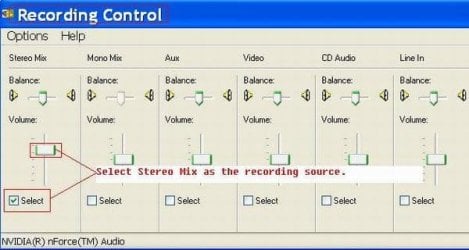
I used this computer for podcast recording:
- Windows XP
- Input: Stereo-Mix
Now, I have a new computer, Windows 7 Ultimate 32bit.
When I plug my microphone in my computer and start Audacity,
the sound is very bad. It's the same problem for other Windows 7 computers...
- Windows 7
- Input: Microphone

Does someone know how I can solve this problem?
 

Attachments
  • swf-to-ipod-4.jpg
    swf-to-ipod-4.jpg
    29.9 KB · Views: 15

My Computer

Computer Manufacturer/Model Number
Medion MD 96640
OS
Windows 7
Memory
320GB
Graphics Card(s)
NVIDIA® GeForce® 9300M G
Sound Card
Realtek High Definition Audio
Screen Resolution
1680 x 1050
Hard Drives
2 Hard Drives
Hi radiofreak and welcome to Windows 7 Forums :party:

It would help us to help you if we knew what soundcard you were using . Is it separate, or is it built in to the motherboard?. Can you please fill in your System Specs (see mine, at the foot of this post, for an example of what we need).
 

My Computer

Computer type
PC/Desktop
Computer Manufacturer/Model Number
Dwarf Dwf/11/2012 r09/2013
OS
Windows 8.1 Pro RTM x64
CPU
Intel Core-i5-3570K 4-core @ 3.4GHz (Ivy Bridge) (OC 4.4GHz)
Motherboard
ASRock Z77 Extreme4-M
Memory
4 x 4GB DDR3-1600 Corsair Vengeance CMZ8GX3M2A1600C9B (16GB)
Graphics Card(s)
MSI GeForce GTX770 Gaming OC 2GB
Sound Card
Realtek High Definition on board solution (ALC 898)
Monitor(s) Displays
ViewSonic VA1912w Widescreen (VGA)
Screen Resolution
1440x900
Hard Drives
OCZ Agility 3 SSD 120GB SATA III x2 (RAID 0)
Samsung HD501LJ 500GB SATA II x2
Hitachi HDS721010CLA332 1TB SATA II
Iomega 1.5TB Ext USB 2.0
WD 2.0TB Ext USB 3.0
PSU
XFX Pro Series 850W Semi-Modular
Case
Gigabyte IF233
Cooling
1 x 120mm Front Inlet 1 x 120mm Rear Exhaust
Keyboard
Microsoft Comfort Curve Keyboard 3000 (USB)
Mouse
Microsoft Comfort Mouse 3000 for Business (USB)
Internet Speed
NetGear DG834Gv3 ADSL Modem/Router (Ethernet) ~4.0 Mb/s (O2)
Antivirus
Avast! 8.0.1497
Browser
IE 11
Other Info
Optical Drive: HL-DT-ST BD-RE BH10LS30 SATA Bluray
Lexmark S305 Printer/Scanner/Copier (USB)
WEI Score: 8.1/8.1/8.5/8.5/8.25
Asus Eee PC 1011PX Netbook (Windows 7 x86 Starter)
First can you post your system specs so we can see what we're working with. You will find the options in the bottom left of your post, my system specs..

Second have you updated your drivers?
 

My Computer

Computer Manufacturer/Model Number
Custom Build.
OS
Windows 7 Ultimate x64.
CPU
i5 760 @ 4.2Ghz. 1.18v
Motherboard
Gigabyte - H55M-USB3
Memory
4g Corsair xms3 ddr3, 1600Mhz.
Graphics Card(s)
Gigabyte GTX-560Ti soc edition
Sound Card
Asus Xonar Dx - Logitech Z5500.
Monitor(s) Displays
Acer 22" LCD Wide screen 1680-1050 -Samsung 42" Plasma....
Screen Resolution
1680/1050 -----1920/1080p.
Hard Drives
2x 2TB Seagate Go Flex,
1x 1TB Seagate,
1x 640WD Black,
x16 Gig sandisc flash drive,
1x8Gig sandisc flash drive.
PSU
XigmaTek 80plus NRP-PC702 - 700w dual 30a.
Case
Venus Gamers Midi Tower Case with LED Display
Cooling
Arctic Freezer 7 Pro Rev 2... x2 Arctic F8 case fans........
Keyboard
Logitech G15-v2 Gaming.
Mouse
Microsoft Sidewinder X8.
Internet Speed
Virgin Media - 50mb down- 8mb up.
Other Info
x2 Xbox 360 wireless controllers...

Dual layer optical disc drive...

Chrome 79million

A.V = MSE
Now my System Specs are updated...
Second have you updated your drivers?
Yes, I did, my drivers are updated...
 

My Computer

Computer Manufacturer/Model Number
Medion MD 96640
OS
Windows 7
Memory
320GB
Graphics Card(s)
NVIDIA® GeForce® 9300M G
Sound Card
Realtek High Definition Audio
Screen Resolution
1680 x 1050
Hard Drives
2 Hard Drives
Thanks for that. I assume that you are using the R2.49 driver version.

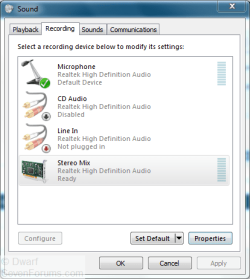
Right-click the speaker icon in the notification area and select the Recording devices option.
Capture.PNG
If you don't see all of the input options, right-click on the dialogue panel and ensure that the options Show Disabled Devices and Show Disconnected Devices are both enabled.
 

My Computer

Computer type
PC/Desktop
Computer Manufacturer/Model Number
Dwarf Dwf/11/2012 r09/2013
OS
Windows 8.1 Pro RTM x64
CPU
Intel Core-i5-3570K 4-core @ 3.4GHz (Ivy Bridge) (OC 4.4GHz)
Motherboard
ASRock Z77 Extreme4-M
Memory
4 x 4GB DDR3-1600 Corsair Vengeance CMZ8GX3M2A1600C9B (16GB)
Graphics Card(s)
MSI GeForce GTX770 Gaming OC 2GB
Sound Card
Realtek High Definition on board solution (ALC 898)
Monitor(s) Displays
ViewSonic VA1912w Widescreen (VGA)
Screen Resolution
1440x900
Hard Drives
OCZ Agility 3 SSD 120GB SATA III x2 (RAID 0)
Samsung HD501LJ 500GB SATA II x2
Hitachi HDS721010CLA332 1TB SATA II
Iomega 1.5TB Ext USB 2.0
WD 2.0TB Ext USB 3.0
PSU
XFX Pro Series 850W Semi-Modular
Case
Gigabyte IF233
Cooling
1 x 120mm Front Inlet 1 x 120mm Rear Exhaust
Keyboard
Microsoft Comfort Curve Keyboard 3000 (USB)
Mouse
Microsoft Comfort Mouse 3000 for Business (USB)
Internet Speed
NetGear DG834Gv3 ADSL Modem/Router (Ethernet) ~4.0 Mb/s (O2)
Antivirus
Avast! 8.0.1497
Browser
IE 11
Other Info
Optical Drive: HL-DT-ST BD-RE BH10LS30 SATA Bluray
Lexmark S305 Printer/Scanner/Copier (USB)
WEI Score: 8.1/8.1/8.5/8.5/8.25
Asus Eee PC 1011PX Netbook (Windows 7 x86 Starter)
OK, right-click, options, and now?
 

My Computer

Computer Manufacturer/Model Number
Medion MD 96640
OS
Windows 7
Memory
320GB
Graphics Card(s)
NVIDIA® GeForce® 9300M G
Sound Card
Realtek High Definition Audio
Screen Resolution
1680 x 1050
Hard Drives
2 Hard Drives
Assuming that you have the dialogue panel displayed as above, right-click on the input option that you wish to modify and then click Enable on the menu that appears. You might also need to click on Properties to change things such as levels and enhancements for the device.
 

My Computer

Computer type
PC/Desktop
Computer Manufacturer/Model Number
Dwarf Dwf/11/2012 r09/2013
OS
Windows 8.1 Pro RTM x64
CPU
Intel Core-i5-3570K 4-core @ 3.4GHz (Ivy Bridge) (OC 4.4GHz)
Motherboard
ASRock Z77 Extreme4-M
Memory
4 x 4GB DDR3-1600 Corsair Vengeance CMZ8GX3M2A1600C9B (16GB)
Graphics Card(s)
MSI GeForce GTX770 Gaming OC 2GB
Sound Card
Realtek High Definition on board solution (ALC 898)
Monitor(s) Displays
ViewSonic VA1912w Widescreen (VGA)
Screen Resolution
1440x900
Hard Drives
OCZ Agility 3 SSD 120GB SATA III x2 (RAID 0)
Samsung HD501LJ 500GB SATA II x2
Hitachi HDS721010CLA332 1TB SATA II
Iomega 1.5TB Ext USB 2.0
WD 2.0TB Ext USB 3.0
PSU
XFX Pro Series 850W Semi-Modular
Case
Gigabyte IF233
Cooling
1 x 120mm Front Inlet 1 x 120mm Rear Exhaust
Keyboard
Microsoft Comfort Curve Keyboard 3000 (USB)
Mouse
Microsoft Comfort Mouse 3000 for Business (USB)
Internet Speed
NetGear DG834Gv3 ADSL Modem/Router (Ethernet) ~4.0 Mb/s (O2)
Antivirus
Avast! 8.0.1497
Browser
IE 11
Other Info
Optical Drive: HL-DT-ST BD-RE BH10LS30 SATA Bluray
Lexmark S305 Printer/Scanner/Copier (USB)
WEI Score: 8.1/8.1/8.5/8.5/8.25
Asus Eee PC 1011PX Netbook (Windows 7 x86 Starter)
I think, the problem is solved. The problem lies with the Tube MP that gives only a Mono signal instead of a stereo signal.
lg_tubemp.jpg

You can see on top of the mixer, Input and Output:
Input is an XLR cable
Output is with 1 Mini-jack cable from Output to Microphone-Input on my laptop.
 
Last edited:

My Computer

Computer Manufacturer/Model Number
Medion MD 96640
OS
Windows 7
Memory
320GB
Graphics Card(s)
NVIDIA® GeForce® 9300M G
Sound Card
Realtek High Definition Audio
Screen Resolution
1680 x 1050
Hard Drives
2 Hard Drives
I have a problem with my microphone. I am using windows 7 with realtek audio drivers. I even rolled back my drivers and the problem still persisted. I am using Fruity loops to record a track but the only microphone that seems to be working is the one in the speakers of my lap top. When I attach a microphone I hear a small click or bumb in my headphones. There is then a slight wistle then the audio drops. I then hear nothing. i can't seem to find the problem as I have checked all the volumes and made sure nothing is muted. I need help.
 
Last edited:

My Computer

Computer Manufacturer/Model Number
Toshiba Ld 300 D
OS
windows 7
Back
Top