Solved Problem with reinstalling windows 7 starter on a netbook

pkrplyr

New member
Local time
5:42 PM
Messages
7
Hello,

I have a Toshiba NB 255 Netbook. I had decided to install another operating system (Linux) and now have come to the conclusion that I no longer want both windows and linux on my system. I want to go back to just using windows 7. Its windows 7 starter edition. I have literally tried other methods to do this for countless and pointless hours coming to the conclusion I would rather format my hard drive and reinstall windows.

Now here is the problem.

I have a netbook which does not come with a cd drive; nor do I have an external.

I have actually figured out how to make a boot module from a usb/flash drive.

The problem is I do not know how to or where to obtain an ISO for windows 7 starter edition.

I do have the serial key for windows 7 starter located on the bottom of my netbook.

Finally which really ticks me off is when I bought my netbook I have now come to realize that it did or DOES NOT HAVE A RECOVERY PARTITION.


Any advice on how I can reinstall windows 7 starter with hard drive formatting?

Thank You

P.S. my product key is OEM
 

My Computer

Computer Manufacturer/Model Number
Toshiba NB 255 Netbook
OS
windows 7 starter for netbook
CPU
Intel Atom
Memory
1 gigabite
Hello pkrplyr, welcome to Seven Forums!


You can use any version of Windows 7 and the info in this tutorial at the link below to create an 'all versions' installer that can be used to install "Windows 7 starter" to the netbook and use your key to activate.

Windows 7 Universal Installation Disc - Create

USB Windows 7 Installation Key Drive - Create


The first best thing to do would be a wipe (secure erase) of the Hard Disk Drive, after you have made backups of anything you want to save, this will give you the best possible space to install Windows 7 to while removing all the old Linux code.

SSD / HDD : Optimize for Windows Reinstallation
 

My Computer

Computer Manufacturer/Model Number
* BFK Customs *
OS
W 7 64-bit Ultimate
CPU
Intel Q9550 Yorkfield
Motherboard
ASUS P5Q Pro
Memory
8GB Dominator 8500C5D
Graphics Card(s)
ATI : XFX 5870
Sound Card
Realtek HD Audio 7-1
Monitor(s) Displays
1x 47" LCD HDMI & 3x 26" LCD HDMI
Screen Resolution
1920x1080P & 1920x1200
Hard Drives
1x 80GB Intel X25-M G2 SSD : 1x 500GB & 1x 640GB WD Caviar Black(s)
PSU
Corsair 620HX
Case
Cooler Master RC-690
Cooling
Tuniq Tower 120, 2x 140mm and 3x 120mm case fans
Keyboard
Microsoft 500
Mouse
Razer Diamondback 3G
Internet Speed
14 Mb/s
Other Info
1x Koutech 3Gb/s SATA HDD Hot Swap Rack
Hi pk,

If you know anyone with an install dvd - you can use that to do as BFK suggested above.

No recovery is odd - I was under the impression oem's have to provide a means of recovering the o/s as part of their license with MS.

Perhaps that doesn't apply to the tiny things like netbooks.

Anybody else got a netbook with no os recovery method?
 

My Computers

System One System Two

  • Computer type
    PC/Desktop
    OS
    7 X64
    CPU
    i5 8400
    Motherboard
    gigabyte b365m ds3h
    Memory
    2x8gb 3200mhz
    Hard Drives
    various
    PSU
    pure power 11 400w cm
    Case
    Coolermaster
    Cooling
    cryorig m9i
  • Computer type
    PC/Desktop
    OS
    7x64
    CPU
    g5400
    Motherboard
    ga b365m ds3h
    Memory
    8gb ddr4 2400
    PSU
    xfx pro 450w
Normally if the netbook it too small to comfortably include a Recov partition, the manufacturer will either provide disks with purchase or will ship them free if requested within a prescribed time limit. Otherwise they charge shipping.

Your best choice however is to wipe the HD to go completely clean with a clean install using the methods suggested earlier. This is a much better install as the bloatware and useless factory utilities don't weigh down Win7 so it can be as light as your netbook.

Here are some tips for a perfect install: http://www.sevenforums.com/installation-setup/125874-re-install-windows-7-a.html#post1086729
 
Update on reinstallation windows 7 for netbook

I realized I cant make a usb/flash without the iso. I could not find a windows 7 starter ISO so I read the how to make a universal disk. With my dismay I thought I could skip the editing ISO to make universal. The usb does work i just realized when i entered my product key it wouldnt take because it installed windows 7 premium.

So when I edit the ISO to make it universal will a screen pop up letting me choose which version of windows i want to install?
 

My Computer

Computer Manufacturer/Model Number
Toshiba NB 255 Netbook
OS
windows 7 starter for netbook
CPU
Intel Atom
Memory
1 gigabite
Yes, exactly. Just run this tool on the ISO and it will surgically remove ei.cfg from Sources and unlock all versions: Ei.cfg Removal Utility Lets You Use Any Product Key With Your Windows 7 Disc

Then write it back to flash stick. The method I find which works best to do this is Ultra ISO trial version: Open ISO on File tab, Write Disk Image on Bootable Tab, Format, Write.

Be sure to wipe the HD of all factory code using BFK's tutorial linked earlier.
 
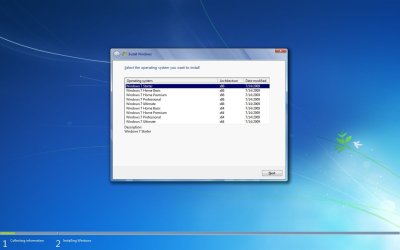
Like this :D
 

Attachments

  • All_In_One_Win7_DVD.jpg
    All_In_One_Win7_DVD.jpg
    62.4 KB · Views: 415

My Computer

Computer type
PC/Desktop
Computer Manufacturer/Model Number
Built them myself, Science Experiments !
OS
Win7 Enterprise, Win7 x86 (Ult 7600), Win7 x64 Ult 7600, TechNet RTM on AMD x64 (2.8Ghz)
CPU
AMD fx8350 4ghz, AMD-32 2400mhz, AMD-64 3200mhz, AMDx64 2.8G
Motherboard
SIS 755, ECS-K8M890M-M (Ult 7600), GigaByte & others
Memory
2gb, 4gb on the Ult 7600, 4gb on Technet RTM, 32gb on FX8350
Graphics Card(s)
Draw my own Graphics, several nVidia cards
Sound Card
on motherboard
Monitor(s) Displays
19" flat scr, 28" I-Inc widescr,22" Emprex Widescr, 23" Acer
Screen Resolution
1280 x 1024, 1440 x 900, 1920 x 1080
Hard Drives
6 pata Ide HD's & 2 Sata HD's
added 80gb external on Ult 7600 computer,
numerous extra 1tb, 2TB, 3Tb SATA HD's
A collection of ext HD Docks w/ HDs
PSU
430w, 550w, 600w, 700, 800, etc
Case
All Generic Full Towers
Cooling
Open Air & a few fans, some w/ colored LEDs
Keyboard
Compaq & Dell recycled from GoodWill
Mouse
Made in China Optical Wired Mouse
Internet Speed
Fast Cable InterNet
Antivirus
AVG Free on 24 different Desktops, NO Problems!
Browser
IE 8 is preferred, but use FireFox sometimes
Other Info
Linksys Routers, switches, & Hubs
Too Many USB Flash Drives to count, Biggest is 64GB !
Eight computers in my home network.
Sixteen computers at my business network.
Linked via TeamViewer !
Lots of old used spare computer parts everywhere!
Just so you know, you don't have to edit the ISO file. If you want you can just delete the ei.cfg file in the sources folder on your thumbdrive. Then try your install again.
 

My Computer

Computer type
PC/Desktop
Computer Manufacturer/Model Number
Home Built
OS
Windows 10 Education 64 bit
CPU
AMD Phenom II X4 980 Black Edition Deneb 3.7GHz
Motherboard
Asus M4N68T-M V2 µATX Motherboard
Memory
8GB 4GBx2 Kingston PC10600 DDR3 1333 Memory
Graphics Card(s)
Zotac NVIDIA Geforce GT640 2 Gig DDR3 PCIe
Sound Card
VIA VT1708s High Definition Audio 8-channel Onboard
Monitor(s) Displays
22" LG E2242 1080p and 2 19" I-INC AG191D
Screen Resolution
1280x1024 - 1920x1080 - 1280x1024
Hard Drives
Crucial M100 256 GB SSD and 500 GB WD Blue SATA
PSU
Thermaltake TR 620
Case
Power Up Black ATX Mid-Tower Case
Cooling
Stock heatsink and fan
Keyboard
Logitech Wireless K350 Wave
Mouse
Logitech Wireless M570 Trackman Wheel
Internet Speed
80 Mbps Down 30 Mbps Up
Antivirus
Windows Defender
Browser
Internet Explorer 11
Other Info
HP DVD1040e Lightscribe - External USB2
Thank You guys. It took me about 4 hours but everything is working like a charm.

I had some confusion with the ISO extractor but I found that if I just deleted the ei.cfg file from the usb flash drive it worked.

Again Thank You and Happy Thanksgiving.
 

My Computer

Computer Manufacturer/Model Number
Toshiba NB 255 Netbook
OS
windows 7 starter for netbook
CPU
Intel Atom
Memory
1 gigabite
Congrats on learning something new & a successful installation :D
 

My Computer

Computer type
PC/Desktop
Computer Manufacturer/Model Number
Built them myself, Science Experiments !
OS
Win7 Enterprise, Win7 x86 (Ult 7600), Win7 x64 Ult 7600, TechNet RTM on AMD x64 (2.8Ghz)
CPU
AMD fx8350 4ghz, AMD-32 2400mhz, AMD-64 3200mhz, AMDx64 2.8G
Motherboard
SIS 755, ECS-K8M890M-M (Ult 7600), GigaByte & others
Memory
2gb, 4gb on the Ult 7600, 4gb on Technet RTM, 32gb on FX8350
Graphics Card(s)
Draw my own Graphics, several nVidia cards
Sound Card
on motherboard
Monitor(s) Displays
19" flat scr, 28" I-Inc widescr,22" Emprex Widescr, 23" Acer
Screen Resolution
1280 x 1024, 1440 x 900, 1920 x 1080
Hard Drives
6 pata Ide HD's & 2 Sata HD's
added 80gb external on Ult 7600 computer,
numerous extra 1tb, 2TB, 3Tb SATA HD's
A collection of ext HD Docks w/ HDs
PSU
430w, 550w, 600w, 700, 800, etc
Case
All Generic Full Towers
Cooling
Open Air & a few fans, some w/ colored LEDs
Keyboard
Compaq & Dell recycled from GoodWill
Mouse
Made in China Optical Wired Mouse
Internet Speed
Fast Cable InterNet
Antivirus
AVG Free on 24 different Desktops, NO Problems!
Browser
IE 8 is preferred, but use FireFox sometimes
Other Info
Linksys Routers, switches, & Hubs
Too Many USB Flash Drives to count, Biggest is 64GB !
Eight computers in my home network.
Sixteen computers at my business network.
Linked via TeamViewer !
Lots of old used spare computer parts everywhere!
Glad you got it going! hang on to that USB! Its as good as gold! I love mine! multi version and both 32 and 64 bit installs available too! Its a nice toold, and installs are so fast compared to DVD!
 

My Computer

Computer Manufacturer/Model Number
Homebrew PC - "Alpha_Dawg"
OS
Windows 7 Ultimate 64 bit Steve Ballmer Signature Edition
CPU
Intel Core 2 Quad - Q9550 - 2.83GHz stock - OC'd to 3.6GHz
Motherboard
Gigabyte EP45-UD3P
Memory
4GB DDR2 800MHz (PC6400) OCZ Reaper
Graphics Card(s)
Nvidia GE Force 8800 GTS
Sound Card
Asus Xonar DX
Monitor(s) Displays
Samsung SyncMaster 2333HD
Screen Resolution
1920 x 1080
Hard Drives
WD Caviar Black 750GB - 7200RPM - 32MB cache
WD Caviar Green 1.5TB - 5400RPM - 64MB cache
WD Caviar Green 2.0TB - 5400RPM - 64MB cache
PSU
PC Power & Cooling Silencer 750
Case
Gigabyte 3D Aurora
Cooling
Case is Air - 5ea. 120mm fans (mix of Arctic and Xigmatec)
Keyboard
MS Natural Wireless KB
Mouse
MS Wireless Mouse
Internet Speed
50 mbps down/5 mbps up
Other Info
AVerMedia - AVerTVHD G2 Dual Tuner Card
Thank You guys. It took me about 4 hours but everything is working like a charm.

I had some confusion with the ISO extractor but I found that if I just deleted the ei.cfg file from the usb flash drive it worked.

Again Thank You and Happy Thanksgiving.


Hello again, you're welcome and happy turkey-day; good to see you got it running and thanks for the update.
 

My Computer

Computer Manufacturer/Model Number
* BFK Customs *
OS
W 7 64-bit Ultimate
CPU
Intel Q9550 Yorkfield
Motherboard
ASUS P5Q Pro
Memory
8GB Dominator 8500C5D
Graphics Card(s)
ATI : XFX 5870
Sound Card
Realtek HD Audio 7-1
Monitor(s) Displays
1x 47" LCD HDMI & 3x 26" LCD HDMI
Screen Resolution
1920x1080P & 1920x1200
Hard Drives
1x 80GB Intel X25-M G2 SSD : 1x 500GB & 1x 640GB WD Caviar Black(s)
PSU
Corsair 620HX
Case
Cooler Master RC-690
Cooling
Tuniq Tower 120, 2x 140mm and 3x 120mm case fans
Keyboard
Microsoft 500
Mouse
Razer Diamondback 3G
Internet Speed
14 Mb/s
Other Info
1x Koutech 3Gb/s SATA HDD Hot Swap Rack
Windows 7 now claiming to be counterfeit

About a month ago I fixed my laptop (netbook) through this tutorial. Now recently windows is saying I may be running a counterfeit version but the serial key I am using for windows 7 is the key I had and have since I purchased this netbook.

Could this have anything to do with the way windows was installed?

How can I fix this problem if the windows serial number is actually mine and not counterfeit?
 

My Computer

Computer Manufacturer/Model Number
Toshiba NB 255 Netbook
OS
windows 7 starter for netbook
CPU
Intel Atom
Memory
1 gigabite
Hello pkrplyr.


You will have better success starting a completely new thread, click here to do so and be very specific listing all the details of your situation.


About a month ago I fixed my laptop (netbook) through this tutorial. Now recently windows is saying I may be running a counterfeit version but the serial key I am using for windows 7 is the key I had and have since I purchased this netbook.

Could this have anything to do with the way windows was installed?

How can I fix this problem if the windows serial number is actually mine and not counterfeit?
 

My Computer

Computer Manufacturer/Model Number
* BFK Customs *
OS
W 7 64-bit Ultimate
CPU
Intel Q9550 Yorkfield
Motherboard
ASUS P5Q Pro
Memory
8GB Dominator 8500C5D
Graphics Card(s)
ATI : XFX 5870
Sound Card
Realtek HD Audio 7-1
Monitor(s) Displays
1x 47" LCD HDMI & 3x 26" LCD HDMI
Screen Resolution
1920x1080P & 1920x1200
Hard Drives
1x 80GB Intel X25-M G2 SSD : 1x 500GB & 1x 640GB WD Caviar Black(s)
PSU
Corsair 620HX
Case
Cooler Master RC-690
Cooling
Tuniq Tower 120, 2x 140mm and 3x 120mm case fans
Keyboard
Microsoft 500
Mouse
Razer Diamondback 3G
Internet Speed
14 Mb/s
Other Info
1x Koutech 3Gb/s SATA HDD Hot Swap Rack
About a month ago I fixed my laptop (netbook) through this tutorial. Now recently windows is saying I may be running a counterfeit version but the serial key I am using for windows 7 is the key I had and have since I purchased this netbook.

Could this have anything to do with the way windows was installed?

How can I fix this problem if the windows serial number is actually mine and not counterfeit?

Is it a retail key or the one which came pre-installed on the netbook located on the COA sticker on machine? Are you sure you installed the correct version?

Did it activate correctly at Computer>Properties? It may be that it never activated. What does the exact status say there now?

Try inserting the Product Key again at the activation link there, or run an Elevated Command Line and type slmgr -ipk followed by a space and the Product key. Then activate at Computer>Properties.

You'll get more advice if you post a new thread in Activation forum here.
 
Back
Top