problem with reinstalling windows 7

Oh you probably have WinRAR associated with an ISO image. Crap I don't know how to undo that.

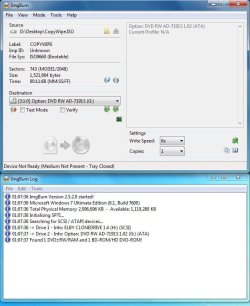
Just leave it alone after you download it. Go to ImgBurn>> Write Image File to Disc>>>Browse for file>>>Locate file>>> OPEN>>>Burn!
 

Attachments

  • Untitled.jpg
    Untitled.jpg
    72.1 KB · Views: 9
  • Untitled2.jpg
    Untitled2.jpg
    68.3 KB · Views: 5

My Computers

System One System Two

  • Computer type
    PC/Desktop
    Computer Manufacturer/Model Number
    PowerSpec G164
    OS
    WIN10
    CPU
    AMD Ryzen 5 3600 6-Core Processor 3.59 GHz
    Memory
    16.0 GB
    Internet Speed
    VERY FAST>>>!!!
  • Antivirus
    ESET Security Premium
alright so i did all that and got this.

TBOSLDR 1.02

Please Wait...(then after a few seconds i get)

CauseWay error 11: DOS reported an error or corrupt file found

then told me to press enter to reboot
 

My Computer

OS
32bit windows 7
CPU
amd phenom 11 black edition
Motherboard
asus m4a78l-m
Memory
4 gigs
Graphics Card(s)
gforce 9400gt
Hard Drives
seagate 250g 7200 rpm
At what point??? Did it fail???
 

My Computers

System One System Two

  • Computer type
    PC/Desktop
    Computer Manufacturer/Model Number
    PowerSpec G164
    OS
    WIN10
    CPU
    AMD Ryzen 5 3600 6-Core Processor 3.59 GHz
    Memory
    16.0 GB
    Internet Speed
    VERY FAST>>>!!!
  • Antivirus
    ESET Security Premium
ya it failed. that is all i got before i reboot and when i reboot it asks me if i wanna boot xp in safe mode or normally.(which had nothing to do with ur program obviously)
 

My Computer

OS
32bit windows 7
CPU
amd phenom 11 black edition
Motherboard
asus m4a78l-m
Memory
4 gigs
Graphics Card(s)
gforce 9400gt
Hard Drives
seagate 250g 7200 rpm
OK so you set it to boot from disc and it failed too boot. Then its your hardware. Sometime is not right. RAM/Hard drive/CD drive pretty much any of these.

Your not going to be able to install any OS if you can't get PC too boot. Try again, remove all but one stick or RAM. If it still fails, then test out with a different hard drive or different CD rom drive.

You got to start eliminating hardware problems, because its not normal for a PC not too boot into a simple program like CopyWipe, unless your not booting from CD or your not burning it properly.
 

My Computers

System One System Two

  • Computer type
    PC/Desktop
    Computer Manufacturer/Model Number
    PowerSpec G164
    OS
    WIN10
    CPU
    AMD Ryzen 5 3600 6-Core Processor 3.59 GHz
    Memory
    16.0 GB
    Internet Speed
    VERY FAST>>>!!!
  • Antivirus
    ESET Security Premium
ya i figured it had something to do with my cd drive :(. just sucks cuz i had w7 on my comp a few days ago and now i have to deal with all of this. I will keep u updated and thank you very much for the help, also sorry for being a noob when it comes to comps.
 

My Computer

OS
32bit windows 7
CPU
amd phenom 11 black edition
Motherboard
asus m4a78l-m
Memory
4 gigs
Graphics Card(s)
gforce 9400gt
Hard Drives
seagate 250g 7200 rpm
No problem, you don't have another drive to test out.

Get one of these if its a SATA connection, cheap but VERY reliable.
Sony Optiarc

Code:
http://www.newegg.com/Product/Product.aspx?Item=N82E16827118039
 

My Computers

System One System Two

  • Computer type
    PC/Desktop
    Computer Manufacturer/Model Number
    PowerSpec G164
    OS
    WIN10
    CPU
    AMD Ryzen 5 3600 6-Core Processor 3.59 GHz
    Memory
    16.0 GB
    Internet Speed
    VERY FAST>>>!!!
  • Antivirus
    ESET Security Premium
i was actually looking at
HTML:
http://www.newegg.com/Product/Product.aspx?Item=N82E16827136147

nice and cheap
 

My Computer

OS
32bit windows 7
CPU
amd phenom 11 black edition
Motherboard
asus m4a78l-m
Memory
4 gigs
Graphics Card(s)
gforce 9400gt
Hard Drives
seagate 250g 7200 rpm
That works too. I used those "Sony" Optiarc burners for years. The one I use now is 2+ years and has never failed. I don't use cheap media.

Try it, I got an LG bluray, but I never used it. Just looks pretty in my case. LOL
 

My Computers

System One System Two

  • Computer type
    PC/Desktop
    Computer Manufacturer/Model Number
    PowerSpec G164
    OS
    WIN10
    CPU
    AMD Ryzen 5 3600 6-Core Processor 3.59 GHz
    Memory
    16.0 GB
    Internet Speed
    VERY FAST>>>!!!
  • Antivirus
    ESET Security Premium
speaking of bluray. what is the difference between a bluray burner and a cd/dvd? im guessing just quality? or is there something special about them?
 

My Computer

OS
32bit windows 7
CPU
amd phenom 11 black edition
Motherboard
asus m4a78l-m
Memory
4 gigs
Graphics Card(s)
gforce 9400gt
Hard Drives
seagate 250g 7200 rpm
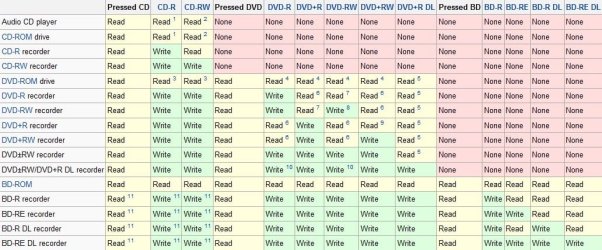
Theres different types of optical disc drives (ODD) and each performs different functions.

A BD-RE DL recorder will read and write every format but its way too expensive.

I attached a wiki chart below. There are differences.
 

Attachments

  • Untitled.jpg
    Untitled.jpg
    109.9 KB · Views: 5

My Computers

System One System Two

  • Computer type
    PC/Desktop
    Computer Manufacturer/Model Number
    PowerSpec G164
    OS
    WIN10
    CPU
    AMD Ryzen 5 3600 6-Core Processor 3.59 GHz
    Memory
    16.0 GB
    Internet Speed
    VERY FAST>>>!!!
  • Antivirus
    ESET Security Premium
speaking of bluray. what is the difference between a bluray burner and a cd/dvd? im guessing just quality? or is there something special about them?


Bluray Burner lets you burn BD disk that will be playable in bluray devices. The quality comes into question if you have a suitable format. So if you just add a DVD to a blurary burner it will play the DVD just like a regular DVD player would. The quality doesn't increase.
 

My Computers

System One System Two

  • Computer type
    PC/Desktop
    Computer Manufacturer/Model Number
    PowerSpec G164
    OS
    WIN10
    CPU
    AMD Ryzen 5 3600 6-Core Processor 3.59 GHz
    Memory
    16.0 GB
    Internet Speed
    VERY FAST>>>!!!
  • Antivirus
    ESET Security Premium
Verify your ISO and burn using ImgBurn: load in ISO to see if it says "Bootable" in text at left. If not, download another ISO and verify it same way.

If so, insert DVD and click "Verify" button to verify against ISO. You may need to burn another DVD at 4x speed. Or try install using flash stick: USB Windows 7 Installation Key Drive - Create - Windows 7 Forums.URL

Go over the steps given in this tutorial to make sure you have set BIOS correclty to boot DVD: How to Boot your Computer from a Bootable CD or DVD - Boot to CD.URL

You can also run the installer from XP to get Win7 installed if you want. Choose to overwrite XP partition.
 
Back
Top