Problem with Sharing My Pictures by Two Users

LeighTwo

New member
Local time
10:12 PM
Messages
3
Location
Silver Spring, MD
I am just trying this forum for the first time. I have a problem with sharing on our home computer. My wife and I each have administrator user accounts on our new Dell computer, each of us with our individual password, and I want her to be able to see and use the pictures and folders that I have placed in the Picture Library on my user's site My Pictures. I have read up on sharing and have gone to Advanced Sharing options and marked the 100 picture folders I have in My Pictures for her to be able to share and see those folders. Yet when she has gotten on the computer and entered her user site and password those pictures do not appear on her MY Pictures. I have found that she can see picture folders and use them when I have placed them, on my site, in Public Pictures. So I have an alternative way to get pictures to her. But I would like to share the My Pictures folder instead and I have tried every way to get it to work. But it doesn't work. I suspect there is a glich with picture sharing in Windows 7 but I don't know for sure. Can anyone tell me if there is a way to fix the problem. I am certain that I have marked the folders for sharing correctly but it does not work. Could it be that since we are both Admistrator Users that it won't work. Please advise. LeighTwo
 

My Computer My Computer

At a glance

Windows y Home premium 64 bit
Computer Manufacturer/Model Number
Dell/Model 537
OS
Windows y Home premium 64 bit
Hi LeighTwo, and welcome to Sevenforums.
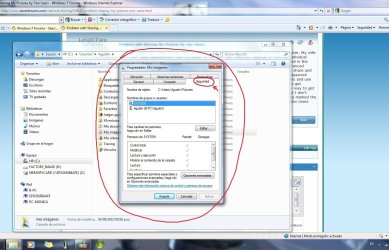
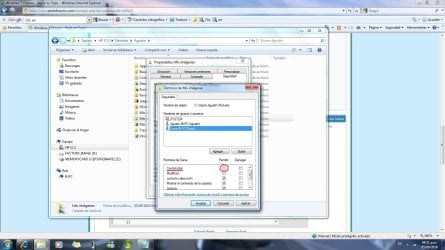
It seems to be a permissions problem. What are permissions? The way to control folders in the NTFS system of Windows. Where I could see them? Let's say that every folder has permissions, so to see them just follow this: Rigth clic on the folder -> Properties -> Security.
Here is an example of how it looks (My Windows is in Spanish, so where it says "Seguridad" it is "Security" for you):
pestaña.jpg
As you notice, just under where it says "System" (highlighted in blue) you can see my User acount (Agustin). So what does it mean? That no other user has access to my folders (exept the System that is not a "human user"), in this case My Pictures folder. It is the case in which, altougth I tried to share files, other users won't see them. So what you should do: add your wife's user acount with the properly permissions in the security tab. Here is the way:
1) Rigth clic on the folder -> Properties -> Security

pestaña.jpg


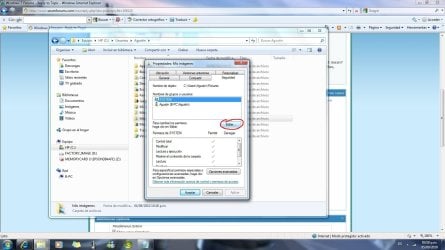
2) Clic on Edit ("Editar" in my Windows).

post.jpg


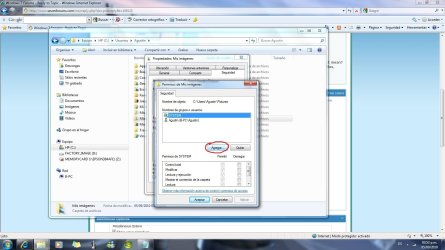
3) Clic on Add ("Agregar" in my Windows).

post1.jpg


4) Write your wife's account in the blank place (just the name of the account; for example my account is "Agustin" so I just need to write "Agustin" in the blank place).

post2.jpg


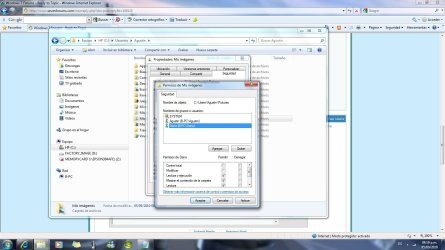
5) Clic "Ok" in each window to submit changes. Here is the new user show in the properties window (in my case the new user is Dana).

post 4.jpg

At this point you are able to share your folder with the user you give permissions.

I read you know how to share files so try it or post back for more help.

By default, Windows give some permissions but not all of them, so if you want the other user be able to modify the contents in the shared folder or another thing that has to do with permissions, you need to mark the especific permission for it.

For example, I want that user "Dana" be able to have all the permission. So if I mark "Total Control" permission, it will mark all the permissions. Of course this must be done in the rigth colum of permissions, which is the one under where it is readable the "Allow" word ("Permitir" in my Windows).
post3.jpg
I hope it helps you. In case of any doubt, just post back, we are here to help. ;)
 

My Computer My Computer

At a glance

Windows 7 Ultimate 64 bitsDual Core Intel Core 2 Duo E75002x[2048 MB DDR2-SDRAM (PC2-6400 / 800 MHz), 2...Intel(R) G33/G31 Express Chipset Family (256 MB)
Computer Manufacturer/Model Number
HP Pavilon Slimline
OS
Windows 7 Ultimate 64 bits
CPU
Dual Core Intel Core 2 Duo E7500
Motherboard
MSI MS-7525 (Boston)
Memory
2x[2048 MB DDR2-SDRAM (PC2-6400 / 800 MHz), 2 Gb]; Total:4Gb
Graphics Card(s)
Intel(R) G33/G31 Express Chipset Family (256 MB)
Sound Card
Realtek ALC662 @ Intel 82801GB ICH7 - HD Audio Controller
Monitor(s) Displays
HP 2009m 20'' LCD
Screen Resolution
1600x900
Hard Drives
SAMSUNG HD642JJ (596 GB)
I tried your solution of going and modifying the permissions, and found that did not solve my problelm. As a matter of fact, I had already fixed the permissions table to include my wife and had applied them. And when applied the computer took some time to apply the new permission to share with my wife. But when we changed from my user site to hers, the pictures to be shared never showed on her version of My Pictures. So I think there is something wrong with Windows 7, in that it has some glitch. The way to share pictures for us is that I put picture folders into Public Pictures on my site and they do show up on her site's Public Pictures folder. But that is not the solution I prefer. I am open to any suggestions, as I have tried everything I can find out about though Windows Help. Please let me know any other advice anyone may have. LeighTwo
 

My Computer My Computer

At a glance

Windows y Home premium 64 bit
Computer Manufacturer/Model Number
Dell/Model 537
OS
Windows y Home premium 64 bit
Why would your pictures appear under your wife's My Pictures folder? The My pictures,My documents etc. folders are User folders not Homegroup folders, although it is possible to share the entire User folder, it doesn't work like the Homegroup folders.

The Homegroup "Pictures" folder needs to be accessed by going to the folder icon lower left on the taskbar, then choose Homegroups>User name> Pictures folder, this is where you both can share the Homegroups pictures folder, this assumes you have the permissions set correctly. Notice that it's not showing as "My Pictures" under Homegroups but instead is just the "Pictures" folder.

The Network tab>User name> "My Pictures" folder isn't the same as the Homegroup "Pictures" folder.

The network tab "My Pictures" folder is accessed by going to the little folder icon "taskbar lower left">"Network" tab> User name "Wife-PC"> Users>My Pictures folder. You can share this entire set of User folders or just one of them "My Pictures,My Documents etc. by right clicking the User folder and setting up the usual permissions. Both sets of folders need to be shared seperately, Homegroups and User folders.

Also rememeber that the Homegroup folders only represent folders that reside in your User folders, they aren't the actual folder themselfs. Otherwise you would need to have them stored in both places which would take up twice as much disk space.
 

My Computer My Computer

At a glance

Windows 7 Ult, Windows 8.1 Pro,Q9650-4.275GHz, E8600 4.5GHz, E6750-3.8GHzG.Skill PC2 9600 1200Mhz 5 5 5 15 2TGTX480
Computer type
PC/Desktop
Computer Manufacturer/Model Number
Home built
OS
Windows 7 Ult, Windows 8.1 Pro,
CPU
Q9650-4.275GHz, E8600 4.5GHz, E6750-3.8GHz
Motherboard
Evga 780i FTW
Memory
G.Skill PC2 9600 1200Mhz 5 5 5 15 2T
Graphics Card(s)
GTX480
Sound Card
Asus Xonar D2
Monitor(s) Displays
HannsG
Screen Resolution
1680X1050
Hard Drives
GSkill Phoenix Pro 120GB SSD
PSU
ThermalTake Toughpower 1000Watt modular
Case
ThermalTake XaserV
Cooling
Xigmatek S1283
Keyboard
Logitech G15
Mouse
Logitech G9
Internet Speed
T1
Thanks for your reply and help. But I wonder if I am using an up to date version of Windows 7, which I installed when it first came out. I can get to Homegroup by going to the Windows Explorer icon on the task bar, which has an icon with a group of folders on it, but from there I cannot get to any Homegroup Pictures. In fact I doubt If I have any pictures there. But my goal is to have My Pictures in my Pictures Library shared with my wife on her user site on our one computer. I have gone to users and then to My Pictures on my user site and set up permissions and sharing access correctly and so I expected my wife on her user site, after entering her password, to see the pictures I marked for sharing, all within My Pictures, yet she sees none of those picture folders with their enclosed pictures. I have by trial and error placed two or three picture folders on my site in Public Pictures and we do share those. That is the only way to share pictures until I solve the access problem.
 

My Computer My Computer

At a glance

Windows y Home premium 64 bit
Computer Manufacturer/Model Number
Dell/Model 537
OS
Windows y Home premium 64 bit
Just to check the facts here the folders you wish to share are on two different accounts on the same win7 computer?

Both are administrator level accounts?

Assuming this is true homegroup should not be involved, as this is a network sharing system between two or more computers

in your wife's account - open the libraries from the taskbar icon.

right click on the pictures library in the navigation pane (left hand list) and select properties

in the screen that appears click on the add a folder button.

In the selector navigate to the C:\users folders then you should see your user listed, select this then the pictures folder and select add.

You may have to confirm access to these folders if permissions have not been fully set correctly but the admin account rights should allow this

This adds your pictures to her pictures library, which I believe what you are looking for :D
 

My Computers My Computers

  • At a glance

    Windows 11 Pro x64 [Latest Release and Releas...Ryzen 9 5950X, 3.8 - 5.2 MHz64GB [2 x 32GB] DDR4 3200MHz4GB NVIDIA GEFORCE GTX 1650 Ti
    Computer type
    PC/Desktop
    Computer Manufacturer/Model Number
    ChillBlast - Custom to my design
    OS
    Windows 11 Pro x64 [Latest Release and Release Preview]
    CPU
    Ryzen 9 5950X, 3.8 - 5.2 MHz
    Motherboard
    Asus Prime X570-Pro
    Memory
    64GB [2 x 32GB] DDR4 3200MHz
    Graphics Card(s)
    4GB NVIDIA GEFORCE GTX 1650 Ti
    Sound Card
    On-board SPDIF to 5.1 System + HDMI [5.1 system]
    Monitor(s) Displays
    32" UHD 32 Bit HDR Monitor + 43" UHD 4K 32Bit HDR TV
    Screen Resolution
    2 x 3840 x 2160 @60Hz
    Hard Drives
    1TB M2 SSD OS, 500GB Fast Access SSD, 2 x 8TB Data + Various Externals from 1TB to 4TB, 10TB NAS
    PSU
    NZXT C750 80 PLUS Gold 750W Modular PSU
    Case
    Workstation Case [Matt Black]
    Cooling
    NZXT Kraken X63 280mm CPU Cooler +2x Quiet Case fans
    Keyboard
    Logitech Wireless MX Keys & K400 + others
    Mouse
    Logitech Wireless MX Master 3S
    Internet Speed
    920 MB Down 50 MB Up
    Antivirus
    BitDefender Total Security Pro
    Browser
    Chrome (always run latest Non-Beta)
    Other Info
    Also run ...
    Laptop - Quad 8GB - Windows 10 Pro x64
    Nexus 7 Android tablet x2
    Samsung 10.2" tablet
    Blackview TAB 8 4G Android Tablet c/w Keyboard
    Wacom Intuos Pro Medium Pen Pad
    Wacom Intuos Pro Small Pen Pad
    Wacom Expresskeys Remote
    Loopdeck+ Graphics Controller
    Shuttle Pro v2 Control
  • At a glance

    Windows 11 Pro x64 Latest RPIntel I7 10750H 5.0GHz32GB [2x16GB] DDR4 2933 MHznVidia GTX1650Ti 4 GB GDDR6
    Computer type
    Laptop
    System Manufacturer/Model Number
    Dell XPS 17 10750H
    OS
    Windows 11 Pro x64 Latest RP
    CPU
    Intel I7 10750H 5.0GHz
    Motherboard
    Dell XPS
    Memory
    32GB [2x16GB] DDR4 2933 MHz
    Graphics Card(s)
    nVidia GTX1650Ti 4 GB GDDR6
    Sound Card
    Stock [Realtek] 4 Speaker
    Monitor(s) Displays
    17" IPS UHD+ Infinity Edge Touchscreen
    Screen Resolution
    3840 x 2400
    Hard Drives
    2TB M2 NVMe, 4TB External + various 500GB & 1TB External NVMe (also have access to spinner HDD from
    PSU
    Stock
    Case
    Stock XPS Aluminium & Carbon Fibre
    Cooling
    Stock - Active Fan Control
    Keyboard
    Backlit + Various Logitech
    Mouse
    Stock Track Pad + Logitech MX Trackball
    Internet Speed
    72 MB Down 18MB Up
    Browser
    Chrome
    Other Info
    Also run ...
    Laptop - Quad 8GB - Windows 10 Pro x64
    Nexus 7 Android tablet x2
    10.2" tablet
    Sony Z3 Android Smartphone
    Wacom Intuos Pro Medium Pen Pad
    Wacom Intuos Pro Small Pen Pad
    Wacom Expresskeys Remote
    Loopdeck+ Graphics Controller
    Shuttle Pro v2 Control Pad
    10TB NAS
Back
Top