Problem with Sony Soundforge 7 on Windows 7

Sputniks

New member
Local time
1:59 AM
Messages
3
Hi,

I recently purchased a laptop with Windows 7 having previously been on Windows Vista. The laptop works very well except when I come to record music through Sony Soundforge 7.

I had Sony Soundforge 7 on my Vista laptop and it worked perfectly but I have been having issues with recording since switching to 7. Basically my problem is everytime I try and record through Sony Soundforge 7 my music records really loud and distorted. (I've tried to turn down my recording levels) What's more my laptop seems to be picking up noise from what I'm doing - for example: tapping on the counter that the laptop is on or touching the laptop itself. It shouldn't be doing this as it should only be picking up noise from my mixer.

I use a cable from a DJM 600 mixer directly into the line in port of the laptop as I did with my vista laptop with no issues. The cable and mixer are in perfect working order so I assume it's something I'm not aware about on Windows 7.

can anybody help me?

Thanks for any answers/help given.

Chris.
 

My Computer My Computer

OS
Windows 7
Win 7 works the same as Vista in the audio department. But if it's pickup extraneous noises it would appear the microphone is enabled and on all the time.

Go to the Control Panel/Hardware and Sound and finally the Sound panel. Click on the Recording tab and if there is an icon for the microphone, Right click that then disable. Disabling the mic may also fix the overload problem. You can doubleclick on the Line In icon and set the levels for the input if it's still overloading.

I have a PC based recording studio setup using Sonar software.
 

My Computer My Computer

Computer type
PC/Desktop
Computer Manufacturer/Model Number
My Own Build
OS
Windows 10 64 bit
CPU
Intel i7 6700K
Motherboard
ASUS ROG Maximus VIII Hero
Memory
16GB Corsair Dominator
Graphics Card(s)
Intel CPU Graphics
Sound Card
RealTek
Monitor(s) Displays
27" Dell S2719dgf
Screen Resolution
2560X1440
Hard Drives
1 TB Samsung 850 EVO SSD for Win 10 Pro
500GB Samsung 850 EVO SSD for Win 10 Insider
2 TB drive for backup
PSU
EVGA Supernova 750G2
Case
BeQuiet Silent Base 600
Cooling
Deepcool Captain 120EX
Keyboard
Microsoft Wireless 2000
Mouse
Microsoft wireless
Internet Speed
100 MB/sec (Cable)
Antivirus
Microsoft Defender and Malwarebytes
Browser
Edge/Firefox
Other Info
Cakewalk (Sonar) by BandLab and Studio One 4.1 Pro recording studio software. MOTU 896Mk3 Hybrid recording interface, Frontier Tranzport wireless control unit, Behringer X-Touch Control Surface.
Five USB connected optical drives for CD Audio production using Nero BurningROM
Thanks for your help.

I did what you asked but couldn't find the 'line in' Icon anywhere. It just left me with 'stereo mix' active, when I came to record I pick up no volume at all with this active.
 

My Computer My Computer

OS
Windows 7
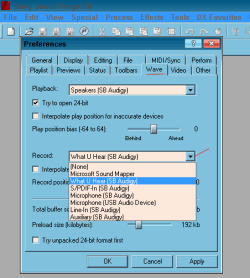
Stereo Mix (SoundBlaster calls this "what you hear") is what you should be setting as the recording source and not the Line In. Try that and if nothing, enable the Microphone again as apparently that needs to be on in this PC for the jack to be active. Is this a combination Mic and Line In Jack as most laptops have or do you have separate input jacks for the mic and for Line In?

Look for some other configuration panel for the audio, as some audio systems have a separate configuration panel.
 

My Computer My Computer

Computer type
PC/Desktop
Computer Manufacturer/Model Number
My Own Build
OS
Windows 10 64 bit
CPU
Intel i7 6700K
Motherboard
ASUS ROG Maximus VIII Hero
Memory
16GB Corsair Dominator
Graphics Card(s)
Intel CPU Graphics
Sound Card
RealTek
Monitor(s) Displays
27" Dell S2719dgf
Screen Resolution
2560X1440
Hard Drives
1 TB Samsung 850 EVO SSD for Win 10 Pro
500GB Samsung 850 EVO SSD for Win 10 Insider
2 TB drive for backup
PSU
EVGA Supernova 750G2
Case
BeQuiet Silent Base 600
Cooling
Deepcool Captain 120EX
Keyboard
Microsoft Wireless 2000
Mouse
Microsoft wireless
Internet Speed
100 MB/sec (Cable)
Antivirus
Microsoft Defender and Malwarebytes
Browser
Edge/Firefox
Other Info
Cakewalk (Sonar) by BandLab and Studio One 4.1 Pro recording studio software. MOTU 896Mk3 Hybrid recording interface, Frontier Tranzport wireless control unit, Behringer X-Touch Control Surface.
Five USB connected optical drives for CD Audio production using Nero BurningROM
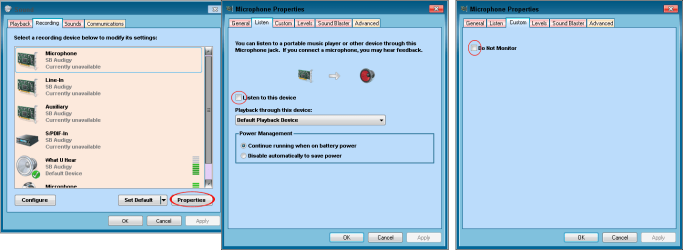
Did U try to play with this to check if it improves?
like in pic 2
listen to this device
& do not monitor
for line in, mic & aux.
 

Attachments

  • sf7.png
    sf7.png
    8.5 KB · Views: 53
  • Mixer.png
    Mixer.png
    21 KB · Views: 74

My Computer My Computer

Computer type
PC/Desktop
Computer Manufacturer/Model Number
696
OS
7 Ultimate x64 sp1
CPU
Intel i5-4690K
Motherboard
GA Z97X Gaming 5
Memory
16Gb HyperX fury
Graphics Card(s)
R9-270x 2Gb
Sound Card
On Board
Monitor(s) Displays
2443NW
Screen Resolution
1920x1200
Hard Drives
WD5000 -
WD5001 -
WD1002
PSU
Cft-650-14cs
Case
Very Big Case
Cooling
stock
Keyboard
G11
Mouse
Logitech
Internet Speed
Adsl
Browser
FF
Other Info
RWD
Thanks for your help guys, I think I've fixed the issue now. Really appreciate your help
 

My Computer My Computer

OS
Windows 7
Sputniks...

It's a good idea to let the thread know exactly how you resolved your problem. It makes it easier for the next person with the same problem.
 

My Computer My Computer

Computer type
PC/Desktop
Computer Manufacturer/Model Number
Homebuilt
OS
windows 7 32
CPU
Intel i7 4770K
Motherboard
Asus Z97-A
Memory
Corsair Vengeance 8gb DDR3 2133(PC3 17000)
Graphics Card(s)
nVidia GTX 660 2gb
Sound Card
Asus Xonar D1
Monitor(s) Displays
Dell Ultrasharp UM2913WM
Screen Resolution
2560x1080 32
Hard Drives
PNY 240gb SSD
Seagate 500gb SSD
PSU
Corsair CXM 600
Case
Fractal Design Define R4
Cooling
Arctic Freezer Xtreme rev 2
Keyboard
Logitech K800 Wireless Illuminated
Mouse
MicroSoft 5000
Internet Speed
Cable
Antivirus
MSE
Browser
IE 11 and Chrome
Other Info
Samsung DVD-RW
Cambridge 4.1 speakers
Hauppauge HVR-950 USB Tuner
Asus Optimized Overclock to 4.4ghz
Back
Top