problem with win7

aw22

New member
Member
VIP
Local time
9:20 AM
Messages
131
Location
Finland
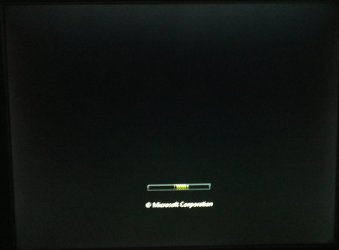
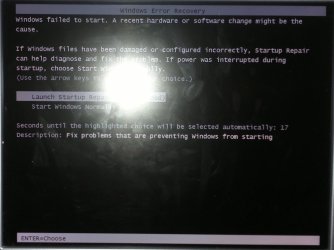
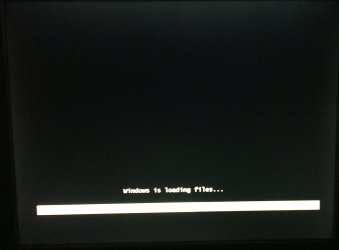
Windows 7 32bit dont want to start on my little brother PC.. When I start that PC I get "repair (recommanded)" or "start normally".. when I press repair it goes fine loads (white) and its only contiues loading when it has that green line... And when I start normally it only shows that windows logo and its not like OS has freezed, because that logo moves (loads)..

Anyone knows how can I fix that problem? I dont have any idea how to fix it.

PC worked fine yesterday..

EDIT:
Its seems after loading (repair) here came black screen and after that here is now mouse cursor.. in other word now here is black screen with mouse cursor.
 

My Computer

Computer type
PC/Desktop
Computer Manufacturer/Model Number
Custom Built
OS
Windows 7 Ultimate x64 Service Pack 1
CPU
Intel Core i7-3770K Ivy Bridge Quad-Core 3.5GHz (4180.19MHz)
Motherboard
ASUS P8Z77-V LX
Memory
Corsair 32GB (4 x 8GB) Vengeance, DDR3 1600MHz, CL10, 1.5V
Graphics Card(s)
Asus GeForce DUAL-GTX1060-O6G
Sound Card
Asus XONAR DG, 90-YAA0K0-0UAN0BZ
Monitor(s) Displays
Iiyama 24" XB2483HSU, BenQ GW2470HL 24", UE32EH4005
Screen Resolution
1920x1080 60Hz, 1920x1080 60Hz, 1366x768 60Hz
Hard Drives
WDS500G1B0A-00H9H0, S3Z9NB0K316712Z, S3YVNB0KB15768W, ST2000DM001-1CH164, ST3000DM002-1BJ166, ST3000DM008-2DM166
PSU
Corsair PSU TX V2 750W 14CM ATX2.31 80+
Case
Fractal Design Define R6 - Black, ATX
Cooling
CORSAIR Hydro Series H100z Liquid Cooler
Keyboard
Logitech Gaming Keyboard G510
Mouse
SteelSeries RIVAL 500 GAMING MOUSE
Internet Speed
ADSL, 350/20Mbit/s FullRate
Antivirus
Malwarebytes Premium 3.7.1 + Windows Defender
Browser
Mozilla Firefox, Google Chrome
Other Info
TP-Link TG-3468 PCI-Express Gigabit Network Card
really no one know how to help me in this problem?..
 

My Computer

Computer type
PC/Desktop
Computer Manufacturer/Model Number
Custom Built
OS
Windows 7 Ultimate x64 Service Pack 1
CPU
Intel Core i7-3770K Ivy Bridge Quad-Core 3.5GHz (4180.19MHz)
Motherboard
ASUS P8Z77-V LX
Memory
Corsair 32GB (4 x 8GB) Vengeance, DDR3 1600MHz, CL10, 1.5V
Graphics Card(s)
Asus GeForce DUAL-GTX1060-O6G
Sound Card
Asus XONAR DG, 90-YAA0K0-0UAN0BZ
Monitor(s) Displays
Iiyama 24" XB2483HSU, BenQ GW2470HL 24", UE32EH4005
Screen Resolution
1920x1080 60Hz, 1920x1080 60Hz, 1366x768 60Hz
Hard Drives
WDS500G1B0A-00H9H0, S3Z9NB0K316712Z, S3YVNB0KB15768W, ST2000DM001-1CH164, ST3000DM002-1BJ166, ST3000DM008-2DM166
PSU
Corsair PSU TX V2 750W 14CM ATX2.31 80+
Case
Fractal Design Define R6 - Black, ATX
Cooling
CORSAIR Hydro Series H100z Liquid Cooler
Keyboard
Logitech Gaming Keyboard G510
Mouse
SteelSeries RIVAL 500 GAMING MOUSE
Internet Speed
ADSL, 350/20Mbit/s FullRate
Antivirus
Malwarebytes Premium 3.7.1 + Windows Defender
Browser
Mozilla Firefox, Google Chrome
Other Info
TP-Link TG-3468 PCI-Express Gigabit Network Card

My Computer

Computer Manufacturer/Model Number
HP Pavilion Elite 495UK
OS
Windows 7 Ultimate SP1 64-Bit
CPU
Intel Core i7 870 @ 2.93GHz
Motherboard
MSI 2A9C (CPU1)
Memory
8Gb Dual-Channel DDR3 @ 664MHz
Graphics Card(s)
nVidia GeForce GTX 460 1024MB dedicated RAM
Sound Card
Realtek HD Audio
Monitor(s) Displays
HP2310i
Screen Resolution
1920 x 1080
Hard Drives
1x1954GB Hitachi HDS22020ALA 330 (RAID), 1x1954GB Hitachi External for backup and storage
PSU
460W
Case
HP Elite
Cooling
Air cooled
Keyboard
Logitech K750 solar-powered keyboard
Mouse
Logitech Wireless M180 mouse
Internet Speed
2Mb
Other Info
Pure Avanti Flow Internet Radio with iPod Dock, 64Gb iPod, HP USB Speakers, Sony MDR-V500 Headphones, Sony Vaio F-Series Laptop
I have this problem that when startup has loaded I get Black screen And mouse cursor. so mostly I dont seem to get to do anything..
I have Win7 install DVD in PC so I could run "Startup Repair"... but still after it has loaded that black screen and mouse cursor r only thinkgs what I get.
mouse works fine on that black screen.

EDIT:
I watched youtube.com/watch?v=vbq8vfs1wYY
and I think that HDD is dead.. because it makes also same noise. dam
I hoped that it wasn't...
 
Last edited:

My Computer

Computer type
PC/Desktop
Computer Manufacturer/Model Number
Custom Built
OS
Windows 7 Ultimate x64 Service Pack 1
CPU
Intel Core i7-3770K Ivy Bridge Quad-Core 3.5GHz (4180.19MHz)
Motherboard
ASUS P8Z77-V LX
Memory
Corsair 32GB (4 x 8GB) Vengeance, DDR3 1600MHz, CL10, 1.5V
Graphics Card(s)
Asus GeForce DUAL-GTX1060-O6G
Sound Card
Asus XONAR DG, 90-YAA0K0-0UAN0BZ
Monitor(s) Displays
Iiyama 24" XB2483HSU, BenQ GW2470HL 24", UE32EH4005
Screen Resolution
1920x1080 60Hz, 1920x1080 60Hz, 1366x768 60Hz
Hard Drives
WDS500G1B0A-00H9H0, S3Z9NB0K316712Z, S3YVNB0KB15768W, ST2000DM001-1CH164, ST3000DM002-1BJ166, ST3000DM008-2DM166
PSU
Corsair PSU TX V2 750W 14CM ATX2.31 80+
Case
Fractal Design Define R6 - Black, ATX
Cooling
CORSAIR Hydro Series H100z Liquid Cooler
Keyboard
Logitech Gaming Keyboard G510
Mouse
SteelSeries RIVAL 500 GAMING MOUSE
Internet Speed
ADSL, 350/20Mbit/s FullRate
Antivirus
Malwarebytes Premium 3.7.1 + Windows Defender
Browser
Mozilla Firefox, Google Chrome
Other Info
TP-Link TG-3468 PCI-Express Gigabit Network Card
You mean you see no desktop but a black screen with a mouse:rolleyes:? Mostly it is caused by faulty video card drivers. Install the latest video card driver or reinstall your current driver.
 

My Computer

Computer Manufacturer/Model Number
Lenovo Ideapad Y550 (4186)
OS
Windows 7 Ultimate x64 SP1 / Ubuntu 12.04.3 x64
CPU
Intel Core 2 Duo 2.20 Ghz
Motherboard
LENOVO KIWB1 (U2E1)
Memory
4.0GB Dual-Channel DDR3 @ 398MHz
Graphics Card(s)
NVIDIA GeForce GT 240M 1GB
Sound Card
Realtek High Definition Audio
Monitor(s) Displays
15 inch (1366x768@60Hz)
Screen Resolution
1366*768
Hard Drives
320GB Hitachi HITACHI HTS545032B9A300 (SATA)
Keyboard
Build In
Mouse
Touchpad
Internet Speed
30 KBps (Dial up)
I can’t do anything...
When I start PC, its starts fine. I see every info also I can even go to setup.. then it takes ~30min to load windows (at windows logo), after that here is only black screen and mouse cursor... I don’t even see log in screen

at 08012012211.jpg it takes ~30-45min to load until its black screen with mouse cursor.. and HDD makes those noises what shouldn’t be happen.
 

Attachments

  • 08012012208.jpg
    08012012208.jpg
    211.9 KB · Views: 8
  • 08012012210.jpg
    08012012210.jpg
    116.7 KB · Views: 7
  • 08012012211.jpg
    08012012211.jpg
    107.9 KB · Views: 12

My Computer

Computer type
PC/Desktop
Computer Manufacturer/Model Number
Custom Built
OS
Windows 7 Ultimate x64 Service Pack 1
CPU
Intel Core i7-3770K Ivy Bridge Quad-Core 3.5GHz (4180.19MHz)
Motherboard
ASUS P8Z77-V LX
Memory
Corsair 32GB (4 x 8GB) Vengeance, DDR3 1600MHz, CL10, 1.5V
Graphics Card(s)
Asus GeForce DUAL-GTX1060-O6G
Sound Card
Asus XONAR DG, 90-YAA0K0-0UAN0BZ
Monitor(s) Displays
Iiyama 24" XB2483HSU, BenQ GW2470HL 24", UE32EH4005
Screen Resolution
1920x1080 60Hz, 1920x1080 60Hz, 1366x768 60Hz
Hard Drives
WDS500G1B0A-00H9H0, S3Z9NB0K316712Z, S3YVNB0KB15768W, ST2000DM001-1CH164, ST3000DM002-1BJ166, ST3000DM008-2DM166
PSU
Corsair PSU TX V2 750W 14CM ATX2.31 80+
Case
Fractal Design Define R6 - Black, ATX
Cooling
CORSAIR Hydro Series H100z Liquid Cooler
Keyboard
Logitech Gaming Keyboard G510
Mouse
SteelSeries RIVAL 500 GAMING MOUSE
Internet Speed
ADSL, 350/20Mbit/s FullRate
Antivirus
Malwarebytes Premium 3.7.1 + Windows Defender
Browser
Mozilla Firefox, Google Chrome
Other Info
TP-Link TG-3468 PCI-Express Gigabit Network Card
If your hard drive is making strange noises and Windows won't boot, I think it's fair to assume that the drive is about to or has failed.
 

My Computer

Computer Manufacturer/Model Number
HP Pavilion Elite 495UK
OS
Windows 7 Ultimate SP1 64-Bit
CPU
Intel Core i7 870 @ 2.93GHz
Motherboard
MSI 2A9C (CPU1)
Memory
8Gb Dual-Channel DDR3 @ 664MHz
Graphics Card(s)
nVidia GeForce GTX 460 1024MB dedicated RAM
Sound Card
Realtek HD Audio
Monitor(s) Displays
HP2310i
Screen Resolution
1920 x 1080
Hard Drives
1x1954GB Hitachi HDS22020ALA 330 (RAID), 1x1954GB Hitachi External for backup and storage
PSU
460W
Case
HP Elite
Cooling
Air cooled
Keyboard
Logitech K750 solar-powered keyboard
Mouse
Logitech Wireless M180 mouse
Internet Speed
2Mb
Other Info
Pure Avanti Flow Internet Radio with iPod Dock, 64Gb iPod, HP USB Speakers, Sony MDR-V500 Headphones, Sony Vaio F-Series Laptop
Boot with the (any) installation/repair disc and go into Command Prompt. Then run chkdsk /r. Maybe it can fix it.
 

My Computer

Computer Manufacturer/Model Number
HP, Dell, Gateway, Toshiba - 4 laptops and 2 desktops
OS
Vista, Windows7, Mint Mate, Zorin, Windows 8
CPU
from 1.6GHz Duo to i7
Monitor(s) Displays
2x HP w2207
Hard Drives
5x HDD, 7x SSD, 12x Externals
Keyboard
with trackball - no mices
Mouse
Trackball mice
Internet Speed
DSL 6000
Boot with the (any) installation/repair disc and go into Command Prompt. Then run chkdsk /r. Maybe it can fix it.

I tried to run installation disc but in the end it was same, black screen with mouse cursor.
 

My Computer

Computer type
PC/Desktop
Computer Manufacturer/Model Number
Custom Built
OS
Windows 7 Ultimate x64 Service Pack 1
CPU
Intel Core i7-3770K Ivy Bridge Quad-Core 3.5GHz (4180.19MHz)
Motherboard
ASUS P8Z77-V LX
Memory
Corsair 32GB (4 x 8GB) Vengeance, DDR3 1600MHz, CL10, 1.5V
Graphics Card(s)
Asus GeForce DUAL-GTX1060-O6G
Sound Card
Asus XONAR DG, 90-YAA0K0-0UAN0BZ
Monitor(s) Displays
Iiyama 24" XB2483HSU, BenQ GW2470HL 24", UE32EH4005
Screen Resolution
1920x1080 60Hz, 1920x1080 60Hz, 1366x768 60Hz
Hard Drives
WDS500G1B0A-00H9H0, S3Z9NB0K316712Z, S3YVNB0KB15768W, ST2000DM001-1CH164, ST3000DM002-1BJ166, ST3000DM008-2DM166
PSU
Corsair PSU TX V2 750W 14CM ATX2.31 80+
Case
Fractal Design Define R6 - Black, ATX
Cooling
CORSAIR Hydro Series H100z Liquid Cooler
Keyboard
Logitech Gaming Keyboard G510
Mouse
SteelSeries RIVAL 500 GAMING MOUSE
Internet Speed
ADSL, 350/20Mbit/s FullRate
Antivirus
Malwarebytes Premium 3.7.1 + Windows Defender
Browser
Mozilla Firefox, Google Chrome
Other Info
TP-Link TG-3468 PCI-Express Gigabit Network Card
Hmm, that sounds like a hardware problem. Maybe the RAM. Try to run on one Dimm only and if that fails, try with the other Dimm.
 

My Computer

Computer Manufacturer/Model Number
HP, Dell, Gateway, Toshiba - 4 laptops and 2 desktops
OS
Vista, Windows7, Mint Mate, Zorin, Windows 8
CPU
from 1.6GHz Duo to i7
Monitor(s) Displays
2x HP w2207
Hard Drives
5x HDD, 7x SSD, 12x Externals
Keyboard
with trackball - no mices
Mouse
Trackball mice
Internet Speed
DSL 6000
If your hard drive is making strange noises and Windows won't boot, I think it's fair to assume that the drive is about to or has failed.

I also think so:huh:.
 

My Computer

Computer Manufacturer/Model Number
Lenovo Ideapad Y550 (4186)
OS
Windows 7 Ultimate x64 SP1 / Ubuntu 12.04.3 x64
CPU
Intel Core 2 Duo 2.20 Ghz
Motherboard
LENOVO KIWB1 (U2E1)
Memory
4.0GB Dual-Channel DDR3 @ 398MHz
Graphics Card(s)
NVIDIA GeForce GT 240M 1GB
Sound Card
Realtek High Definition Audio
Monitor(s) Displays
15 inch (1366x768@60Hz)
Screen Resolution
1366*768
Hard Drives
320GB Hitachi HITACHI HTS545032B9A300 (SATA)
Keyboard
Build In
Mouse
Touchpad
Internet Speed
30 KBps (Dial up)
sry that I haven't reply before... I was today testing that PC again. And I don't know whats wrong with it, is it motherboard or RAM... It had 3x1Gb DDR2 and I tested everything about RAM and I only get as far to black screen with mouse cursor.
BIOS and after that it loads windows..
because wireless keyboard don't activate, I can't use keyboard (don't have keyboard with caple)

I don't know anymore whats the problem.. is it motherboard, RAM or HDD

... also when I started PC here was noise's.. 1st when I started PC here was noise and I think it came from motherboard and few min here was silents and after that here was HDD noise

1st noise was 1st time to me.. It haven't happened before when I used that PC.
 

My Computer

Computer type
PC/Desktop
Computer Manufacturer/Model Number
Custom Built
OS
Windows 7 Ultimate x64 Service Pack 1
CPU
Intel Core i7-3770K Ivy Bridge Quad-Core 3.5GHz (4180.19MHz)
Motherboard
ASUS P8Z77-V LX
Memory
Corsair 32GB (4 x 8GB) Vengeance, DDR3 1600MHz, CL10, 1.5V
Graphics Card(s)
Asus GeForce DUAL-GTX1060-O6G
Sound Card
Asus XONAR DG, 90-YAA0K0-0UAN0BZ
Monitor(s) Displays
Iiyama 24" XB2483HSU, BenQ GW2470HL 24", UE32EH4005
Screen Resolution
1920x1080 60Hz, 1920x1080 60Hz, 1366x768 60Hz
Hard Drives
WDS500G1B0A-00H9H0, S3Z9NB0K316712Z, S3YVNB0KB15768W, ST2000DM001-1CH164, ST3000DM002-1BJ166, ST3000DM008-2DM166
PSU
Corsair PSU TX V2 750W 14CM ATX2.31 80+
Case
Fractal Design Define R6 - Black, ATX
Cooling
CORSAIR Hydro Series H100z Liquid Cooler
Keyboard
Logitech Gaming Keyboard G510
Mouse
SteelSeries RIVAL 500 GAMING MOUSE
Internet Speed
ADSL, 350/20Mbit/s FullRate
Antivirus
Malwarebytes Premium 3.7.1 + Windows Defender
Browser
Mozilla Firefox, Google Chrome
Other Info
TP-Link TG-3468 PCI-Express Gigabit Network Card
Back
Top