problem with Windows 7 OEM Theme Packs

ahmadmaher

New member
Local time
3:27 PM
Messages
5
problem with Windows 7 OEM Theme Packs - SOLVED

Hi,

I have downloaded the "Windows 7 OEM Theme Packs" and did try 2 of them :

FUJITSU and GIGABYTE

then I went to remove them so I first did select an other them , and then made right click on each one and selected > Delete.

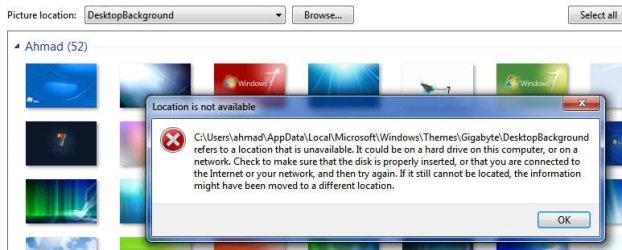
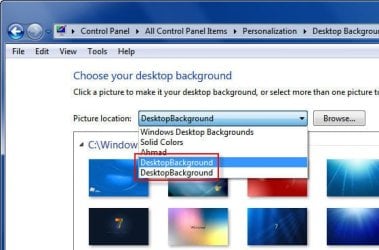
Problem is in the window where you change the desktop wallpaper, there is still a link for them in the drop down menu to select the wallpaper for them

how can i fix this ?

- i went to the location in the error message - hidden folder - and there is nothing in it !

- i made a search in the registry and came out with nothing.


thanks for the help
 

Attachments
  • 001gb.jpg
    001gb.jpg
    34 KB · Views: 43
  • 002pb.jpg
    002pb.jpg
    41.9 KB · Views: 28
Last edited:

My Computer

OS
Windows 7 Ultimate
CPU
Intel Core2Duo CPU E7300 @ 2.66GHz
Motherboard
Gigabyte EP35-DS3L
Memory
4096 MBytes
Graphics Card(s)
GeForce 8600 GT
Monitor(s) Displays
Philips 190CW
Screen Resolution
1440 x 900
Hi ahmadmaher and Welcome to SevenForums

If i understand you right you just want to change the background Right. Just right click your desktop, go to personalization choose a background you want and double click it, if you want to change it double click the next one. Don't try to delete them. Hope this helps, if not we're here to try again.

Smitty
 

My Computer

Computer Manufacturer/Model Number
Dell XPS 730
OS
Windows 7 Home Premium 64 bit
CPU
Intel Core 2 quad Extreme Q9770 @ 3.2 GHz
Memory
4x2 GB Muskin 1600 MHz ram
Graphics Card(s)
NVidia GTX 250
Sound Card
Soundblaster X-Fi Fatality Champion
Monitor(s) Displays
2 Dell 2007WFP Ultrascans
Screen Resolution
3360 x 1050
Hard Drives
WD Black 1TB sata, 2-WD Black 500 sata, 2-Seagate 500 Go external
PSU
1000 Watt
Cooling
air
Keyboard
MS Natrual Keyboard Pro
Mouse
Logitech Wireless Trackball
Internet Speed
DSL Elite
Hi Smitty,

am sorry but no this is not what i want,

you see i have un-installed the 2 themes , but yet still there is 2 lines for them in the drop down menu options, the one in the red frame

that is why when i click any of them i get the error message, the 2nd image in the attachment

now that i have un installed them i also want to remove there line from the menu

hope i made it clear now and thanks for the help
 

My Computer

OS
Windows 7 Ultimate
CPU
Intel Core2Duo CPU E7300 @ 2.66GHz
Motherboard
Gigabyte EP35-DS3L
Memory
4096 MBytes
Graphics Card(s)
GeForce 8600 GT
Monitor(s) Displays
Philips 190CW
Screen Resolution
1440 x 900
have you made sure that the themes are no longer residing in Resources/Themes ?
 

My Computer

Computer type
PC/Desktop
Computer Manufacturer/Model Number
LENOVO K450 @3.0GHZ
OS
64-bit Windows 8.1 Pro
CPU
Core(TM) i5 CPU 4330 Haswell @ 3.20GHz
Motherboard
LENOVO
Memory
12.00 GB
Graphics Card(s)
Intel(R) HD Graphics
Sound Card
Intel HD integtrated
Monitor(s) Displays
HP 25' ISP Monitor
Screen Resolution
1900/1020
Hard Drives
(1) ST1000DM003-1CH162 (2) Generic STORAGE DEVICE USB Device (3) Generic STORAGE DEVICE USB Device
Internet Speed
100mb down/10mb up
have you made sure that the themes are no longer residing in Resources/Themes ?


yes they are not there, and i went to : C:\Users\ahmad\AppData\Local\Microsoft\Windows\Themes\

and there is nothing there too.


this is what i have in Resources/Themes :

Aero > folder
aero.theme
architecture.theme
characters.theme
landscapes.theme
nature.theme
scenes.theme
 

My Computer

OS
Windows 7 Ultimate
CPU
Intel Core2Duo CPU E7300 @ 2.66GHz
Motherboard
Gigabyte EP35-DS3L
Memory
4096 MBytes
Graphics Card(s)
GeForce 8600 GT
Monitor(s) Displays
Philips 190CW
Screen Resolution
1440 x 900
problem solved :)

removing a line in the drop down menu for "Choose your desktop background".

Control Panel\Appearance and Personalization\Personalization\Desktop Background\Picture Location user defined drop down menu list entries are contained in the following registry location:

HKEY_CURRENT_USER\Software\Microsoft\Windows \CurrentVersion\Explorer\Wallpapers\Images

As you'll see, these entries are encrypted (I think they are in ascending chronological order) but you can safely delete them all if you wish as the default Vista/7 entries (in the latter's case: Windows Desktop Backgrounds, Pictures Library, Top Rated Photos and Solid Colors) will be unaffected.

When you select an existing Desktop Background which is held in one of the locations which you may have been deleted, this location will be re-added into the drop-down menu.

problemsolved465.jpg


thanks guys and hope this will help some one else too
 

My Computer

OS
Windows 7 Ultimate
CPU
Intel Core2Duo CPU E7300 @ 2.66GHz
Motherboard
Gigabyte EP35-DS3L
Memory
4096 MBytes
Graphics Card(s)
GeForce 8600 GT
Monitor(s) Displays
Philips 190CW
Screen Resolution
1440 x 900
Back
Top