Problem with windows 7

seems that a clear install is the only option.But i definitely have to back up some files too.So is it possible to install the OS to one of my external disks partition,open the computer with my external disk and then copy the files from my hd to the external?And if it is could you give me a link that tells me how it can be done?
 

My Computer

OS
windows 7
CPU
Intel(R) Core(TM)2 Duo CPU E8200 @ 2.66GHz
Motherboard
gigabyte technology EX38-DS4
Memory
symmetric 2048mbytes DDR2
Graphics Card(s)
Nvidia geforce9600gt
Screen Resolution
1920x1080
Hard Drives
WDC caviar blue 1tb
WD 500BEV External usb device
Internet Speed
24mbs
It is not possible to install to an external HD.
 

My Computer

Computer Manufacturer/Model Number
Custom
OS
Windows 7 Professional x64
CPU
Intel i7 2600K OC'd @ 4620 MHz
Motherboard
Asus P8Z68-V Pro
Memory
16GB GSkill Sniper 2133 Mhz (4x4GB)
Graphics Card(s)
EVGA GeForce GTX 480 SuperClocked+
Sound Card
Realtek High Definition Audio
Monitor(s) Displays
2x Acer S273HLbmii 27"
Screen Resolution
2 x 1920x1080
Hard Drives
64GB Crucial M4 SSD

Storage: Hitachi 1TB 5400RPM, Samsung 1.5TB 5400RPM
PSU
Corsair HW Series 750w (modular)
Case
Cooler Master HAF 932 Advanced Blue Edition
Cooling
CM Hyper 212+ CPU cooler, 3x 230mm + 1x 140mm case fans
Keyboard
Logitech MK320 (wireless)
Mouse
Logitech MK320 (wireless)
Internet Speed
30 Mb/s : 2 Mb/s
after the failure of the system recovery tool i successfully run the startup repair tool and after of 3 hours of fixing and attempting to repair disk problems it finally said that the repairs have been made and i have to restart my pc
so i did.but nothing changed and not only that now anytime i try to load the OS or the installation disc my screen get black and nothing happens...
any idea?
You could burn knoppix (a linux version) to a cd and then boot from that CD, preferably with the hard drive disconnected. If it runs fine and loads the desktop and you can run firefox and browse the net, you'll know that your hard drive is bad but your other hardware is okay. This is a way of creating a useable environment that does not include a hard drive. (as you may know, windows requires a writeable drive, which means it can't boot from just a CD, but linux can)

Download Knoppix Live CD or DVD, Get Documentation and Help

But that's not really necessary, based on what you have said so far your hard drive sounds like you should chuck it. And because of its errors, your windows7 installation is now corrupted. I would disconnect it, put in a new hard drive and do a clean win7 install on that drive, then boot from that drive and then get it running and set up. Then I would re-attach the old drive, boot from the new drive (so that the old drive gets seen as E: or G: or whatever), and then selectively copy over whatever files you need.)

It is also possible, though less likely, that you have a bios problem. Your comment about three hours makes that a possibility. Reflash if you know how

 

My Computer

Computer type
PC/Desktop
Computer Manufacturer/Model Number
diy
OS
Win7 pro x64
CPU
stock i7 7700k
Motherboard
Gigabyte Z270N-WIFI mini-ITX
Memory
Corsair Vengeance LPX 16GB (2x8GB) DDR4 @ 3200MHz
Graphics Card(s)
integrated Intel HD 630
Sound Card
onboard Realtek ALC1220
Monitor(s) Displays
two vertically mounted samsung 55" 4k un55mu8000
Screen Resolution
1920x1280
Hard Drives
256GB Samsung EVO 960 M.2 pci-e NVMe SSD
PSU
SilverStone Nightjar ST45NF 450Watt Fanless
Case
No case. Motherboard is mounted directly onto power supply
Cooling
Evercool low profile 815EP with Panaflow 12L fan at 7v
Keyboard
Ortek MCK-86 mini
Mouse
Belkin 5-button USB
Internet Speed
spectrum 400mbps
after the failure of the system recovery tool i successfully run the startup repair tool and after of 3 hours of fixing and attempting to repair disk problems it finally said that the repairs have been made and i have to restart my pc
so i did.but nothing changed and not only that now anytime i try to load the OS or the installation disc my screen get black and nothing happens...
any idea?
You could burn knoppix (a linux version) to a cd and then boot from that CD, preferably with the hard drive disconnected. If it runs fine and loads the desktop and you can run firefox and browse the net, you'll know that your hard drive is bad but your other hardware is okay. This is a way of creating a useable environment that does not include a hard drive. (as you may know, windows requires a writeable drive, which means it can't boot from just a CD, but linux can)

Download Knoppix Live CD or DVD, Get Documentation and Help

But that's not really necessary, based on what you have said so far your hard drive sounds like you should chuck it. And because of its errors, your windows7 installation is now corrupted. I would disconnect it, put in a new hard drive and do a clean win7 install on that drive, then boot from that drive and then get it running and set up. Then I would re-attach the old drive, boot from the new drive (so that the old drive gets seen as E: or G: or whatever), and then selectively copy over whatever files you need.)

It is also possible, though less likely, that you have a bios problem. Your comment about three hours makes that a possibility. Reflash if you know how

thanks i will try what you said.
by the way i tried to format my old HD and i got this message:failed to format the selected partition: [error ox80070057] does this mean that my hard disk fail?
 

My Computer

OS
windows 7
CPU
Intel(R) Core(TM)2 Duo CPU E8200 @ 2.66GHz
Motherboard
gigabyte technology EX38-DS4
Memory
symmetric 2048mbytes DDR2
Graphics Card(s)
Nvidia geforce9600gt
Screen Resolution
1920x1080
Hard Drives
WDC caviar blue 1tb
WD 500BEV External usb device
Internet Speed
24mbs
by the way i tried to format my old HD and i got this message:failed to format the selected partition: [error ox80070057] does this mean that my hard disk fail?

Most likely yes. However you might delete the partition, then create a partition, then try formatting again in case its just a partition error. There are many programs that can do this, one being Partition Master by EaseUS which is freeware that will allow you to create a boot CD that then loads partition master, and from there you can delete/create partitions

Create EASEUS Partition Master bootable CD/DVD. Bootable Partition Manager.
 

My Computer

Computer type
PC/Desktop
Computer Manufacturer/Model Number
diy
OS
Win7 pro x64
CPU
stock i7 7700k
Motherboard
Gigabyte Z270N-WIFI mini-ITX
Memory
Corsair Vengeance LPX 16GB (2x8GB) DDR4 @ 3200MHz
Graphics Card(s)
integrated Intel HD 630
Sound Card
onboard Realtek ALC1220
Monitor(s) Displays
two vertically mounted samsung 55" 4k un55mu8000
Screen Resolution
1920x1280
Hard Drives
256GB Samsung EVO 960 M.2 pci-e NVMe SSD
PSU
SilverStone Nightjar ST45NF 450Watt Fanless
Case
No case. Motherboard is mounted directly onto power supply
Cooling
Evercool low profile 815EP with Panaflow 12L fan at 7v
Keyboard
Ortek MCK-86 mini
Mouse
Belkin 5-button USB
Internet Speed
spectrum 400mbps

My Computer

Computer type
PC/Desktop
Computer Manufacturer/Model Number
Home built
OS
Windows 7 Ult, Windows 8.1 Pro,
CPU
Q9650-4.275GHz, E8600 4.5GHz, E6750-3.8GHz
Motherboard
Evga 780i FTW
Memory
G.Skill PC2 9600 1200Mhz 5 5 5 15 2T
Graphics Card(s)
GTX480
Sound Card
Asus Xonar D2
Monitor(s) Displays
HannsG
Screen Resolution
1680X1050
Hard Drives
GSkill Phoenix Pro 120GB SSD
PSU
ThermalTake Toughpower 1000Watt modular
Case
ThermalTake XaserV
Cooling
Xigmatek S1283
Keyboard
Logitech G15
Mouse
Logitech G9
Internet Speed
T1
Finnaly,problem solved!
I cant understand what the problem was...i opened the case today blew all of the dust and then opened the pc, it said there is no OS installed.so i executed the windows 7 installation disc and it loaded without a single problem!the only problem was that i completely lost all my folders and programs :(

Anyway,thanks everyone for all the help you provided
 

My Computer

OS
windows 7
CPU
Intel(R) Core(TM)2 Duo CPU E8200 @ 2.66GHz
Motherboard
gigabyte technology EX38-DS4
Memory
symmetric 2048mbytes DDR2
Graphics Card(s)
Nvidia geforce9600gt
Screen Resolution
1920x1080
Hard Drives
WDC caviar blue 1tb
WD 500BEV External usb device
Internet Speed
24mbs
You need to DLoad install and run the FREE diagnostics from the HDD manuf. to see if that drive can be trusted with your data...
Those error messages aren't suggestions but an indication of trouble.
 

My Computer

Computer Manufacturer/Model Number
Self-Built
OS
Vista Ultimate X64/ Windows 7 Dual-boot
CPU
Q6600
Motherboard
ASUS P5K
Memory
4G OCZ PC2 8500 Platinum
Graphics Card(s)
EVGA 8800GTS Vid Card
Hard Drives
500G Seagate SATA
200G Seagate SATA
100G WD Caviar SATA
80G WD Caviar IDE
PSU
OCZ Elite 800W PSU
Case
RaidMax Smilodon Case
You need to DLoad install and run the FREE diagnostics from the HDD manuf. to see if that drive can be trusted with your data...
Those error messages aren't suggestions but an indication of trouble.

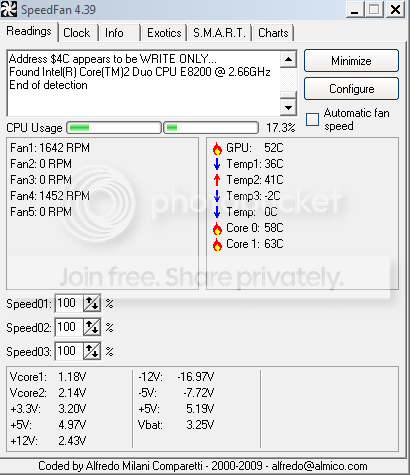
im not sure how i can see if my drive has problem or not,so here is the diagnostic from
speedfan hope it help you:

Capture-6.png
 

My Computer

OS
windows 7
CPU
Intel(R) Core(TM)2 Duo CPU E8200 @ 2.66GHz
Motherboard
gigabyte technology EX38-DS4
Memory
symmetric 2048mbytes DDR2
Graphics Card(s)
Nvidia geforce9600gt
Screen Resolution
1920x1080
Hard Drives
WDC caviar blue 1tb
WD 500BEV External usb device
Internet Speed
24mbs
Is it me or do those GPU and CPU temperatures look too hot? I have seen oil temperatures in aircraft engines within the range of the Core 1 CPU temperature.
 

My Computer

Computer Manufacturer/Model Number
Dell Vostro 420
OS
Windows 7 Pro x64
CPU
3.00 GHz Intel Core2 Quad Q9650
Memory
4 GB
Graphics Card(s)
ATI Radeon HD 3400 Series
Monitor(s) Displays
DELL 2405FPW
Screen Resolution
1920x1200
Hard Drives
System: 80GB WDC WD800JD-22MSA1
Data: 500GB Hitachi HDP725050GLA360
Internet Speed
Verizon FiOS 20/5 mbps
Other Info
Computing is primarily business use with off-time troubleshooting practice: Remote desktop, scanning and producing invoices, some minor graphics work.
Is it me or do those GPU and CPU temperatures look too hot? I have seen oil temperatures in aircraft engines within the range of the Core 1 CPU temperature.
Those temperatures are very normal. Typically, 70 is just about the hottest they can run without burning up. At 68, I might start to watch it.
 

My Computer

Computer Manufacturer/Model Number
Custom
OS
Windows 7 Professional x64
CPU
Intel i7 2600K OC'd @ 4620 MHz
Motherboard
Asus P8Z68-V Pro
Memory
16GB GSkill Sniper 2133 Mhz (4x4GB)
Graphics Card(s)
EVGA GeForce GTX 480 SuperClocked+
Sound Card
Realtek High Definition Audio
Monitor(s) Displays
2x Acer S273HLbmii 27"
Screen Resolution
2 x 1920x1080
Hard Drives
64GB Crucial M4 SSD

Storage: Hitachi 1TB 5400RPM, Samsung 1.5TB 5400RPM
PSU
Corsair HW Series 750w (modular)
Case
Cooler Master HAF 932 Advanced Blue Edition
Cooling
CM Hyper 212+ CPU cooler, 3x 230mm + 1x 140mm case fans
Keyboard
Logitech MK320 (wireless)
Mouse
Logitech MK320 (wireless)
Internet Speed
30 Mb/s : 2 Mb/s
Is it me or do those GPU and CPU temperatures look too hot? I have seen oil temperatures in aircraft engines within the range of the Core 1 CPU temperature.
Those temperatures are very normal. Typically, 70 is just about the hottest they can run without burning up. At 68, I might start to watch it.

I see. As someone who doesn't overclock I was always used to seeing temps in the lower to mid 30s (centigrade).
 

My Computer

Computer Manufacturer/Model Number
Dell Vostro 420
OS
Windows 7 Pro x64
CPU
3.00 GHz Intel Core2 Quad Q9650
Memory
4 GB
Graphics Card(s)
ATI Radeon HD 3400 Series
Monitor(s) Displays
DELL 2405FPW
Screen Resolution
1920x1200
Hard Drives
System: 80GB WDC WD800JD-22MSA1
Data: 500GB Hitachi HDP725050GLA360
Internet Speed
Verizon FiOS 20/5 mbps
Other Info
Computing is primarily business use with off-time troubleshooting practice: Remote desktop, scanning and producing invoices, some minor graphics work.
Is it me or do those GPU and CPU temperatures look too hot? I have seen oil temperatures in aircraft engines within the range of the Core 1 CPU temperature.
Those temperatures are very normal. Typically, 70 is just about the hottest they can run without burning up. At 68, I might start to watch it.

I see. As someone who doesn't overclock I was always used to seeing temps in the lower to mid 30s (centigrade).
Yeah, I used to run about 35, but I am overclocking, and now I am getting temperatures about 40.
 

My Computer

Computer Manufacturer/Model Number
Custom
OS
Windows 7 Professional x64
CPU
Intel i7 2600K OC'd @ 4620 MHz
Motherboard
Asus P8Z68-V Pro
Memory
16GB GSkill Sniper 2133 Mhz (4x4GB)
Graphics Card(s)
EVGA GeForce GTX 480 SuperClocked+
Sound Card
Realtek High Definition Audio
Monitor(s) Displays
2x Acer S273HLbmii 27"
Screen Resolution
2 x 1920x1080
Hard Drives
64GB Crucial M4 SSD

Storage: Hitachi 1TB 5400RPM, Samsung 1.5TB 5400RPM
PSU
Corsair HW Series 750w (modular)
Case
Cooler Master HAF 932 Advanced Blue Edition
Cooling
CM Hyper 212+ CPU cooler, 3x 230mm + 1x 140mm case fans
Keyboard
Logitech MK320 (wireless)
Mouse
Logitech MK320 (wireless)
Internet Speed
30 Mb/s : 2 Mb/s
edit: that weird because i dont overclock :S
 

My Computer

OS
windows 7
CPU
Intel(R) Core(TM)2 Duo CPU E8200 @ 2.66GHz
Motherboard
gigabyte technology EX38-DS4
Memory
symmetric 2048mbytes DDR2
Graphics Card(s)
Nvidia geforce9600gt
Screen Resolution
1920x1080
Hard Drives
WDC caviar blue 1tb
WD 500BEV External usb device
Internet Speed
24mbs
the temps are fine. Speedfan does not necessarily report temps correctly (your cpu temp as reported in cmos setup/bios is better), plus some temps are read from inside the cpu, where 60-70C is normal. 35c-40c are external cpu temps
 

My Computer

Computer type
PC/Desktop
Computer Manufacturer/Model Number
diy
OS
Win7 pro x64
CPU
stock i7 7700k
Motherboard
Gigabyte Z270N-WIFI mini-ITX
Memory
Corsair Vengeance LPX 16GB (2x8GB) DDR4 @ 3200MHz
Graphics Card(s)
integrated Intel HD 630
Sound Card
onboard Realtek ALC1220
Monitor(s) Displays
two vertically mounted samsung 55" 4k un55mu8000
Screen Resolution
1920x1280
Hard Drives
256GB Samsung EVO 960 M.2 pci-e NVMe SSD
PSU
SilverStone Nightjar ST45NF 450Watt Fanless
Case
No case. Motherboard is mounted directly onto power supply
Cooling
Evercool low profile 815EP with Panaflow 12L fan at 7v
Keyboard
Ortek MCK-86 mini
Mouse
Belkin 5-button USB
Internet Speed
spectrum 400mbps
You need to DLoad install and run the FREE diagnostics from the HDD manuf. to see if that drive can be trusted with your data...
Those error messages aren't suggestions but an indication of trouble.

SpeedFan does show HDD health and temps but for a clear test travel to the drive manuf. site for their FREE diagnostics...
Follow the info on creating a bootable CD and power up with the bootCD in...
Run the long test.
 

My Computer

Computer Manufacturer/Model Number
Self-Built
OS
Vista Ultimate X64/ Windows 7 Dual-boot
CPU
Q6600
Motherboard
ASUS P5K
Memory
4G OCZ PC2 8500 Platinum
Graphics Card(s)
EVGA 8800GTS Vid Card
Hard Drives
500G Seagate SATA
200G Seagate SATA
100G WD Caviar SATA
80G WD Caviar IDE
PSU
OCZ Elite 800W PSU
Case
RaidMax Smilodon Case
Back
Top