Solved Problems after running SeaTools

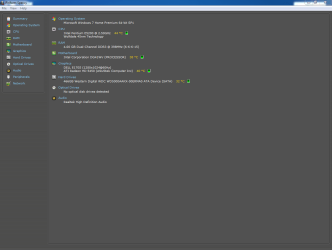
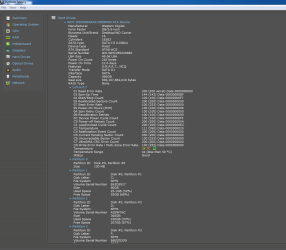
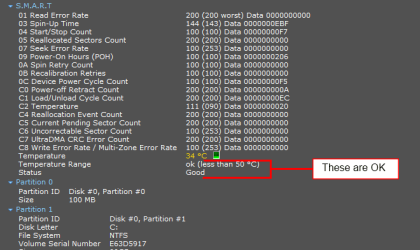
Capture one is of the C's at start up Capture 2 is of the SMART stuff.

I got back home a while back removed the HDD from inside, kept it physically on top of the case. No sound or vibration but I do feel the case vibrating slightly. All pc's vibrate verrrrrryyyy slightly? Don't they? I also disconnected the DVD ROM before booting up.

Should I keep it like this the whole week?

Update: These are screenshots from WD, din't take the test yet.
30372157.png

hd1.png
 

Attachments

  • Capture.PNG
    Capture.PNG
    25 KB · Views: 9
  • Capture2.PNG
    Capture2.PNG
    35 KB · Views: 9
Last edited:

My Computer

Computer type
PC/Desktop
Computer Manufacturer/Model Number
Self assembled
OS
Windows 10 Home 64Bit
CPU
Intel Core i5 10400 @ 2.90GHz
Motherboard
Intel Corporation DG41WV (PROCESSOR)
Memory
8.00GB Single-Channel Unknown @ 1329MHz (16-20-20-38)
Sound Card
Realtek High Definition Audio
Monitor(s) Displays
DELL E170S
Screen Resolution
1280x1024 pixels
Hard Drives
931GB TOSHIBA DT01ACA100 (SATA)
238GB TEAM TM8PS7256G (SATA SSD)
Case
Nothing Fancy
Cooling
Fans
Keyboard
A4 Tech Co LTD
Mouse
A4 Tech Co Ltd/Logitech
Internet Speed
25 Mbps
I think the drive is OK, SMART status is ok, confirmed from two sources. Go ahead and run the WD test though.
Yussi SMART.png

A PC case will have some tiny teensy-weensy bit of vibration. It should not be audible though unless in a very quiet room.

Since all moving parts are attached to the case, anything vibrating will cause the entire thing to vibrate. It could make it appear to come from different sources.
Someone else suggested a bad fan, I think so too now. You may have several in the PC, exhaust/intake on the case, in the PSU, on the GPU card, and the CPU cooler. One way to isolate is use an empty paper towel tube, one end to an ear and the other end to various fans in the case.
 

My Computer

Computer type
PC/Desktop
Computer Manufacturer/Model Number
Home Built Desktop By DataTech
OS
Windows 7 Ultimate X64 SP1
CPU
Intel i5-2550K, Differing ~4.4-4.8GHz No built in GPU
Motherboard
ASUS P8Z68-V PRO/GEN3
Memory
16GB G.Skill Sniper 1866MHz @ 2133MHz 2x8GB
Graphics Card(s)
ASUS GTX650TIB-DC2OC-2GD5, (650TI Boost)
Sound Card
Onboard Realtek 5-1
Monitor(s) Displays
Samsung P2570HD
Screen Resolution
1920x1080
Hard Drives
Samsung 840 Pro 256GB SSD for OS, 500GB Seagate Constellation (Enterprise drive) for Data
PSU
Corsair HX650W
Case
Inwin Dragon Rider
Cooling
Hyper 212 EVO w/two Noctua fans, push-pull, @1300 RPM
Keyboard
E-Z Eyes, bright yellow keys with large characters
Mouse
steelseries SENSEI Laser Pro Gaming
Internet Speed
48-51Mbs Mbs down, 11 Mbs up Xfinity Cable
Antivirus
Norton Internet Security 2013
Browser
IE 10, Opera, Pale Moon if needed
Other Info
4 case fans, LG BluRay-RE, ASUS DVD-RW, Mr. Fusion power supply, 1.21 gigawatts.
Physically touching the drive during a boot as mentioned by Dave76 as well as using an empty paper towel tube as mentioned by Britton30 are both great ways to pinpoint the source. A pencil, one end physically touching the drive and the other touching your ear is another way.

I'm really thinking a fan as a likely culprit like a few of the other posters are thinking. The vibration/noise that a bad fan can make might make someone think it's coming from a drive. If the drive was really the source of the same kind of vibration/noise that a bad fan can make then you'd really have to wonder how much longer it'll last. Most of the SMART numbers in your CrystalDisk snip look good though, similar to a brand new healthy drive. One attribute I'm not sure about is that "Spin-Up Time" number; keep an eye on that attribute (keep Crystal running at all times so that you can see how it changes over time). I don't think it's indicative of a failing drive as it's a long way from tripping SMART, but I think it should be more like 160 or higher.
 

My Computer

OS
Windows 7 Ultimate x64
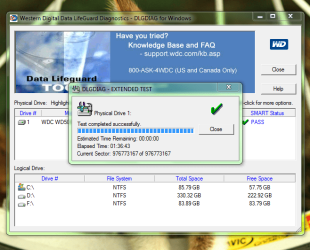
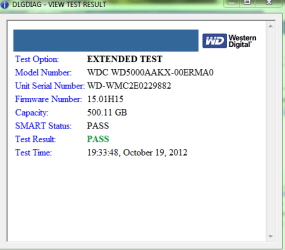
Hmm.. So I did the WD life guard test and the results are attached. One thing which I didn't mention is that there was a loose (small) screw holding the drive all these days and I did switch it with a big one but cannot recall if the drive stopped vibrating that time. Anyway, I've kept the hard drive on top of the case since yesterday and it hasn't vibrated or made any sound. Celsius also remains below 40. I will keep the drive like this for a week :)

Thanks for the time and input to all :)
 

Attachments

  • Capture1.PNG
    Capture1.PNG
    62.8 KB · Views: 8
  • Capture23.PNG
    Capture23.PNG
    11.5 KB · Views: 7

My Computer

Computer type
PC/Desktop
Computer Manufacturer/Model Number
Self assembled
OS
Windows 10 Home 64Bit
CPU
Intel Core i5 10400 @ 2.90GHz
Motherboard
Intel Corporation DG41WV (PROCESSOR)
Memory
8.00GB Single-Channel Unknown @ 1329MHz (16-20-20-38)
Sound Card
Realtek High Definition Audio
Monitor(s) Displays
DELL E170S
Screen Resolution
1280x1024 pixels
Hard Drives
931GB TOSHIBA DT01ACA100 (SATA)
238GB TEAM TM8PS7256G (SATA SSD)
Case
Nothing Fancy
Cooling
Fans
Keyboard
A4 Tech Co LTD
Mouse
A4 Tech Co Ltd/Logitech
Internet Speed
25 Mbps
Hmm.. So I did the WD life guard test and the results are attached. One thing which I didn't mention is that there was a loose (small) screw holding the drive all these days and I did switch it with a big one but cannot recall if the drive stopped vibrating that time. Anyway, I've kept the hard drive on top of the case since yesterday and it hasn't vibrated or made any sound. Celsius also remains below 40. I will keep the drive like this for a week :)

Thanks for the time and input to all :)

Was the drive firmly attached with the other 3 screws? Based on the way you described the sound and vibration and the way I'm imagining it, I don't think one loose screw could've been the cause.

I think I'd put it all back together again and keep monitoring. See what the temp does when it's installed normally with typical air flow (use CrystalDisk graphs). Remember that with the case opened the case fans are really only doing local cooling rather than forcing/inducing air flow throughout the case. Leave it in a position where you can easily open it in order to check things out (for source of noise/vibration). An IR temp gun is useful for things like this (if you've got access to one).
 

My Computer

OS
Windows 7 Ultimate x64
Glad to see your hard drive passed the test.

With the HDD out of the case, did you notice any vibration or noise from the case?
As mentioned previously, it might be a fan going bad.
Did all vibrations and noise stop when the HDD was removed?
 

My Computer

Computer type
PC/Desktop
Computer Manufacturer/Model Number
76~2.0
OS
Windows 7 Ult x64 - SP1/ Windows 8 Pro x64
CPU
Intel Core i5-3570K 4.6GHz
Motherboard
Gigabyte GA-Z77X UD3H, f18
Memory
8GB (2X4GB) DDR3 1600 Corsair Vengeance CL8 1.5v
Graphics Card(s)
Sapphire HD 7770 Vapor-X OC 1GB DDR5
Sound Card
Onboard VIA VT2021
Monitor(s) Displays
22" LCD Dell
Screen Resolution
1680x1050
Hard Drives
Samsung 840Pro 128GB SSD,
Seagate Barracuda 500GB SATA2 7200rpm 32MB cache, Seagate Barracuda 1TB SATA2 7200rpm 32MB cache,
PSU
Corsair HX650W
Case
Cooler Master Storm Scout
Cooling
Corsair H80 2x12cm Noctua NF P12 , 2x14cm case fans
Keyboard
Logitech Wave
Mouse
CM Sentinel
Internet Speed
Dismal
Antivirus
Avast
Browser
Opera Next
Other Info
Haswell laptop: HP Envy 17t-j, i7-4700MQ, GeForce 740M 2GB DDR3, 17.3" Full HD 1920x1080, 16GB RAM, Samsung 840 Pro 128GB, 1TB Hitachi 7200 HDD,
Desktop: eSATA ports,
External eSATA Seagate 500GB SATA2 7200rpm,
External WD USB 500GB
Was the drive firmly attached with the other 3 screws? Based on the way you described the sound and vibration and the way I'm imagining it, I don't think one loose screw could've been the cause.

I think I'd put it all back together again and keep monitoring. See what the temp does when it's installed normally with typical air flow (use CrystalDisk graphs). Remember that with the case opened the case fans are really only doing local cooling rather than forcing/inducing air flow throughout the case. Leave it in a position where you can easily open it in order to check things out (for source of noise/vibration). An IR temp gun is useful for things like this (if you've got access to one).

Hello F5ing,
I usually use 2 screws, this casing isn't that good so :(. It's a bit congested and I was thinking of getting a new casing but have not yet collected enough $$ for it. Currently I'm monitoring the disk outside the case, will keep it like this for 4 days more. I will do what you said in the coming days. :)

Glad to see your hard drive passed the test.

With the HDD out of the case, did you notice any vibration or noise from the case?
As mentioned previously, it might be a fan going bad.
Did all vibrations and noise stop when the HDD was removed?

Hi Dave,
There's no sound/vibration ever since I kept the HDD on top of the case. Not from the inside of the case also.

Will observe and update you'll in due course :)
 
Last edited:

My Computer

Computer type
PC/Desktop
Computer Manufacturer/Model Number
Self assembled
OS
Windows 10 Home 64Bit
CPU
Intel Core i5 10400 @ 2.90GHz
Motherboard
Intel Corporation DG41WV (PROCESSOR)
Memory
8.00GB Single-Channel Unknown @ 1329MHz (16-20-20-38)
Sound Card
Realtek High Definition Audio
Monitor(s) Displays
DELL E170S
Screen Resolution
1280x1024 pixels
Hard Drives
931GB TOSHIBA DT01ACA100 (SATA)
238GB TEAM TM8PS7256G (SATA SSD)
Case
Nothing Fancy
Cooling
Fans
Keyboard
A4 Tech Co LTD
Mouse
A4 Tech Co Ltd/Logitech
Internet Speed
25 Mbps
Updates..

So I went ahead and spent some collected $$ on a new casing. It's a normal one, but definitely bigger than the previous and the pc is at least worth looking at now. (giggles) I actually got it yesterday but there was a problem with the casings earthing (everything would work but the monitor wouldn't power up/displayed nothing if the pc was powered on) so returned it and they had to get remove stuffs out. They asked if I wanted to wait so that they find another but I said them to remove the stuff that's creating the earthing problem (a$$holes couldn't give me something better on one go + we're having a long week religious holiday here in bangladesh.) How can I stay without my computer for so long!!! :cry:

:note: Surprising to note:
Yesterday when my brother got it back home I was able to find out the actual source of the grinding/vibrations. It was my PSU. (The new one I got a few months back). I knew there was a problem with the PSU I got recently but my brother wouldn't listen. It used to make this very soft cricket (insect) noise but nothing serious happened to my PC while using and my bro told me to avoid the sound and that its normal etc.. I was told that the HDD might have been heating up because the PSU might not be giving enough power or something.. (not sure) :o

So I'm keeping this thread open for a few more days.. or maybe weeks if I ever hear the noise. (fingers crossed)

Thank you all for the time and input once again :)
 

My Computer

Computer type
PC/Desktop
Computer Manufacturer/Model Number
Self assembled
OS
Windows 10 Home 64Bit
CPU
Intel Core i5 10400 @ 2.90GHz
Motherboard
Intel Corporation DG41WV (PROCESSOR)
Memory
8.00GB Single-Channel Unknown @ 1329MHz (16-20-20-38)
Sound Card
Realtek High Definition Audio
Monitor(s) Displays
DELL E170S
Screen Resolution
1280x1024 pixels
Hard Drives
931GB TOSHIBA DT01ACA100 (SATA)
238GB TEAM TM8PS7256G (SATA SSD)
Case
Nothing Fancy
Cooling
Fans
Keyboard
A4 Tech Co LTD
Mouse
A4 Tech Co Ltd/Logitech
Internet Speed
25 Mbps
Good news :)
 

My Computer

Computer type
PC/Desktop
Computer Manufacturer/Model Number
Self Assembled
OS
Microsoft Windows 10 Pro Insider Preview 64-bit
CPU
Intel(R) Core(TM) i3-4130 CPU @ 3.40GHz
Motherboard
Gigabyte Technology Co., Ltd. B85M-D3H
Memory
Corsair Vengence 4GB x2 (8.00GB Dual-Channel DDR3 @ 798MHz)
Graphics Card(s)
2047MB GeForce GTS 450 (ZOTAC International)
Sound Card
Onboard (Realtek High Definition Audio)
Monitor(s) Displays
LG Flatron E2040T
Screen Resolution
1600x900
Hard Drives
Western Digital 1 TB
Seagate 500 GB
PSU
Corsair VS550
Case
Cooler Master K380
Cooling
Cooler Master Seidon 120V Plus
Keyboard
Logitech MK260r
Mouse
Logitech MK260r
Internet Speed
PMPL Broadband
Antivirus
Windows Defender + MBAM
Browser
Firefox
Other Info
Dell Studio 15" Laptop
After you whack your brother, get a good quality PSU. ;)
 

My Computer

Computer type
PC/Desktop
Computer Manufacturer/Model Number
Home Built Desktop By DataTech
OS
Windows 7 Ultimate X64 SP1
CPU
Intel i5-2550K, Differing ~4.4-4.8GHz No built in GPU
Motherboard
ASUS P8Z68-V PRO/GEN3
Memory
16GB G.Skill Sniper 1866MHz @ 2133MHz 2x8GB
Graphics Card(s)
ASUS GTX650TIB-DC2OC-2GD5, (650TI Boost)
Sound Card
Onboard Realtek 5-1
Monitor(s) Displays
Samsung P2570HD
Screen Resolution
1920x1080
Hard Drives
Samsung 840 Pro 256GB SSD for OS, 500GB Seagate Constellation (Enterprise drive) for Data
PSU
Corsair HX650W
Case
Inwin Dragon Rider
Cooling
Hyper 212 EVO w/two Noctua fans, push-pull, @1300 RPM
Keyboard
E-Z Eyes, bright yellow keys with large characters
Mouse
steelseries SENSEI Laser Pro Gaming
Internet Speed
48-51Mbs Mbs down, 11 Mbs up Xfinity Cable
Antivirus
Norton Internet Security 2013
Browser
IE 10, Opera, Pale Moon if needed
Other Info
4 case fans, LG BluRay-RE, ASUS DVD-RW, Mr. Fusion power supply, 1.21 gigawatts.

My Computer

Computer type
PC/Desktop
Computer Manufacturer/Model Number
Self assembled
OS
Windows 10 Home 64Bit
CPU
Intel Core i5 10400 @ 2.90GHz
Motherboard
Intel Corporation DG41WV (PROCESSOR)
Memory
8.00GB Single-Channel Unknown @ 1329MHz (16-20-20-38)
Sound Card
Realtek High Definition Audio
Monitor(s) Displays
DELL E170S
Screen Resolution
1280x1024 pixels
Hard Drives
931GB TOSHIBA DT01ACA100 (SATA)
238GB TEAM TM8PS7256G (SATA SSD)
Case
Nothing Fancy
Cooling
Fans
Keyboard
A4 Tech Co LTD
Mouse
A4 Tech Co Ltd/Logitech
Internet Speed
25 Mbps
That's good news!

Was it the fan for the PSU? Do you suspect the PSU was running hot? Was the drive mounted close to the PSU?

Or maybe it was undervoltage...

Go ahead and give him a whack! Just tell him it was from one of us. :devil: He's supposed to take care of his little sis afterall.
 

My Computer

OS
Windows 7 Ultimate x64
Good that you found the cause, I'm going with 'give him a whack!'
What PSU do you have?

Be careful, worst case scenario a bad PSU can damage all of the other components, permanently.

Let us know your progress.
 

My Computer

Computer type
PC/Desktop
Computer Manufacturer/Model Number
76~2.0
OS
Windows 7 Ult x64 - SP1/ Windows 8 Pro x64
CPU
Intel Core i5-3570K 4.6GHz
Motherboard
Gigabyte GA-Z77X UD3H, f18
Memory
8GB (2X4GB) DDR3 1600 Corsair Vengeance CL8 1.5v
Graphics Card(s)
Sapphire HD 7770 Vapor-X OC 1GB DDR5
Sound Card
Onboard VIA VT2021
Monitor(s) Displays
22" LCD Dell
Screen Resolution
1680x1050
Hard Drives
Samsung 840Pro 128GB SSD,
Seagate Barracuda 500GB SATA2 7200rpm 32MB cache, Seagate Barracuda 1TB SATA2 7200rpm 32MB cache,
PSU
Corsair HX650W
Case
Cooler Master Storm Scout
Cooling
Corsair H80 2x12cm Noctua NF P12 , 2x14cm case fans
Keyboard
Logitech Wave
Mouse
CM Sentinel
Internet Speed
Dismal
Antivirus
Avast
Browser
Opera Next
Other Info
Haswell laptop: HP Envy 17t-j, i7-4700MQ, GeForce 740M 2GB DDR3, 17.3" Full HD 1920x1080, 16GB RAM, Samsung 840 Pro 128GB, 1TB Hitachi 7200 HDD,
Desktop: eSATA ports,
External eSATA Seagate 500GB SATA2 7200rpm,
External WD USB 500GB
That's good news!

Was it the fan for the PSU? Do you suspect the PSU was running hot? Was the drive mounted close to the PSU?

Or maybe it was undervoltage...

Go ahead and give him a whack! Just tell him it was from one of us. :devil: He's supposed to take care of his little sis afterall.

PSU. I'm not sure if the PSU was running hot.. I never checked. But like I said one short circuit screwed my other PSU so I got this one the next day. It made sounds from day 1, cricket insect sound (that's how I describe it, lol). I complained to Ahmed (my brother) several times but he said me to ignore it...which I did till I changed the casing :rolleyes:.. BTW, yes the hard disk was set a lil above the PSU.
Good that you found the cause, I'm going with 'give him a whack!'
What PSU do you have?

Be careful, worst case scenario a bad PSU can damage all of the other components, permanently.

Let us know your progress.
I think I've progressed quite well. I didn't hear any sounds at all since the time I changed the casing & PSU (Like entire week). However, I will update this thread if I ever hear it again.

Till then I'll mark this as solved. Thank you everyone for your input :)

[I'm not sure what brand the PSU is, I didn't check. Once I do, I will post it on my specs]

Thank you my friends :cool:
 

My Computer

Computer type
PC/Desktop
Computer Manufacturer/Model Number
Self assembled
OS
Windows 10 Home 64Bit
CPU
Intel Core i5 10400 @ 2.90GHz
Motherboard
Intel Corporation DG41WV (PROCESSOR)
Memory
8.00GB Single-Channel Unknown @ 1329MHz (16-20-20-38)
Sound Card
Realtek High Definition Audio
Monitor(s) Displays
DELL E170S
Screen Resolution
1280x1024 pixels
Hard Drives
931GB TOSHIBA DT01ACA100 (SATA)
238GB TEAM TM8PS7256G (SATA SSD)
Case
Nothing Fancy
Cooling
Fans
Keyboard
A4 Tech Co LTD
Mouse
A4 Tech Co Ltd/Logitech
Internet Speed
25 Mbps
Remember, older isn't smarter.;)
 

My Computer

Computer type
PC/Desktop
Computer Manufacturer/Model Number
Home Built Desktop By DataTech
OS
Windows 7 Ultimate X64 SP1
CPU
Intel i5-2550K, Differing ~4.4-4.8GHz No built in GPU
Motherboard
ASUS P8Z68-V PRO/GEN3
Memory
16GB G.Skill Sniper 1866MHz @ 2133MHz 2x8GB
Graphics Card(s)
ASUS GTX650TIB-DC2OC-2GD5, (650TI Boost)
Sound Card
Onboard Realtek 5-1
Monitor(s) Displays
Samsung P2570HD
Screen Resolution
1920x1080
Hard Drives
Samsung 840 Pro 256GB SSD for OS, 500GB Seagate Constellation (Enterprise drive) for Data
PSU
Corsair HX650W
Case
Inwin Dragon Rider
Cooling
Hyper 212 EVO w/two Noctua fans, push-pull, @1300 RPM
Keyboard
E-Z Eyes, bright yellow keys with large characters
Mouse
steelseries SENSEI Laser Pro Gaming
Internet Speed
48-51Mbs Mbs down, 11 Mbs up Xfinity Cable
Antivirus
Norton Internet Security 2013
Browser
IE 10, Opera, Pale Moon if needed
Other Info
4 case fans, LG BluRay-RE, ASUS DVD-RW, Mr. Fusion power supply, 1.21 gigawatts.

My Computer

Computer type
PC/Desktop
Computer Manufacturer/Model Number
Self Assembled
OS
Microsoft Windows 10 Pro Insider Preview 64-bit
CPU
Intel(R) Core(TM) i3-4130 CPU @ 3.40GHz
Motherboard
Gigabyte Technology Co., Ltd. B85M-D3H
Memory
Corsair Vengence 4GB x2 (8.00GB Dual-Channel DDR3 @ 798MHz)
Graphics Card(s)
2047MB GeForce GTS 450 (ZOTAC International)
Sound Card
Onboard (Realtek High Definition Audio)
Monitor(s) Displays
LG Flatron E2040T
Screen Resolution
1600x900
Hard Drives
Western Digital 1 TB
Seagate 500 GB
PSU
Corsair VS550
Case
Cooler Master K380
Cooling
Cooler Master Seidon 120V Plus
Keyboard
Logitech MK260r
Mouse
Logitech MK260r
Internet Speed
PMPL Broadband
Antivirus
Windows Defender + MBAM
Browser
Firefox
Other Info
Dell Studio 15" Laptop
Let us know if it's running ok.

You'll have to open the case and look at the PSU information.
 

My Computer

Computer type
PC/Desktop
Computer Manufacturer/Model Number
76~2.0
OS
Windows 7 Ult x64 - SP1/ Windows 8 Pro x64
CPU
Intel Core i5-3570K 4.6GHz
Motherboard
Gigabyte GA-Z77X UD3H, f18
Memory
8GB (2X4GB) DDR3 1600 Corsair Vengeance CL8 1.5v
Graphics Card(s)
Sapphire HD 7770 Vapor-X OC 1GB DDR5
Sound Card
Onboard VIA VT2021
Monitor(s) Displays
22" LCD Dell
Screen Resolution
1680x1050
Hard Drives
Samsung 840Pro 128GB SSD,
Seagate Barracuda 500GB SATA2 7200rpm 32MB cache, Seagate Barracuda 1TB SATA2 7200rpm 32MB cache,
PSU
Corsair HX650W
Case
Cooler Master Storm Scout
Cooling
Corsair H80 2x12cm Noctua NF P12 , 2x14cm case fans
Keyboard
Logitech Wave
Mouse
CM Sentinel
Internet Speed
Dismal
Antivirus
Avast
Browser
Opera Next
Other Info
Haswell laptop: HP Envy 17t-j, i7-4700MQ, GeForce 740M 2GB DDR3, 17.3" Full HD 1920x1080, 16GB RAM, Samsung 840 Pro 128GB, 1TB Hitachi 7200 HDD,
Desktop: eSATA ports,
External eSATA Seagate 500GB SATA2 7200rpm,
External WD USB 500GB

My Computer

Computer type
PC/Desktop
Computer Manufacturer/Model Number
Self assembled
OS
Windows 10 Home 64Bit
CPU
Intel Core i5 10400 @ 2.90GHz
Motherboard
Intel Corporation DG41WV (PROCESSOR)
Memory
8.00GB Single-Channel Unknown @ 1329MHz (16-20-20-38)
Sound Card
Realtek High Definition Audio
Monitor(s) Displays
DELL E170S
Screen Resolution
1280x1024 pixels
Hard Drives
931GB TOSHIBA DT01ACA100 (SATA)
238GB TEAM TM8PS7256G (SATA SSD)
Case
Nothing Fancy
Cooling
Fans
Keyboard
A4 Tech Co LTD
Mouse
A4 Tech Co Ltd/Logitech
Internet Speed
25 Mbps
Back
Top