
MrBachelor
User
Hey guys I'm pretty new here but have been reading / searching a lot. There is a wealth of information here; thanks for that.
This is going to be a long post so sorry for that.
Here's the problem:
As the title states I can no longer boot into XP on my dual boot setup. I do still get the startup option to "select older version of windows" but when I do so, and attempt to start XP I get a black screen. No errors, or anything. I can't even boot in safe mode (I get a bunch of lines of code that eventually just hang).
My problem is similar to this thread and so, I believe, is the solution.
I'm looking for advise before I start messing with boot files and really jack something up.
Here is a little background:
Been running XP on this machine for 5+years, it was an OEM HP Pavilion. I have since upgraded the hard drive to a 500gb seagate along with the case, power supply, and video card. When I installed the new HD I simply used seagate's software and cloned the existing drive, including the OS. Everything worked fine. I had successfully cloned drives C: (main system) and D: (OEM recovery partition) onto my new drive.
When installing Win7 about a month ago I followed this how-to for the most part. However, I was out of DVD's so I simply mounted the image and installed through XP. That being said I have no DVD of either XP or Win7 to fall back on should my system stop booting completely.
Ok here when the problem started:
When I partitioned the 500gb drive to install Win7 I left quite a bit of space unallocated. I successfully booted between 7 and XP for a few weeks. Then, I assigned a drive letter (S: for storate) to the unallocated space using Win7 Disk Management utility. After doing so I was unable to boot back to XP.
This is what I have found so far:
Reading several similar (but different) threads here and googling everything I could think of I thought my XP Boot.ini file may have been pointing to the wrong partition number and not booting properly. However, when I look under the C: partition through explorer there is no Boot.ini file at all.
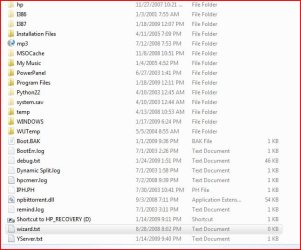
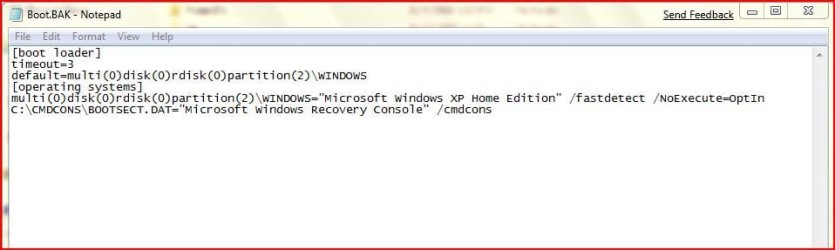
I proceed to search the C: drive for said file and have come up with a couple interesting items. Boot.BAK does exist under the C: drive and Boot.ini.backup exists at C:\Windows\pss <-- (this "backup" is dated the same as my installation of Win7). These files both contain the same information.
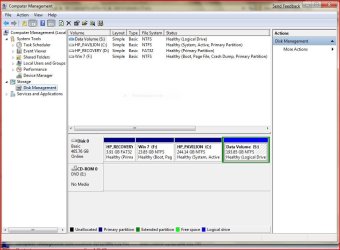
I believe that XP is now on the 3rd partition when it was the 2nd one prior. Can someone please verify this from the pic below?
Solution:??
If XP is now the 3rd partition can I simply copy Boot.BAK, change it to Boot.ini and replace partition (2) with partition (3)??
What does the segment "/fastdetect /NoExecute=OptIn" mean/do?? I have a good idea, but really just wondering if it needs to be changed.
Thanks guys for any input you may have. This forum is GREAT!
This is going to be a long post so sorry for that.
Here's the problem:
As the title states I can no longer boot into XP on my dual boot setup. I do still get the startup option to "select older version of windows" but when I do so, and attempt to start XP I get a black screen. No errors, or anything. I can't even boot in safe mode (I get a bunch of lines of code that eventually just hang).
My problem is similar to this thread and so, I believe, is the solution.
I'm looking for advise before I start messing with boot files and really jack something up.
Here is a little background:
Been running XP on this machine for 5+years, it was an OEM HP Pavilion. I have since upgraded the hard drive to a 500gb seagate along with the case, power supply, and video card. When I installed the new HD I simply used seagate's software and cloned the existing drive, including the OS. Everything worked fine. I had successfully cloned drives C: (main system) and D: (OEM recovery partition) onto my new drive.
When installing Win7 about a month ago I followed this how-to for the most part. However, I was out of DVD's so I simply mounted the image and installed through XP. That being said I have no DVD of either XP or Win7 to fall back on should my system stop booting completely.
Ok here when the problem started:
When I partitioned the 500gb drive to install Win7 I left quite a bit of space unallocated. I successfully booted between 7 and XP for a few weeks. Then, I assigned a drive letter (S: for storate) to the unallocated space using Win7 Disk Management utility. After doing so I was unable to boot back to XP.
This is what I have found so far:
Reading several similar (but different) threads here and googling everything I could think of I thought my XP Boot.ini file may have been pointing to the wrong partition number and not booting properly. However, when I look under the C: partition through explorer there is no Boot.ini file at all.
I proceed to search the C: drive for said file and have come up with a couple interesting items. Boot.BAK does exist under the C: drive and Boot.ini.backup exists at C:\Windows\pss <-- (this "backup" is dated the same as my installation of Win7). These files both contain the same information.
I believe that XP is now on the 3rd partition when it was the 2nd one prior. Can someone please verify this from the pic below?
Solution:??
If XP is now the 3rd partition can I simply copy Boot.BAK, change it to Boot.ini and replace partition (2) with partition (3)??
What does the segment "/fastdetect /NoExecute=OptIn" mean/do?? I have a good idea, but really just wondering if it needs to be changed.
Thanks guys for any input you may have. This forum is GREAT!
My Computer
- OS
- Windows 7 Ultimate, Signature Edition 64bit
- CPU
- Intel C2D e7400 2.8ghz
- Motherboard
- Gigabyte GA-EP45-UD3R
- Memory
- G.Skill F2-6200CL5D-4GBPQ (4gigs)
- Graphics Card(s)
- MSI Radeon 4830
- Monitor(s) Displays
- 23" Asus
- Screen Resolution
- 1920x1080
- Hard Drives
- 500 GB Seagate 7200.11 SATA
2TB WD Green
2TB WD Green (having issues with this one)
- PSU
- 550 Watt Cooler Master Real Power
- Case
- Cooler Master CM 690
- Cooling
- air
- Keyboard
- old
- Mouse
- older
- Internet Speed
- cable modem

 Just those files obtained from bittorrent in the last month are gone.

