sandybeach
New member
- Local time
- 11:13 AM
- Messages
- 9
having promblems dling mp3 from site jw.org
My Computer
- Computer type
- Laptop
- OS
- windows7 home premium 32bit



sandybeach, do you know which browser you are using, and what version? When you click the MP3 button the screen should darken a little, and a smaller window pops up with a list of songs to choose from (this would be known as a "lightbox" effect). It may not be working properly for you. Knowing which browser and version you have would help us to know how to help you.
edit: Just a thought... have you tried simply rebooting your computer? Perhaps something glitched out and needs resetting.

I do not know if I am answering in the right place as I said I am new. But I go into jw.org and try to do the music or any files that are Mp3 and it won't open for me to select what to dl.it doesn't say anything just don't open to dl it
SB, don't worry, you have posted your question/thread in the right place.If you click on the MP3 rectangle, a box pops up with a list of songs that says "play/download".
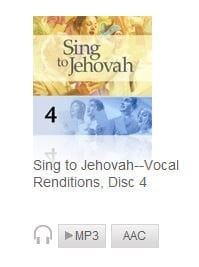
O.K. When I go to that site, it opens its homepage. I scroll down to the bottom where the columns are saying "Read", "Learn About" , "Download" etc. Right? O.k. I click on "Music" in the Download column. It takes me to a page Titled "Music for Christian Worship". Correct? Is this where/what you see/get to also? Theres boxes there that say "Sing to Jehovah" 6 of them, and 6 boxes that say "Kingdom Melodies". Correct? They look like this :
View attachment 259673
Under the "Sing to Jehovah" box/icon theres two smaller rectangles saying MP3 and AAC with a little headphone icon next to the MP3. Correct? If you click on the MP3 rectangle, a box pops up with a list of songs that says "play/download". If you click on the little arrowish thing in front of the song it will play. If you click on the name of the song , it will download. (Or you can look in the upper righthand side to "download all files (ZIP) )" If you want to download them all use that, or you could download them all (or not) one by one. I use Opera as a browser , when I click on a song to download I see this pop up (you should have something similar) : View attachment 259676

IC, It sounds like sandybeach (SB) is okay until s/he reaches the part where the "lightbox" pop-up is supposed to "pop-up", but it does not.
I do not know if I am answering in the right place as I said I am new. But I go into jw.org and try to do the music or any files that are Mp3 and it won't open for me to select what to dl.it doesn't say anything just don't open to dl it
SB, don't worry, you have posted your question/thread in the right place.If you click on the MP3 rectangle, a box pops up with a list of songs that says "play/download".
There is one FireFox (FF) option I would like you to check:
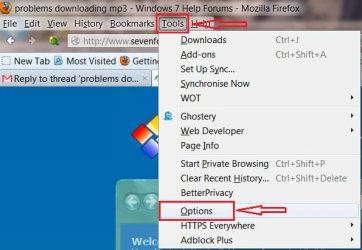
Click on Tools and near the bottom click on Options:
View attachment 259711
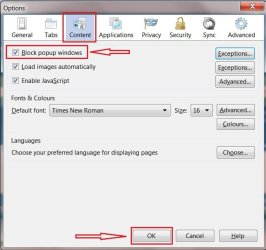
When Options opens, click on the Content Tab. Is your setting for allowing pop-ups checked or unchecked?
View attachment 259712
If it is checked, uncheck it, and OK your way out.
Restart FF and try to make your D/L at jw.org
If it is already unchecked or your change to the option does not work, I have several questions,
Do you have this problem on any other sites that have Mp3 D/L's or is this the only site that acts this way?
Have you successfully done Mp3 D/L's from jw.org before, but now they won't?
And, just for a test. Can you try using your Internet Explorer (IE) browser at that jw.org page to see if it also acts the same way? Do you need help finding your IE browser?

 I'll be in the background watchin'


