

Hello everyone!
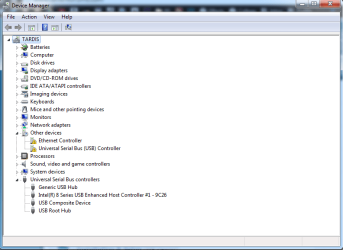
I just downgraded from Windows 8.1 to Windows 7 (yay!) and I've managed to get everything up and running apart from my USB ports.
When I plug my external hard drive in, I get the green flashing light so I know there is power to it; but Windows does not detect it.
I've downloaded all Windows 7 drivers from HP's website for my laptop and installed them, but the USB ports still aren't working.
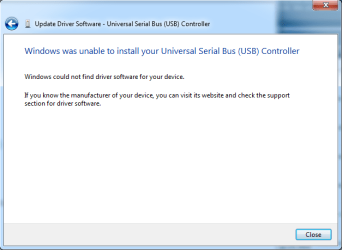
I've also tried right clicking the drivers n device manager (the search that automatically uses the internet to detect and download them) but it says it can't find the drivers.
If anyone has any suggestions questions or ideas that can help me I would very much appreciate it! I've attached a couple of pictures, hope they help!
♥ Thank you in advance ♥
Edit:
It's a HP Notebook - 15-r150sa.
The USB ports won't detect anything at all, it's not just my external hard drive.
I just downgraded from Windows 8.1 to Windows 7 (yay!) and I've managed to get everything up and running apart from my USB ports.
When I plug my external hard drive in, I get the green flashing light so I know there is power to it; but Windows does not detect it.
I've downloaded all Windows 7 drivers from HP's website for my laptop and installed them, but the USB ports still aren't working.
I've also tried right clicking the drivers n device manager (the search that automatically uses the internet to detect and download them) but it says it can't find the drivers.
If anyone has any suggestions questions or ideas that can help me I would very much appreciate it! I've attached a couple of pictures, hope they help!
♥ Thank you in advance ♥
Edit:
It's a HP Notebook - 15-r150sa.
The USB ports won't detect anything at all, it's not just my external hard drive.
Attachments
Last edited:
My Computer
At a glance
Windows 7 Professional 64 bit.AMD A88GBAMD Radeon R5
- Computer type
- Laptop
- Computer Manufacturer/Model Number
- HP
- OS
- Windows 7 Professional 64 bit.
- CPU
- AMD A8
- Memory
- 8GB
- Graphics Card(s)
- AMD Radeon R5
- Hard Drives
- 1 TB
- Internet Speed
- 150 mb
- Antivirus
- Norton
- Browser
- Google Chrome


