
David the Brack
New member
- Local time
- 4:11 PM
- Messages
- 4
Hi - I hope someone can help. I've trawled the net but can't find an obvious solution.
I'm running Windows 7.1 (64 bit) on a Dell XPS 8500 desktop. A little while ago I got the dreaded black screen at startup and Windows wouldn't load. Tried to recover using the Windows Repair Disc but nothing worked so I did a fresh install of Windows from a Dell supplied USB. Thankfully my PC is up and running again.
Trying to reduce the risk of going through a long and tedious new install again, I checked whether my fresh Windows Repair Disc was working and would allow me to make less drastic repairs using the automatic repair or system restore options. No joy !
The automatic repair option gave me a diskpart error - the instruction referenced memory at x. The memory could not be read. When I went to system restore no operating system was not found. Perhaps Windows Repair was not reading the internal HD with the operating system on the C: partition.
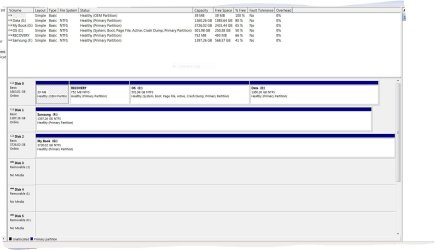
To establish whether this was so I ran the Diskpart command from the command prompt within Windows Recovery. Sure enough only the two external HDs were detected. I then ran the command within Windows and all the discs showed up as they do in Disk Management - see attachment. The OEM partition appears to be empty while the Recovery partition seems to have files within it.
Does anyone have any idea please as to why Windows doesn't recognise Disc 0 when in Recovery mode ? My only thought is that perhaps I corrupted the OEM and Recovery partitions when I attempted an unsuccessful restore using Acronis before I carried out the Win 7 reinstall mentioned at the start.
Any suggestions welcome but I do have a working Win 7 PC at the moment so I wouldn't want to do anything too drastic to mess this up. I'm just preparing for a possible future calamity !
I'm running Windows 7.1 (64 bit) on a Dell XPS 8500 desktop. A little while ago I got the dreaded black screen at startup and Windows wouldn't load. Tried to recover using the Windows Repair Disc but nothing worked so I did a fresh install of Windows from a Dell supplied USB. Thankfully my PC is up and running again.
Trying to reduce the risk of going through a long and tedious new install again, I checked whether my fresh Windows Repair Disc was working and would allow me to make less drastic repairs using the automatic repair or system restore options. No joy !
The automatic repair option gave me a diskpart error - the instruction referenced memory at x. The memory could not be read. When I went to system restore no operating system was not found. Perhaps Windows Repair was not reading the internal HD with the operating system on the C: partition.
To establish whether this was so I ran the Diskpart command from the command prompt within Windows Recovery. Sure enough only the two external HDs were detected. I then ran the command within Windows and all the discs showed up as they do in Disk Management - see attachment. The OEM partition appears to be empty while the Recovery partition seems to have files within it.
Does anyone have any idea please as to why Windows doesn't recognise Disc 0 when in Recovery mode ? My only thought is that perhaps I corrupted the OEM and Recovery partitions when I attempted an unsuccessful restore using Acronis before I carried out the Win 7 reinstall mentioned at the start.
Any suggestions welcome but I do have a working Win 7 PC at the moment so I wouldn't want to do anything too drastic to mess this up. I'm just preparing for a possible future calamity !
Attachments
My Computer
At a glance
Win 7 64 bit
- Computer type
- PC/Desktop
- OS
- Win 7 64 bit


