problems on maping a drive to a webdav server

datactrl

New member
Local time
2:43 AM
Messages
18
I map a webdav server to a drive with networking properties. It works fine except every time when I start my PC it always ask for user name and password to login in wevdav server even I ticked 'remember it'. :(
 

My Computer

OS
Windows 7 Home Premium 32bit
Credentials

http://forums.techguy.org/#Try this....

Go to Control Panel--> User Accounts --> Manage Your Network Passwords (second option down on the left).

You will see a window for your 'Stored User Names and Passwords'
Click the 'Add' button and another window will appear.
In the 'Log on to' field, type the name of the machine/server you want to connect to, then type the Username and Password in the relevant fields that you would normally log in with.

Not sure what the 'Credential type' is, but I can't change mine from the bottom option but it works anyway.
 

My Computer

Computer Manufacturer/Model Number
Antec/custom
OS
Windows 7 Professional x64
CPU
Sempron 145 2.8Ghz(Unlocked to an Athlon II x2 4450e 3.4Ghz)
Motherboard
ASRock 880gm-le
Memory
8GB Corsair Vengeance LP 1600Mhz
Graphics Card(s)
EVGA Geforce GTX 280
Sound Card
Creative
Monitor(s) Displays
Envision 22", Dell 17"
Screen Resolution
1680x1050, 1280x1024
Hard Drives
WDC WD1200BEVS-75LAT0 2.5inch 120GB
WDC WD5000AAKS-00V2B0 3.5inch 500GB
PSU
Cooler Master 750w
Case
Antec
Cooling
Air
Keyboard
MS 1000
Mouse
MS wireless 2000
Internet Speed
15 Mbps down, 4.7 Mbps up
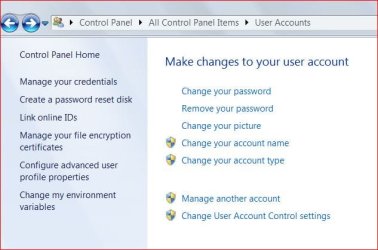
I can't find Manage your network passwords on User accounts. What I got is as the attachment.
 

Attachments

  • user.JPG
    user.JPG
    41.3 KB · Views: 5

My Computer

OS
Windows 7 Home Premium 32bit
Didn't take note that you had "Home" version.
Click "Manage your credentials" in left pane.
Select the password you want to manage.
Click "Edit", make the change you want, click OK.
 

My Computer

Computer Manufacturer/Model Number
Antec/custom
OS
Windows 7 Professional x64
CPU
Sempron 145 2.8Ghz(Unlocked to an Athlon II x2 4450e 3.4Ghz)
Motherboard
ASRock 880gm-le
Memory
8GB Corsair Vengeance LP 1600Mhz
Graphics Card(s)
EVGA Geforce GTX 280
Sound Card
Creative
Monitor(s) Displays
Envision 22", Dell 17"
Screen Resolution
1680x1050, 1280x1024
Hard Drives
WDC WD1200BEVS-75LAT0 2.5inch 120GB
WDC WD5000AAKS-00V2B0 3.5inch 500GB
PSU
Cooler Master 750w
Case
Antec
Cooling
Air
Keyboard
MS 1000
Mouse
MS wireless 2000
Internet Speed
15 Mbps down, 4.7 Mbps up
I found it and originally I have one in "generic credentials". Anyway I delete it and create again. The problem is still the same. When I start my PC, that map drive has a red cross. Click on that drive, it prompts for user name and password. But actually, the user name and password is there. Just by pressing an enter, it will connect to the dav server.
 

My Computer

OS
Windows 7 Home Premium 32bit
Back
Top