Problems removing folder

sc00zy

New member
Local time
12:19 AM
Messages
19
Location
Assen, Netherlands
Hi all,

I'm trying to delete a folder, but Windows keeps asking about Administrator privileges. I even logged in as Administrator and it keeps telling me I don't have the rights to edit or remove this folder.

Any suggestions?

Thanks in advance!
 
Last edited:

My Computer

OS
Windows 7

My Computer

Computer Manufacturer/Model Number
Custom
OS
Windows 7 Professional x64
CPU
Intel i7 2600K OC'd @ 4620 MHz
Motherboard
Asus P8Z68-V Pro
Memory
16GB GSkill Sniper 2133 Mhz (4x4GB)
Graphics Card(s)
EVGA GeForce GTX 480 SuperClocked+
Sound Card
Realtek High Definition Audio
Monitor(s) Displays
2x Acer S273HLbmii 27"
Screen Resolution
2 x 1920x1080
Hard Drives
64GB Crucial M4 SSD

Storage: Hitachi 1TB 5400RPM, Samsung 1.5TB 5400RPM
PSU
Corsair HW Series 750w (modular)
Case
Cooler Master HAF 932 Advanced Blue Edition
Cooling
CM Hyper 212+ CPU cooler, 3x 230mm + 1x 140mm case fans
Keyboard
Logitech MK320 (wireless)
Mouse
Logitech MK320 (wireless)
Internet Speed
30 Mb/s : 2 Mb/s
right click folder select properties. Click Security Tab (are the options greyed out)?
 

My Computer

OS
7 Pro

My Computer

Computer Manufacturer/Model Number
Custom
OS
Windows 7 Professional x64
CPU
Intel i7 2600K OC'd @ 4620 MHz
Motherboard
Asus P8Z68-V Pro
Memory
16GB GSkill Sniper 2133 Mhz (4x4GB)
Graphics Card(s)
EVGA GeForce GTX 480 SuperClocked+
Sound Card
Realtek High Definition Audio
Monitor(s) Displays
2x Acer S273HLbmii 27"
Screen Resolution
2 x 1920x1080
Hard Drives
64GB Crucial M4 SSD

Storage: Hitachi 1TB 5400RPM, Samsung 1.5TB 5400RPM
PSU
Corsair HW Series 750w (modular)
Case
Cooler Master HAF 932 Advanced Blue Edition
Cooling
CM Hyper 212+ CPU cooler, 3x 230mm + 1x 140mm case fans
Keyboard
Logitech MK320 (wireless)
Mouse
Logitech MK320 (wireless)
Internet Speed
30 Mb/s : 2 Mb/s
If you have "Take Ownership" in your right click context menu, it can also be applied to folders.
But maybe it is another problem. The folder could be owned e.g. by the Trusted Installer. Then you need a different procedure. What kind of folder is it?
 

My Computer

Computer Manufacturer/Model Number
HP, Dell, Gateway, Toshiba - 4 laptops and 2 desktops
OS
Vista, Windows7, Mint Mate, Zorin, Windows 8
CPU
from 1.6GHz Duo to i7
Monitor(s) Displays
2x HP w2207
Hard Drives
5x HDD, 7x SSD, 12x Externals
Keyboard
with trackball - no mices
Mouse
Trackball mice
Internet Speed
DSL 6000
Ok I tried it using the "Take Ownership" option in the context menu, but that doesn't help either... It still says it can't find the current owner... :(
 

My Computer

OS
Windows 7
Ok I tried it using the "Take Ownership" option in the context menu, but that doesn't help either... It still says it can't find the current owner... :(

But where does the folder come from and what is the path?
 

My Computer

Computer Manufacturer/Model Number
HP, Dell, Gateway, Toshiba - 4 laptops and 2 desktops
OS
Vista, Windows7, Mint Mate, Zorin, Windows 8
CPU
from 1.6GHz Duo to i7
Monitor(s) Displays
2x HP w2207
Hard Drives
5x HDD, 7x SSD, 12x Externals
Keyboard
with trackball - no mices
Mouse
Trackball mice
Internet Speed
DSL 6000
If you don't have the proper rights (or permissions) for a file or folder, you can't delete it. If you didn't create the file, you might not be able to delete it, even if it is stored in the Public folder. If that's the case, you need to ask the owner of the file to delete it.

Also, you can't delete a file (or the folder that contains it) if the file is currently open in a program. Make sure that the file isn't open in any program, and then try to delete the file or folder again.

To learn more about permissions: What are permissions?

Hope this helps!

Cheers,
Cassandra
Microsoft Windows Outreach
 

My Computer

Computer Manufacturer/Model Number
HP/p6207c
OS
Windows 7 Professional 64-bit
CPU
Pentium(R) Dual-Core CPU E5300 @260GHz
Sound Card
RealTek High Def Audio
Monitor(s) Displays
HP 2159m
Screen Resolution
1920 x 1080 x 60
Mouse
HP M/N: M-U0009-HP1
Internet Speed
Broadband

My Computer

Computer Manufacturer/Model Number
HP, Dell, Gateway, Toshiba - 4 laptops and 2 desktops
OS
Vista, Windows7, Mint Mate, Zorin, Windows 8
CPU
from 1.6GHz Duo to i7
Monitor(s) Displays
2x HP w2207
Hard Drives
5x HDD, 7x SSD, 12x Externals
Keyboard
with trackball - no mices
Mouse
Trackball mice
Internet Speed
DSL 6000

My Computer

Computer Manufacturer/Model Number
HP, Dell, Gateway, Toshiba - 4 laptops and 2 desktops
OS
Vista, Windows7, Mint Mate, Zorin, Windows 8
CPU
from 1.6GHz Duo to i7
Monitor(s) Displays
2x HP w2207
Hard Drives
5x HDD, 7x SSD, 12x Externals
Keyboard
with trackball - no mices
Mouse
Trackball mice
Internet Speed
DSL 6000
It's from the messenger called Pidgin. There at least three folders I can't delete or alter. For example:

C:\Program Files (x86)\Pidgin\sasl2
C:\Program Files (x86)\Pidgin\plugins\perl\auto\Pidgin
C:\Program Files (x86)\Pidgin\plugins\perl\auto\Purple

If I look at the owner tab under the folder properties, it says it can't find the current owner.
 

My Computer

OS
Windows 7
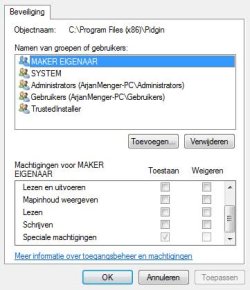
What are the security settings for the "Pidgin" parent folder?
 

My Computer

OS
7 Pro
Hello,

I guess Enabling the Build-in administrator and deleting those under that Account might work.

Good Luck,
Captain
 

My Computer

Computer Manufacturer/Model Number
Samsung NP550P5C-S02IN
OS
Windows 7 Ultimate - 64-bit | Windows 8 Pro - 64-bit
CPU
Intel® Core™ i7 Processor 3,610QM (2.30Hz, 6MB L3 Cach
Memory
8 GB
Graphics Card(s)
NVIDIA® GeForce® GT 650M 2GB Graphics, Optimus™ techno
Sound Card
SoundAlive™ JBL 3 Speakers (With sub-Woofer)
Monitor(s) Displays
39.62cm (15.6) SuperBright 300nit HD+ LED Display
Screen Resolution
1,600 x 900, Anti-Reflective
Hard Drives
1TB S-ATA II Hard Drive (5,400RPM)
You probably won't be able to delete the folder if the application it pertains to has any processes or services running. Try deleting it from safe mode
 
There are greyed out special permissions for "Maker EIGENAAR", these are either inherited from another parent folder or they are set by a higher authority on the folder. Do you have permission to "Add" another user or group? or is that option greyed out too? If you can, please select "add" type in "everyone" click "check names"... they should then underline. After you add them, in the check box select "full control". you can manually set the folder to stop inheriting from it's parent, i highly suggest removing the inherited permissions. You must make sure the software is not running when making these changes. DOUBLE CHECK to make sure there is no service or process associated to this program while making these changes.
 

My Computer

OS
7 Pro
Back
Top