Problems w/ various programs

QCumber20

New member
Hey there.

I'm new to this forum so i apologize in advance if another thread already dealt with my problem.

I have a legal copy of Windows 7 Home Premium 64bit running on a homebrew rig with Intel Dualcore 2.67 processor with 4 gigs of ram.

I've been running W7 for over a year now, mostly without problems and have been pleased with the new operating system.
A while ago i started running into some problems. I've been experiencing process crashes with Firefox and explorer, and various other programs.
The biggest problem for me now is that i cannot update to the newest version of Avira Antivir and the new Windows Live Messenger 11. I also (rarely) experience a blue screen crash.
I keep my registry clean and limit the number of startup processes and regularly scan with anti-spyware/virus programs.
 

My Computer

OS
Windows 7 Home Premium 64bit

My Computer

Computer type
PC/Desktop
Computer Manufacturer/Model Number
Dell XPS 420
OS
Windows 10, Home Clean Install
CPU
Intel Core2 processsor Q8200(2.33Ghz 1333FSB) Quad Core Tech
Motherboard
Dell
Memory
6 gb
Graphics Card(s)
ATI Radeon 256MB HD3650
Sound Card
Intergrated 7.1 Channel Audio
Monitor(s) Displays
Dell SP2009W 20"
Hard Drives
640 GB Serial ATA Hard drive
Cooling
Fan
Keyboard
Dell USB Keyboard
Mouse
Dell Premium Optical USB
Internet Speed
DSL 2.85
Hi you said you keep you registry clean, in windows 7 you very rarely need to clean the registry in windows 7 unless you do a lot of installing and uninstalling of programs.

if you are getting a lot of these crashes when using firefox try disabling all addons then eventually starting one by one as one of the addons could be causing this.

what prgrams are causing you problems?

But firstly type in SFC /SCANNOW in the elevated command prompt and let it scan, it should fix all problems if any found, then restart pc.

also you should only be using one Anti Virus program on your pc! as this will cause you problems, and if you insist on using registry program use ccleaner. nothing else.

let me know how you get on.
 

My Computer

Computer Manufacturer/Model Number
Dell Studio XPS 8100
OS
Windows 7 Home Premium 64Bit
CPU
Intel Core i3 Processor 550 - 3.20GHz - 4MB
Memory
4 GB DDR3
Graphics Card(s)
ATI Radeon HD 5450 - 1GB
Hard Drives
1TB Serial ATA - 7200RPM
With what and how do you clean the registry? Win 7 is not XP; Win 7 manages the registry very differently. Do not use a registry cleaner on Win 7 unless you are very knowledgeable of the registry and no exactly what you are doing. Registry cleaners can screw up Win 7 and the repair is a clean install.
 

My Computer

Computer Manufacturer/Model Number
Home built
OS
Windows 7 Ultimate 32 bit
CPU
Intel(R) Pentium(R) 4 CPU 3.00GHz
Motherboard
ASUS P4P800-VM Motherboard Chipset: Intel 865G + ICH5
Memory
2.50 GB RAM
Graphics Card(s)
NVIDIA GeForce 7600 GS
Sound Card
SoundMax Integrated Digital Audio (Chip)
Monitor(s) Displays
ViewSonic VX 1962 wm
Screen Resolution
1680 X 1050
Hard Drives
Seagate Barracuda 7200.10 80 GB
ST380215A ATA Device 18.6 GB
Western Digital "My Book" external hard drive 750 GB
Cooling
Fan based
Keyboard
Microsoft Comfort Curve Keyboard 2000 v10 USB
Mouse
Logitec optic USB
Internet Speed
3.01 Mb/s download 0.64 Mb/s upload
Hey again.

Thanks for all the advice.

First off, I only use Hijack This to clean up my registry and i hand pick only the programs I know. I'm not using an automated registry cleaner.

I tried the SFC /SCANNOW command in command prompt but got an error: "You must be an administrator running a console session to use the sfc utility"

I downloaded Malwarebytes and intend to do a scan, will let you know how it turns out.
 

My Computer

OS
Windows 7 Home Premium 64bit
you will need to right click command prompt - run as administrator!
 

My Computer

Computer Manufacturer/Model Number
Dell Studio XPS 8100
OS
Windows 7 Home Premium 64Bit
CPU
Intel Core i3 Processor 550 - 3.20GHz - 4MB
Memory
4 GB DDR3
Graphics Card(s)
ATI Radeon HD 5450 - 1GB
Hard Drives
1TB Serial ATA - 7200RPM

My Computer

Computer Manufacturer/Model Number
Home built
OS
Windows 7 Ultimate 32 bit
CPU
Intel(R) Pentium(R) 4 CPU 3.00GHz
Motherboard
ASUS P4P800-VM Motherboard Chipset: Intel 865G + ICH5
Memory
2.50 GB RAM
Graphics Card(s)
NVIDIA GeForce 7600 GS
Sound Card
SoundMax Integrated Digital Audio (Chip)
Monitor(s) Displays
ViewSonic VX 1962 wm
Screen Resolution
1680 X 1050
Hard Drives
Seagate Barracuda 7200.10 80 GB
ST380215A ATA Device 18.6 GB
Western Digital "My Book" external hard drive 750 GB
Cooling
Fan based
Keyboard
Microsoft Comfort Curve Keyboard 2000 v10 USB
Mouse
Logitec optic USB
Internet Speed
3.01 Mb/s download 0.64 Mb/s upload
As was stated above the Reg cleaner is doing more harm than good. Dont know if it is the cause of this problem, but discontiune use

EDIT
Congrats Carl
 

My Computer

Computer type
PC/Desktop
Computer Manufacturer/Model Number
Dell XPS 420
OS
Windows 10, Home Clean Install
CPU
Intel Core2 processsor Q8200(2.33Ghz 1333FSB) Quad Core Tech
Motherboard
Dell
Memory
6 gb
Graphics Card(s)
ATI Radeon 256MB HD3650
Sound Card
Intergrated 7.1 Channel Audio
Monitor(s) Displays
Dell SP2009W 20"
Hard Drives
640 GB Serial ATA Hard drive
Cooling
Fan
Keyboard
Dell USB Keyboard
Mouse
Dell Premium Optical USB
Internet Speed
DSL 2.85
I didn't realize registry programs were harmful, I will discontinue their use immediately!

I scanned with malwarebytes and it found 3 infections, which i removed.

Since I've begun scanning and cleaning up I've been able to install Windows Live Essentials and a new version of AntiVir, which i hope is a good sign.

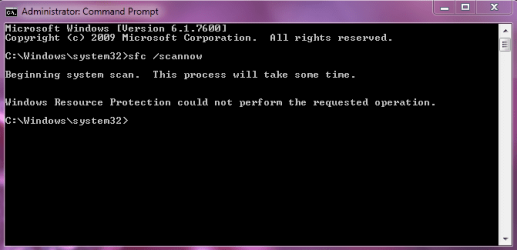
When i try and run the command "sfc /scannow" in the Elevated Command Prompt as an Administrator, it now proceeds to try to run, only to display the message: "Windows Resource Protection could not perform the requested operation"

I accidentally closed the .txt file that came up after i did the BSoD scan, so i have to do another one:geek:
 

My Computer

OS
Windows 7 Home Premium 64bit

My Computer

Computer type
PC/Desktop
Computer Manufacturer/Model Number
Dell XPS 420
OS
Windows 10, Home Clean Install
CPU
Intel Core2 processsor Q8200(2.33Ghz 1333FSB) Quad Core Tech
Motherboard
Dell
Memory
6 gb
Graphics Card(s)
ATI Radeon 256MB HD3650
Sound Card
Intergrated 7.1 Channel Audio
Monitor(s) Displays
Dell SP2009W 20"
Hard Drives
640 GB Serial ATA Hard drive
Cooling
Fan
Keyboard
Dell USB Keyboard
Mouse
Dell Premium Optical USB
Internet Speed
DSL 2.85
you cant be running as admin if you get this message.

you will get this message if you dont run as admin.

try doing it in safe mode
 

My Computer

Computer Manufacturer/Model Number
Dell Studio XPS 8100
OS
Windows 7 Home Premium 64Bit
CPU
Intel Core i3 Processor 550 - 3.20GHz - 4MB
Memory
4 GB DDR3
Graphics Card(s)
ATI Radeon HD 5450 - 1GB
Hard Drives
1TB Serial ATA - 7200RPM
check local disk for errors: open Computer, right-click on partition (local disk), click Properties, click the Tools tab, click Check Now, schedule a disk check for the next time your computer starts,
restart your computer and let CHKDSK run its course. After your computer retstarts you should have no problem running SFC /SCANNOW
 

My Computer

Computer Manufacturer/Model Number
Dell Studio XPS 8100
OS
Windows 7 Home Premium 64Bit
CPU
Intel Core i3 Processor 550 - 3.20GHz - 4MB
Memory
4 GB DDR3
Graphics Card(s)
ATI Radeon HD 5450 - 1GB
Hard Drives
1TB Serial ATA - 7200RPM
I ran command prompt as administrator, and this is what i got
 

Attachments

  • sfc.PNG
    sfc.PNG
    60.2 KB · Views: 7

My Computer

OS
Windows 7 Home Premium 64bit
Ok maybe a silly question but did you try it again? :D

if so restart pc and then try again!
 

My Computer

Computer Manufacturer/Model Number
Dell Studio XPS 8100
OS
Windows 7 Home Premium 64Bit
CPU
Intel Core i3 Processor 550 - 3.20GHz - 4MB
Memory
4 GB DDR3
Graphics Card(s)
ATI Radeon HD 5450 - 1GB
Hard Drives
1TB Serial ATA - 7200RPM
@abberline

I hadn't read your posts when i posted my results. I'll check it out right now.
 

My Computer

OS
Windows 7 Home Premium 64bit
Ok. I've finished the BSoD scan and posted results in another thread.

Back to the matter at hand. I've run CHKDSK, restarted twice, and run in safe mode, every single time I try to run sfc /scannow, very mindful of right clicking and running as administrator, I get that same error. I've followed the instructions for elevated command prompt to the letter and It still won't work.

One thing comes to mind though. While in safe mode, i don't think i got started off in the system folder while in command prompt, even though "running as admin". Now why could that be?
 

My Computer

OS
Windows 7 Home Premium 64bit
restart and go safe mode with command prompt option, you will get there :D and try again.
 

My Computer

Computer Manufacturer/Model Number
Dell Studio XPS 8100
OS
Windows 7 Home Premium 64Bit
CPU
Intel Core i3 Processor 550 - 3.20GHz - 4MB
Memory
4 GB DDR3
Graphics Card(s)
ATI Radeon HD 5450 - 1GB
Hard Drives
1TB Serial ATA - 7200RPM
Ok think you have other issues here, you said you posted the bsod scan the other guys will deal with that as they are the expert in that, meanwhile if you an install dvd i suggest you run a repair windows from that as i think you may have registry issues too.

if you dont have a dvd you can download a repair disc for free Download Windows 7 System Recovery Discs — The NeoSmart Files burn to disc using imgburn then run repair.
 

My Computer

Computer Manufacturer/Model Number
Dell Studio XPS 8100
OS
Windows 7 Home Premium 64Bit
CPU
Intel Core i3 Processor 550 - 3.20GHz - 4MB
Memory
4 GB DDR3
Graphics Card(s)
ATI Radeon HD 5450 - 1GB
Hard Drives
1TB Serial ATA - 7200RPM
Back
Top