If they are not in the sent box then you are not sending them. Give us full details of what you do and what happens when you finish typing the email!
My Computer
Computer type
PC/Desktop
OS
Microsoft Windows 7 Home Premium 64-bit 7601 Multiprocessor Free Service Pack 1
CPU
Intel(R) Core(TM) i7-3770 CPU @ 3.40GHz
Motherboard
ASUSTeK COMPUTER INC. P8H77-M
Memory
8.00 GB
Graphics Card(s)
Intel(R) HD Graphics 4000
Sound Card
On Board
Monitor(s) Displays
Dell 24"
Screen Resolution
1920 x 1080
Hard Drives
(1) INTEL SSDSC2CT180A3 ATA Device (2) ST500DM002-1BD142 ATA Device (3) WDC WD3200AAKS-75L9A0 ATA Device (4) Generic- Compact Flash USB Device (5) Generic- MS/MS-Pro USB Device (6) Generic- SD/MMC USB Device (7) Generic- SM/xD-Picture USB
Microsoft Windows 7 Home Premium 64-bit 7601 Multiprocessor Free Service Pack 1
CPU
Intel(R) Core(TM) i7-3770 CPU @ 3.40GHz
Motherboard
ASUSTeK COMPUTER INC. P8H77-M
Memory
8.00 GB
Graphics Card(s)
Intel(R) HD Graphics 4000
Sound Card
On Board
Monitor(s) Displays
Dell 24"
Screen Resolution
1920 x 1080
Hard Drives
(1) INTEL SSDSC2CT180A3 ATA Device (2) ST500DM002-1BD142 ATA Device (3) WDC WD3200AAKS-75L9A0 ATA Device (4) Generic- Compact Flash USB Device (5) Generic- MS/MS-Pro USB Device (6) Generic- SD/MMC USB Device (7) Generic- SM/xD-Picture USB
It looks like you have only recently upgraded to WLM2011. That being so it appears that you have an install problem. Do a system restore to a point before you installed MLM 2011 and either stick with 2010 or try a new re install!
My Computer
Computer type
PC/Desktop
OS
Microsoft Windows 7 Home Premium 64-bit 7601 Multiprocessor Free Service Pack 1
CPU
Intel(R) Core(TM) i7-3770 CPU @ 3.40GHz
Motherboard
ASUSTeK COMPUTER INC. P8H77-M
Memory
8.00 GB
Graphics Card(s)
Intel(R) HD Graphics 4000
Sound Card
On Board
Monitor(s) Displays
Dell 24"
Screen Resolution
1920 x 1080
Hard Drives
(1) INTEL SSDSC2CT180A3 ATA Device (2) ST500DM002-1BD142 ATA Device (3) WDC WD3200AAKS-75L9A0 ATA Device (4) Generic- Compact Flash USB Device (5) Generic- MS/MS-Pro USB Device (6) Generic- SD/MMC USB Device (7) Generic- SM/xD-Picture USB
I have to ask the person who did it for me re the restore..
but dont have time now
i dont really like the 2011
and what is the link please for the 2011
to uninstall and re install
could I go back to my 2010
and if so what is the link for it....
it is making me so upset
thank you for your help
My Computer
OS
Microsoft Windows 7 Professional 64-bit 7601 Multiprocessor Free Service Pack 1
Hi Cocod2. Have a look in your OUTBOX. If they are in there, they are not getting out of the building. Have you had success sending mail with WLM 2011 since you installed it? Please get back to us.
Cheers
JohnnyA
Hi Cocod2. Have a look in your OUTBOX. If they are in there, they are not getting out of the building. Have you had success sending mail with WLM 2011 since you installed it? Please get back to us.
Cheers
JohnnyA
So nothing in the Outbox generally means that they have left the building. Strange that they are not showing in Sent folder. Have you tried sending an Email to yourself, then wait a few minutes and then try to receive mail and see if you get it back. Also, how many Email accounts do you have set up in WLM 2011?
Cheers
JohnnyA
yes they are leaving but people are not getting them, and they are not showing up in the sent file.
I only have one email address.
I did email myself hang on I will do it again
My Computer
OS
Microsoft Windows 7 Professional 64-bit 7601 Multiprocessor Free Service Pack 1
This seems to be a bug in WLM 2011. I've sent some test emails to myself, and when I click on the Send button, (1) briefly appears next to Outbox. I then do a manual Send/Receive and my test email comes through, so I know that it is sending and receiving as it should. What it isn't doing, however, is saving a copy of the email in the Sent items folder, even though the options clearly show Save copy of sent messages in the 'Sent Items folder as checked.
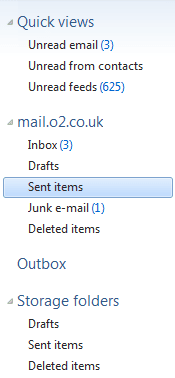
Edit: Just noticed that there are 2 Sent items folders. Are you checking the correct one? The one you should be checking is the one highlighted in the image below:
4 x 4GB DDR3-1600 Corsair Vengeance CMZ8GX3M2A1600C9B (16GB)
Graphics Card(s)
MSI GeForce GTX770 Gaming OC 2GB
Sound Card
Realtek High Definition on board solution (ALC 898)
Monitor(s) Displays
ViewSonic VA1912w Widescreen (VGA)
Screen Resolution
1440x900
Hard Drives
OCZ Agility 3 SSD 120GB SATA III x2 (RAID 0)
Samsung HD501LJ 500GB SATA II x2
Hitachi HDS721010CLA332 1TB SATA II
Iomega 1.5TB Ext USB 2.0
WD 2.0TB Ext USB 3.0
Ok, so you can send and receive Emails sent to yourself and the one you sent ended up in the Sent folder as it should. But when you send email to others, they do not go to the sent folder and the recipient does not receive them. Umm very strange. Instead of inserting the recipients address via the To: button and then choosing from the address book, try manually inserting the address and sending.
Get back.
JohnnyA
Your email settings are correct, since you have proved that you can send and receive an email that you sent to yourself. Are you sure that you have got the correct email address? Check that you haven't mistyped it, particularly if it contains letters that can easily be confused with numbers and vice-versa (e.g. 1 with l, o with 0 and 5 with s etc).
4 x 4GB DDR3-1600 Corsair Vengeance CMZ8GX3M2A1600C9B (16GB)
Graphics Card(s)
MSI GeForce GTX770 Gaming OC 2GB
Sound Card
Realtek High Definition on board solution (ALC 898)
Monitor(s) Displays
ViewSonic VA1912w Widescreen (VGA)
Screen Resolution
1440x900
Hard Drives
OCZ Agility 3 SSD 120GB SATA III x2 (RAID 0)
Samsung HD501LJ 500GB SATA II x2
Hitachi HDS721010CLA332 1TB SATA II
Iomega 1.5TB Ext USB 2.0
WD 2.0TB Ext USB 3.0
4 x 4GB DDR3-1600 Corsair Vengeance CMZ8GX3M2A1600C9B (16GB)
Graphics Card(s)
MSI GeForce GTX770 Gaming OC 2GB
Sound Card
Realtek High Definition on board solution (ALC 898)
Monitor(s) Displays
ViewSonic VA1912w Widescreen (VGA)
Screen Resolution
1440x900
Hard Drives
OCZ Agility 3 SSD 120GB SATA III x2 (RAID 0)
Samsung HD501LJ 500GB SATA II x2
Hitachi HDS721010CLA332 1TB SATA II
Iomega 1.5TB Ext USB 2.0
WD 2.0TB Ext USB 3.0