
Processes not under my user

aw22

New member
Member
VIP
Local time
7:48 AM
Messages
131
Location
Finland
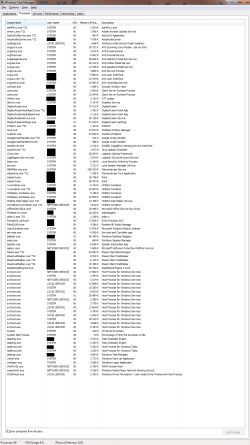
Hi. I noticed today that here are more processes in Windows Task Manager under other users then my account. I have only 1 account which is admin. 29 of 89 Processes are active under my user name.
Other user names are: "SYSTEM", "LOCAL SERVICE" and "NETWORK SERVICE".
I had before few processes under SYSTEM not anything else.

Can I remove "LOCAL SERVICE" and "NETWORK SERVICE" somehow?

I added screenshot of those processes which are running. I took it after starting PC.
Are those processes normal? Here is 15 svchost.exe running are those also normal? I didn't have those running before.
 

Attachments
  • WTM.png
    WTM.png
    65.5 KB · Views: 5

My Computer

Computer type
PC/Desktop
Computer Manufacturer/Model Number
Custom Built
OS
Windows 7 Ultimate x64 Service Pack 1
CPU
Intel Core i7-3770K Ivy Bridge Quad-Core 3.5GHz (4180.19MHz)
Motherboard
ASUS P8Z77-V LX
Memory
Corsair 32GB (4 x 8GB) Vengeance, DDR3 1600MHz, CL10, 1.5V
Graphics Card(s)
Asus GeForce DUAL-GTX1060-O6G
Sound Card
Asus XONAR DG, 90-YAA0K0-0UAN0BZ
Monitor(s) Displays
Iiyama 24" XB2483HSU, BenQ GW2470HL 24", UE32EH4005
Screen Resolution
1920x1080 60Hz, 1920x1080 60Hz, 1366x768 60Hz
Hard Drives
WDS500G1B0A-00H9H0, S3Z9NB0K316712Z, S3YVNB0KB15768W, ST2000DM001-1CH164, ST3000DM002-1BJ166, ST3000DM008-2DM166
PSU
Corsair PSU TX V2 750W 14CM ATX2.31 80+
Case
Fractal Design Define R6 - Black, ATX
Cooling
CORSAIR Hydro Series H100z Liquid Cooler
Keyboard
Logitech Gaming Keyboard G510
Mouse
SteelSeries RIVAL 500 GAMING MOUSE
Internet Speed
ADSL, 350/20Mbit/s FullRate
Antivirus
Malwarebytes Premium 3.7.1 + Windows Defender
Browser
Mozilla Firefox, Google Chrome
Other Info
TP-Link TG-3468 PCI-Express Gigabit Network Card
This is perfectly normal, removing the system "users" will totally break the operating system the Network users are required to access the internet and local network.

Think of it this way - If you do not have a system user, how are you going to log-in The way Windows and most modern operating system works is that every Process has to be run by a User to provide the credentials needed to perform the task
 

My Computers

System One System Two

  • Computer type
    PC/Desktop
    Computer Manufacturer/Model Number
    ChillBlast - Custom to my design
    OS
    Windows 11 Pro x64 [Latest Release and Release Preview]
    CPU
    Ryzen 9 5950X, 3.8 - 5.2 MHz
    Motherboard
    Asus Prime X570-Pro
    Memory
    64GB [2 x 32GB] DDR4 3200MHz
    Graphics Card(s)
    4GB NVIDIA GEFORCE GTX 1650 Ti
    Sound Card
    On-board SPDIF to 5.1 System + HDMI [5.1 system]
    Monitor(s) Displays
    32" UHD 32 Bit HDR Monitor + 43" UHD 4K 32Bit HDR TV
    Screen Resolution
    2 x 3840 x 2160 @60Hz
    Hard Drives
    1TB M2 SSD OS, 500GB Fast Access SSD, 2 x 8TB Data + Various Externals from 1TB to 4TB, 10TB NAS
    PSU
    NZXT C750 80 PLUS Gold 750W Modular PSU
    Case
    Workstation Case [Matt Black]
    Cooling
    NZXT Kraken X63 280mm CPU Cooler +2x Quiet Case fans
    Keyboard
    Logitech Wireless MX Keys & K400 + others
    Mouse
    Logitech Wireless MX Master 3S
    Internet Speed
    920 MB Down 50 MB Up
    Antivirus
    BitDefender Total Security Pro
    Browser
    Chrome (always run latest Non-Beta)
    Other Info
    Also run ...
    Laptop - Quad 8GB - Windows 10 Pro x64
    Nexus 7 Android tablet x2
    Samsung 10.2" tablet
    Blackview TAB 8 4G Android Tablet c/w Keyboard
    Wacom Intuos Pro Medium Pen Pad
    Wacom Intuos Pro Small Pen Pad
    Wacom Expresskeys Remote
    Loopdeck+ Graphics Controller
    Shuttle Pro v2 Control
  • Computer type
    Laptop
    System Manufacturer/Model Number
    Dell XPS 17 10750H
    OS
    Windows 11 Pro x64 Latest RP
    CPU
    Intel I7 10750H 5.0GHz
    Motherboard
    Dell XPS
    Memory
    32GB [2x16GB] DDR4 2933 MHz
    Graphics Card(s)
    nVidia GTX1650Ti 4 GB GDDR6
    Sound Card
    Stock [Realtek] 4 Speaker
    Monitor(s) Displays
    17" IPS UHD+ Infinity Edge Touchscreen
    Screen Resolution
    3840 x 2400
    Hard Drives
    2TB M2 NVMe, 4TB External + various 500GB & 1TB External NVMe (also have access to spinner HDD from
    PSU
    Stock
    Case
    Stock XPS Aluminium & Carbon Fibre
    Cooling
    Stock - Active Fan Control
    Keyboard
    Backlit + Various Logitech
    Mouse
    Stock Track Pad + Logitech MX Trackball
    Internet Speed
    72 MB Down 18MB Up
    Browser
    Chrome
    Other Info
    Also run ...
    Laptop - Quad 8GB - Windows 10 Pro x64
    Nexus 7 Android tablet x2
    10.2" tablet
    Sony Z3 Android Smartphone
    Wacom Intuos Pro Medium Pen Pad
    Wacom Intuos Pro Small Pen Pad
    Wacom Expresskeys Remote
    Loopdeck+ Graphics Controller
    Shuttle Pro v2 Control Pad
    10TB NAS
This is perfectly normal, removing the system "users" will totally break the operating system the Network users are required to access the internet and local network.

Think of it this way - If you do not have a system user, how are you going to log-in The way Windows and most modern operating system works is that every Process has to be run by a User to provide the credentials needed to perform the task


I'm wondering why now I have those, few days age I didn't have them, only few "SYSTEM" processes were running and rest were under my "User name".
 

My Computer

Computer type
PC/Desktop
Computer Manufacturer/Model Number
Custom Built
OS
Windows 7 Ultimate x64 Service Pack 1
CPU
Intel Core i7-3770K Ivy Bridge Quad-Core 3.5GHz (4180.19MHz)
Motherboard
ASUS P8Z77-V LX
Memory
Corsair 32GB (4 x 8GB) Vengeance, DDR3 1600MHz, CL10, 1.5V
Graphics Card(s)
Asus GeForce DUAL-GTX1060-O6G
Sound Card
Asus XONAR DG, 90-YAA0K0-0UAN0BZ
Monitor(s) Displays
Iiyama 24" XB2483HSU, BenQ GW2470HL 24", UE32EH4005
Screen Resolution
1920x1080 60Hz, 1920x1080 60Hz, 1366x768 60Hz
Hard Drives
WDS500G1B0A-00H9H0, S3Z9NB0K316712Z, S3YVNB0KB15768W, ST2000DM001-1CH164, ST3000DM002-1BJ166, ST3000DM008-2DM166
PSU
Corsair PSU TX V2 750W 14CM ATX2.31 80+
Case
Fractal Design Define R6 - Black, ATX
Cooling
CORSAIR Hydro Series H100z Liquid Cooler
Keyboard
Logitech Gaming Keyboard G510
Mouse
SteelSeries RIVAL 500 GAMING MOUSE
Internet Speed
ADSL, 350/20Mbit/s FullRate
Antivirus
Malwarebytes Premium 3.7.1 + Windows Defender
Browser
Mozilla Firefox, Google Chrome
Other Info
TP-Link TG-3468 PCI-Express Gigabit Network Card
There does not appear to be anything that looks wrong, Although it is possible that one of the processes may not be what it claims to be but as you are running AV this is not likely, what I do notice is that you have the "show processes from all users" box Checked - It could well be that you did not have this checked previously which would have limited the visible processes just to those opened by your user name ;)
 

My Computers

System One System Two

  • Computer type
    PC/Desktop
    Computer Manufacturer/Model Number
    ChillBlast - Custom to my design
    OS
    Windows 11 Pro x64 [Latest Release and Release Preview]
    CPU
    Ryzen 9 5950X, 3.8 - 5.2 MHz
    Motherboard
    Asus Prime X570-Pro
    Memory
    64GB [2 x 32GB] DDR4 3200MHz
    Graphics Card(s)
    4GB NVIDIA GEFORCE GTX 1650 Ti
    Sound Card
    On-board SPDIF to 5.1 System + HDMI [5.1 system]
    Monitor(s) Displays
    32" UHD 32 Bit HDR Monitor + 43" UHD 4K 32Bit HDR TV
    Screen Resolution
    2 x 3840 x 2160 @60Hz
    Hard Drives
    1TB M2 SSD OS, 500GB Fast Access SSD, 2 x 8TB Data + Various Externals from 1TB to 4TB, 10TB NAS
    PSU
    NZXT C750 80 PLUS Gold 750W Modular PSU
    Case
    Workstation Case [Matt Black]
    Cooling
    NZXT Kraken X63 280mm CPU Cooler +2x Quiet Case fans
    Keyboard
    Logitech Wireless MX Keys & K400 + others
    Mouse
    Logitech Wireless MX Master 3S
    Internet Speed
    920 MB Down 50 MB Up
    Antivirus
    BitDefender Total Security Pro
    Browser
    Chrome (always run latest Non-Beta)
    Other Info
    Also run ...
    Laptop - Quad 8GB - Windows 10 Pro x64
    Nexus 7 Android tablet x2
    Samsung 10.2" tablet
    Blackview TAB 8 4G Android Tablet c/w Keyboard
    Wacom Intuos Pro Medium Pen Pad
    Wacom Intuos Pro Small Pen Pad
    Wacom Expresskeys Remote
    Loopdeck+ Graphics Controller
    Shuttle Pro v2 Control
  • Computer type
    Laptop
    System Manufacturer/Model Number
    Dell XPS 17 10750H
    OS
    Windows 11 Pro x64 Latest RP
    CPU
    Intel I7 10750H 5.0GHz
    Motherboard
    Dell XPS
    Memory
    32GB [2x16GB] DDR4 2933 MHz
    Graphics Card(s)
    nVidia GTX1650Ti 4 GB GDDR6
    Sound Card
    Stock [Realtek] 4 Speaker
    Monitor(s) Displays
    17" IPS UHD+ Infinity Edge Touchscreen
    Screen Resolution
    3840 x 2400
    Hard Drives
    2TB M2 NVMe, 4TB External + various 500GB & 1TB External NVMe (also have access to spinner HDD from
    PSU
    Stock
    Case
    Stock XPS Aluminium & Carbon Fibre
    Cooling
    Stock - Active Fan Control
    Keyboard
    Backlit + Various Logitech
    Mouse
    Stock Track Pad + Logitech MX Trackball
    Internet Speed
    72 MB Down 18MB Up
    Browser
    Chrome
    Other Info
    Also run ...
    Laptop - Quad 8GB - Windows 10 Pro x64
    Nexus 7 Android tablet x2
    10.2" tablet
    Sony Z3 Android Smartphone
    Wacom Intuos Pro Medium Pen Pad
    Wacom Intuos Pro Small Pen Pad
    Wacom Expresskeys Remote
    Loopdeck+ Graphics Controller
    Shuttle Pro v2 Control Pad
    10TB NAS
Any normal Windows 7 installation will have probably at least 30 processes with SYSTEM, LOCAL SERVICE, and NETWORK SERVICE accounts and it is not at all unusual to have more. That is completely normal. The only reason (unless the installation had serious problems) for not seeing this is if "Show processes from all users" was not checked. In that case you would see only your own processes plus several under the SYSTEM account. You can check this yourself by checking and unchecking "Show processes from all users".

I see no reason suspect a problem.
 

My Computer

Computer type
PC/Desktop
Computer Manufacturer/Model Number
HP
OS
Windows 7 Pro 64 bit
CPU
Xeon W3520
Memory
8 GB
Graphics Card(s)
Nvidia Geforce 210
Back
Top