Solved Will Not Load My User Profile

newenglandmom2

New member
Member
Local time
10:50 AM
Messages
95
Hello---I have been researching this problem for a few days, and am turning to you in hoipe of help. I cannot log on with my own profile. After improper Windows shut-down due to power failures, I got error messages that Windows 7 was logging me in temporarily. Those error messages stopped, and now after repeated rebooting, Windows simply logs me in under some kind of new profile. Under the Users folder in the C drive, there are two folders (myuser name and my username1) In the registry, the Profile List is pointing to username1, which is the new one. I can see my old documents, pictures, etc., under the old user name in OS:C, but they are not loading with my profile. There is no .bak on the end of the Registry entry, which most of the fix-it advice seems to assume.
If I simply delete the wrong user (the one to which the Registry is pointing) from the Users folder, will Windows find the correct user profile? I miss my stuff!
Thanks so much for any help,
New England Mom
 

My Computer

Computer type
Laptop
Computer Manufacturer/Model Number
Dell
OS
Windows 7 Home Premium 64 bit
Antivirus
Microsoft Security Essentials
Hi newenglandmum2, welcome to Seven Forums.

Have you tried a System Restore, that goes back to before the power outage.

To see if you have a System Restore, open Control Panel & select Action Centre, when that opens select Recovery & see if you have a restore point before the power problem. If you do, select it & see if that overcomes your problem.
 

My Computer

Computer type
PC/Desktop
Computer Manufacturer/Model Number
Self built using existing case
OS
Windows 7 Home Premium 64 bit sp1
CPU
Intel i5 3570 3.4Ghz Ivy Bridge SKT 1155 quad core
Motherboard
Gigabyte Z77-HD3 SKT 1155 2xSata 3, 4x USB 3.0
Memory
G-Skill Rip Jaws 16Gb (8x2) DDR3 -1600 PC3 12800 CL 10 red
Graphics Card(s)
Gigabyte NVIDIA GT610 1Gb DDR3 810/1200 PCI-E 2.0 Silent
Sound Card
NVIDIA High Definition & Realtech High Definition Audio
Monitor(s) Displays
2 x Philips 226V4L 16:9 aspect ratio
Screen Resolution
1920 x 1080 HD
Hard Drives
Samsung 840 Pro 256gb SSD, SATA 3.
Hitachi Touro Portable 1tb, USB 3.0 HDD used for image b/ups.
PSU
Corsair VS450
Case
Codeng
Cooling
PSU fan & CPU fan
Keyboard
Logitech
Mouse
Logitech Wireless trackball M570
Internet Speed
Wireless 3G. 3mg down & 550kb up.
Antivirus
Bitdefender Internet Security 2020
Browser
Opera (Current Version) & Firefox
Other Info
MS Office 2013 Pro. Davis weather station software. MGE Nova 600 avr UPS.
Boy, I wish system restore would work. But there's no recovery point before this all started. thanks for trying to help...
 

My Computer

Computer type
Laptop
Computer Manufacturer/Model Number
Dell
OS
Windows 7 Home Premium 64 bit
Antivirus
Microsoft Security Essentials
Have you tried to set up a new User Account with the same details that you had before the power problem.

Open Control Panel & select User Accounts & see what accounts are listed & if you can change any of them.
 

My Computer

Computer type
PC/Desktop
Computer Manufacturer/Model Number
Self built using existing case
OS
Windows 7 Home Premium 64 bit sp1
CPU
Intel i5 3570 3.4Ghz Ivy Bridge SKT 1155 quad core
Motherboard
Gigabyte Z77-HD3 SKT 1155 2xSata 3, 4x USB 3.0
Memory
G-Skill Rip Jaws 16Gb (8x2) DDR3 -1600 PC3 12800 CL 10 red
Graphics Card(s)
Gigabyte NVIDIA GT610 1Gb DDR3 810/1200 PCI-E 2.0 Silent
Sound Card
NVIDIA High Definition & Realtech High Definition Audio
Monitor(s) Displays
2 x Philips 226V4L 16:9 aspect ratio
Screen Resolution
1920 x 1080 HD
Hard Drives
Samsung 840 Pro 256gb SSD, SATA 3.
Hitachi Touro Portable 1tb, USB 3.0 HDD used for image b/ups.
PSU
Corsair VS450
Case
Codeng
Cooling
PSU fan & CPU fan
Keyboard
Logitech
Mouse
Logitech Wireless trackball M570
Internet Speed
Wireless 3G. 3mg down & 550kb up.
Antivirus
Bitdefender Internet Security 2020
Browser
Opera (Current Version) & Firefox
Other Info
MS Office 2013 Pro. Davis weather station software. MGE Nova 600 avr UPS.
Hi NEM2,
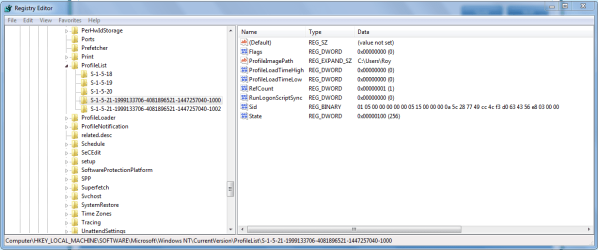
Is this the registry entry your talking about,
please post yours

Roy
 

Attachments

  • reg1000.PNG
    reg1000.PNG
    27.7 KB · Views: 4

My Computer

Computer type
PC/Desktop
Computer Manufacturer/Model Number
medionl/Aspire 6930G/acer x55a
OS
W7 home premium 32bit/W7HP 64bit/w10 tp insider ring
CPU
E5300 dual core
Motherboard
medion MS7366
Memory
3gb
Graphics Card(s)
Nvidia Geforce 7100 Nforce 630i
Monitor(s) Displays
avixc
Internet Speed
n (isp resticted to 72)
Antivirus
mse/pands
Browser
palemoon
Other Info
Belkin Fd7050 n USB using Railink RT2870 drivers, more upto date
Hello again. Ranger4, I'm not sure what you mean about changing the User Accounts. Change in what way? The accounts listed are:
Default
Diana (where my old stuff is)
Diana.Diana-PC (the new one created)
Public

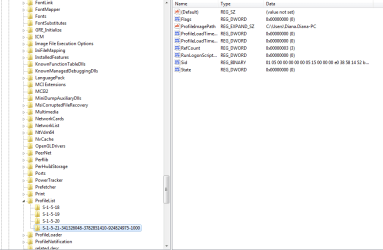
I attached the registry entry to which I am referring:
 

Attachments

  • Capture.PNG
    Capture.PNG
    18.2 KB · Views: 3

My Computer

Computer type
Laptop
Computer Manufacturer/Model Number
Dell
OS
Windows 7 Home Premium 64 bit
Antivirus
Microsoft Security Essentials
Hi NEM2,
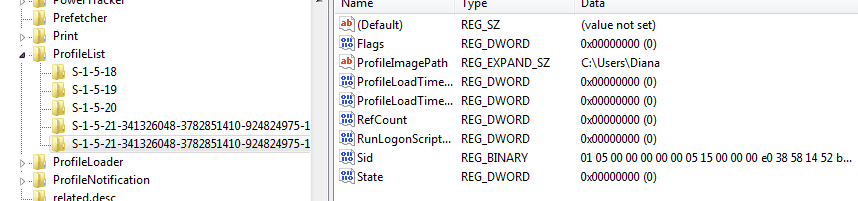
According to those registry entries.
You only have your NEW username, no guest account either they'd be 1002 etc.

To revert to your old ID you need to change diane.diane.pc back to diane.
double click on profileimagepath, diane.diane should appear in a new window select change.

Roy
 

My Computer

Computer type
PC/Desktop
Computer Manufacturer/Model Number
medionl/Aspire 6930G/acer x55a
OS
W7 home premium 32bit/W7HP 64bit/w10 tp insider ring
CPU
E5300 dual core
Motherboard
medion MS7366
Memory
3gb
Graphics Card(s)
Nvidia Geforce 7100 Nforce 630i
Monitor(s) Displays
avixc
Internet Speed
n (isp resticted to 72)
Antivirus
mse/pands
Browser
palemoon
Other Info
Belkin Fd7050 n USB using Railink RT2870 drivers, more upto date
This has helped me after local power outages:

See if you can get to the Advanced Boot Options screen, please, do not have any disks of any type in your optical disk drive or any USB flash drives attached to your machine then,

  • Turn off the computer, wait a few seconds until you're sure it's off.

  • Turn on the computer and start tapping the F8 or on some machines the F5 key.
If you can get to the advanced boot options screen, use the down arrow to move the highlighted choice down to "Last Known Good Configuration (advanced)" then press the Enter Key and let the operating system boot.
 

My Computer

Computer type
PC/Desktop
Computer Manufacturer/Model Number
Gateway DX4831-01e (Mid-Tower Desktop)
OS
Originally Win 7 Hm Prem x64 Ver 6.1.7600 Build 7601-SP1 | Upgraded to Windows 10 December 14, 2019
CPU
Intel i3 530 2.93GHz, 2933MHz 2 Cores 4 Logical Processors
Motherboard
Gateway H57M01 133 megahertz
Memory
6GB of 1,333MHz DDR3 SDRAM
Graphics Card(s)
32MB Intel Graphics Media Accelerator HD IGChip
Sound Card
Realtek High Definition Audio
Monitor(s) Displays
Gateway HX2000 20inch TFT active matrix TN
Screen Resolution
1600 x 900 x 59 hertz
Hard Drives
WDC WD10EADS-00M2B0 [HDD] (1000.20 GB) -- drive 0,
HL-DT-ST DVDRAM GH41N [CD-ROM dr]
Four card readers, and Four USB 2.0
PSU
300watts.
Case
Mid-Tower Desktop
Cooling
Stock from Gateway
Keyboard
Natural Ergonomic Keyboard 4000, see Other Info
Mouse
Orig. Gateway wore out now using Insignia USB wired optical
Internet Speed
Vz FIOS 10ms png 57.64Mbps down 65.53Mbps up Speedtest.org
Antivirus
Zamana Anti-logger with Anti-malware, MSE, Windows Firewall,
Browser
IE11.0.9600.19399-Upd ver11.0.135, Firefox 68.0.1 x64
Other Info
System Specs by Belarc.

BIOS: American Megatrends Inc. P01-A0 11/17/2009

Replaced the MS 'Natural' Standard PS/2 Enhanced 101-102 Keyboard with a new Natural Ergonomic Keyboard 4000 on August 1st 2014.

Canon Pixma MG3222 Printer.

Updated to IE11 on 12102015 | Fios Quantum Router g1100

Additional AV: SpywareBlaster, manual Mbam, SAS
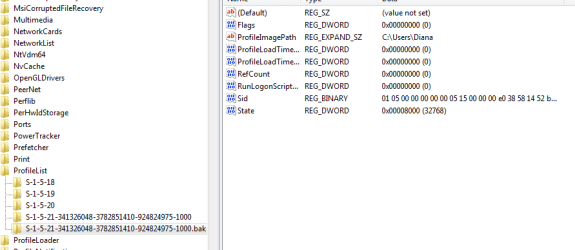
Hi again. I tried Torchwood's suggestion (changing the profileimagepath to Diana (the old ID) from Diana.Diana-PC. I restarted, and after a long time, Windows logged me in as a temporary profile again. But now there is a .bak entry in the registry that seems to be associated with the proper user ID (Diana). Below is what the registry entry looks like--the first long string seems to be for the temp profile. How can I make it log in with the Diana profile? If you can help, I'd be so grateful.
 

Attachments

  • Capture2.PNG
    Capture2.PNG
    12.4 KB · Views: 2

My Computer

Computer type
Laptop
Computer Manufacturer/Model Number
Dell
OS
Windows 7 Home Premium 64 bit
Antivirus
Microsoft Security Essentials
Hi Diana,

Until torchwood can make it back see if these tutorials offer any insight.

The first one: User Profile Error - Logged on with a Temporary Profile seems to fit your situation, but if in the beginning under the warning and before StepOne you believe your situation is more like:

   Warning
If you have this error message below instead, then see: How to Fix the Error "The User Profile Service failed the logon. User profile cannot be loaded."

The User Profile Service failed the logon. User profile cannot be loaded.

22222d1370213953t-user-profile-error-logged-temporary-profile-windows7-jpg
Image source courtesy of the aforementioned sevenForums tutorial.

You should use the tutorial link in the warning box. With it you may be able to start at Option One: Step 7 .

Read them both over carefully paying attention to the
green info, yellow tip, blue note, and red warning boxes to understand the procedural steps involved in fixing a user profile, it would help if you either print out the tutorials and/or have a second computer nearby.

Heed the tips about creating a restore point, the links to how to do that are here and in the main tutorial.


Clear Skies!
Steve


My Computer

Computer type
PC/Desktop
Computer Manufacturer/Model Number
Gateway DX4831-01e (Mid-Tower Desktop)
OS
Originally Win 7 Hm Prem x64 Ver 6.1.7600 Build 7601-SP1 | Upgraded to Windows 10 December 14, 2019
CPU
Intel i3 530 2.93GHz, 2933MHz 2 Cores 4 Logical Processors
Motherboard
Gateway H57M01 133 megahertz
Memory
6GB of 1,333MHz DDR3 SDRAM
Graphics Card(s)
32MB Intel Graphics Media Accelerator HD IGChip
Sound Card
Realtek High Definition Audio
Monitor(s) Displays
Gateway HX2000 20inch TFT active matrix TN
Screen Resolution
1600 x 900 x 59 hertz
Hard Drives
WDC WD10EADS-00M2B0 [HDD] (1000.20 GB) -- drive 0,
HL-DT-ST DVDRAM GH41N [CD-ROM dr]
Four card readers, and Four USB 2.0
PSU
300watts.
Case
Mid-Tower Desktop
Cooling
Stock from Gateway
Keyboard
Natural Ergonomic Keyboard 4000, see Other Info
Mouse
Orig. Gateway wore out now using Insignia USB wired optical
Internet Speed
Vz FIOS 10ms png 57.64Mbps down 65.53Mbps up Speedtest.org
Antivirus
Zamana Anti-logger with Anti-malware, MSE, Windows Firewall,
Browser
IE11.0.9600.19399-Upd ver11.0.135, Firefox 68.0.1 x64
Other Info
System Specs by Belarc.

BIOS: American Megatrends Inc. P01-A0 11/17/2009

Replaced the MS 'Natural' Standard PS/2 Enhanced 101-102 Keyboard with a new Natural Ergonomic Keyboard 4000 on August 1st 2014.

Canon Pixma MG3222 Printer.

Updated to IE11 on 12102015 | Fios Quantum Router g1100

Additional AV: SpywareBlaster, manual Mbam, SAS
Hi NEM2,
next

    • If you have two folders starting with S-1-5 followed by some long numbers and one of them ended with .bak, you have to rename the .bak folder. To do this, follow these steps:
      1. Right-click the folder without .bak, and then click Rename. Type .ba, and then press ENTER.
        2493038.png
      2. Right-click the folder that is named .bak, and then click Rename. Remove .bak at the end of the folder name, and then press ENTER.
        2493039.png
      3. Right-click the folder that is named .ba, and then click Rename. Change the .ba to .bak at the end of the folder name, and then press ENTER.
        2493040.png
    • If you have only one folder starting with S-1-5 that is followed by long numbers and ends with .bak. Right-click the folder, and then click Rename. Remove .bak at the end of the folder name, and then press ENTER.
  1. Click the folder without .bak in the details pane, double-click RefCount, type 0, and then click OK.
    2493045.png
  2. Click the folder without .bak, in the details pane, double-click State, type 0, and then click OK.
    2493046.png
  3. Close Registry Editor.
  4. Restart the computer.
  5. Log on again with your account.


Roy
 

My Computer

Computer type
PC/Desktop
Computer Manufacturer/Model Number
medionl/Aspire 6930G/acer x55a
OS
W7 home premium 32bit/W7HP 64bit/w10 tp insider ring
CPU
E5300 dual core
Motherboard
medion MS7366
Memory
3gb
Graphics Card(s)
Nvidia Geforce 7100 Nforce 630i
Monitor(s) Displays
avixc
Internet Speed
n (isp resticted to 72)
Antivirus
mse/pands
Browser
palemoon
Other Info
Belkin Fd7050 n USB using Railink RT2870 drivers, more upto date
Hi Steve,
A couple of questions before I follow the steps in the tutorial: Is it worth trying to boot into System Restore? The machine as is has no restore points before the event, but I haven't tried reaching System Restore by booting.
And how would I know in Safe Mode that i'm in the built-in administrator?

Thanks again,
Diana
 

My Computer

Computer type
Laptop
Computer Manufacturer/Model Number
Dell
OS
Windows 7 Home Premium 64 bit
Antivirus
Microsoft Security Essentials
Sorry, I just saw Torchwood's latest post. So I don't need to log in as another administrator? Just go straight to registry and do as illustrated?
 

My Computer

Computer type
Laptop
Computer Manufacturer/Model Number
Dell
OS
Windows 7 Home Premium 64 bit
Antivirus
Microsoft Security Essentials
Update: I followed Torchwood's directions meticulously, changing the .bak name in the registry, etc. Restarted, and now the error message is "The user profile failed the logon. Cannot be loaded." Sigh. I guess I follow that tutorial now?
 

My Computer

Computer type
Laptop
Computer Manufacturer/Model Number
Dell
OS
Windows 7 Home Premium 64 bit
Antivirus
Microsoft Security Essentials
OK, after getting message "Cannot Load Profile," I booted into Safe Mode, followed registry changes outlined in that tutorial. I restarted in normal mode. Got no error messages, BUT--it's still not my user profile. Seems like it's just a temp profile. Below is the registry screenshot.
When I got to safe mode, I still had to sign on with my usual password...after awhile, I got the message that I had been logged in as a default user. So I'm not sure if I was using the Built-In Administrator log on...
In the registry, it seems like the .bak entry is pointing to the right user. But the temp user is loading.
I am determined to fix this dang thing! I certainly appreciate your help.
Diana
 

Attachments

  • Capture3.PNG
    Capture3.PNG
    9.4 KB · Views: 1

My Computer

Computer type
Laptop
Computer Manufacturer/Model Number
Dell
OS
Windows 7 Home Premium 64 bit
Antivirus
Microsoft Security Essentials
Diana, have a look at Method 3 of the MS website. You will notice that the info supplied by torchwood is covered in the first part, but the later section might be worth considering..

https://support.microsoft.com/en-au/kb/947215
 

My Computer

Computer type
PC/Desktop
Computer Manufacturer/Model Number
Self built using existing case
OS
Windows 7 Home Premium 64 bit sp1
CPU
Intel i5 3570 3.4Ghz Ivy Bridge SKT 1155 quad core
Motherboard
Gigabyte Z77-HD3 SKT 1155 2xSata 3, 4x USB 3.0
Memory
G-Skill Rip Jaws 16Gb (8x2) DDR3 -1600 PC3 12800 CL 10 red
Graphics Card(s)
Gigabyte NVIDIA GT610 1Gb DDR3 810/1200 PCI-E 2.0 Silent
Sound Card
NVIDIA High Definition & Realtech High Definition Audio
Monitor(s) Displays
2 x Philips 226V4L 16:9 aspect ratio
Screen Resolution
1920 x 1080 HD
Hard Drives
Samsung 840 Pro 256gb SSD, SATA 3.
Hitachi Touro Portable 1tb, USB 3.0 HDD used for image b/ups.
PSU
Corsair VS450
Case
Codeng
Cooling
PSU fan & CPU fan
Keyboard
Logitech
Mouse
Logitech Wireless trackball M570
Internet Speed
Wireless 3G. 3mg down & 550kb up.
Antivirus
Bitdefender Internet Security 2020
Browser
Opera (Current Version) & Firefox
Other Info
MS Office 2013 Pro. Davis weather station software. MGE Nova 600 avr UPS.
Well, that's interesting. When I follow Method 3 on the MS website as suggested, there are three User Profiles: Default; and two labeled Diana-PC/Diana. The first has 60.8 GB under Size, and the second, only 15 MB. Think I should delete the second one? And should I delete Default, too?
 

My Computer

Computer type
Laptop
Computer Manufacturer/Model Number
Dell
OS
Windows 7 Home Premium 64 bit
Antivirus
Microsoft Security Essentials
Oh oh. I don't think I can delete the Userprofile with the smaller size (15MB). The only UserProfile with an active delete button is the larger one (60.8 GB).
 

My Computer

Computer type
Laptop
Computer Manufacturer/Model Number
Dell
OS
Windows 7 Home Premium 64 bit
Antivirus
Microsoft Security Essentials

My Computer

Computer type
Laptop
Computer Manufacturer/Model Number
Dell
OS
Windows 7 Home Premium 64 bit
Antivirus
Microsoft Security Essentials
This Forum tutorial might be of use to you as well, particularly Option 2.

Not being able to delete the smaller User Profile is probably because it is the active one that is currently being used. I don't think you should delete the Default User.

http://www.sevenforums.com/tutorial...-failed-logon-user-profile-cannot-loaded.html

It would be a good idea to set up a Restore Point before any changes. I don't suppose you have a back up image stored. Once you get this problem sorted out it would be a good idea to investigate having a recent back up image.
I use Macrium Reflect, as do a lot of others on the Forum & when a major problem occurs you can be back up & running again in about 15-30 minutes.
 
Last edited:

My Computer

Computer type
PC/Desktop
Computer Manufacturer/Model Number
Self built using existing case
OS
Windows 7 Home Premium 64 bit sp1
CPU
Intel i5 3570 3.4Ghz Ivy Bridge SKT 1155 quad core
Motherboard
Gigabyte Z77-HD3 SKT 1155 2xSata 3, 4x USB 3.0
Memory
G-Skill Rip Jaws 16Gb (8x2) DDR3 -1600 PC3 12800 CL 10 red
Graphics Card(s)
Gigabyte NVIDIA GT610 1Gb DDR3 810/1200 PCI-E 2.0 Silent
Sound Card
NVIDIA High Definition & Realtech High Definition Audio
Monitor(s) Displays
2 x Philips 226V4L 16:9 aspect ratio
Screen Resolution
1920 x 1080 HD
Hard Drives
Samsung 840 Pro 256gb SSD, SATA 3.
Hitachi Touro Portable 1tb, USB 3.0 HDD used for image b/ups.
PSU
Corsair VS450
Case
Codeng
Cooling
PSU fan & CPU fan
Keyboard
Logitech
Mouse
Logitech Wireless trackball M570
Internet Speed
Wireless 3G. 3mg down & 550kb up.
Antivirus
Bitdefender Internet Security 2020
Browser
Opera (Current Version) & Firefox
Other Info
MS Office 2013 Pro. Davis weather station software. MGE Nova 600 avr UPS.
Back
Top