
How to Add or Remove "Run with CPU Affinity" to the Context Menu
Information
By default, Vista, Windows 7, and Windows 8 runs an application on all available cores of the processor. If you have a multi-core processor, then this will show you how to add or remove Run with CPU Affinity from all application files and shortcuts context menu to set processor affinity to an application to control which core(s) of the processor an application will run on.
If the application and CPU supports Symmetric Multiprocessing (SMP) or HyperThreading (HT), then Windows will automatically adjust the application's usage of each processor core for the best performance. You will not gain much, if anything, from manually changing the processor affinity for these type of applications.
If the application and CPU supports Symmetric Multiprocessing (SMP) or HyperThreading (HT), then Windows will automatically adjust the application's usage of each processor core for the best performance. You will not gain much, if anything, from manually changing the processor affinity for these type of applications.
Note
The affinity changes you make to the current instance of an application or process are only temporary and not set permanently.
Once you close the application or restart your system, Windows forgets your set affinity and automatically sets back the default affinity of the application running on all available cores of the processor.
Once you close the application or restart your system, Windows forgets your set affinity and automatically sets back the default affinity of the application running on all available cores of the processor.
Warning
I have included REG downloads below to add context menu items for up to a 12 core processor. How many cores you actually have will depend on your processor. You can add one or more of any of the following Run with CPU Affinity context menu items below to use as needed.
DO NOT ADD A CONTEXT MENU ITEM numbered above how many cores you actually have.
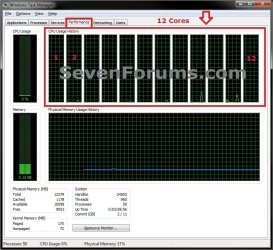
You can quickly see how many processor cores you have by opening Task Manager (CTRL+SHIFT+ESC), clicking on the Performance tab, and counting how many CPU Usage History graphs you have.
DO NOT ADD A CONTEXT MENU ITEM numbered above how many cores you actually have.
You can quickly see how many processor cores you have by opening Task Manager (CTRL+SHIFT+ESC), clicking on the Performance tab, and counting how many CPU Usage History graphs you have.
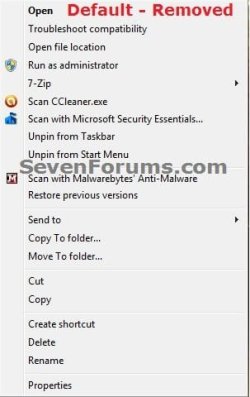
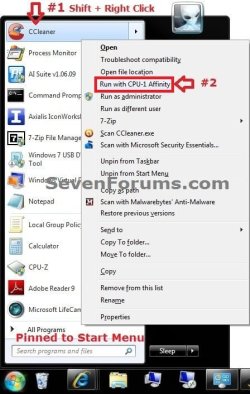
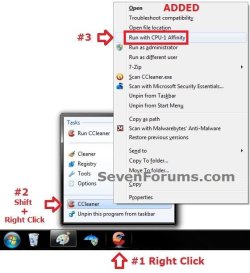
EXAMPLE: Run with CPU Affinity Added or Removed from Context Menu

OPTION ONE
Using a REG File Download
NOTE: You can only merge these REG files while logged in as an administrator. See warning box above.
CPU-0 = Processor Core 1, CPU-1 = Processor Core 2, etc.......
1. To Add Run with CPU-0 Affinity to Context Menu
A) Click on the Download button below to download the file below.
Add_Run_with_CPU-0_Affinity_to_Context_Menu.reg
Download
2. To Remove Run with CPU-0 Affinity from Context Menu
A) Click on the Download button below to download the
file below.
Remove_Run_with_CPU-0_Affinity_from_Context_Menu.reg
Download
3. To Add Run with CPU-1 Affinity to Context Menu
A) Click on the Download button below to download the file below.
Add_Run_with_CPU-1_Affinity_to_Context_Menu.reg
Download
4. To Remove Run with CPU-1 Affinity from Context Menu
A) Click on the Download button below to download the
file below.
Remove_Run_with_CPU-1_Affinity_from_Context_Menu.reg
Download
5. To Add Run with CPU-2 Affinity to Context Menu
A) Click on the Download button below to download the file below.
Add_Run_with_CPU-2_Affinity_to_Context_Menu.reg
Download
6. To Remove Run with CPU-2 Affinity from Context Menu
A) Click on the Download button below to download the
file below.
Remove_Run_with_CPU-2_Affinity_from_Context_Menu.reg
Download
7. To Add Run with CPU-3 Affinity to Context Menu
A) Click on the Download button below to download the file below.
Add_Run_with_CPU-3_Affinity_to_Context_Menu.reg
Download
8. To Remove Run with CPU-3 Affinity from Context Menu
A) Click on the Download button below to download the
file below.
Remove_Run_with_CPU-3_Affinity_from_Context_Menu.reg
Download
9. To Add Run with CPU-4 Affinity to Context Menu
A) Click on the Download button below to download the file below.
Add_Run_with_CPU-4_Affinity_to_Context_Menu.reg
Download
10. To Remove Run with CPU-4 Affinity from Context Menu
A) Click on the Download button below to download the
file below.
Remove_Run_with_CPU-4_Affinity_from_Context_Menu.reg
Download
11. To Add Run with CPU-5 Affinity to Context Menu
A) Click on the Download button below to download the file below.
Add_Run_with_CPU-5_Affinity_to_Context_Menu.reg
Download
12. To Remove Run with CPU-5 Affinity from Context Menu
A) Click on the Download button below to download the
file below.
Remove_Run_with_CPU-5_Affinity_from_Context_Menu.reg
Download
13. To Add Run with CPU-6 Affinity to Context Menu
A) Click on the Download button below to download the file below.
Add_Run_with_CPU-6_Affinity_to_Context_Menu.reg
Download
14. To Remove Run with CPU-6 Affinity from Context Menu
A) Click on the Download button below to download the
file below.
Remove_Run_with_CPU-6_Affinity_from_Context_Menu.reg
Download
15. To Add Run with CPU-7 Affinity to Context Menu
A) Click on the Download button below to download the file below.
Add_Run_with_CPU-7_Affinity_to_Context_Menu.reg
Download
16. To Remove Run with CPU-7 Affinity from Context Menu
A) Click on the Download button below to download the
file below.
Remove_Run_with_CPU-7_Affinity_from_Context_Menu.reg
Download
17. To Add Run with CPU-8 Affinity to Context Menu
A) Click on the Download button below to download the file below.
Add_Run_with_CPU-8_Affinity_to_Context_Menu.reg
Download
18. To Remove Run with CPU-8 Affinity from Context Menu
A) Click on the Download button below to download the
file below.
Remove_Run_with_CPU-8_Affinity_from_Context_Menu.reg
Download
19. To Add Run with CPU-9 Affinity to Context Menu
A) Click on the Download button below to download the file below.
Add_Run_with_CPU-9_Affinity_to_Context_Menu.reg
Download
20. To Remove Run with CPU-9 Affinity from Context Menu
A) Click on the Download button below to download the
file below.
Remove_Run_with_CPU-9_Affinity_from_Context_Menu.reg
Download
21. To Add Run with CPU-10 Affinity to Context Menu
A) Click on the Download button below to download the file below.
Add_Run_with_CPU-10_Affinity_to_Context_Menu.reg
Download
22. To Remove Run with CPU-10 Affinity from Context Menu
A) Click on the Download button below to download the
file below.
Remove_Run_with_CPU-0_Affinity_from_Context_Menu.reg
Download
23. To Add Run with CPU-11 Affinity to Context Menu
A) Click on the Download button below to download the file below.
Add_Run_with_CPU-11_Affinity_to_Context_Menu.reg
Download
24. To Remove Run with CPU-11 Affinity from Context Menu
A) Click on the Download button below to download the
file below.
Remove_Run_with_CPU-11_Affinity_from_Context_Menu.reg
Download
25. Save the .reg file to your desktop.
26. Double click/tap on the downloaded .reg file to merge it.
27. Clic/tap on Run, Yes (UAC), Yes, and OK when prompted.
28. When finished, you can delete the downloaded .reg file(s) on the desktop if you like.
OPTION TWO
Using a BAT File Download
NOTE: You can only merge these BAT files while logged in as an administrator. See warning box above. Special thanks to Dwarf for this option.
CPU-0 = Processor Core 1, CPU-1 = Processor Core 2, etc.......
1. To Add Run with CPU-0 Affinity to Context Menu
A) Click on the Download button below to download the file below.
Add_Run_with_CPU-0_Affinity_to_Context_Menu.bat
Download
2. To Remove Run with CPU-0 Affinity from Context Menu
A) Click on the Download button below to download the
file below.
Remove_Run_with_CPU-0_Affinity_from_Context_Menu.bat
Download
3. To Add Run with CPU-1 Affinity to Context Menu
A) Click on the Download button below to download the file below.
Add_Run_with_CPU-1_Affinity_to_Context_Menu.bat
Download
4. To Remove Run with CPU-1 Affinity from Context Menu
A) Click on the Download button below to download the
file below.
Remove_Run_with_CPU-1_Affinity_from_Context_Menu.bat
Download
5. To Add Run with CPU-2 Affinity to Context Menu
A) Click on the Download button below to download the file below.
Add_Run_with_CPU-2_Affinity_to_Context_Menu.bat
Download
6. To Remove Run with CPU-2 Affinity from Context Menu
A) Click on the Download button below to download the
file below.
Remove_Run_with_CPU-2_Affinity_from_Context_Menu.bat
Download
7. To Add Run with CPU-3 Affinity to Context Menu
A) Click on the Download button below to download the file below.
Add_Run_with_CPU-3_Affinity_to_Context_Menu.bat
Download
8. To Remove Run with CPU-3 Affinity from Context Menu
A) Click on the Download button below to download the
file below.
Remove_Run_with_CPU-3_Affinity_from_Context_Menu.bat
Download
9. To Add Run with CPU-4 Affinity to Context Menu
A) Click on the Download button below to download the file below.
Add_Run_with_CPU-4_Affinity_to_Context_Menu.bat
Download
10. To Remove Run with CPU-4 Affinity from Context Menu
A) Click on the Download button below to download the
file below.
Remove_Run_with_CPU-4_Affinity_from_Context_Menu.bat
Download
11. To Add Run with CPU-5 Affinity to Context Menu
A) Click on the Download button below to download the file below.
Add_Run_with_CPU-5_Affinity_to_Context_Menu.bat
Download
12. To Remove Run with CPU-5 Affinity from Context Menu
A) Click on the Download button below to download the
file below.
Remove_Run_with_CPU-5_Affinity_from_Context_Menu.bat
Download
13. To Add Run with CPU-6 Affinity to Context Menu
A) Click on the Download button below to download the file below.
Add_Run_with_CPU-6_Affinity_to_Context_Menu.bat
Download
14. To Remove Run with CPU-6 Affinity from Context Menu
A) Click on the Download button below to download the
file below.
Remove_Run_with_CPU-6_Affinity_from_Context_Menu.bat
Download
15. To Add Run with CPU-7 Affinity to Context Menu
A) Click on the Download button below to download the file below.
Add_Run_with_CPU-7_Affinity_to_Context_Menu.bat
Download
16. To Remove Run with CPU-7 Affinity from Context Menu
A) Click on the Download button below to download the
file below.
Remove_Run_with_CPU-7_Affinity_from_Context_Menu.bat
Download
17. To Add Run with CPU-8 Affinity to Context Menu
A) Click on the Download button below to download the file below.
Add_Run_with_CPU-8_Affinity_to_Context_Menu.bat
Download
18. To Remove Run with CPU-8 Affinity from Context Menu
A) Click on the Download button below to download the
file below.
Remove_Run_with_CPU-8_Affinity_from_Context_Menu.bat
Download
19. To Add Run with CPU-9 Affinity to Context Menu
A) Click on the Download button below to download the file below.
Add_Run_with_CPU-9_Affinity_to_Context_Menu.bat
Download
20. To Remove Run with CPU-9 Affinity from Context Menu
A) Click on the Download button below to download the
file below.
Remove_Run_with_CPU-9_Affinity_from_Context_Menu.bat
Download
21. To Add Run with CPU-10 Affinity to Context Menu
A) Click on the Download button below to download the file below.
Add_Run_with_CPU-10_Affinity_to_Context_Menu.bat
Download
22. To Remove Run with CPU-10 Affinity from Context Menu
A) Click on the Download button below to download the
file below.
Remove_Run_with_CPU-0_Affinity_from_Context_Menu.bat
Download
23. To Add Run with CPU-11 Affinity to Context Menu
A) Click on the Download button below to download the file below.
Add_Run_with_CPU-11_Affinity_to_Context_Menu.bat
Download
24. To Remove Run with CPU-11 Affinity from Context Menu
A) Click on the Download button below to download the
file below.
Remove_Run_with_CPU-11_Affinity_from_Context_Menu.bat
Download
25. Save the .bat file to your desktop.
26. Right click or press and hold on the downloaded .bat file, and click on Run as administrator.
27. Click/tap on Run and Yes (UAC) when prompted.
28. When finished, you can delete the downloaded .bat file(s) on the desktop if you like.
That's it,
Shawn
Related Tutorials
- How to Set Priority Level for Applications and Processes in Windows 7
- How to Create a Shortcut to Run an Application with a Set CPU Affinity in Windows
- How to Set Processor Affinity to an Application in Windows 7
- How to Set Processor Affinity for an Application in Windows 8
- How to Add or Remove "Run with Priority" to Context Menu of EXE Files in Windows
- How to Adjust Processor Scheduling for Best Performance in Vista, Windows 7, and Windows 8
Attachments
-
Add_Run_with_CPU-0_Affinity_to_Context_Menu.reg492 bytes · Views: 4,429
-
Remove_Run_with_CPU-0_Affinity_from_Context_Menu.reg210 bytes · Views: 2,210
-
Add_Run_with_CPU-1_Affinity_to_Context_Menu.reg492 bytes · Views: 3,002
-
Remove_Run_with_CPU-1_Affinity_from_Context_Menu.reg210 bytes · Views: 1,592
-
Add_Run_with_CPU-2_Affinity_to_Context_Menu.reg492 bytes · Views: 1,335
-
Remove_Run_with_CPU-2_Affinity_from_Context_Menu.reg210 bytes · Views: 1,108
-
Add_Run_with_CPU-3_Affinity_to_Context_Menu.reg492 bytes · Views: 1,300
-
Remove_Run_with_CPU-3_Affinity_from_Context_Menu.reg210 bytes · Views: 1,085
-
Add_Run_with_CPU-4_Affinity_to_Context_Menu.reg492 bytes · Views: 1,123
-
Remove_Run_with_CPU-4_Affinity_from_Context_Menu.reg210 bytes · Views: 1,163
-
Add_Run_with_CPU-5_Affinity_to_Context_Menu.reg492 bytes · Views: 877
-
Remove_Run_with_CPU-5_Affinity_from_Context_Menu.reg210 bytes · Views: 852
-
Add_Run_with_CPU-6_Affinity_to_Context_Menu.reg492 bytes · Views: 846
-
Remove_Run_with_CPU-6_Affinity_from_Context_Menu.reg210 bytes · Views: 808
-
Add_Run_with_CPU-7_Affinity_to_Context_Menu.reg492 bytes · Views: 1,035
-
Remove_Run_with_CPU-7_Affinity_from_Context_Menu.reg210 bytes · Views: 809
-
Add_Run_with_CPU-8_Affinity_to_Context_Menu.reg492 bytes · Views: 858
-
Remove_Run_with_CPU-8_Affinity_from_Context_Menu.reg210 bytes · Views: 788
-
Add_Run_with_CPU-9_Affinity_to_Context_Menu.reg494 bytes · Views: 771
-
Remove_Run_with_CPU-9_Affinity_from_Context_Menu.reg210 bytes · Views: 731
-
Add_Run_with_CPU-10_Affinity_to_Context_Menu.reg498 bytes · Views: 730
-
Remove_Run_with_CPU-10_Affinity_from_Context_Menu.reg212 bytes · Views: 704
-
Add_Run_with_CPU-11_Affinity_to_Context_Menu.reg498 bytes · Views: 834
-
Remove_Run_with_CPU-11_Affinity_from_Context_Menu.reg212 bytes · Views: 783
-
Add_Run_with_CPU-0_Affinity_to_Context_Menu.bat223 bytes · Views: 1,647
-
Remove_Run_with_CPU-0_Affinity_from_Context_Menu.bat92 bytes · Views: 900
-
Add_Run_with_CPU-1_Affinity_to_Context_Menu.bat223 bytes · Views: 923
-
Remove_Run_with_CPU-1_Affinity_from_Context_Menu.bat92 bytes · Views: 791
-
Add_Run_with_CPU-2_Affinity_to_Context_Menu.bat223 bytes · Views: 749
-
Remove_Run_with_CPU-2_Affinity_from_Context_Menu.bat92 bytes · Views: 692
-
Add_Run_with_CPU-3_Affinity_to_Context_Menu.bat223 bytes · Views: 757
-
Remove_Run_with_CPU-3_Affinity_from_Context_Menu.bat92 bytes · Views: 678
-
Add_Run_with_CPU-4_Affinity_to_Context_Menu.bat223 bytes · Views: 730
-
Remove_Run_with_CPU-4_Affinity_from_Context_Menu.bat92 bytes · Views: 692
-
Add_Run_with_CPU-5_Affinity_to_Context_Menu.bat223 bytes · Views: 616
-
Remove_Run_with_CPU-5_Affinity_from_Context_Menu.bat92 bytes · Views: 623
-
Add_Run_with_CPU-6_Affinity_to_Context_Menu.bat223 bytes · Views: 679
-
Remove_Run_with_CPU-6_Affinity_from_Context_Menu.bat92 bytes · Views: 634
-
Add_Run_with_CPU-7_Affinity_to_Context_Menu.bat223 bytes · Views: 672
-
Remove_Run_with_CPU-7_Affinity_from_Context_Menu.bat92 bytes · Views: 654
-
Add_Run_with_CPU-8_Affinity_to_Context_Menu.bat223 bytes · Views: 685
-
Remove_Run_with_CPU-8_Affinity_from_Context_Menu.bat92 bytes · Views: 605
-
Add_Run_with_CPU-9_Affinity_to_Context_Menu.bat224 bytes · Views: 639
-
Remove_Run_with_CPU-9_Affinity_from_Context_Menu.bat92 bytes · Views: 788
-
Add_Run_with_CPU-10_Affinity_to_Context_Menu.bat227 bytes · Views: 598
-
Remove_Run_with_CPU-10_Affinity_from_Context_Menu.bat93 bytes · Views: 619
-
Add_Run_with_CPU-11_Affinity_to_Context_Menu.bat227 bytes · Views: 906
-
Remove_Run_with_CPU-11_Affinity_from_Context_Menu.bat93 bytes · Views: 870
Last edited:


